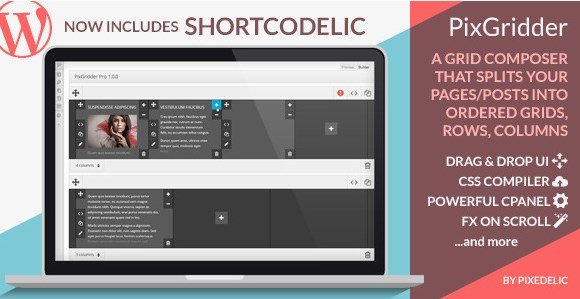
What is PixGridder Pro Page Grid Composer for WordPress?
When WordPress users need PixGridder Pro Page Grid Composer for WordPress, they’re looking for a fundamentally different approach to page layout creation. Unlike traditional page builders that lock you into proprietary shortcodes, PixGridder Pro operates as a true grid builder that leverages your existing TinyMCE editor while adding powerful row and column management capabilities. This unique WordPress plugin allows you to split pages, posts, and custom post types into responsive grids without generating messy shortcodes that break when you deactivate the plugin.
What Makes PixGridder Pro Page Grid Composer for WordPress Different
The primary distinction of PixGridder Pro lies in its revolutionary “no trace” architecture. While conventional page builders like Elementor or Visual Composer inject numerous shortcodes into your content, PixGridder uses invisible HTML comments to define grid structures. This means your content remains clean, portable, and forever accessible regardless of whether the plugin remains active. You retain complete creative control while avoiding the vendor lock-in that plagues many modern WordPress design tools.
- Shortcode-Free Architecture: Uses HTML comments instead of shortcodes, preventing content breakage upon uninstallation
- Native Editor Integration: Works with your standard TinyMCE interface, maintaining compatibility with all existing buttons and media uploaders
- Universal Plugin Compatibility: Since it uses the native WordPress editor, any shortcode from other plugins works seamlessly within grid columns
- No Trace Technology: Optional feature removes all plugin references from source code while preserving your content layout
PixGridder Pro Page Grid Composer for WordPress Features
Advanced Grid Building Interface
The heart of PixGridder Pro is its intuitive visual grid composer that transforms how you structure WordPress content. Through a sophisticated user interface, you can expand or reduce column widths dynamically, change column layouts on the fly, clone existing columns or entire rows, and reorder elements with drag-and-drop simplicity. Each column and row accepts custom IDs and classes, giving developers granular control over styling while maintaining accessibility for non-technical users. The builder tab provides instant visual feedback, allowing you to see exactly how your grid will render across different devices.
Real-Time Frontend Preview & Animation Engine
Unlike backend-only editors that require constant page refreshing, PixGridder Pro features a live preview tab displaying the real frontend experience complete with headers, JavaScript effects, and actual rendered CSS. When you modify content in the builder tab, changes propagate immediately to the preview panel without server requests. Additionally, the plugin includes a powerful animation engine allowing you to apply sophisticated scroll-triggered transitions to grid elements. These entrance effects activate as users scroll through your content, creating engaging visual experiences that boost time-on-page metrics and user engagement.
CSS Compilation & Theme Integration
For developers and performance-conscious site owners, PixGridder Pro Page Grid Composer for WordPress offers enterprise-grade CSS management. The plugin generates optimized CSS files that you can either download manually or push automatically to your active theme directory. This compilation process eliminates render-blocking resources and ensures your grid styles load efficiently. You can also establish particular rules for custom post types or specific page templates, enabling different column configurations for portfolios versus blog posts. Learn more about optimizing WordPress grid layouts in our comprehensive guide to best grid plugins for WordPress.
How to Install PixGridder Pro
CodeCanyon Installation Method
- Purchase and download the plugin files from CodeCanyon
- Navigate to Plugins → Add New in your WordPress dashboard
- Click “Upload Plugin” and select the pixgridder-pro.zip file
- Click Install Now, then Activate the plugin
- Navigate to PixGridder settings to configure default column behaviors and CSS output options
For detailed implementation strategies, refer to the WordPress Plugin Developer Resources or explore our tutorial on creating responsive columns in WordPress.
Who Should Use PixGridder Pro Page Grid Composer for WordPress?
Content Creators Seeking Editorial Flexibility
Magazine editors, bloggers, and content marketers benefit immensely from PixGridder Pro’s approach to layout management. Because the plugin preserves the native TinyMCE experience detailed in the WordPress TinyMCE documentation, editorial teams don’t need retraining. You can create complex magazine-style layouts, multi-column feature articles, and image-heavy galleries while maintaining the familiar writing environment. The ability to use any existing shortcode within grid columns means your favorite gallery plugins, form builders, and review boxes integrate seamlessly without compatibility conflicts.
Developers and Agencies Prioritizing Clean Code
Professional WordPress developers choose PixGridder Pro when building client sites that require future-proofing. The HTML comment-based grid system ensures that if a client decides to switch themes or abandon the plugin, their content remains structurally intact and readable. The CSS compilation features allow developers to extract clean stylesheets for custom theme integration, while the custom ID/class assignment facilitates targeted JavaScript manipulation. For agencies managing multiple sites, the plugin’s ability to push CSS directly to theme directories streamlines deployment workflows significantly.
PixGridder Pro vs Traditional Page Builders
| Feature | PixGridder Pro | Traditional Page Builders |
|---|---|---|
| Content Storage Method | HTML comments (invisible, clean) | Proprietary shortcodes |
| Plugin Dependency | Content survives uninstallation | Content breaks without plugin |
| Editor Interface | Native TinyMCE (familiar) | Custom interface (learning curve) |
| Third-party Shortcodes | Fully compatible | Often conflicted or restricted |
| CSS Output | Compiled files, theme integration | Inline styles or bulky stylesheets |
While comparing page building solutions, check our analysis of WordPress page builders compared to understand where PixGridder Pro fits in your workflow.
PixGridder Pro Pricing
PixGridder Pro Page Grid Composer for WordPress is available exclusively through CodeCanyon as a one-time purchase, typically priced between $20-$30 depending on current promotions. This includes lifetime updates for the plugin and six months of priority support from the developer, with options to extend support to twelve months for an additional fee. Unlike subscription-based page builders requiring monthly payments, PixGridder Pro offers unlimited site usage under the standard Envato license terms, making it cost-effective for developers managing multiple client projects.
Pros and Cons
✅ Pros
- Zero Shortcode Lock-in: HTML comment architecture ensures content portability
- Native WordPress Experience: Uses standard TinyMCE editor with no learning curve
- Universal Compatibility: Works with any plugin that uses standard WordPress shortcodes
- Performance Optimized: CSS compilation and minimal database queries
- Developer Friendly: Custom classes/IDs and direct theme CSS integration
❌ Cons
- Limited Design Elements: Focuses on grid structure rather than providing pre-designed widgets
- Steeper Learning Curve for Visual Builders: Users accustomed to Elementor’s drag-and-drop may miss visual editing
- CodeCanyon Exclusive: Not available in the free WordPress.org repository for trial testing
Frequently Asked Questions
Will my content break if I uninstall PixGridder Pro?
No. Unlike traditional page builders that leave broken shortcodes, PixGridder Pro uses invisible HTML comments that don’t render on the frontend. Your content remains readable as standard WordPress content even after removal.
Is PixGridder Pro compatible with WooCommerce and other major plugins?
Yes. Since PixGridder Pro preserves the native TinyMCE editor, any shortcode from WooCommerce, Contact Form 7, or other popular plugins functions normally within grid columns.
Can I use custom CSS with PixGridder Pro grids?
Absolutely. The plugin allows you to assign custom IDs and classes to any row or column. Additionally, you can compile and export CSS files directly to your theme directory.
How does PixGridder Pro differ from Elementor or Visual Composer?
PixGridder Pro is a grid builder, not a full page builder. It focuses specifically on column and row structures using your native editor, whereas Elementor replaces the entire editing experience with proprietary widgets.
Does PixGridder Pro support custom post types?
Yes. You can configure specific grid rules for different post types, allowing unique column configurations for portfolios, testimonials, or custom content types.
What is the “No Trace” option?
This feature removes all PixGridder HTML comments from your source code upon plugin deletion, leaving absolutely zero footprint while preserving your content structure.
Final Verdict
PixGridder Pro Page Grid Composer for WordPress represents the ideal solution for users prioritizing content longevity and clean code over flashy visual builders. It’s particularly well-suited for editorial teams, developers building client sites, and anyone frustrated by shortcode lock-in. While it may not offer the pre-designed widgets of Elementor, its grid-building capabilities, native editor integration, and commitment to data portability make it a valuable addition to any serious WordPress professional’s toolkit. The one-time pricing model further enhances its appeal for budget-conscious agencies and freelancers.