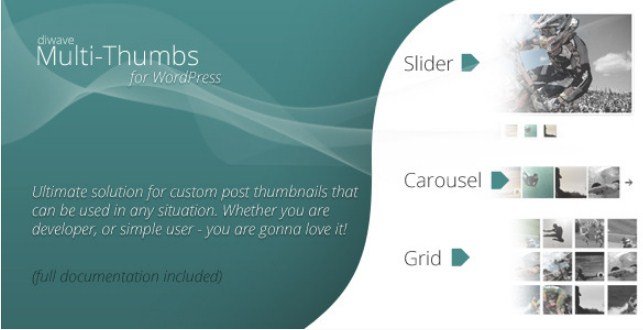
What is Multi-Thumbs for WordPress?
When WordPress users need to display multiple featured images beyond the standard single thumbnail limitation, Multi-Thumbs for WordPress offers the ultimate solution with built-in slider, carousel, and grid functionality. I’ve worked with countless gallery plugins over the years, but this CodeCanyon gem stands out by combining user-friendly shortcodes with a powerful developer API that eliminates hard-coded image URLs entirely. Whether you’re building photography portfolios, real estate listings, or product showcases, this plugin transforms how you handle WordPress post thumbnails by allowing unlimited image attachments directly within your post editor.
What Makes Multi-Thumbs for WordPress Different
Unlike standard gallery plugins that create separate media relationships, Multi-Thumbs for WordPress integrates natively into the post editing experience through a dedicated meta box. This approach maintains WordPress’s intuitive workflow while extending functionality that typically requires complex custom fields or multiple plugins. The versatility appeals to both beginners who need simple shortcodes and developers requiring programmatic image access.
- Native Media Integration: Works seamlessly with the WordPress Media Library without creating duplicate uploads
- Three Display Modes: Includes responsive slider, carousel, and grid galleries with PrettyPhoto lightbox built-in
- Developer-Friendly API: Clean programming interface for custom theme development without absolute URL dependencies
- Custom Post Type Support: Functions across standard posts, pages, and any registered custom post types
Multi-Thumbs for WordPress Features for WordPress Users
Unlimited Image Attachment System
The core functionality centers around a dedicated “Multi-Thumbs” meta box that appears in your post and page edit screens. Once you install the plugin, adding images becomes remarkably straightforward—simply click the “Add New” button and select as many images as needed from your WordPress Media Library. This system eliminates the frustration of being limited to one featured image per post, making it ideal for portfolios, galleries, and documentation sites where visual storytelling requires multiple hero images. The attachment process maintains WordPress’s familiar interface, reducing the learning curve for content creators while providing the flexibility that custom post types desperately need for rich media presentation.
Responsive Display Shortcodes
Multi-Thumbs for WordPress includes three carefully crafted shortcodes that adapt perfectly to mobile, tablet, and desktop viewing. The [dimt_slider] shortcode creates elegant horizontal carousels with navigation controls, while [dimt_carousel] offers infinite scrolling capabilities perfect for showcasing product variations. For masonry-style layouts, the [dimt_grid] shortcode generates responsive grids that maintain aspect ratios across devices. Every shortcode automatically integrates PrettyPhoto lightbox functionality, allowing visitors to click thumbnails and view full-resolution images in an overlay without navigating away from your content. Each shortcode accepts customizable parameters for controlling transition speeds, auto-play behavior, and thumbnail sizing, giving you granular control over the user experience.
Developer API and Template Integration
For developers building custom WordPress themes, the plugin provides a robust API that makes retrieving specific images programmatically effortless. The [dimt_thumb index="n"] shortcode allows you to pull individual images by their numerical index, perfect for creating custom hero sections or featured image alternatives. This approach completely eliminates the need for hard-coded absolute links in your templates, ensuring that images update automatically when you replace files in the Media Library. The API includes hooks and filters for extending functionality, making it compatible with advanced WordPress development workflows and multisite installations. If you’re working on client sites that require custom WordPress development, this programmatic flexibility proves invaluable for maintaining clean, maintainable codebases.
How to Install Multi-Thumbs for WordPress
CodeCanyon Installation Process
- Purchase and download the plugin files from CodeCanyon
- Navigate to Plugins → Add New in your WordPress dashboard
- Click “Upload Plugin” and select the downloaded ZIP file
- Click Install Now, then Activate the plugin
- Configure display settings under the new Multi-Thumbs menu item
After activation, you’ll notice a new “Multi-Thumbs” meta box appears on all post and page edit screens, ready for immediate use without complex configuration.
Who Should Use Multi-Thumbs for WordPress?
Content Creators and Photography Professionals
If you manage photography portfolios, travel blogs, or recipe sites where single featured images feel limiting, Multi-Thumbs transforms your content strategy. Food bloggers can showcase multiple angles of finished dishes, while travel writers can display destination galleries directly within post headers. The intuitive interface means you won’t waste time training team members on complex gallery workflows—if they can use WordPress, they can use Multi-Thumbs. The responsive design ensures your visual content looks professional across all devices, which is crucial for maintaining engagement with mobile audiences who expect rich media experiences.
WordPress Developers and Agencies
For developers building custom themes or plugins requiring advanced image manipulation, this tool provides the API flexibility that standard gallery plugins lack. Real estate websites benefit from multiple property photos in listings, while e-commerce sites can display product variations without relying on heavy WooCommerce extensions. The ability to retrieve specific images by index through shortcodes means you can build complex templates that reference different images for different contexts—perhaps using the first image as a hero banner and subsequent images in related posts sections. This programmatic approach keeps your code clean while delivering sophisticated functionality that clients demand in modern web development projects.
Multi-Thumbs for WordPress vs Alternatives
| Feature | Multi-Thumbs for WordPress | Standard Gallery Plugins |
|---|---|---|
| Featured Image Extension | Native post meta integration | Separate gallery post type |
| Display Shortcodes | Slider, Carousel, Grid included | Usually one display type |
| Developer Access | Index-based image retrieval API | Limited programmatic access |
| Lightbox Integration | PrettyPhoto built-in | Requires separate plugin |
| Custom Post Type Support | Universal CPT compatibility | Often limited to standard posts |
Multi-Thumbs for WordPress Pricing
Available exclusively through CodeCanyon, Multi-Thumbs for WordPress operates on a one-time purchase model typical of premium WordPress plugins. The regular license usually ranges between $20-$30, which includes lifetime updates for the plugin and six months of support from the developer. Extended licenses are available for developers building websites for clients or incorporating the plugin into commercial themes. This pricing structure represents excellent value considering you receive three distinct gallery types, lightbox functionality, and developer API access that would typically require purchasing multiple separate plugins.
Pros and Cons
✅ Pros
- Unlimited Image Attachments: Break free from WordPress’s single featured image limitation
- Three Display Formats: Slider, carousel, and grid options cover most use cases without additional plugins
- Developer-Friendly: Powerful API for custom implementations and theme integration
- Responsive Design: Mobile-optimized galleries that maintain visual integrity across devices
- Built-in Lightbox: PrettyPhoto integration saves money on separate lightbox plugins
❌ Cons
- Premium Only: No free version available for testing before purchase
- CodeCanyon Exclusive: Updates and support managed through Envato ecosystem rather than WordPress.org
- Shortcode Dependency: Requires manual shortcode insertion rather than visual block editor integration (Gutenberg)
- Learning Curve for API: Developers need to review documentation for advanced implementations
Frequently Asked Questions
Can I use Multi-Thumbs for WordPress with custom post types?
Yes, the plugin automatically detects and works with all registered custom post types, including those created with plugins like Custom Post Type UI or Pods. The Multi-Thumbs meta box appears on any post type edit screen where you enable it.
How do I display a specific single image using the shortcode?
Use the [dimt_thumb index="1"] shortcode, replacing “1” with the numerical position of your desired image (0 for first image, 1 for second, etc.). This is perfect for creating custom templates that reference specific images outside the standard galleries.
Is Multi-Thumbs for WordPress responsive on mobile devices?
Absolutely. All three display modes—slider, carousel, and grid—are fully responsive and use touch-friendly navigation. The plugin automatically adjusts image sizing and gallery layouts for optimal viewing on smartphones and tablets.
Does Multi-Thumbs work with page builders like Elementor or Divi?
Yes, you can insert the provided shortcodes into any page builder that supports shortcode widgets or text editors. While it doesn’t offer dedicated Elementor widgets, the shortcodes render perfectly within builder modules.
Can I customize the appearance of the slider and carousel?
The shortcodes accept multiple parameters for customization including auto-play speed, transition effects, thumbnail sizes, and navigation arrow styles. Developers can further customize appearance through CSS and the plugin’s template system.
Do I need a separate lightbox plugin for image popups?
No, Multi-Thumbs for WordPress includes PrettyPhoto lightbox functionality by default. When users click images in your slider, carousel, or grid, they open in an elegant overlay without requiring additional plugins or configuration.
Final Verdict
Multi-Thumbs for WordPress delivers exactly what it promises—a seamless solution for managing multiple featured images that satisfies both casual users and demanding developers. The combination of intuitive shortcodes for content creators and robust API access for programmers makes it versatile enough for virtually any WordPress project requiring enhanced image management. While the lack of a free version and Gutenberg-specific blocks might deter some users, the one-time purchase price offers exceptional value considering you receive three responsive gallery types and lightbox functionality in a single package. For photography sites, portfolios, real estate listings, or any content requiring rich visual storytelling, this plugin eliminates frustrating workarounds and provides the native WordPress experience users expect.