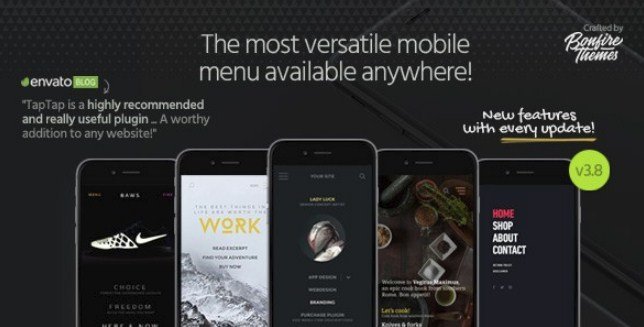
What is TapTap WordPress Mobile Menu?
When mobile traffic dominates your website analytics, providing an intuitive navigation experience becomes critical for user retention and conversions. TapTap WordPress mobile menu solves the limitations of standard WordPress mobile navigation by offering an easy-to-customize, mobile-first, off-canvas menu solution that works flawlessly on literally any site. Whether you’re building a creative portfolio, corporate website, or e-commerce store, this plugin eliminates the constraints of pre-determined layouts, allowing you to construct a mobile menu that perfectly aligns with your brand identity without touching a single line of code.
What Makes TapTap Different
Unlike conventional WordPress mobile menu plugins that offer limited templates and rigid positioning, TapTap provides granular control over every visual element. The plugin recognizes that mobile navigation isn’t one-size-fits-all, delivering pixel-perfect customization capabilities previously only available through custom development. With support for over 600 icons, animated backgrounds, and intelligent scroll behaviors, TapTap transforms your mobile header from a functional necessity into a distinctive brand element that enhances user experience across all devices.
- Per-pixel positioning accuracy for buttons, logos, and labels
- Smart header functionality that auto-hides when scrolling down and reappears when scrolling up
- Unlimited menu depth with accordion-style submenus and individual font controls
- Complete RTL support and WordPress multisite compatibility
TapTap Features for WordPress Users
Advanced Menu Button Customization
TapTap offers 6 distinct menu button styles, each available in regular and thin variations, creating 12 unique design options out of the box. Each button supports dual animation states or static presentation, with customizable animation speeds and opacity levels. You can position the button left or right with per-pixel precision, add custom text labels with independent font controls (12 included font families or your theme’s typography), and customize colors for default, hover, and active states. For advanced implementations, you can even hide the default button entirely and trigger the menu via custom CSS classes or existing theme elements.
Integrated Search & Branding Elements
The plugin seamlessly incorporates logo placement and search functionality within your mobile header. Position your logo left, center, or right with pixel-perfect accuracy, using either text-based logos (with full typography control) or image uploads with custom sizing. The integrated search button mirrors the menu button’s customization options, including label support, positioning flexibility, and color schemes. The search overlay itself features customizable placeholder text, field dimensions, background opacity, and RTL text alignment support, ensuring a cohesive experience for global audiences.
Visual Design & Animation Control
Create immersive navigation experiences with TapTap’s extensive visual customization suite. The menu container supports full-screen or custom dimensions, with slide-in animations from any direction (left, right, top, bottom) or fade-in effects. Background options include solid colors with adjustable opacity, custom images or patterns, and unique pulsating animated color backgrounds with speed controls. Content animation effects include scaling, opacity transitions, and blur effects that apply to selected page content when the menu opens. Additionally, the plugin features a customizable styled scrollbar for desktop viewing, with controls for color, thickness, corner roundness, and visibility triggers.
According to mobile accessibility guidelines, proper navigation structure significantly impacts user engagement metrics. TapTap addresses this through its accordion menu system supporting unlimited depth levels, with individual font, spacing, and color controls for top-level items, submenus, and descriptions. Add any of the 600+ included icons to menu items with independent sizing and coloring, and utilize widget locations above and below the menu structure for additional content like social links or contact information.
How to Install TapTap
CodeCanyon Installation Process
As a premium plugin available exclusively through the CodeCanyon marketplace, TapTap requires manual installation rather than WordPress repository search.
- Purchase and download the plugin files from CodeCanyon
- Navigate to Plugins → Add New → Upload Plugin in your WordPress dashboard
- Select the downloaded .zip file and click Install Now
- Activate the plugin through the Plugins menu
- Access TapTap settings via the new menu item in your dashboard sidebar
After activation, configure your off-canvas menu implementation through the intuitive live preview interface, where changes reflect immediately without saving.
Who Should Use TapTap?
Creative Agencies & Portfolio Sites
Designers and creative professionals requiring unique mobile presentations benefit from TapTap’s elimination of template constraints. The ability to mix fonts, adjust letter spacing, implement animated backgrounds, and position elements with surgical precision allows portfolios to maintain artistic integrity across devices. The smart header feature ensures maximum screen real estate for visual work while keeping navigation accessible.
Corporate & Multilingual Websites
Businesses operating in global markets leverage TapTap’s full RTL support and multisite compatibility to deliver consistent navigation experiences across language variations. The plugin’s ability to hide on specific posts or pages allows selective implementation, while the class/ID hiding feature ensures compatibility with complex corporate themes. Corporate sites particularly benefit from the search integration and detailed submenu capabilities for extensive service catalogs.
TapTap vs Alternatives
| Feature | TapTap | WP Mobile Menu (Free) |
|---|---|---|
| Customization Granularity | Per-pixel positioning, 600+ icons, animated backgrounds | Basic color and positioning options |
| Menu Animation Styles | Slide from 4 directions + fade, custom speed controls | Standard slide options only |
| Smart Header | Auto-hide/show on scroll with customizable sensitivity | Not available |
| Icon Library | 600+ built-in icons (FontAwesome-based) | Limited or requires additional plugins |
| RTL Support | Native full RTL support | Variable depending on theme |
TapTap Pricing
TapTap operates on a premium licensing model through CodeCanyon. The Regular License typically ranges from $25-$30, suitable for single-site implementations or projects where end-users are not charged for access. For commercial applications, SaaS platforms, or projects distributed to multiple clients, the Extended License is required at a higher price point. Both licenses include lifetime updates and six months of support from the developer, with options to extend support periods. Unlike freemium alternatives, TapTap does not offer a free version, ensuring all users receive the complete feature set without upgrade prompts or advertising.
Pros and Cons
✅ Pros
- Unparalleled customization depth with pixel-perfect positioning and 12 menu button variations
- Native RTL support and multisite compatibility for international and network installations
- Smart header functionality improves mobile UX by maximizing content viewing area
- Real-time preview allows instant visualization of changes without saving
- No coding required for complex animations, icon integrations, and visual effects
❌ Cons
- Premium pricing with no free trial version available for testing
- Steep learning curve due to the extensive customization options available
- CodeCanyon exclusivity requires manual updates and marketplace account management
- Potential feature overlap with modern theme builders that include mobile menu widgets
Frequently Asked Questions
Is TapTap compatible with Elementor and other page builders?
Yes, TapTap works seamlessly with Elementor, Divi, Beaver Builder, and other major page builders. You can use the class/ID hiding feature to disable theme menus and let TapTap take over mobile navigation completely.
Does TapTap support right-to-left (RTL) languages like Arabic and Hebrew?
Absolutely. TapTap includes comprehensive RTL support with dedicated alignment options for the search field and menu text, ensuring proper display for languages reading right-to-left.
Can I use custom fonts with TapTap?
Yes, you can use your theme’s existing fonts or choose from 12 carefully curated font variations included with the plugin. Custom Google Fonts can also be implemented through additional CSS.
Is there a free version of TapTap available?
No, TapTap is a premium-only plugin available through CodeCanyon. There is no free version, which ensures all users receive the complete feature set without limitations.
Can I hide TapTap on desktop devices and show only on mobile?
Yes, TapTap includes resolution-based visibility controls allowing you to show the menu only on specified screen sizes, hide it completely on desktop, or vice versa.
Does TapTap work with WordPress Multisite?
Yes, TapTap is fully WordPress Multisite compatible, allowing network administrators to configure menus across multiple sites or allow individual site customization.
Final Verdict
TapTap WordPress mobile menu stands as the most versatile off-canvas navigation solution available for WordPress users requiring pixel-perfect control over their mobile experience. While the premium price point and CodeCanyon distribution model may deter casual users, professionals and agencies seeking distinctive mobile branding will find the investment justified by the plugin’s unmatched customization capabilities. It’s particularly well-suited for design-conscious portfolios, multilingual corporate sites, and any project where standard mobile menus fall short of brand standards. For those prioritizing mobile UX excellence over budget constraints, TapTap delivers exceptional value through its combination of visual flexibility and robust technical features.


.png "Download WooCommerce Multi Locations Inventory Management")