What is Make an Offer For Woocommerce?
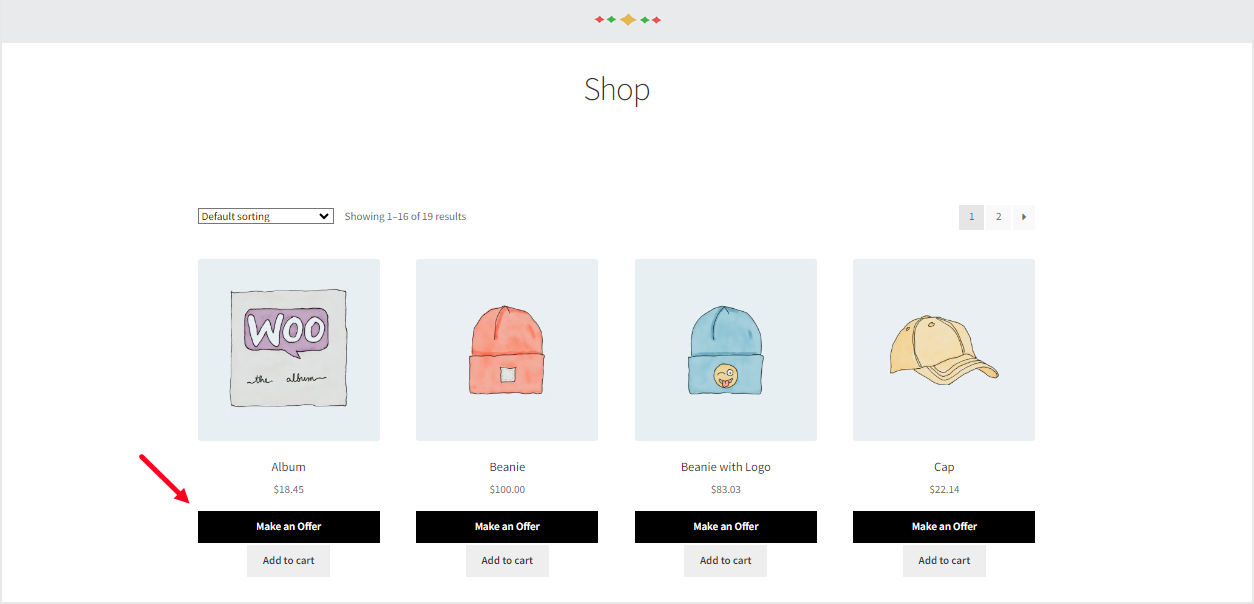
Make an Offer For Woocommerce is a dynamic WooCommerce extension designed to enhance e-commerce interactions by allowing customers to negotiate prices directly on your WordPress site. This plugin adds a ‘Make an Offer’ button to shop and product pages, enabling shoppers to propose their desired price for products, which can significantly boost customer engagement and sales. With over 300 active installs and a 4.6-star rating from 19 reviews, it proves its value for online stores seeking to foster a more interactive shopping experience. By integrating seamlessly with WooCommerce, it empowers store owners to approve offers, set time-limited price changes, and manage negotiations efficiently. This tool is particularly beneficial for businesses in competitive markets where personalized pricing can lead to higher conversion rates and customer loyalty. For instance, features like email notifications and customer chat options ensure transparent communication, making it easier to handle offers from both registered and guest users. Overall, Make an Offer For Woocommerce transforms standard e-commerce into a negotiation-friendly platform, helping you stand out in the crowded online marketplace. Explore more on WooCommerce plugins at WP Exclusive for complementary tools.
Key Features of Make an Offer For Woocommerce
- Enables a ‘Make an Offer’ button on shop and product pages, allowing customers to submit price proposals for specific quantities, fostering direct negotiation and increasing engagement.
- Supports customer chat functionality post-offer submission, enabling real-time discussions to refine deals and improve user experience.
- Automatically updates product prices upon offer approval for a set duration, such as one hour or three days, and reverts them afterward for controlled promotions.
- Sends customized email notifications for offer submissions, approvals, or rejections, keeping both admins and customers informed throughout the process.
- Allows admins to restrict offers to specific products, categories, or user roles, with options to enable for guest users, enhancing flexibility and accessibility.
The latest version, 3.0.4, includes fixes for variation names, security enhancements, and improved compatibility with WooCommerce’s High-Performance Order Storage (HPOS). These updates ensure smoother operations and better integration, making it a reliable choice for modern WordPress sites. Learn more about optimizing WooCommerce setups at WordPress hosting guides on WP Exclusive.
How to Download Make an Offer For Woocommerce for Free
1. Visit the Official Page:
- Go to the WooCommerce marketplace at the sales page to access the plugin details.
- Click on the ‘Download’ button if available, or ensure you have a WooCommerce account for free extensions.
2. Check Repository:
- Search for free versions on WordPress.org, though this plugin may require purchase for full features.
- Verify compatibility with your WooCommerce setup before downloading.
3. Complete Installation Prep:
- Ensure your site meets requirements like PHP 5.2+ and WooCommerce 2.6.0+.
- For optimized performance, use WPX Hosting as recommended for seamless WordPress management.
Installing Make an Offer For Woocommerce: Step-by-Step Guide
1. Upload the Plugin:
- Log into your WordPress dashboard and navigate to ‘Plugins > Add New’.
- Upload the ZIP file downloaded from the official source and activate it immediately.
2. Configure Settings:
- Go to WooCommerce > Settings > Make an Offer to customize options like enabling buttons for specific products.
- Adjust email templates and notification settings for better integration, as detailed on WooCommerce documentation.
3. Test Functionality:
- Visit your shop page to ensure the ‘Make an Offer’ button appears and functions correctly.
- Back up your site beforehand; use built-in tools if updates are prompted, and refer to backup guides on WP Exclusive for safety.
Make an Offer For Woocommerce Pricing
| Component | Price | Details |
|---|---|---|
| 1-Year Plan | $59 | Includes product updates, improvements, and customer support with a 30-day money-back guarantee. |
| 2-Years Plan | $94.40 (Save 20%) | Extended access with all features, billed annually, ideal for long-term users. |
| Per Month (Billed Annually) | $4.92 | Affordable monthly equivalent, covering updates and support as part of the subscription. |
Make an Offer For Woocommerce Alternatives
Product Offers for WooCommerce:
- Pros: User-friendly interface with bulk offer management and seamless integration.
- Cons: Lacks advanced chat features.
- Best For: Small businesses needing simple price negotiation tools.
Negotiate for WooCommerce:
- Pros: Advanced customization and analytics for offers.
- Cons: Higher learning curve.
- Best For: Enterprises with complex negotiation needs, as per WooCommerce’s extension blog.
WooCommerce Custom Offers:
- Pros: Free basic version with extensive add-ons.
- Cons: Requires more setup time.
- Best For: Budget users exploring WordPress.org resources for plugins.
Make an Offer For Woocommerce vs. Other Plugins
Compared to competitors like Product Offers for WooCommerce, Make an Offer For Woocommerce stands out with its robust chat and email features, making it more interactive for customer negotiations.
- Cost Efficiency: Offers competitive pricing starting at $4.92 per month, providing better value than premium alternatives.
- Flexibility: Superior customization for rules and user roles, enhancing control over offers.
- Compatibility: Fully compatible with WooCommerce blocks and HPOS, ensuring smooth performance on modern sites.
- Support Quality: Includes dedicated support with quick responses, as evidenced by user reviews.
This makes it ideal for stores with high traffic, though setup requires basic WooCommerce knowledge. Check plugin comparisons on WP Exclusive for more insights.
Tips for Using Make an Offer For Woocommerce Effectively
- Customize offer forms to include minimum quantities, ensuring proposals align with your inventory.
- Use the chat feature to negotiate in real-time, building trust and closing deals faster.
- Set time limits on approved offers to create urgency and encourage prompt purchases.
- Monitor offers from the dashboard regularly to respond quickly and improve conversion rates.
- Integrate with email marketing tools for follow-ups on rejected offers to nurture leads.
Pairing Make an Offer For Woocommerce with Complementary Tools
Pair Make an Offer For Woocommerce with WooCommerce itself for enhanced e-commerce functionality, allowing seamless offer management alongside core features like cart and checkout. This combination boosts sales by enabling personalized pricing negotiations, as supported by WooCommerce integration guides, and improves user experience on your site.
Should You Invest in Premium Extensions?
The free version of Make an Offer For Woocommerce handles basic negotiations, but premium features are worth considering if you need advanced options like unlimited offers, detailed analytics, or enhanced security.
- Advanced functionality for multi-user notifications.
- Enhanced chat and email customization.
- Seamless integration with third-party tools.
- Priority support for faster resolutions.
Visit the official site for updated pricing; it’s a smart investment for growing stores. For more, see premium options on WP Exclusive.
Frequently Asked Questions
Is Make an Offer For Woocommerce compatible with all WooCommerce themes?
Yes, it works with most themes, but testing is recommended; refer to the documentation for any custom adjustments.
How does the offer approval process work?
Admins review offers in the dashboard, approve them to update prices temporarily, and notify customers via email.
Can guest users make offers?
Absolutely, the plugin supports guest offers, though you can restrict it to registered users for better tracking.
What are the system requirements?
It requires PHP 5.2+ and WooCommerce 2.6.0+, with compatibility up to the latest versions for optimal performance.
Does it integrate with email services?
Yes, it supports customized email notifications and can pair with services like Mailchimp for advanced marketing.
How secure is Make an Offer For Woocommerce?
It includes security fixes in updates like version 3.0.4, ensuring safe operations; always keep it updated.
Conclusion
Make an Offer For Woocommerce is an essential tool for WooCommerce users looking to enhance customer interactions and drive sales through personalized negotiations. Its key features, like real-time chat and automated emails, make it a standout choice for boosting engagement. Download and integrate it today to experience the benefits firsthand, and explore e-commerce tips on WP Exclusive for further optimization.
Disclaimer: Always use official sources for downloads and verify the latest pricing and features, as they may change.