What is Food Menu WordPress Plugin?
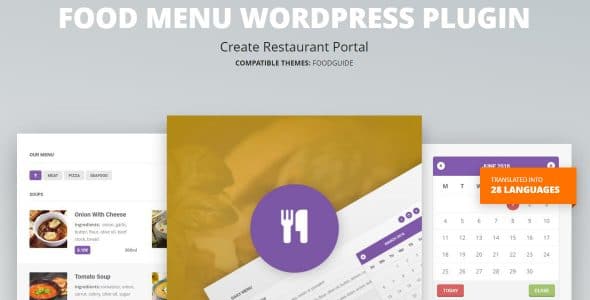
When WordPress users need a professional solution for displaying and managing restaurant menus, the Food Menu WordPress Plugin offers a comprehensive menu management system right on your site. This powerful plugin brings complete food menu management capabilities to your WordPress dashboard, allowing you to create stunning a-la-carte menus, time-limited specials, and recurring food offers with ease. Whether you’re running a fine dining restaurant, casual cafe, or food delivery service, this Food Menu WordPress Plugin transforms how you present your culinary offerings to customers.
What Makes Food Menu WordPress Plugin Different
Unlike generic menu plugins, the Food Menu WordPress Plugin is specifically designed for food-centered businesses, offering specialized features that cater to the unique needs of restaurants and food service establishments. The plugin seamlessly integrates with your existing WordPress theme while providing advanced menu categorization, pricing management, and visual customization options that make your dishes irresistible to potential customers.
- Create unlimited menu categories and subcategories
- Display beautiful food images with zoom functionality
- Manage special offers and recurring promotions automatically
Food Menu WordPress Plugin Features for WordPress Users
Advanced Menu Management System
The Food Menu WordPress Plugin provides a robust backend interface where you can organize your entire menu structure with intuitive drag-and-drop functionality. Create multiple menu types such as breakfast, lunch, dinner, and special event menus. Each menu item supports detailed descriptions, nutritional information, allergen warnings, and multiple pricing options for different sizes or variations. The plugin also includes bulk import capabilities, making it easy to update your entire menu from a CSV file when seasonal changes occur.
Visual Customization and Display Options
Present your culinary creations in style with multiple layout options including grid, list, and card displays. The Food Menu WordPress Plugin offers customizable color schemes, typography controls, and spacing adjustments to match your brand identity. Each menu item can feature high-resolution images with lightbox viewing, customer ratings, and preparation time estimates. The responsive design ensures your menus look perfect on all devices, from desktop computers to mobile phones, crucial for customers browsing on-the-go.
Dynamic Pricing and Special Offers
Take control of your pricing strategy with the plugin’s advanced pricing features. Set up happy hour specials, early bird discounts, and seasonal promotions with automatic scheduling. The Food Menu WordPress Plugin supports time-based pricing changes, allowing you to automatically adjust prices during different service periods. Create combo deals and meal bundles to increase average order value, and implement customer loyalty programs with special pricing for returning customers. The plugin also integrates with popular payment gateways for online ordering capabilities.
How to Install Food Menu WordPress Plugin
Quick Installation
- Go to Plugins → Add New in WordPress dashboard
- Search for “Food Menu WordPress Plugin”
- Click Install Now → Activate
Who Should Use Food Menu WordPress Plugin?
Restaurant Owners and Managers
Restaurant owners can benefit tremendously from this plugin by maintaining complete control over their menu presentation and pricing. Update daily specials instantly without technical assistance, manage multiple location menus from a single dashboard, and track which menu items perform best through integrated analytics. The plugin’s multilingual support makes it perfect for restaurants in diverse communities, allowing you to display menus in multiple languages to cater to all customers.
Food Bloggers and Recipe Websites
Food bloggers can use the Food Menu WordPress Plugin to create professional recipe collections and meal planning guides. Organize recipes by cuisine type, dietary restrictions, or cooking difficulty. The plugin’s print-friendly menu designs are perfect for creating downloadable recipe books, while the nutritional information fields help health-conscious readers make informed choices about their meals.
Food Menu WordPress Plugin vs Alternatives
| Feature | Food Menu WordPress Plugin | Five Star Restaurant Menu |
|---|---|---|
| Menu Categories | Unlimited with nesting | Limited categories |
| Time-based Specials | Advanced scheduling | Basic scheduling |
| Multi-language Support | 83 languages included | Premium add-on required |
Food Menu WordPress Plugin Pricing
The Food Menu WordPress Plugin is available as part of the CitadelaWP plugin ecosystem. Pricing starts at $69 for a single site license with one year of updates and support. Multi-site licenses are available for agencies and developers managing multiple restaurant websites. The plugin includes 83 language translations at no additional cost, making it an excellent value for international restaurants. All purchases come with a 30-day money-back guarantee and access to comprehensive documentation and video tutorials.
Pros and Cons
✅ Pros
- Extensive multilingual support with 83 included translations
- Advanced scheduling for time-sensitive menu changes
- Seamless integration with WooCommerce for online ordering
❌ Cons
- Requires CitadelaWP theme for full functionality
- Learning curve for advanced features
- No free version available for testing
Frequently Asked Questions
Is the Food Menu WordPress Plugin compatible with my existing theme?
While the plugin works best with CitadelaWP theme, it’s designed to be compatible with most modern WordPress themes that support Gutenberg blocks and standard WordPress functionality.
Can I import my existing menu from another system?
Yes, the plugin supports CSV import functionality, allowing you to bulk import menu items, categories, and pricing from spreadsheets or export from other menu systems.
Does the plugin support online ordering and payment processing?
The Food Menu WordPress Plugin integrates seamlessly with WooCommerce, enabling you to add online ordering capabilities and accept payments through various payment gateways.
How often can I update my menu prices and items?
You can update your menu items and prices in real-time through the WordPress dashboard. There are no limitations on the number of updates you can make.
Is customer support included with the plugin purchase?
Yes, all purchases include one year of premium support via ticket system, along with access to comprehensive documentation and video tutorials.
Can I display nutritional information and allergen warnings?
Absolutely! The plugin includes custom fields for nutritional data, calorie counts, and allergen information, helping you comply with food safety regulations.
Final Verdict
The Food Menu WordPress Plugin stands out as a comprehensive solution for restaurants and food businesses seeking professional menu management capabilities. Its extensive multilingual support, advanced scheduling features, and seamless WooCommerce integration make it particularly valuable for establishments serving diverse communities and those offering online ordering. While the requirement for CitadelaWP theme might limit some users, the plugin’s robust feature set and professional presentation options justify the investment for serious food businesses looking to enhance their online presence.