What is Flexible Checkout Fields PRO?
Flexible Checkout Fields PRO is a premium WordPress plugin designed specifically for WooCommerce stores, offering advanced customization options for the checkout process. This plugin allows e-commerce site owners to edit, add, or hide fields on the WooCommerce checkout form, making it easier to tailor the user experience to specific business needs. With over 90,000 active installations, it stands out as a significant tool in the WordPress ecosystem for improving conversion rates by streamlining forms and reducing cart abandonment. Key aspects include conditional logic, which shows or hides fields based on user inputs, cart contents, or other criteria, and pricing options for fields to upsell products seamlessly.
At its core, Flexible Checkout Fields PRO addresses common pain points in online shopping, such as overwhelming forms that deter customers. By enabling merchants to add custom fields like checkboxes for newsletter sign-ups or radio buttons for delivery options, it ensures that only relevant information is collected. This not only enhances the checkout flow but also complies with data privacy regulations by allowing optional fields. Integrated with WooCommerce’s robust framework, the plugin supports multilingual sites and various field types, making it versatile for global e-commerce operations. For users seeking to optimize their store, this plugin is essential, as it directly impacts customer satisfaction and sales performance. Visit the official page at WP Desk for more details, and explore related resources on best WordPress plugins for additional insights.
Key Features of Flexible Checkout Fields PRO
- Advanced conditional logic allows users to set multiple conditions using AND/OR operators, based on shipping methods, payment options, cart contents, or custom fields, ensuring dynamic form adjustments for a personalized checkout experience.
- Drag-and-drop interface for reordering fields, including WooCommerce defaults and custom additions, simplifies the design process and enhances usability without requiring coding knowledge.
- Support for 22 field types, such as text, checkboxes, radio buttons with images or colors, date and time pickers, and file uploads, enables comprehensive customization to meet diverse business requirements.
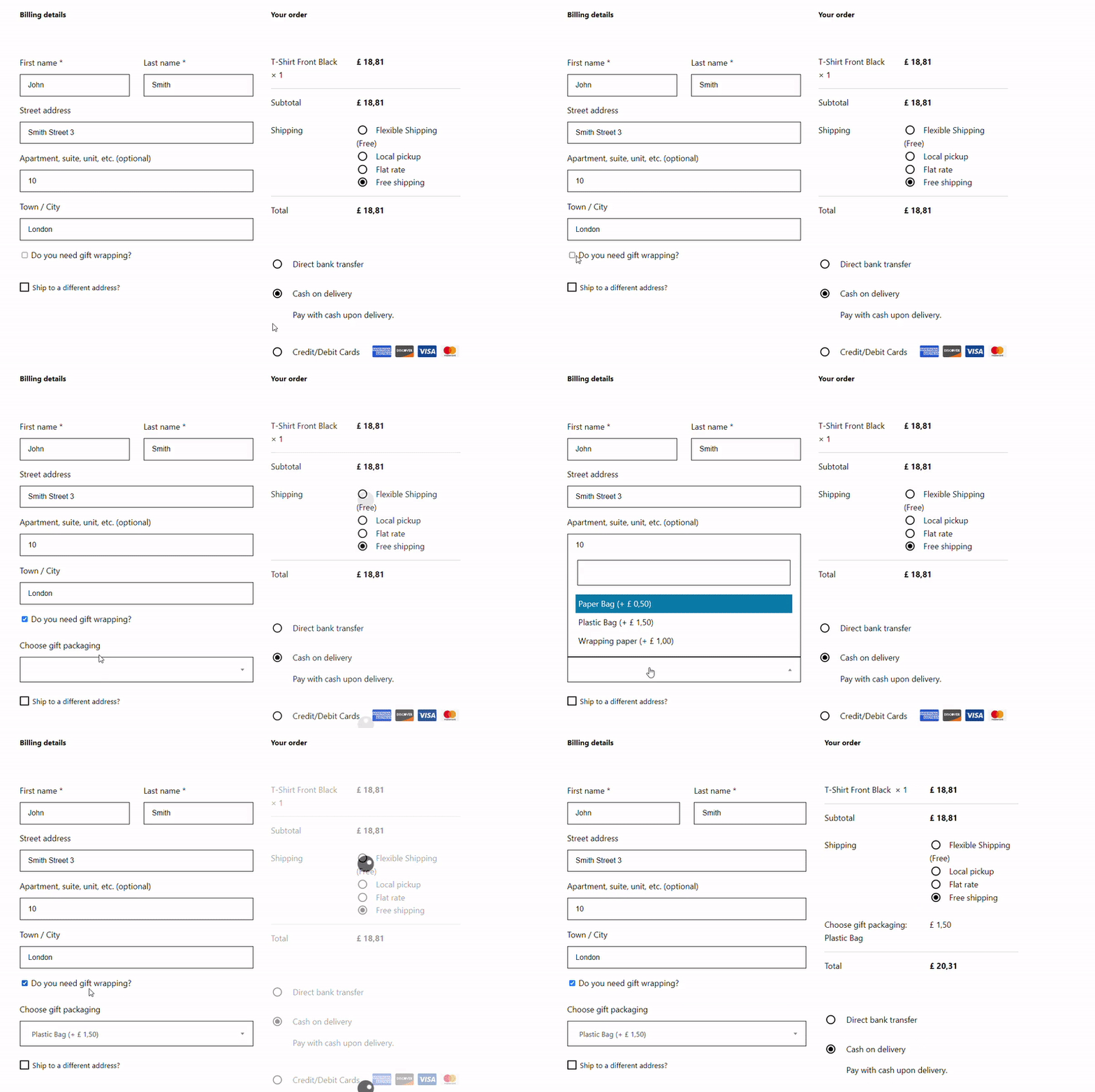
- Pricing integration lets you assign fixed or percentage-based prices to fields, facilitating upsells like gift wrapping or insurance, which can be combined with conditional logic for targeted promotions.
- Validation rules for fields, including email, phone, and postcode checks, ensure data accuracy and improve order processing efficiency, reducing errors and enhancing customer trust.
The latest version, 4.0.0 and above, introduces enhanced conditional logic based on user roles, dates, and Flexible Product Fields integration, allowing for more sophisticated scenarios like time-sensitive offers or role-based field visibility. This update also improves compatibility with WooCommerce 9.5-9.8, ensuring seamless performance on modern sites. For more on implementation, check out authoritative guides on WooCommerce documentation, and compare features with alternatives via WooCommerce alternatives on our site.
How to Download Flexible Checkout Fields PRO for Free
1. Visit the Official Site:
- Go to the WP Desk website and navigate to the Flexible Checkout Fields PRO page at https://wpdesk.net/products/flexible-checkout-fields-pro-woocommerce/.
- Ensure you have an account; if not, sign up for free to access downloads.
2. Check for Free Trials or Demos:
- Look for demo options or trial versions, though the full PRO version typically requires purchase; explore free alternatives on WordPress.org for basic features.
- Download any available free resources or documentation for testing.
3. Install via WordPress Dashboard:
- Once downloaded, log into your WordPress admin, go to Plugins > Add New, and upload the ZIP file.
- Activate the plugin and configure settings for optimal use. For a seamless setup, consider WPX Hosting from top-rated providers, which offers pre-installed WordPress and WooCommerce with optimized performance.
Installing Flexible Checkout Fields PRO: Step-by-Step Guide
1. Prepare Your Site:
- Back up your WordPress site before proceeding to avoid any data loss.
- Ensure WooCommerce is installed and active, as Flexible Checkout Fields PRO requires it for full functionality.
2. Upload and Activate:
- From your WordPress dashboard, go to Plugins > Add New, then upload the plugin ZIP file you downloaded.
- Activate the plugin and navigate to WooCommerce > Settings > Checkout to begin configuration.
3. Configure Settings:
- Access the plugin settings to customize fields, apply conditional logic, and test the checkout process.
- After setup, verify functionality with a test order. For video guidance, watch this tutorial on YouTube, and refer to our guide on WordPress installation best practices.
Note: Back up your site before installing or updating plugins. Use Flexible Checkout Fields PRO’s built-in tools if prompted after an update.
Flexible Checkout Fields PRO Pricing
| Component | Price | Details |
|---|---|---|
| Professional Plan | £59 / year | Includes 1 plugin for 1 site, with updates and email support for a year. |
| All Plugins Bundle | £99 / year | Access to 20+ plugins for 1 site, including Flexible Checkout Fields PRO, with premium support and future updates. |
| All Plugins Bundle (25 sites) | £199 / year | Extended access to all plugins for up to 25 sites, ideal for agencies or larger operations. |
Flexible Checkout Fields PRO Alternatives
Checkout Field Editor by ThemeHigh:
- Pros: User-friendly interface with drag-and-drop functionality and basic conditional logic.
- Cons: Lacks advanced pricing options and integration depth compared to Flexible Checkout Fields PRO.
- Best For: Small to medium stores needing simple customizations without complex features.
Advanced Custom Fields (ACF):
- Pros: Highly flexible for various form needs beyond checkout, with extensive field types.
- Cons: Not WooCommerce-specific, requiring more setup for checkout integration.
- Best For: Developers building custom sites with broader form requirements.
WooCommerce Custom Fields:
- Pros: Free option with basic field additions and easy integration.
- Cons: Limited conditional logic and no pricing features, making it less robust.
- Best For: Budget-conscious users with minimal customization needs. For comparisons, see WooCommerce marketplace and our list on top e-commerce plugins.
Flexible Checkout Fields PRO vs. Other Plugins
Flexible Checkout Fields PRO excels in WooCommerce environments by offering superior customization compared to competitors like Checkout Field Editor, which lacks advanced conditional logic and pricing integrations. This makes it a top choice for merchants prioritizing user experience and sales optimization.
- Cost Efficiency: More affordable for advanced features, with bundled options reducing overall expenses.
- Flexibility in Integration: Seamless compatibility with WooCommerce and other WP Desk plugins, enhancing ecosystem functionality.
- User Control: Provides granular control over field visibility and validation, outperforming basic alternatives.
- Support Quality: Includes premium email support and regular updates, ensuring long-term reliability.
Ideal for users with moderate technical skills, it requires minimal setup while delivering high ROI through better conversions. Learn more from WordPress support forums and our in-depth reviews on plugin comparisons.
Tips for Using Flexible Checkout Fields PRO Effectively
- Use conditional logic to display fields only when relevant, such as showing gift options for specific product categories, to keep the checkout clean and user-focused.
- Combine pricing with fields to encourage upsells, like adding a fee for expedited shipping based on cart value, boosting average order values without overwhelming customers.
- Regularly test field validations to ensure accurate data collection, preventing issues like invalid emails that could lead to failed orders.
- Integrate with email marketing tools to capture consent via checkboxes, building your subscriber list ethically and enhancing post-purchase engagement.
- Monitor analytics on field interactions to refine the checkout process, identifying drop-off points and optimizing for better conversion rates.
Pairing Flexible Checkout Fields PRO with WooCommerce
Pairing Flexible Checkout Fields PRO with WooCommerce creates a powerful duo for e-commerce sites, allowing seamless customization of checkout forms while leveraging WooCommerce’s core strengths. This combination enables dynamic field adjustments based on cart items or user roles, improving personalization and potentially increasing sales. Benefits include streamlined processes, reduced cart abandonment, and better data collection for marketing, making it ideal for stores aiming to enhance customer interactions.
Should You Invest in Premium Extensions?
The free version of Flexible Checkout Fields PRO is sufficient for basic checkout tweaks, but premium features are worth considering if you need advanced capabilities like intricate conditional logic or field pricing. These enhancements can significantly improve user engagement and revenue.
- Advanced functionality for complex stores with high customization demands.
- Enhanced features like pricing and multi-conditional logic for upsells.
- Integration with tools for better e-commerce workflows.
- Customization options for tailored user experiences.
Visit the official site for pricing details and decide based on your store’s needs.
Frequently Asked Questions:
How do I install Flexible Checkout Fields PRO?
Installation involves downloading the plugin from the official site, uploading it via your WordPress dashboard, and activating it. Ensure WooCommerce is installed first for compatibility.
What features does Flexible Checkout Fields PRO offer?
It provides conditional logic, various field types, pricing options, and validation, allowing for a customized checkout experience to boost conversions.
Is Flexible Checkout Fields PRO compatible with my theme?
It works with most WooCommerce-compatible themes, but testing is recommended. Check the documentation for any specific requirements.
Can I use conditional logic with this plugin?
Yes, it supports advanced conditional logic based on cart, user roles, and more, making your checkout dynamic and user-friendly.
What is the pricing for Flexible Checkout Fields PRO?
Pricing starts at £59 per year for one site, with bundles available for multiple sites and access to other plugins.
How does it integrate with other plugins?
It pairs well with WooCommerce and WP Desk tools, enhancing features like order management and marketing automation.
Conclusion
Flexible Checkout Fields PRO is an invaluable asset for WooCommerce users seeking to optimize their checkout process, offering robust features that drive better user experiences and higher conversions. By customizing fields and implementing smart logic, you can create a seamless shopping journey that encourages repeat business. Download and integrate this plugin today to elevate your e-commerce site. For ongoing tips, explore WooCommerce resources.
Disclaimer: Always use official sources for downloads and verify pricing and features, as they may change.