What is CSS3 Responsive WordPress Compare Pricing Tables?
When WordPress users need to create professional pricing comparisons without page builders, CSS3 Responsive WordPress Compare Pricing Tables offers a pure CSS3 solution with extensive customization options. This plugin provides an intuitive admin panel with live configuration, allowing you to build beautiful pricing tables in just 2-5 minutes without touching any code.
What Makes CSS3 Responsive WordPress Compare Pricing Tables Different
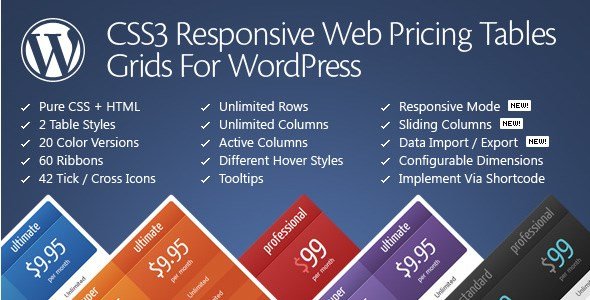
Unlike many pricing table plugins that rely on JavaScript or heavy frameworks, this plugin uses pure CSS3 and HTML for lightning-fast performance. The standout feature is its comprehensive responsive mode configurator, giving you complete control over how your tables display on every device size. With 20 predefined color versions and 60 ribbon options, you can match any brand aesthetic instantly.
- Pure CSS3 implementation for optimal performance
- Live configuration preview in admin panel
- Advanced responsive controls with custom breakpoints
CSS3 Responsive WordPress Compare Pricing Tables Features for WordPress Users
Table Design & Customization
The plugin offers 2 distinct table styles with 20 predefined color variations, ensuring your pricing tables match your brand identity. You can choose from 42 different tick/cross icons and 60 ribbon styles to highlight features or promote specific plans. The font configurator supports different font-face fonts, allowing complete typographic control. Each table cell can have custom tooltips for additional information without cluttering the design.
Responsive Design Controls
What sets this plugin apart is its granular responsive control system. You can enable responsive mode and set custom responsive steps with specific dimensions for each breakpoint. Configure different column widths and font sizes for mobile, tablet, and desktop views independently. This ensures your pricing tables remain perfectly readable and functional across all devices, providing an optimal user experience regardless of screen size.
Advanced Features & Functionality
The plugin includes sophisticated features like sliding columns for plan comparisons and expandable rows with collapse functionality. You can set columns as active (popped-up) by default to highlight recommended plans. The admin panel allows quick column disabling, sorting, and configuration. With unlimited tables, columns, and rows, there’s no restriction on your pricing presentation. The import/export functionality makes it easy to backup configurations or deploy tables across multiple sites.
How to Install CSS3 Responsive WordPress Compare Pricing Tables
Quick Installation
- Purchase and download the plugin from CodeCanyon
- Go to Plugins → Add New → Upload Plugin in WordPress dashboard
- Select the downloaded zip file and click Install Now
- Activate the plugin and configure your first pricing table
Who Should Use CSS3 Responsive WordPress Compare Pricing Tables?
SaaS Companies & Software Providers
Perfect for SaaS businesses needing to display tiered pricing plans with feature comparisons. The sliding columns feature allows potential customers to compare plans side-by-side easily. Use the active column feature to highlight your most popular plan, and leverage tooltips to provide additional context for complex features without overwhelming visitors.
Membership Sites & Online Courses
Ideal for membership platforms offering multiple subscription levels. The expandable rows feature is perfect for showing detailed course curricula or membership benefits that can be expanded on demand. The responsive design ensures your pricing looks great on mobile devices where many potential members browse before signing up.
CSS3 Responsive WordPress Compare Pricing Tables vs Alternatives
| Feature | CSS3 Responsive Pricing Tables | Pricing Table by Supsystic |
|---|---|---|
| Performance | Pure CSS3, no JavaScript dependencies | JavaScript-based, heavier load |
| Responsive Control | Custom breakpoints per device size | Basic responsive stacking |
| Color Options | 20 predefined color versions | Limited color schemes |
CSS3 Responsive WordPress Compare Pricing Tables Pricing
Available as a one-time purchase from CodeCanyon for $18, including 6 months of support and future updates. Extended support options are available for additional cost. The plugin includes unlimited usage across websites once purchased, making it cost-effective for agencies and developers managing multiple client sites.
Pros and Cons
✅ Pros
- Lightweight pure CSS3 implementation
- Extensive customization options with live preview
- Advanced responsive controls with custom breakpoints
❌ Cons
- No drag-and-drop interface for table creation
- Limited to 2 table styles compared to some competitors
- Requires manual shortcode implementation
Frequently Asked Questions
How do I add a pricing table to my WordPress page?
Use the shortcode [css3_grid] after creating your table in the plugin’s admin panel. You can create unlimited tables and place them anywhere using shortcodes.
Can I use this plugin with my WordPress theme?
Yes, the plugin is theme-independent and uses pure CSS3, ensuring compatibility with any WordPress theme without conflicts.
Does this plugin work with page builders like Elementor?
While primarily shortcode-based, you can add the [css3_grid] shortcode using page builder shortcode widgets for integration with Elementor, Divi, or other builders.
Is the plugin mobile-responsive?
Absolutely. The plugin includes advanced responsive controls with customizable breakpoints, ensuring your tables look perfect on all devices.
Can I customize the colors to match my brand?
Yes, choose from 20 predefined color versions or customize colors through CSS. The plugin also supports custom ribbons and icons for brand consistency.
Does it support WooCommerce integration?
While not a direct WooCommerce extension, you can use the tables to display pricing tiers and link them to WooCommerce products for a complete e-commerce solution.
Final Verdict
CSS3 Responsive WordPress Compare Pricing Tables is an excellent choice for WordPress users who prioritize performance and customization. Its pure CSS3 approach ensures fast loading times, while the extensive customization options provide professional results. It’s particularly well-suited for SaaS companies, membership sites, and service businesses needing detailed pricing comparisons. The advanced responsive controls make it stand out in a crowded market of pricing table plugins.