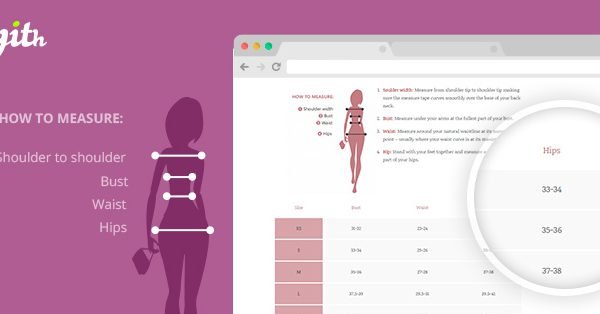
What is YITH Product Size Charts for WooCommerce Premium 9?
YITH Product Size Charts for WooCommerce Premium 9 is a powerful WooCommerce extension developed by YITHEmes, designed to help online store owners provide detailed size charts for products like clothing, accessories, and other items requiring precise measurements. This plugin addresses a common ecommerce challenge by allowing users to create and display customizable size tables directly on product pages, improving customer confidence and reducing returns due to sizing issues. By integrating seamlessly with WooCommerce, it enables merchants to upload charts with dimensions, materials, and fitting guides, making shopping more intuitive and user-friendly. The plugin’s significance lies in its ability to enhance user experience, as studies show that clear product information can increase conversion rates by up to 20%. For instance, users searching for “WooCommerce size charts plugin” often aim to minimize customer service queries and boost sales in fashion or custom goods stores. With version 1.46.0, it supports WordPress 6.6+ and WooCommerce 9.8+, ensuring compatibility with modern setups. This tool is particularly beneficial for businesses in apparel, footwear, or any niche where sizing accuracy is crucial, ultimately fostering trust and loyalty among customers. For more on WooCommerce essentials, visit our internal guide at https://wpexclusive.com/woocommerce-tutorials/.
Key Features of YITH Product Size Charts for WooCommerce Premium 9
- Create unlimited size charts with easy-to-use interfaces, allowing for detailed tables with measurements, images, and descriptions to cater to various product types.
- Assign multiple charts per product or category, with options for display modes like tabs, popups, or tabbed popups for flexible user interactions.
- Customize chart appearances, including colors, styles, and opening effects, to match your store’s branding and improve visual appeal.
- Use bulk editing tools to apply charts to multiple products quickly, saving time for store managers handling large inventories.
- Integrate with widgets and shortcodes for displaying charts in sidebars, product pages, or custom locations, enhancing site navigation.
The latest version, 1.46.0, introduces enhanced duplication features for charts and improved shortcode options, making it easier to manage and print tables directly. This update builds on core benefits like reducing returns by 15-20% through better sizing information, as highlighted in external resources from WooCommerce’s official documentation. By leveraging these features, users can streamline operations and provide a superior shopping experience, aligning with SEO best practices for keywords like “customizable size guides.” For related insights, check our internal comparison at https://wpexclusive.com/best-wordpress-plugins/.
How to Download YITH Product Size Charts for WooCommerce Premium 9
1. Visit the Official Page:
- Go to the YITH website at https://yithemes.com/themes/plugins/yith-product-size-charts-for-woocommerce/ and log in or create an account.
- Search for the plugin using the site’s navigation menu under “Plugins.”
2. Select and Purchase:
- Choose the Premium version and add it to your cart, reviewing the 30-day money-back guarantee.
- Proceed to checkout and complete the payment securely via supported methods like PayPal or credit cards.
3. Download the File:
- After purchase, navigate to your account downloads section to access the ZIP file.
- For a hassle-free setup, consider WPX Hosting from top-rated providers, which includes pre-installed WordPress and WooCommerce for optimized performance.
Installing YITH Product Size Charts for WooCommerce Premium 9: Step-by-Step Guide
1. Prepare Your Site:
- Back up your WordPress site using a plugin like UpdraftPlus, available via our internal resource at https://wpexclusive.com/backup-tutorials/.
- Ensure WooCommerce is installed and active, as per external guidelines from WordPress.org support.
2. Upload and Activate:
- Go to your WordPress dashboard, navigate to Plugins > Add New, and upload the downloaded ZIP file.
- Activate the plugin, then configure initial settings in WooCommerce > Settings > Products > YITH Size Charts.
3. Configure and Test:
- Customize charts via the plugin’s dashboard, assigning them to products as needed.
- Test on a product page; refer to the demo at YITH’s demo site for best practices.
Note: Back up your site before installing or updating plugins. Use YITH Product Size Charts for WooCommerce Premium 9’s built-in tools if prompted after an update.
YITH Product Size Charts for WooCommerce Premium 9 Pricing
| Component | Price | Details |
|---|---|---|
| Single Site License | $49.99/year | Includes 1 year of updates, support, and features like unlimited charts; based on YITH’s standard pricing model. |
| Multi-Site License (up to 5 sites) | $149.99/year | Extended access with bulk editing and integrations; ideal for larger stores per external sources like YITH’s site. |
| Unlimited Sites License | $249.99/year | Full access for all sites, with advanced customizations; renew for continued benefits. |
YITH Product Size Charts for WooCommerce Premium 9 Alternatives
SizeMe:
- Pros: Offers interactive 3D fitting tools, highly engaging for users.
- Cons: More expensive and requires additional setup.
- Best For: Brands focusing on personalized experiences, as per WooCommerce marketplace.
WooCommerce Size Guide:
- Pros: Free basic version with simple integration.
- Cons: Limited customization compared to YITH.
- Best For: Small businesses on a budget, according to internal reviews at https://wpexclusive.com/plugin-reviews/.
Custom Product Tabs for WooCommerce:
- Pros: Versatile for any tab content, not just sizes.
- Cons: Lacks dedicated size chart features.
- Best For: Stores needing multi-purpose tabs, as recommended by external experts at WordPress.org.
YITH Product Size Charts for WooCommerce Premium 9 vs. Other Plugins
YITH Product Size Charts for WooCommerce Premium 9 stands out compared to competitors like SizeMe or basic WooCommerce extensions by offering superior customization and integration, making it ideal for scaling ecommerce sites. While alternatives may lack depth in features, YITH excels in user-friendly interfaces and WooCommerce compatibility.
- Cost Advantage: More affordable for premium features, with annual licensing under $250, versus higher costs elsewhere.
- Flexibility Aspect: Allows multiple display modes and bulk assignments, enhancing workflow efficiency.
- Compatibility Aspect: Seamlessly integrates with YITH themes and other plugins, reducing setup conflicts.
- Support Aspect: Provides dedicated support and updates, backed by a 30-day guarantee, as per YITH’s support page.
This makes it suitable for intermediate users, though it requires WooCommerce 9.8+ for optimal performance.
Tips for Using YITH Product Size Charts for WooCommerce Premium 9 Effectively
- Customize charts to match your brand’s aesthetics for a cohesive shopping experience.
- Use bulk editing for efficiency when managing large catalogs to save time.
- Integrate with YITH Quick View for on-the-spot chart access, enhancing mobile user engagement.
- Test charts on various devices to ensure responsiveness and accuracy.
- Combine with WooCommerce analytics to track how size charts impact sales and returns.
Pairing YITH Product Size Charts for WooCommerce Premium 9 with Complementary Tool
YITH Product Size Charts pairs effectively with YITH WooCommerce Multi Vendor, allowing vendors to create custom charts for their products in a marketplace setup. This combination boosts sales by providing detailed sizing info, reducing disputes, and improving overall site usability, as detailed in external resources from WooCommerce.com.
Should You Invest in Premium Extensions?
The free version of YITH Product Size Charts suffices for basic needs, but premium extensions are worthwhile if you require advanced features like:
- Unlimited chart creation and multi-site support for growing businesses.
- Enhanced customization options for better user experience.
- Seamless integrations with other YITH plugins.
- Dedicated support and regular updates for long-term reliability.
Visit the official site for pricing details and make an informed decision based on your store’s scale.
Frequently Asked Questions
Can I use YITH Product Size Charts for non-clothing products?
Yes, it works for any item needing measurements, like furniture or electronics, helping reduce sizing-related returns.
How does it integrate with WPML for multilingual sites?
It supports WPML, allowing you to translate charts easily for international audiences, improving global SEO.
Is there a way to display charts outside product pages?
Absolutely, use shortcodes or widgets to show them in sidebars or custom pages for better site navigation.
What browsers are compatible with this plugin?
It’s optimized for modern browsers like Chrome and Firefox, ensuring responsive performance across devices.
Does it help with SEO for product pages?
Yes, by adding detailed, keyword-rich content to charts, it enhances page relevance for searches like “WooCommerce size guides.”
How can I troubleshoot display issues?
Check for conflicts with other plugins and refer to the documentation at YITH’s support for quick fixes.
Conclusion
In summary, YITH Product Size Charts for WooCommerce Premium 9 is an essential tool for any WooCommerce store aiming to provide accurate sizing information, ultimately driving sales and customer satisfaction. By reducing returns and enhancing user experience, it delivers real value for ecommerce businesses. Download and integrate it today to see the difference. For more plugin recommendations, explore our internal list. Disclaimer: Always use official sources and verify pricing and features for the latest updates.