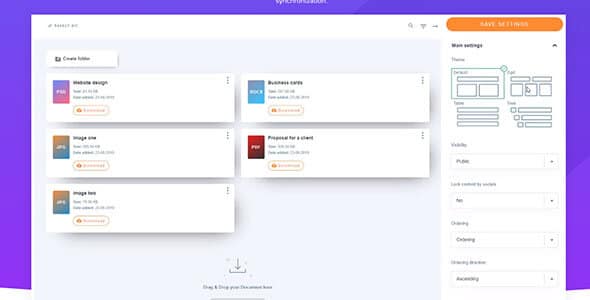
WP File Download – WordPress File Manager is a versatile document management plugin that provides administrators with a drag-and-drop interface to organize, control access to, and track digital downloads. By replacing the default library layout with an organized folder map, it offers complete control over private assets. For developers building client sites, this plugin secures downloadable files and digital products directly from the administrative dashboard.
WPExclusive members get access to WP File Download as part of a full plugin and theme library — plans from $9.99/month. See the full JoomUnited collection →
What Is WP File Download – WordPress File Manager?
WP File Download is developed by JoomUnited and functions as a secure file manager plugin for WordPress. It belongs to the administration category on WPExclusive, alongside other tools designed for organizing complex site assets effectively.
The plugin solves the problem of messy media libraries by grouping files into protected categories and applying clear download restrictions. It is designed for site owners and administrators who need a strict system for distributing digital content based on user roles.
WP File Download Features
WP File Download introduces a visual desktop-like interface to the WordPress backend, allowing users to arrange files rapidly without jumping between complex settings menus.
Drag-and-Drop File Organization
Users can create nested folders and subfolders to categorize digital products, PDFs, or media elements. The interface lets administrators move single or multiple files directly into designated folders with basic mouse actions. It also includes an advanced search engine, enabling fast retrieval across thousands of document records. You can further expand your backend controls by discovering other JoomUnited plugins on WPExclusive.
Granular Access Control
Not all files should be accessible to the general public or unverified traffic. WP File Download provides advanced file access restrictions, giving you the ability to define exact permissions based entirely on existing WordPress user roles. Administrators dictate explicitly who can view, update, download, or manage specific file categories.
Page Builder and Cloud Integrations
For designers constructing custom layouts, WP File Download stands out as the only download manager offering full integration with the Elementor page builder. It also seamlessly connects with external cloud storage through Nextcloud integration. This capability lets your team sync and deliver files straight from a self-hosted cloud server without ever leaving the primary dashboard.
Advanced Icon Builder and Statistics
The plugin features an advanced icon builder specifically formatted for WordPress, equipping owners with the tools to assign clear visual representations to distinct file types. Furthermore, it tracks detailed analytics for every downloaded asset. These download statistics help managers monitor which digital documents perform best within the user base.
Pricing
Check current WP File Download pricing and licensing terms on the official JoomUnited sales page. While evaluating a file manager plugin free edition from other providers might seem appealing, WP File Download operates as a premium deployment offering dedicated integrations, but WPExclusive members access it instantly as part of their active plan.
| Plan | Price | Sites | Includes |
|---|---|---|---|
| WPExclusive Membership | From $9.99/month | Unlimited | WP File Download + full library |
For independent developers managing multiple environments, a WPExclusive membership covers WP File Download cost metrics plus hundreds of other premium assets. This setup drastically reduces project overhead when compared to buying separate per-site licenses.
WP File Download – Latest Version
WP File Download receives regular updates to guarantee ongoing compatibility with WordPress releases, Elementor upgrades, and Nextcloud security guidelines. WPExclusive updates plugin files promptly after each official developer rollout, ensuring your network always runs the WP File Download latest version securely.
How to Install?
- Download the WP File Download .zip from your WPExclusive member account
- In WordPress: Plugins → Add New → Upload Plugin
- Select the .zip and click Install Now → Activate
- Navigate to the new WP File Download administrative menu to create your primary file category
- Assign specific user role access settings before uploading any private client documents
WP File Download Use Cases
Securing Digital Products and Client Records
Site operators selling digital goods or distributing sensitive client data rely on the WP File Download plugin to construct secure download paths. By applying role-based limitations, you stop unauthorized users from accessing private folders. Review our other WordPress administration plugins to expand this protected delivery infrastructure.
Cloud Storage Synchronization
Companies hosting massive internal archives consistently face severe local server limits. Using the Nextcloud integration components, administrators connect external storage drives visually to the frontend site. This arrangement offloads heavy file hosting externally while displaying documents natively in WordPress grids.
Agencies and Developers Managing Multiple Client Sites
Agencies deploying branded document portals for regional corporate clients configure WP File Download to define a consistent, user-friendly backend layout. Users everywhere, from design houses in Europe to server technicians seeking WP File Download india localized setups, benefit from its clean UI. Accessing it via WPExclusive membership eliminates restrictive per-site licensing constraints entirely.
WP File Download vs Alternatives
| Feature | WP File Download | WordPress Download Manager | WP File Manager |
|---|---|---|---|
| Primary Focus | Digital downloads and role-based access | eCommerce and digital product selling | Direct direct server file editing |
| Elementor Integration | ✅ Yes (Full) | Limited | ❌ No |
| Available on WPExclusive | ✅ Yes | ✅ Yes | ✅ Yes |
Those seeking the best file manager plugin wordpress has to offer appreciate WP File Download for front-facing downloads, while WP File Manager excels strictly as a backend developer tool. Find the complete collection of administration plugins on WPExclusive →
Pros and Cons
✅ Strengths
- Offers a native desktop-style folder organization system to visualize uploads
- Includes dedicated compatibility options for Elementor page builders
- Allows precise control over who views or downloads records using WordPress roles
⚠️ Limitations
- Structuring deep permission chains for complex user bases requires careful planning
- Connecting to external infrastructure relies on specific cloud storage integrations
- Developer auto-updates require an active license key. WPExclusive publishes updates manually when new versions are released.
Is WP File Download GPL Licensed?
Yes. WP File Download is distributed under the GNU General Public License (GPL) — the same license that governs WordPress itself. GPL gives any user the legal right to use, study, share, and redistribute the software. This is the legal framework that makes WPExclusive’s membership model possible.
WPExclusive distributes 100% original, unmodified files — the same release the developer publishes. No injected code, no alterations, no security risks.
Get WP File Download on WPExclusive
WPExclusive membership starts at $9.99/month, $87/year, or $149 lifetime — giving you WP File Download plus every plugin and theme in the library, on unlimited sites.
Explore the full JoomUnited collection → or browse all WordPress plugins →
Frequently Asked Questions
What does WP File Download – WordPress File Manager do?
WP File Download – WordPress File Manager is an administration plugin used to sort, define permissions for, and track digital files directly inside WordPress. It replaces confusing media directories with a logical folder layout. Site owners and administrators implement it to ensure users only access authorized documents.
Is WP File Download – WordPress File Manager free?
WP File Download – WordPress File Manager is supported through premium development tiers. Through WPExclusive, you unlock access to it as part of an active monthly or yearly membership.
What is the latest version of WP File Download – WordPress File Manager?
WP File Download – WordPress File Manager is actively maintained to handle security operations correctly. WPExclusive members always download the most current release after JoomUnited ships upgrades.
How much does WP File Download – WordPress File Manager cost?
Consult the developer’s website for specific WP File Download – WordPress File Manager retail quotes. Via WPExclusive, it is included in plans from $9.99/month — covering unlimited sites and the entire centralized digital library.
Is it legal to use WP File Download – WordPress File Manager via WPExclusive?
WP File Download – WordPress File Manager is GPL licensed, which explicitly permits redistribution without conditions. WPExclusive delivers original, unmodified installation scripts, staying fully within global GPL terms.
What are the best alternatives to WP File Download – WordPress File Manager?
WordPress Download Manager caters to administrators selling files online, and WP File Manager serves users writing application code on direct backend connections. Both of these WP File Download alternatives hold active listings on WPExclusive within the same subscription tier.