What is WordPress AJAX Search & AutoSuggest Plugin?
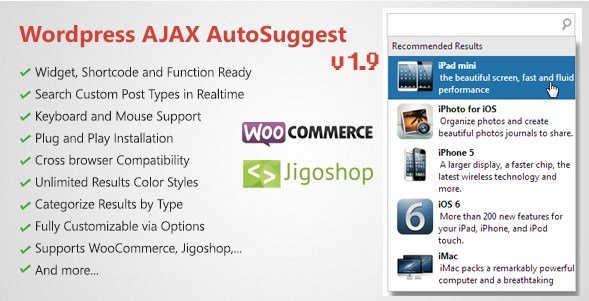
When WordPress users need a faster, more intuitive way to retrieve content without reloading the page, the WordPress AJAX Search & AutoSuggest Plugin offers a powerful solution. As a site owner, I understand that the default search functionality often leaves users frustrated with slow loading times and irrelevant results. This premium plugin transforms the search experience by querying your database in real-time as users type, displaying a categorized drop-down list with featured images instantly. It is particularly essential for e-commerce stores and content-heavy sites aiming to reduce bounce rates and increase conversions through superior navigation.
What Makes WordPress AJAX Search & AutoSuggest Plugin Different
>Unlike standard search enhancements that merely tweak the search results page, this plugin completely replaces the search interaction model. It utilizes Asynchronous JavaScript and XML (AJAX) to predict user intent before they even hit enter. Its unique selling proposition lies in its robust handling of Custom Post Types (CPT) and seamless integration with major e-commerce platforms like WooCommerce and Jigoshop. While many search plugins struggle with taxonomy and custom fields, this tool categorizes results intelligently—allowing users to distinguish between a blog post, a product, or a portfolio item instantly within the search suggestions.- Real-Time Performance: Instant feedback loop that significantly enhances user engagement.
- E-commerce Ready: Native support for WooCommerce and Jigoshop product search.
- Granular Control: Ability to include or exclude specific post types from search indices.
WordPress AJAX Search & AutoSuggest Plugin Features for WordPress Users
Advanced Custom Post Type Integration
One of the standout features I’ve found is the plugin’s ability to handle complex data structures. WordPress is often used for more than just blogging; it powers portfolios, FAQs, testimonials, and real estate listings. This plugin allows you to index and search through these specific Custom Post Types. You can configure the search to look through everything or limit it strictly to specific custom post types (e.g., limiting search to only “Pages” or only “Products”). This specificity ensures that users find exactly what they are looking for without the clutter of unrelated content types appearing in the auto-suggest dropdown.
WooCommerce & E-commerce Optimization
For online store owners, every second counts. The WooCommerce integration in this plugin is top-notch. It identifies products and displays them with featured images in the search results. This visual confirmation helps users quickly identify the merchandise they want to purchase. Furthermore, the plugin supports variations and can handle specific product attributes, making it a vital tool for increasing conversion rates. By allowing customers to go directly to a product page from the search bar, you are shortening the sales funnel and reducing friction. You can learn more about optimizing your store by checking out other WordPress plugins on our site.
Flexible Search Configuration & UX
User experience is at the forefront of this plugin’s design. It offers a highly configurable interface where administrators can decide how many results to show, whether to display post counts, and how to style the dropdown to match their theme. The “AutoSuggest” feature isn’t just a text list; it’s a rich media display. You can choose to open the result directly or view the full search results page. The plugin also includes smart handling of taxonomy, allowing users to filter by category or tag within the search context. This level of customization ensures that the search bar feels like a native part of your website rather than a tacked-on widget.
How to Install WordPress AJAX Search & AutoSuggest Plugin
Quick Installation
- Log in to your WordPress dashboard and navigate to Plugins → Add New.
- Click the “Upload Plugin” button at the top of the page.
- Select the ZIP file you downloaded from CodeCanyon and click “Install Now”.
- Activate the plugin and navigate to the plugin settings page to configure your search form.
Who Should Use WordPress AJAX Search & AutoSuggest Plugin?
E-commerce Store Owners
If you are running a WooCommerce store with a large catalog, the default search is often insufficient. Users typing “red shi” should immediately see “red shirt” products with images. This plugin is specifically designed for store owners who want to reduce the time it takes for a customer to find a product, thereby directly impacting sales revenue positively.
Content-Rich Portfolios and Directories
Developers and site managers who use WordPress for directories, real estate listings, or large portfolios often rely heavily on Custom Post Types. This plugin allows these specific users to make their custom content searchable. For instance, a user searching for an apartment can see a list of property types in the dropdown, separated from blog posts about real estate trends. For more complex directory setups, you might also look into specialized WordPress themes that complement this functionality.
WordPress AJAX Search & AutoSuggest Plugin vs Alternatives
| Feature | WordPress AJAX Search & AutoSuggest | Standard WordPress Search |
|---|---|---|
| Search Mechanism | AJAX / Real-time AutoSuggest | Page Reload required |
| Visual Feedback | Featured Images & Categorized Dropdown | Text-only list on results page |
| E-commerce Support | Native WooCommerce & Jigoshop support | Treats products as standard posts |
| Custom Post Types | Selective inclusion/exclusion | Limited or inconsistent indexing |
WordPress AJAX Search & AutoSuggest Plugin Pricing
This plugin is available as a premium solution via CodeCanyon. It typically follows a standard licensing model where you can purchase a Regular License for use on a single end product, or an Extended License for clients or SaaS applications. The purchase includes lifetime updates and 6 months of support from the developer, which can be extended for an additional fee. Given the conversion optimization benefits, the investment is often justified quickly for e-commerce sites.
Pros and Cons
✅ Pros
- Real-Time Results: Drastically improves user engagement by showing results instantly.
- Visual Interface: Displays featured images and categories, making navigation intuitive.
- High Compatibility: Works seamlessly with WooCommerce, Jigoshop, and various custom post types.
- Granular Settings: Fine-tune which post types appear in search results.
❌ Cons
- Premium Only: Unlike some WordPress.org repository plugins, this requires a purchase.
- Customization: Changing the look of the dropdown may require some CSS knowledge for perfect theme matching.
- Resource Usage: Like all AJAX search plugins, querying the database on every keystroke can be resource-intensive on very large sites if not cached properly.
Frequently Asked Questions
Does this plugin support WooCommerce variable products?
Yes, the plugin is built to handle WooCommerce products efficiently. It queries the product post type and can display variations and attributes in the search results depending on your configuration.
Can I limit the search to only specific categories?
Absolutely. The plugin gives you administrative control to include or exclude specific post types. You can configure it to search only within specific custom post types or taxonomies to refine user results.
Is the search bar mobile responsive?
Yes, the AJAX search dropdown is designed to be responsive. It adapts to different screen sizes, ensuring that the auto-suggest functionality works smoothly on mobile devices and tablets.
Will this slow down my website?
While AJAX queries do hit the database, this plugin is optimized for performance. On standard hosting setups, the impact is negligible. However, for sites with tens of thousands of posts, using a caching plugin is recommended to ensure the instant search remains snappy.
Can I customize the design of the search results?
Yes, the plugin provides options in the settings to adjust basic styling. For deeper customization, you can inject custom CSS to match the dropdown exactly to your theme’s colors and typography.
Does it work with page builders like Elementor or Divi?
Yes, the plugin functions independently of page builders. You can place the search widget in any widget area or shortcode location supported by your page builder.
Final Verdict
The WordPress AJAX Search & AutoSuggest Plugin is a robust, feature-rich solution that modernizes the default WordPress search experience. Its ability to intelligently categorize results and support complex Custom Post Types makes it a standout choice for developers and store owners. While it requires a financial investment, the return in terms of user experience and potential conversion uplift for e-commerce sites makes it a worthy addition to any serious WordPress project.