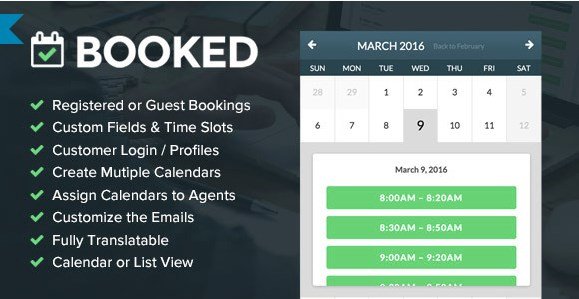
What is Booked Appointments – Appointment Booking for WordPress?
When WordPress users need a robust, user-friendly solution to manage client schedules without the headache of double-booking, Booked Appointments – Appointment Booking for WordPress offers a comprehensive and visually intuitive approach. I have worked with numerous booking systems over the years, and I find Booked to be uniquely positioned because of its seamless integration into the WordPress native interface and its inclusion of premium add-ons at no extra cost. Whether you are a freelance consultant or a large agency, this plugin transforms your website into a fully functional appointment booking engine.
What Makes Booked Appointments Different
p>Unlike many competitors that nickel-and-dime you for essential features like payments or agent dashboards, Booked Appointments takes a different philosophy. Developed by the team at Boxy Studio, this plugin provides a lifetime license model with a one-time purchase on CodeCanyon, which is increasingly rare in the WordPress ecosystem. Its standout feature is the inclusion of powerful add-ons—specifically the WooCommerce Payments add-on and the Front-End Agents add-on—right out of the box. This means you don’t have to worry about compatibility issues between third-party extensions; everything is designed to work together harmoniously from the moment you activate the plugin. You can check out other similar tools on our plugins collection to see how this compares to other models.- Lifetime Updates: Pay once and receive feature updates forever, without a recurring subscription.
- Included Premium Add-ons: Get WooCommerce payments and Front-End Agent access included for free.
- User-Friendly Interface: A clean, responsive calendar view that works beautifully on mobile devices.
Booked Appointments Features for WordPress Users
Advanced Calendar Management & Customization
At the core of the plugin is its highly adaptable calendar system. I appreciate that Booked Appointments allows for granular control over time slots. You can create custom time slots for specific days, set up vacation dates or closed dates, and implement appointment buffering. Buffering is a critical feature for service providers; it prevents appointments from being booked too close to one another, giving you necessary breaks or prep time between clients. The color pickers also allow you to match the calendar to your brand identity exactly, ensuring a consistent user experience across your site. For more customization options, you might want to look at WordPress themes that support this plugin natively.
Seamless WooCommerce Integration
Monetizing appointments is often a pain point with free plugins, but Booked solves this elegantly. The included Payments with WooCommerce add-on allows you to turn your appointment calendar into a revenue generator. Instead of just booking a time slot, users can be directed to the WooCommerce checkout page to pay a deposit or the full fee. This is incredibly powerful because it leverages the security and familiarity of WooCommerce, which is the standard for e-commerce on WordPress. You can use existing payment gateways like Stripe or PayPal without configuring new systems specifically for the booking plugin.
Front-End Agents & User Profiles
If you run a business with multiple employees or service providers, the Front-End Agents feature is a game-changer. Your booking agents get their own profile screen on the front end of your website. They can log in, view their upcoming appointments, and manage requests without needing access to your WordPress Admin dashboard. This separation of duties is vital for security and professional workflow. Furthermore, customers can create their own accounts to manage their appointments, cancel bookings, or export details to Google Calendar and Apple Calendar via iCal feeds, reducing the administrative burden on you.
How to Install Booked Appointments
Quick Installation
- Log in to your WordPress dashboard and navigate to Plugins → Add New.
- Click the “Upload Plugin” button at the top of the page.
- Select the zip file you downloaded from CodeCanyon and click Install Now.
- Once installed, click “Activate Plugin” to start setting up your calendar.
Who Should Use Booked Appointments?
Consultants and Freelancers
If you are a consultant offering billable hours, this plugin allows you to set specific availability buffers so clients cannot book back-to-back sessions without your approval. The integration with Google Calendar ensures that your personal schedule syncs with your professional booking page, keeping your life organized. The custom fields feature is particularly useful here, allowing you to ask clients specific questions during the booking process to prepare for the meeting.
Salons, Spas, and Medical Clinics
For businesses with multiple staff members, the Front-End Agents add-on is essential. A salon owner can set up the calendar so that customers book specifically with their preferred hair stylist. The WooCommerce integration allows for taking deposits upfront, which significantly reduces no-shows—a common issue in the beauty and health industries. The responsive design ensures that clients can book appointments easily directly from their smartphones while on the go.
Booked Appointments vs Alternatives
| Feature | Booked Appointments | Amelia Booking |
|---|---|---|
| Pricing Model | One-time purchase (Lifetime updates) | Subscription-based (Yearly) |
| Payment Integration | WooCommerce (Included) | Native (Stripe/PayPal) |
| Agent Access | Front-end profile included | Backend dashboard primarily |
| Calendar Sync | iCal feed (Export) | Two-way sync (Google/Outlook) |
Booked Appointments Pricing
Booked Appointments is available exclusively on CodeCanyon. Unlike many modern SaaS-style plugins, it utilizes a traditional marketplace model. You purchase a single license for a one-time fee, which includes 6 months of support from the developer. The significant advantage here is the “Lifetime Updates” policy. You will never have to pay again to receive new features or security updates, making it a cost-effective long-term investment for businesses looking to avoid monthly recurring software fees. You can extend support to 12 months at an additional cost if you require prolonged assistance.
Pros and Cons
✅ Pros
- Cost-Effective: One-time payment with lifetime updates saves money over time compared to subscriptions.
- Feature-Rich Add-ons: Essential features like WooCommerce payments and agent dashboards are included for free.
- Customizable: Extensive options for custom fields, colors, and time slots to fit any business model.
❌ Cons
- Synchronization: The iCal feed is currently one-way (export only), so it does not block off times on external calendars automatically.
- Support Renewal: While the plugin gets updates forever, official support requires renewing the 6-month license periodically.
- Learning Curve: The options panel is dense, which might be slightly overwhelming for complete beginners initially.
Frequently Asked Questions
Can I accept payments for appointments?
Yes, Booked Appointments includes a free add-on for WooCommerce Payments. This allows you to require customers to pay a deposit or the full amount at the time of booking using any payment gateway supported by WooCommerce, such as Stripe or PayPal.
Does Booked Appointments sync with Google Calendar?
The plugin supports iCal feeds. Your customers can export their booked appointments to Google Calendar, Apple Calendar, or Outlook. However, it does not currently offer a two-way sync where an event on your Google Calendar automatically blocks a slot on your WordPress site.
Is this plugin suitable for multi-vendor websites?
Yes, thanks to the Front-End Agents add-on. You can assign specific calendars to different users or employees, allowing them to manage their own schedules and appointments directly from the front end of your website without accessing the admin area.
Do I have to pay for updates?
No. One of the best aspects of purchasing Booked Appointments is that your purchase includes lifetime updates. You will receive new features and bug fixes for the life of the product without paying an additional fee.
Can I customize the booking form?
Absolutely. The plugin allows you to create custom fields for your booking forms. This means you can collect specific information relevant to your service, such as dietary restrictions for a restaurant booking or medical history for a clinic.
What happens if I need help with the plugin?
The plugin comes with 6 months of support included with your purchase. You can submit a ticket via the developer’s support system, and they typically respond within 6 hours. If you need support beyond the first 6 months, you can extend it at a discounted rate.
Final Verdict
Booked Appointments – Appointment Booking for WordPress is a solid, professional-grade solution for anyone looking to streamline their scheduling process. I highly recommend it for users who prefer a one-time payment model over monthly subscriptions and who need the flexibility of WooCommerce integration. While the lack of two-way Google Calendar sync might be a drawback for some, the depth of features, including custom fields and agent management, makes it a top-tier choice for consultants, agencies, and service-based businesses.