What is Woocommerce Sale Booster – What are you looking for?
When WordPress users struggle to convert browsing visitors into buyers due to complex catalogs or poor search functionality, Woocommerce Sale Booster – What are you looking for offers a unique, interactive solution. As a WooCommerce expert, I’ve seen many stores lose customers simply because they couldn’t quickly locate the right item. This plugin changes the dynamic by proactively asking users what they need, effectively bridging the gap between user intent and product inventory.
Unlike standard search bars that passively wait for input, this plugin implements a “Helping Window” that guides the user. It transforms the shopping experience from a hunt into a conversation. If you are looking to enhance your WordPress plugins collection with tools that directly impact revenue, this addition focuses on reducing the time-to-purchase.
What Makes Woocommerce Sale Booster – What are you looking for Different
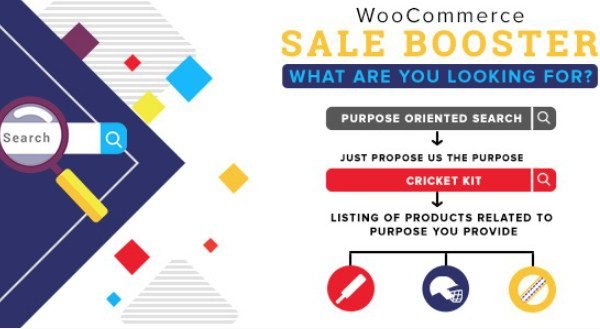
The primary differentiator of this plugin is its focus on “Product Purpose.” Most search plugins rely heavily on keyword matching, titles, and SKUs. However, customers often think in terms of usage or occasion rather than specific product names. This plugin allows store owners to categorize products based on purpose—defined either by the admin or the user—and present them in a guided interface.
- Interactive Guidance: It uses a helping window to engage users immediately rather than waiting for them to navigate menus.
- Purpose-Driven Logic: It filters products not just by name, but by the intent or purpose of the purchase (e.g., “Gift for Him” vs. “Personal Use”).
- Fallback Customization: It keeps users engaged even when search results are empty, offering custom text to redirect them rather than showing a dead end.
Woocommerce Sale Booster – What are you looking for Features for WordPress Users
The Helping Window: Proactive Engagement
The standout feature is the “Helping Window.” In my experience analyzing e-commerce UX, the fewer clicks a user has to make to find a relevant product, the higher the conversion rate. This feature creates a popup or an overlay that asks the user “What are you looking for?” This is incredibly effective for stores with large inventories. It acts as a virtual sales assistant, stepping in the moment the user arrives to guide their journey. This reduces cognitive load and decision fatigue.
Product Purpose by Admin: Strategic Categorization
This feature gives full control to the store owner. As an admin, you can define the “purpose” of your products. For example, if you sell skincare, you can tag products as “Anti-aging,” “Moisturizing,” or “Acne Treatment.” When a user interacts with the plugin, they are presented with these strategic categories. This allows you to guide the sales narrative. You aren’t just showing products; you are showing solutions to specific problems. According to best practices in site search optimization, guided navigation improves conversion rates by filtering out the noise.
Product Purpose by User: Flexibility and Feedback
Conversely, the plugin also supports “Product Purpose by User.” This feature allows the customer to define their intent. Perhaps the admin categories are too broad, or the user has a specific niche need. Allowing the user to input their purpose ensures that the search logic remains flexible. This dual approach—admin-defined structure meeting user-defined flexibility—makes for a robust system that covers various shopping scenarios.
Custom Text for No Results: Retention Strategy
A “No results found” page is a conversion killer. It typically results in a bounce. Woocommerce Sale Booster addresses this by allowing you to configure custom text when no product is found. Instead of a generic error, you can display a message like, “We couldn’t find that exact item, but here are our bestsellers,” or provide a link to a contact form for custom orders. This keeps the user on the site and provides a clear path forward, turning a potential dead-end into another sales opportunity.
Easy Configuration
Despite its advanced functionality, the plugin boasts an easy configuration setup. You don’t need to be a developer to implement it. The settings are intuitive, allowing you to set up the helping window and define product purposes within minutes. This ease of use is vital for store owners who want to focus on sales rather than troubleshooting code. For more WooCommerce plugins that prioritize usability, this is a prime example.
How to Install Woocommerce Sale Booster – What are you looking for
Quick Installation
- Log in to your WordPress dashboard and navigate to Plugins → Add New.
- Click on the “Upload Plugin” button at the top of the page.
- Select the ZIP file you downloaded from CodeCanyon.
- Click “Install Now” and then activate the plugin.
- Locate the plugin settings in your WordPress dashboard to configure the “Helping Window” and product purposes.
Who Should Use Woocommerce Sale Booster – What are you looking for?
Gift Shops and Specialty Stores
If you run a gift shop, customers often arrive with a vague idea (e.g., “something for a dad”) rather than a specific product. This plugin is perfect for that. You can set up purposes like “For Him,” “For Her,” “Anniversary,” or “Birthday.” The “Helping Window” effectively interviews the customer to narrow down the vast catalog to the perfect gift suggestions, significantly increasing the average order value.
Electronics and Tech Retailers
Technology stores often have complex specifications. A user might want a laptop for “gaming” versus “graphic design.” By using the Product Purpose feature, an admin can tag high-spec GPUs as “Gaming” and color-accurate screens as “Graphic Design.” This helps non-technical shoppers find the right hardware without getting bogged down in technical jargon.
Woocommerce Sale Booster vs Alternatives
| Feature | Woocommerce Sale Booster | Standard WooCommerce Search |
|---|---|---|
| Search Interaction | Proactive “Helping Window” asks the user intent. | Passive search bar waits for user input. |
| Filtering Logic | Based on “Purpose” (Use case/Intent). | Based on Keywords, Categories, and Tags. |
| No Results Handling | Custom text to redirect/engage user. | Standard “No products found” message. |
| Setup Complexity | Low (Admin defines purposes). | N/A (Default functionality). |
While advanced search tools like WooCommerce Product Search offer AJAX and live search, they often lack the specific “intent-based” guidance that Woocommerce Sale Booster provides. This plugin is less about searching for a word and more about discovering a solution.
Woocommerce Sale Booster – What are you looking for Pricing
This plugin is available via CodeCanyon as a premium plugin. It typically follows a one-time purchase model which includes lifetime updates and 6 months of support (with the option to extend). This is a cost-effective solution compared to subscription-based SaaS search tools that charge monthly fees based on the number of searches or sessions. For a single site, the investment is relatively low for the potential conversion uplift it provides.
Pros and Cons
✅ Pros
- Improved UX: The guided search reduces the friction of finding products.
- Reduced Bounce Rate: Custom no-result text keeps users on the page.
- Intent-Based Selling: Helps sell the “why” and “use case” rather than just the product specs.
- Easy Setup: No coding required to configure the helping window.
- One-time Fee: Budget-friendly compared to enterprise search solutions.
❌ Cons
- Manual Tagging: Requires the admin to manually assign “purposes” to products for best results.
- Design Limitations: The popup design may require custom CSS to perfectly match some premium themes.
- No AI: It does not use artificial intelligence to auto-generate purposes; it relies on predefined rules.
Frequently Asked Questions
Does this plugin replace the default WooCommerce search bar?
No, it works alongside it. It adds a “Helping Window” to guide users, but the standard search functionality remains available for those who prefer it.
Can I customize the text in the helping window?
Yes, the plugin allows you to configure the text displayed in the helping window as well as the custom messages shown when no products are found.
Is this plugin compatible with page builders like Elementor?
Yes, as it is a standard WooCommerce extension, it works well with most themes and page builders, though you may need to use a shortcode or widget to place the trigger in specific locations.
Do I need to code to set up product purposes?
No coding is required. The plugin provides a user-friendly interface in the WordPress dashboard where you can assign and manage product purposes.
How does the “Product Purpose by User” work?
It allows the customer to input or select their specific need. The plugin then tries to match products that fit that description or purpose, offering a more personalized search experience.
Will this slow down my website?
The plugin is lightweight and designed to be fast. However, as with any plugin, performance depends on your hosting environment and the total number of active plugins.
Final Verdict
Woocommerce Sale Booster – What are you looking for is a highly practical tool for store owners who understand that sales are about solving problems, not just listing inventory. By implementing a guided search mechanism, it addresses the common pain point of “option paralysis” in large stores. It’s particularly well-suited for gift shops, fashion retailers, and specialized electronics stores where user intent varies widely. If you want to move beyond passive search and actively guide your customers to a purchase, this plugin is a smart investment.