What is WooCommerce Products Layouts For Visual Composer?
When WordPress users need to break free from the rigid, standard display options of WooCommerce, WooCommerce Products Layouts For Visual Composer offers a powerful visual solution. As a developer who has built countless e-commerce sites, I know how frustrating it can be when your creative vision is limited by default theme templates. This plugin bridges the gap between the WPBakery Page Builder (formerly Visual Composer) and your WooCommerce store, giving you granular control over how your products are presented. By integrating directly into your page builder interface, it allows you to design complex product displays—such as grids, carousels, and masonry layouts—without touching a single line of code.
What Makes WooCommerce Products Layouts For Visual Composer Different
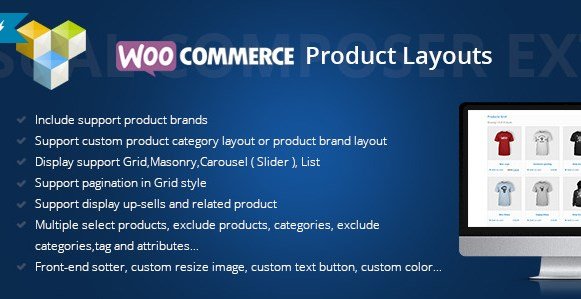
While there are many product grid plugins on the market, this tool stands out because of its deep integration with WPBakery and its robust internal brand management system. Most plugins require you to use shortcodes or separate builders, but this one adds a dedicated element right inside your Visual Composer interface. Its unique selling proposition is the combination of advanced layout flexibility (like Masonry and Carousels) with a built-in feature to manage and display product brands. It’s not just about listing products; it’s about creating a cohesive shopping experience that aligns with your brand identity. Whether you need a simple list for a category page or a dynamic slider for your homepage, this plugin adapts to your specific design requirements.
- Seamless integration with WPBakery Page Builder for intuitive drag-and-drop design.
- Built-in Brand management system to categorize and feature manufacturers.
- Advanced display modes including Grid, Masonry, Carousel, and List views.
WooCommerce Products Layouts For Visual Composer Features for WordPress Users
1. Versatile Display Modes and Layouts
The core strength of this plugin lies in its variety of display modes. Standard WooCommerce grids are functional, but they can be boring. With WooCommerce Products Layouts For Visual Composer, you can switch between Grid, Masonry, Carousel (Slider), and List views. The Grid view is perfect for standard catalogs, while the Masonry layout is ideal for stores with products that have varying image aspect ratios, ensuring a Pinterest-style aesthetic that doesn’t leave awkward gaps. The Carousel mode is excellent for showcasing featured products, best-sellers, or upsells in a compact space on your homepage, reducing the need for users to scroll down endlessly. The List view provides a more information-heavy layout, suitable for stores where detailed specs are needed right at the catalog level.
2. Comprehensive Product Filtering and Querying
Displaying products is one thing; displaying the *right* products is another. This plugin gives you an incredible amount of control over your product queries. You can manually select specific products to display, which is great for hand-picked collections. Alternatively, you can dynamically pull products based on categories, tags, or attributes. The exclusion features are equally powerful—you can exclude specific categories or products from a layout, allowing you to create highly targeted sections. For example, you could create a “Summer Sale” grid that includes all clothing categories but explicitly excludes winter accessories. This level of querying is essential for creating personalized shopping journeys that convert visitors into buyers.
3. Advanced Styling and Customization
Visual consistency is key to building trust. This plugin offers over 40 style settings to ensure your product layouts match your theme perfectly. You can customize image sizes (resizing them on the fly), change button text and colors, and adjust spacing. If you use the YITH WooCommerce Wishlist plugin, you will be pleased to know that this layout manager supports the wishlist button natively, allowing you to keep that functionality visible in your custom layouts. The Bootstrap responsive design ensures that all these customizations look great on mobile devices, tablets, and desktops, providing a seamless experience across all touchpoints.
How to Install WooCommerce Products Layouts For Visual Composer
Quick Installation
- Log in to your WordPress dashboard and navigate to Plugins → Add New.
- Since this is a premium plugin available on CodeCanyon, click the “Upload Plugin” button at the top of the page.
- Select the zip file you downloaded from CodeCanyon and click “Install Now”.
- Once installed, click “Activate” to enable the plugin.
- Ensure you have WPBakery Page Builder installed and active, as this plugin requires it to function.
Who Should Use WooCommerce Products Layouts For Visual Composer?
E-commerce Store Owners Using WPBakery
If you have built your site using WPBakery and are frustrated by the lack of WooCommerce controls, this plugin is essential for you. It allows you to maintain your workflow without switching to a different page builder just to get better product layouts. You can design landing pages for specific products or sales directly within the visual editor, seeing exactly what your customers will see.
Stores with Multiple Brands or Manufacturers
One of the standout features is the brand management capability. If you sell electronics, fashion, or cosmetics that rely heavily on brand reputation, this plugin simplifies the process. You can assign products to brands, create brand descriptions, and display brand logos. This is particularly useful for SEO, as you can create dedicated pages for each brand (e.g., “Shop Nike”) that are automatically populated with the correct products using the layout builder.
WooCommerce Products Layouts For Visual Composer vs Alternatives
| Feature | WooCommerce Products Layouts | Default WooCommerce Shortcodes |
|---|---|---|
| Layout Flexibility | Offers Grid, Masonry, Carousel, and List with 40+ style options. | Limited to standard Grid and List; requires CSS for customization. |
| Builder Integration | Native element inside WPBakery Page Builder interface. | Requires Shortcode blocks; no visual editing interface. |
| Brand Support | Built-in custom taxonomy for brands with widgets and filters. | No native brand support; requires extra plugins. |
WooCommerce Products Layouts For Visual Composer Pricing
This plugin is available exclusively on CodeCanyon as a premium product. It typically follows a standard marketplace pricing model, offering a Regular License for use on a single end product and an Extended License for clients or SaaS applications. The price includes lifetime future updates and six months of support from the developer, which can be extended for an additional fee. Given the versatility it adds, it is a cost-effective solution compared to hiring a developer for custom template coding.
Pros and Cons
✅ Pros
- Highly customizable design options with over 40 settings to match any theme.
- Includes a robust Brand management system, eliminating the need for a separate plugin.
- Supports multiple layout types (Masonry, Carousel) which are not native to WooCommerce.
❌ Cons
- Dependent on WPBakery Page Builder; it will not work if you are using Elementor, Gutenberg, or Divi.
- As a premium plugin, it adds to the overall cost of running your WooCommerce store.
- Advanced styling options might require a brief learning curve for new users to understand all parameters.
Frequently Asked Questions
Does this plugin work with Elementor?
No, WooCommerce Products Layouts For Visual Composer is specifically designed for WPBakery Page Builder. If you are looking for a similar solution for Elementor, you would need a different addon specifically built for that ecosystem.
Can I display related products and upsells?
Yes, the plugin supports displaying up-sells and related products. You can use these settings to create targeted sections on your product pages to increase average order value.
Is the plugin mobile responsive?
Absolutely. The plugin is built using Bootstrap, ensuring that all your custom layouts—whether grids, sliders, or lists—look and function perfectly on mobile devices and tablets.
How do I add brands to my products?
After installation, the plugin adds a “Brands” taxonomy to your WordPress dashboard. You can create brands (like Nike, Sony, etc.) there, upload a logo, and assign them to individual products on the product edit screen.
Can I filter products by attributes?
Yes, the plugin allows you to query products by categories, tags, and attributes. You can also exclude specific items, giving you full control over exactly which products appear in your layouts.
Does it support the YITH Wishlist plugin?
Yes, WooCommerce Products Layouts For Visual Composer includes specific support for the YITH WooCommerce Wishlist button, allowing you to display the wishlist option in your custom product grids.
Final Verdict
WooCommerce Products Layouts For Visual Composer is an indispensable tool for store owners who are committed to the WPBakery ecosystem. It solves the common problem of monotonous product displays by offering diverse, stylish, and functional layout options. The added bonus of a built-in brand system makes it a two-for-one solution that simplifies your plugin stack. It is particularly well-suited for fashion, electronics, and lifestyle stores where visual presentation and brand identity are crucial for conversion. If you want to take your WooCommerce store design to the next level without coding, this plugin is a solid investment.