

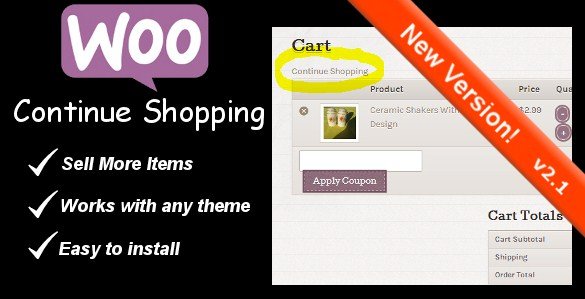
What is WooCommerce Continue Shopping Link?
When WooCommerce store owners need to improve customer navigation during the shopping experience, WooCommerce Continue Shopping Link offers a simple but effective solution. This premium plugin addresses a common pain point in e-commerce: customers who get “stuck” in the cart or checkout pages without an easy way to return to browsing products. The WooCommerce Continue Shopping Link seamlessly integrates with your store to add a customizable button that helps shoppers return to product pages, category views, or custom URLs you specify. By reducing friction in the shopping journey, this plugin directly addresses cart abandonment issues while enhancing the overall user experience.
What Makes WooCommerce Continue Shopping Link Different
While many WooCommerce plugins try to solve cart abandonment with complex features and analytics dashboards, WooCommerce Continue Shopping Link takes a focused, user-centric approach. This plugin recognizes that sometimes the simplest solution is the most effective – when customers are in your cart, they may simply want to return to shopping without going through multiple navigation steps. The unique selling proposition of this plugin is its simplicity combined with customization options that give you complete control over where the continue shopping button directs customers and how it appears on your site.
- Strategic placement of navigation options on cart and checkout pages
- Customizable styling using the wc-continue-shopping CSS class
- Flexible redirect options including shortcode URL specification
WooCommerce Continue Shopping Link Features for WordPress Users
Strategic Button Placement
The WooCommerce Continue Shopping Link automatically adds navigation buttons to your cart and checkout pages in strategic positions. These buttons appear exactly where customers are most likely to need them, reducing the cognitive load required to continue shopping. By placing these links in high-visibility areas, the plugin ensures that customers who decide to continue browsing can do so without frustration, which is especially important for stores with large catalogs or frequent promotions.
Flexible Redirect Options
One of the plugin’s standout features is its flexibility in determining where the continue shopping link directs customers. By default, it can return shoppers to the last product page they viewed, a category page, or your shop homepage. The new shortcode feature allows you to specify custom URLs, giving you precise control over the customer journey. This is particularly valuable during promotions or when you want to guide customers toward specific collections or landing pages that might encourage additional purchases.
Customizable Styling
The WooCommerce Continue Shopping Link comes with a dedicated CSS class (wc-continue-shopping) that makes styling the button to match your store’s design incredibly simple. Whether you prefer a subtle text link or a prominent button that draws attention, you have complete control over its appearance through your theme’s custom CSS. This ensures that the continue shopping functionality doesn’t detract from your carefully crafted design aesthetic while still being visible enough to be useful to customers.
How to Install WooCommerce Continue Shopping Link
Quick Installation
- Purchase and download the plugin from the CodeCanyon marketplace
- Go to Plugins → Add New in WordPress dashboard
- Click Upload Plugin → Choose File → Select the plugin ZIP file
- Click Install Now → Activate
- Enter your license key in the plugin settings page
After activation, you’ll find the plugin settings in your WooCommerce menu. The interface is straightforward, allowing you to configure where the continue shopping links appear and how they function without requiring technical expertise. The plugin works seamlessly with most WooCommerce themes without requiring additional configuration, though you can use the custom CSS options to refine the appearance.
Who Should Use WooCommerce Continue Shopping Link?
Store Owners with Large Product Catalogs
If you’re running a WooCommerce store with dozens or hundreds of products across multiple categories, the WooCommerce Continue Shopping Link is essential. These stores often see customers add items to their cart while browsing specific categories, only to lose track of where they were when they decide to continue shopping. This plugin helps maintain the browsing context by allowing customers to return to the last category or product they viewed, making it more likely they’ll add additional items to their cart. For stores with extensive catalogs, this plugin can significantly increase average order value by facilitating cross-category shopping.
E-commerce Sites Running Frequent Promotions
Stores that regularly run special promotions, seasonal sales, or flash deals will benefit greatly from this plugin. The shortcode feature allows you to strategically redirect customers to promotion pages when they click the continue shopping button. This is particularly valuable during limited-time offers when you want to maximize exposure to discounted products. According to e-commerce research, well-placed navigation options during checkout can recover up to 15% of abandoned carts by giving customers a chance to continue shopping rather than leaving the site entirely.
Mobile-Focused Stores
For stores where a significant portion of traffic comes from mobile devices, navigation challenges are even more pronounced. Mobile screens have limited space for navigation menus, making it easy for customers to feel “trapped” on cart or checkout pages. The WooCommerce Continue Shopping Link provides a clear, touch-friendly exit point that maintains the shopping momentum on smaller screens. Mobile optimization is crucial for conversion rates, and this plugin directly addresses one of the common pain points in mobile e-commerce experiences.
WooCommerce Continue Shopping Link vs Alternatives
| Feature | WooCommerce Continue Shopping Link | WooCommerce Default Functionality |
|---|---|---|
| Button Placement | Strategic placement on cart and checkout pages | Limited options, often only on cart page |
| Redirect Options | Flexible with shortcode URL specification | Generally returns to shop homepage |
| Customization | Dedicated CSS class for easy styling | Limited styling options |
| User Experience | Optimized for reducing cart abandonment | Basic functionality |
While WooCommerce does include some basic continue shopping functionality, it’s often limited and inconsistently implemented across different themes. The WooCommerce Continue Shopping Link plugin enhances this native functionality with greater flexibility, better positioning options, and more intelligent redirect logic. WooCommerce’s native features provide a foundation, but this plugin builds upon it to create a more seamless shopping experience.
WooCommerce Continue Shopping Link Pricing
The WooCommerce Continue Shopping Link is available as a premium plugin through the CodeCanyon marketplace for a one-time purchase of $16. This includes lifetime updates and 6 months of support from the developer, with the option to extend support for an additional fee. The pricing structure represents excellent value for store owners looking to address cart abandonment issues without committing to expensive subscription-based solutions. Given that even a small reduction in cart abandonment can quickly offset the purchase cost, the plugin offers a strong return on investment for stores of all sizes.
Pros and Cons
✅ Pros
- Simple installation process with no technical knowledge required
- Flexible redirect options including shortcode URL specification
- Customizable styling with dedicated CSS class
- One-time purchase with lifetime updates (no recurring fees)
- Lightweight plugin that doesn’t slow down your site
- Effective solution for reducing cart abandonment
❌ Cons
- Limited advanced features compared to more expensive cart optimization solutions
- Premium plugin with no free version available for testing
- Only available through CodeCanyon marketplace
- Documentation could be more comprehensive for advanced customizations
Frequently Asked Questions
Does the WooCommerce Continue Shopping Link work with all themes?
Yes, this plugin is designed to work seamlessly with most WooCommerce themes. It uses standard WordPress hooks and filters, ensuring compatibility with well-coded themes. Some themes may require minor CSS adjustments for optimal visual integration.
Can I customize where the continue shopping button appears on the page?
The plugin automatically places the button in optimal positions on cart and checkout pages. For more precise positioning, you can use the provided CSS class and filters in the plugin code to adjust the placement to your specific needs.
Will this plugin slow down my website?
No, the WooCommerce Continue Shopping Link is a lightweight plugin with minimal code that doesn’t impact site performance. It doesn’t add additional database queries or external resources that could slow down your site.
Can I use the continue shopping link with custom product pages?
Absolutely. The shortcode feature allows you to specify custom URLs for the continue shopping link, making it perfect for use with custom product pages, landing pages, or any other specific URLs you want to direct customers to.
Is technical support included with the plugin purchase?
Yes, your purchase includes 6 months of support from the developer, which can be extended for an additional fee if needed. The support covers issues with installation, configuration, and basic troubleshooting.
Does the plugin work with WooCommerce blocks and the new checkout experience?
The plugin is designed to work with both traditional WooCommerce pages and the newer block-based checkout experience. It integrates with WooCommerce’s template system to ensure compatibility across different page types.
Final Verdict
The WooCommerce Continue Shopping Link is a focused, effective solution for a common e-commerce challenge: keeping customers engaged during the shopping process. Rather than trying to be a comprehensive cart optimization suite, it excels at doing one thing extremely well—providing clear navigation options when customers are in your cart or checkout pages. This simplicity is actually its strength, as it delivers measurable results without the complexity or resource requirements of more expensive solutions. It’s particularly well-suited for stores with extensive product catalogs, mobile-focused businesses, and retailers running frequent promotions. While it may lack some advanced features of premium cart optimization platforms, its affordable one-time pricing and straightforward implementation make it an excellent choice for small to medium-sized WooCommerce stores looking to reduce cart abandonment through improved navigation.

.png "FullEvents – Event Plugin WordPress")


