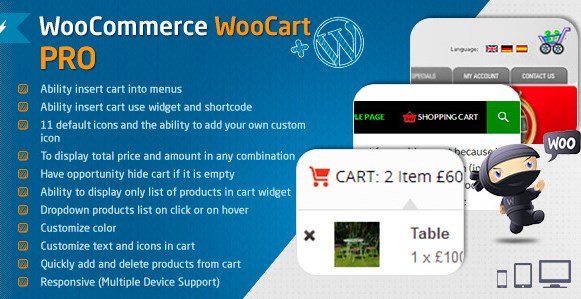
What is WooCommerce Cart – WooCart Pro?
When WordPress users need to streamline the checkout process and minimize friction for their customers, WooCommerce Cart – WooCart Pro offers a robust, customizable alternative to the default cart page. I have found that one of the biggest hurdles in e-commerce conversion is the moment a user decides to check out but is deterred by clunky navigation. This plugin solves that by transforming the cart into an interactive, accessible widget that follows the user or appears instantly on demand. It integrates deeply with WooCommerce to provide a smoother, faster shopping experience that keeps buyers focused on purchasing rather than navigating.
What Makes WooCart Pro Different
The standard WooCommerce implementation forces users to navigate away from the shop page to a separate cart page to review their items. This interruption in the browsing flow often leads to cart abandonment. WooCart Pro differentiates itself by bringing the cart to the user, rather than forcing the user to go to the cart. It offers a versatile suite of display options—including menu carts, sticky floating widgets, and popup lightboxes—that update dynamically via AJAX. This means customers can modify quantities, remove items, and view cross-sells without a single page reload, significantly lowering the cognitive load required to complete a purchase.
- Seamless AJAX updates without page reloads
- Multiple display modes (Floating, Sidebar, Popup, Menu)
- Extensive customization options for colors and icons
WooCart Pro Features for WordPress Users
Advanced Floating and Sticky Cart Widgets
One of the standout features of WooCart Pro is the ability to enable a floating (sticky) cart. As a user scrolls down a long product list or blog post, the cart remains accessible, usually fixed to a corner or the side of the screen. This constant visibility serves as a persistent reminder of the items in the cart and provides immediate access to the checkout button. I particularly appreciate the flexibility here; you can configure the position to ensure it doesn’t obstruct critical content on mobile devices, maintaining a responsive design that caters to on-the-go shoppers.
Interactive Popup and Dropdown Carts
For stores that prioritize a clean interface, the popup and dropdown cart features are invaluable. When a customer adds an item to their cart, WooCart Pro can trigger a lightbox popup displaying the product details. This provides instant visual confirmation that the action was successful. Alternatively, the dropdown cart allows users to hover or click on the cart icon to review their selected items in a menu format. These interactions are handled smoothly with JavaScript, preventing the jarring refreshes typically associated with WooCommerce. This immediate feedback loop is essential for maintaining user engagement. If you are looking to enhance your product page further, you might want to pair this with WooCommerce Extra Product Options to offer more complex product configurations.
Deep Customization and Design Control
Aesthetics are crucial for brand consistency, and WooCart Pro delivers granular control over the cart’s appearance. You can customize the color scheme for every part of the widget, from the background to the button text, ensuring it matches your Elementor Pro built theme perfectly. The plugin includes 11 default icons and allows you to upload custom icons, giving you full creative freedom. Furthermore, you can decide exactly what information is displayed—whether that’s the total price, the quantity of items, or a combination of both. This level of detail ensures the cart feels like a native part of your website rather than a tacked-on addon.
How to Install WooCart Pro
Quick Installation
- Log in to your WordPress dashboard and navigate to Plugins → Add New.
- Click “Upload Plugin” and select the WooCart Pro zip file downloaded from CodeCanyon.
- Click Install Now, then activate the plugin to start configuring your cart settings.
Who Should Use WooCart Pro?
High-Volume Retail Stores
For stores with extensive catalogs and high traffic, efficiency is key. WooCart Pro is ideal for these environments because it reduces the steps required to checkout. By allowing users to manage their cart from any page via a sticky widget or sidebar, you minimize the chances of them getting distracted or lost in the navigation. High-volume stores often suffer from cart abandonment due to checkout friction; this plugin directly addresses that pain point.
Fashion and Apparel Brands
Fashion e-commerce sites rely heavily on visuals and quick browsing cycles. Customers often add multiple items to compare or purchase in bulk. WooCart Pro’s ability to display product variations (like size and color) directly in the cart widget is a game-changer for this demographic. It allows customers to verify they have the right variations without navigating away from the discovery process, making the shopping experience feel fluid and modern.
WooCart Pro vs Alternatives
| Feature | WooCart Pro | Default WooCommerce Cart |
|---|---|---|
| Page Reloads | No (AJAX powered) | Yes (Required for updates) |
| Cart Location | Floating, Sidebar, Popup, or Menu | Separate dedicated page only |
| Customization | Full color, icon, and layout control | Limited, requires coding to modify |
| Cross-Sells | Visible in Popup Cart | Visible only on Cart Page |
WooCart Pro Pricing
WooCommerce Cart – WooCart Pro is a premium plugin available exclusively through CodeCanyon. It typically follows a standard marketplace licensing model, offering a regular license for single-end use. This includes lifetime access to the plugin features and quality checks from the Envato team. While there is no free version, the one-time fee is a justifiable investment considering the conversion optimization potential it provides compared to free alternatives that lack the depth of customization.
Pros and Cons
✅ Pros
- Eliminates page reloads for a faster, app-like experience.
- Offers four distinct cart modes (Floating, Sidebar, Popup, Menu) to suit any layout.
- Highly customizable design elements to match brand identity.
❌ Cons
- Premium only; no free tier to test before buying.
- Configuration options are vast, which might take time to set up perfectly.
- Requires a modern theme to look its absolute best (legacy themes may need CSS adjustments).
Frequently Asked Questions
Does WooCart Pro work with page builders like Elementor?
Yes, WooCart Pro is designed to be compatible with most major page builders and themes. You can insert the cart using shortcodes or widgets, making it easy to integrate into pages built with Elementor Pro.
Can I hide the cart widget when it is empty?
Absolutely. The plugin includes a setting to automatically hide the cart icon or widget if there are no items in it. This helps keep your interface clean for browsing users.
Does this plugin support mobile devices?
Yes, WooCart Pro is fully responsive. The floating and popup carts are specifically optimized to work smoothly on smaller screens, ensuring mobile shoppers have an equally efficient experience.
Will changing the quantity in the widget update the total price?
Yes, thanks to the AJAX functionality, changing the quantity or removing an item within the WooCart Pro widget will instantly calculate and update the total price without refreshing the page.
Is WooCart Pro WPML compatible?
Yes, the plugin is WPML compatible, meaning it works seamlessly on multilingual websites. You can serve translated cart experiences to your international audience.
Can I add custom icons to the cart button?
Yes, while there are 11 default icons included, the plugin allows you to upload your own custom icon images, giving you complete control over the visual style of your cart trigger.
Final Verdict
WooCommerce Cart – WooCart Pro is a powerful tool for any store owner serious about conversion rate optimization (CRO). By replacing the static cart page with a dynamic, interactive widget, it addresses one of the primary causes of lost sales: friction. It’s particularly well-suited for stores with complex products or those aiming for a modern, app-like feel on their website. If you are tired of the default WooCommerce cart limitations, this plugin is a robust solution that delivers tangible UX improvements. To ensure your site remains clean while testing various plugins, I also recommend using WP Reset to manage your plugin configurations efficiently.