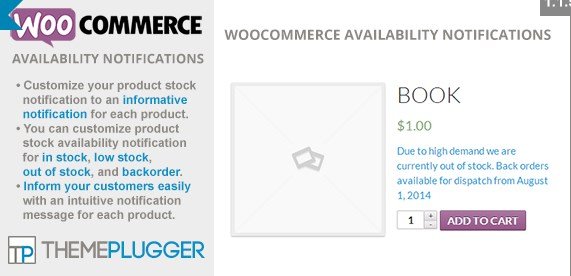
What is WooCommerce Availability Notifications?
When WordPress online store owners need to communicate stock status more effectively with customers, WooCommerce Availability Notifications offers a powerful solution. This plugin enhances your WooCommerce store by allowing you to customize stock availability notifications for different product states. With WooCommerce Availability Notifications, you can create personalized, informative messages that appear when products are in stock, low stock, out of stock, or on backorder, helping your customers make informed purchasing decisions.
What Makes WooCommerce Availability Notifications Different
While WooCommerce provides basic stock status indicators, WooCommerce Availability Notifications transforms these generic messages into valuable communication tools. The plugin stands out by offering complete customization of stock messages, styling options to match your brand, and seamless integration with variable products. This level of personalization helps reduce cart abandonment and improves overall customer experience by providing clear, informative stock status information.
- Enhanced customer experience with informative stock status messages
- Complete control over notification text and styling
- Bulk editing capabilities for efficient store management
- Full support for product variations
- WPML compatibility for multilingual stores
WooCommerce Availability Notifications Features for WordPress Users
Customized Stock Messages
The core feature of WooCommerce Availability Notifications is the ability to create custom messages for each stock status. Instead of generic “In Stock” or “Out of Stock” text, you can craft informative messages that guide your customers. For example, you might create an “In Stock” message that reads “Ready to ship within 24 hours” or an “Out of Stock” message that says “Expected to be back in stock next week.” These customized messages help manage customer expectations and reduce support inquiries.
Visual Customization Options
WooCommerce Availability Notifications goes beyond text customization by offering visual styling options. You can set custom font colors and font weights for each type of notification (in stock, low stock, out of stock, and backorder). This visual flexibility allows you to match the notifications to your brand’s color scheme and design aesthetic. For instance, you might display “In Stock” messages in green to signify availability, while “Out of Stock” messages appear in red to indicate unavailability.
Bulk and Quick Editing
For store owners with large inventories, WooCommerce Availability Notifications includes powerful bulk editing and quick editing features. These time-saving tools allow you to update availability notifications across multiple products at once, rather than editing each product individually. You can use bulk edit to change notifications for multiple products simultaneously, or quick edit to make fast changes to individual products without leaving the product list view. These features are particularly valuable when running sales, seasonal promotions, or when managing inventory across numerous products.
Product Variation Support
Variable products present unique challenges for inventory management, but WooCommerce Availability Notifications handles them seamlessly. The plugin allows you to set customized notifications for individual product variations, giving you precise control over messaging. This means that if you’re selling a t-shirt in multiple colors and sizes, you can display specific stock status for each variation. For example, you might show “In Stock” for red, medium shirts while displaying “Backorder: 2 weeks” for blue, large shirts. This level of detail helps customers make purchasing decisions even when specific variations have different availability.
Multilingual Store Support
For international merchants, WooCommerce Availability Notifications offers WPML compatibility, making it perfect for multilingual stores. This integration ensures that your custom availability notifications display correctly in all languages your store supports. When customers browse your store in their preferred language, they’ll see stock status messages that are properly translated, maintaining a consistent user experience across different language versions of your site.
How to Install WooCommerce Availability Notifications
Quick Installation
- Download the plugin zip file from your CodeCanyon account
- Go to Plugins → Add New in WordPress dashboard
- Click “Upload Plugin” and select the zip file
- Click Install Now → Activate
- Enter your purchase code when prompted
- Configure your notification settings in WooCommerce → Availability Notifications
Who Should Use WooCommerce Availability Notifications?
E-commerce Stores with Limited Stock Items
Stores that sell products with limited availability, such as handmade goods, collectibles, or seasonal items, will benefit greatly from WooCommerce Availability Notifications. These merchants can create detailed stock status messages that inform customers about restocking timelines or unique product availability patterns. By providing transparent information about stock status, these stores can maintain customer trust even during inventory shortages and encourage customers to sign up for notifications when items become available again.
Stores Selling Variable Products
Merchants with extensive catalogs of variable products (items with multiple options like size, color, or style) should use WooCommerce Availability Notifications to manage the complex inventory challenges these products present. The plugin’s ability to customize notifications for individual product variations helps reduce customer confusion and frustration. For example, a clothing retailer can show that a shirt is available in some sizes but not others, preventing customers from attempting to purchase unavailable variations.
International/Multilingual Stores
Global merchants who operate multilingual WooCommerce stores will find the WPML compatibility feature invaluable. These businesses need consistent stock messaging across all language versions of their store to maintain a professional international presence. WooCommerce Availability Notifications ensures that customers in different countries receive properly translated stock status information, which is essential for building trust with international buyers.
WooCommerce Availability Notifications vs Alternatives
| Feature | WooCommerce Availability Notifications | Default WooCommerce |
|---|---|---|
| Custom notification text | Full customization for all stock statuses | Limited to default labels |
| Visual styling options | Custom colors and font weights | Default styling only |
| Bulk editing capabilities | Bulk and quick edit features | No bulk editing for stock messages |
| Variation support | Individual variation notifications | Basic stock status per variation |
| Multilingual support | WPML compatible | Dependent on theme/other plugins |
WooCommerce Availability Notifications Pricing
WooCommerce Availability Notifications is available for purchase on CodeCanyon for a one-time fee of $19. This single-site license includes six months of support from the developer, with the option to extend support to 12 months for an additional $5.63. The plugin offers lifetime updates, ensuring that you’ll always have the latest features and compatibility with the newest versions of WooCommerce and WordPress.
Pros and Cons
✅ Pros
- Complete control over stock notification messaging
- Visual customization to match brand aesthetics
- Bulk editing features save time for large catalogs
- Full support for variable products
- WPML compatibility for international stores
- Lifetime updates included with purchase
- Simple, intuitive interface
❌ Cons
- Premium plugin with no free version
- Limited to stock notifications (doesn’t include actual alert emails)
- Support period limited to 6 months initially
- Doesn’t integrate with all inventory management systems
Frequently Asked Questions
Does WooCommerce Availability Notifications work with all WooCommerce themes?
Yes, WooCommerce Availability Notifications is designed to work with all standard-compliant WooCommerce themes. The plugin integrates directly with WooCommerce’s template system and doesn’t require any theme modifications.
Can I use HTML in my custom notification messages?
Yes, WooCommerce Availability Notifications supports basic HTML formatting in your custom messages, allowing you to add emphasis, line breaks, or links to your stock status notifications.
Will this plugin slow down my store?
No, WooCommerce Availability Notifications is optimized for performance. The plugin has minimal impact on page load times as it leverages WooCommerce’s existing template system rather than adding additional database queries.
Does this plugin send email notifications when products come back in stock?
No, WooCommerce Availability Notifications only controls the display of stock status messages on your product pages. For actual email notifications when products return to stock, you would need a dedicated WooCommerce Back in Stock Notifier plugin.
Can I customize notifications per product or per category?
WooCommerce Availability Notifications allows you to set global defaults for each stock status while also providing the flexibility to customize notifications on a per-product basis through the product edit screen.
Is there a money-back guarantee?
Yes, the plugin is sold through CodeCanyon, which offers a refund policy if the item doesn’t work as described. However, refunds are typically processed only for technical issues that the developer cannot resolve.
Final Verdict
WooCommerce Availability Notifications is a focused, efficient solution for store owners who want to improve how they communicate stock status to customers. The plugin excels at its core function—providing customizable, informative stock notifications—without unnecessary bloat or complexity. It’s particularly well-suited for stores with variable products, limited inventory items, or multilingual operations. While it lacks email notification features, it performs its specialized function admirably and represents excellent value at its price point. For merchants looking to enhance the customer experience around stock availability information, WooCommerce Availability Notifications is a solid investment that can lead to reduced cart abandonment and increased customer satisfaction.