What is uSchema?
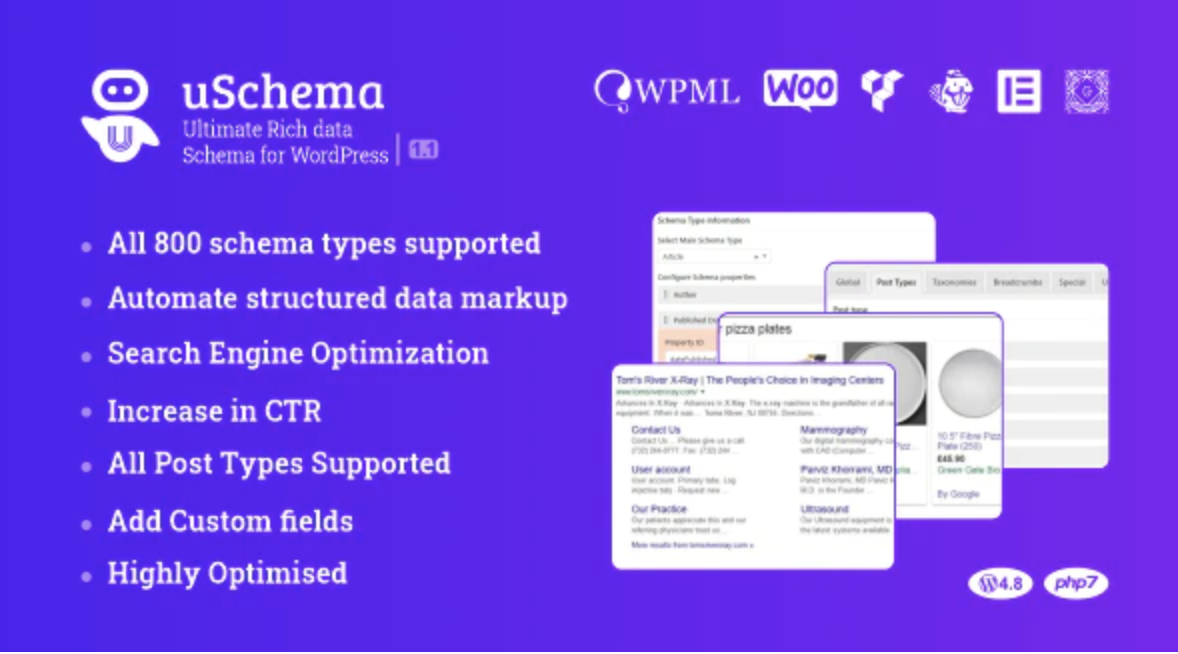
When WordPress users need to implement structured data markup without touching code, uSchema offers an automated, educational approach that transforms how you handle schema.org markup. Unlike complex developer-focused tools, this premium WordPress schema markup plugin bridges the gap between technical SEO requirements and user-friendly implementation, allowing site owners to generate JSON-LD structured data automatically across their entire content library.
What Makes uSchema Different
uSchema distinguishes itself through intelligent automation combined with comprehensive educational resources directly within your WordPress dashboard. While most schema plugins require manual configuration for each post or demand technical knowledge of structured data implementation, uSchema automates the entire process while teaching you exactly what’s happening behind the scenes.
- Automatic retroactive application to all existing posts and pages without manual editing
- Integrated schema.org and Google structured data guides built directly into the plugin interface
- True set-and-forget functionality that continues working as you publish new content
uSchema Features for WordPress Users
Automated JSON-LD Schema Implementation
The core strength of uSchema lies in its ability to automatically generate valid JSON-LD markup for your entire website. Once configured, the plugin intelligently maps your existing content fields—titles, excerpts, featured images, author information, and publication dates—to appropriate schema properties. This automation extends retroactively to your existing content archive and proactively to every new post you publish, ensuring complete Google structured data coverage without requiring manual intervention for each article.
Built-in Schema Education Center
Unlike competitors that assume you understand schema vocabulary, uSchema includes comprehensive guides for schema.org and Google structured data standards directly within the WordPress admin. This educational approach helps you understand which schema types apply to your content—whether Article, BlogPosting, Product, Review, or LocalBusiness—and why they matter for your SEO strategy. The plugin explains each configuration option in plain English, making advanced metadata accessible to non-technical users while still providing the depth developers need for custom implementations.
Comprehensive Schema Type Support
uSchema supports an extensive library of schema types crucial for modern SEO. From standard Article and BlogPosting markup for content publishers to specialized formats like Product, Recipe, Event, and Course schemas for specific industries, the plugin covers the full spectrum of structured data needs. Each schema type includes customizable fields that map to your WordPress data structure, ensuring rich snippet eligibility in Google search results. The plugin also handles complex nested schemas and relationships between entities, providing the technical depth required for advanced SEO optimization strategies.
How to Install uSchema
Quick Installation
- Purchase and download uSchema from CodeCanyon
- Navigate to Plugins → Add New in your WordPress dashboard
- Click Upload Plugin and select the downloaded ZIP file
- Click Install Now → Activate Plugin
- Navigate to uSchema settings to configure your default schema types
Who Should Use uSchema?
Content Publishers and Bloggers
Independent bloggers and content publishers benefit significantly from uSchema’s automated approach. If you manage a content-heavy website with hundreds of articles, manually adding schema markup becomes impractical. uSchema solves this by automatically applying Article or BlogPosting schema to your entire archive, ensuring your content appears with rich snippets—star ratings, publication dates, and author information—in search results. This automation saves dozens of hours while improving click-through rates from organic search.
WordPress Developers and Agencies
For developers building client websites, uSchema represents a time-efficient solution that doesn’t sacrifice quality. Rather than hand-coding JSON-LD into theme files or creating custom fields for schema data, developers can implement comprehensive structured data across entire sites in minutes. The plugin’s flexibility allows for custom post type support and advanced field mapping, making it suitable for complex WordPress implementations including e-commerce, real estate, and educational platforms requiring specialized schema markup.
uSchema vs Alternatives
| Feature | uSchema | Schema Pro |
|---|---|---|
| Pricing Model | One-time purchase ($25-30) | Annual subscription ($79/year) |
| Schema Guidance | Built-in educational guides | Basic tooltips only |
| Retroactive Application | Automatic for all existing posts | Requires manual bulk action |
| Code Dependency | Zero coding required | Minimal coding for advanced use |
uSchema Pricing
uSchema operates on a premium-only model available exclusively through CodeCanyon. The regular license typically costs between $25-30 for lifetime usage on a single website, including six months of priority support from the developers. Extended licensing options are available for agencies and developers building client sites. Unlike subscription-based alternatives like Schema Pro or premium SEO plugins with recurring annual fees, uSchema represents a cost-effective one-time investment for serious WordPress users committed to long-term structured data implementation.
Pros and Cons
✅ Pros
- One-time payment with lifetime updates and no recurring subscription fees
- Comprehensive educational resources built into the admin interface
- True automation that applies schema to existing and new content without manual configuration
- Clean JSON-LD output that doesn’t slow down page performance
- Extensive schema type coverage including specialized formats for e-commerce and local business
❌ Cons
- No free version available for testing before purchase
- Limited to CodeCanyon marketplace for updates and support
- Advanced custom schema types may require developer intervention for complex mapping
Frequently Asked Questions
What is uSchema and how does it work?
uSchema is a premium WordPress plugin that automatically adds structured data markup (schema.org) to your website using JSON-LD format. It works by mapping your existing WordPress content fields—such as post titles, content, author data, and images—to appropriate schema properties without requiring manual code insertion.
Is uSchema compatible with WooCommerce and custom post types?
Yes, uSchema fully supports WooCommerce products, custom post types, and custom taxonomies. The plugin allows you to configure different schema types for different content types, ensuring your products display with price, availability, and review markup while your blog posts use Article schema.
Do I need coding knowledge to use uSchema?
No coding knowledge is required for standard implementation. uSchema features a point-and-click interface with built-in guides explaining each schema option. However, developers can access advanced customization options for complex schema requirements or custom field mapping.
Will uSchema slow down my WordPress website?
No, uSchema generates lightweight JSON-LD code that loads asynchronously. Unlike some schema plugins that add heavy frontend scripts, uSchema outputs clean semantic markup that has minimal impact on page load times, actually helping SEO by improving your site’s structured data footprint.
How is uSchema different from Yoast SEO’s schema features?
While Yoast provides basic schema markup, uSchema offers more comprehensive automation, broader schema type support, and educational resources specifically focused on structured data. uSchema also applies markup retroactively to all existing content automatically, whereas Yoast typically only handles new posts or requires manual updates.
Can I test my structured data after installing uSchema?
Yes, after configuring uSchema, you should validate your markup using Google’s Rich Results Test tool. The plugin itself provides validation feedback in the WordPress admin, but external testing ensures Google properly recognizes your structured data for rich snippet eligibility.
Final Verdict
uSchema delivers exceptional value for WordPress users serious about structured data implementation without the technical complexity. Its unique combination of automation, educational resources, and one-time pricing makes it particularly attractive for content publishers and agencies managing multiple sites. While the lack of a free version may deter casual users, the time saved on manual schema implementation and the potential SEO benefits from rich snippets justify the investment for professional websites. If you need comprehensive schema coverage without recurring fees or coding requirements, uSchema stands as one of the most efficient solutions available in the WordPress ecosystem.