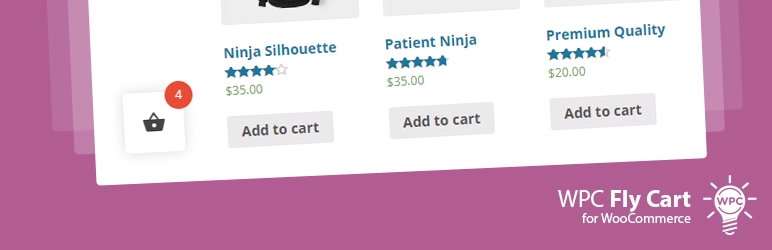
Sticky Mini Cart For WooCommerce is an Ajax-powered floating cart solution that allows customers to review, update, and manage their orders from any page without reloading. With over 270 sales on CodeCanyon, it serves as a conversion optimization tool for online store owners. This plugin provides a streamlined checkout experience for developers building high-performance e-commerce sites.
WPExclusive members get access to Sticky Mini Cart For WooCommerce as part of a full plugin and theme library — plans from $9.99/month. See the full CodeCanyon WooCommerce collection →
What Is Sticky Mini Cart For WooCommerce?
Sticky Mini Cart For WooCommerce is developed by CodeCanyon WooCommerce and is an ecommerce plugin for WordPress. It was created over six years ago and remains a staple for stores requiring a compact, persistent cart interface. It belongs to the ecommerce category on WPExclusive, alongside other tools for optimizing the buyer journey.
The plugin solves the problem of cart abandonment by keeping the order summary visible at all times. It is designed for WooCommerce store owners who want to reduce the clicks required to modify a shopping bag.
Sticky Mini Cart For WooCommerce Features
The plugin provides a highly visual cart summary with extensive controls for both design and functionality.
Visual Customization and Templates
The plugin includes 10 pre-defined templates that allow you to match the cart’s appearance to your site’s aesthetic. You can choose between six different screen positions to ensure the toggle button does not overlap with important site elements. These settings are accessed via the WordPress ecommerce plugins dashboard, where you can also configure custom colors and unique font icons.
Ajax and Animation Effects
A primary feature of the plugin is the fly image animation, which visually tracks a product as it moves into the cart. The Ajax functionality ensures that when customers add, edit, update, or delete items, the changes happen instantly without a page refresh. You can toggle between a standard loader effect or the fly image effect depending on your performance preferences.
Detailed Cart Controls
Administrators can enable or disable the display of SubTotal, Tax, Shipping, and Total prices directly within the mini cart. The plugin also supports product variation attributes, allowing customers to see specific sizes or colors they have selected. You can further increase sales by enabling cross-sell product displays within the mini cart interface itself.
Visibility and Accessibility
The shortcode generator allows you to place the cart on specific pages or within custom layouts. You can restrict the cart to only show on selected pages or product pages to keep your landing pages clean. It also includes a “click outside to close” feature, which improves the user experience on mobile devices and small screens.
Pricing
The regular license for this plugin is priced at $25 on CodeCanyon, which includes six months of support and lifetime updates. Check current pricing on the Sticky Mini Cart For WooCommerce sales page — WPExclusive members access it as part of their plan.
| Plan | Price | Sites | Includes |
|---|---|---|---|
| Regular License | $25 | 1 Site | 6 Months Support |
| WPExclusive Membership | From $9.99/month | Unlimited | Sticky Mini Cart For WooCommerce + full library |
For developers managing multiple sites, a WPExclusive membership covers Sticky Mini Cart plus hundreds of other plugins and themes — usually less than one premium license.
Sticky Mini Cart For WooCommerce – Latest Version
Sticky Mini Cart For WooCommerce receives regular updates to ensure compatibility with the latest versions of WordPress and WooCommerce. The most recent major iterations have focused on custom color configurations and fixing translation string issues. WPExclusive updates plugin files promptly after each release.
How to Install?
- Download the Sticky Mini Cart For WooCommerce .zip from your WPExclusive member account
- In WordPress: Plugins → Add New → Upload Plugin
- Select the .zip and click Install Now → Activate
- Navigate to the plugin settings to select one of the 10 pre-defined templates
- Choose the cart position and enable the Fly image animation if desired
Sticky Mini Cart For WooCommerce Use Cases
Store Owners Reducing Cart Abandonment
A shop owner can use the sticky interface to keep total prices visible as customers continue to browse. By enabling Ajax updates, customers can verify their budget without leaving the product catalog, which often leads to higher conversion rates in WordPress ecommerce plugins.
Mobile-First E-commerce Shops
Mobile users often struggle with standard cart pages due to slow loading times. Using this plugin provides a lightweight popup that summarizes the order instantly, making the checkout path much clearer on small screens.
Agencies and Developers Managing Multiple Client Sites
Agencies can deploy the 10 different templates across various client stores to provide a custom feel without manual CSS coding. Using a WPExclusive membership eliminates per-site licensing costs, allowing for a standard cart optimization toolset across all managed accounts.
Sticky Mini Cart For WooCommerce vs Alternatives
| Feature | Sticky Mini Cart | WooCommerce Menu Cart | Floating Sticky Cart |
|---|---|---|---|
| Templates | 10 Included | Theme Dependent | Basic Styles |
| Ajax Quantity Change | ✅ Yes | ❌ No | ✅ Yes |
| Cross-sell Support | ✅ Yes | ❌ No | ❌ No |
| Starting Price | $25 | Free/Premium | Premium |
| Available on WPExclusive | ✅ Yes | ❌ | ❌ |
Browse the full ecommerce plugins on WPExclusive →
Pros and Cons
✅ Strengths
- Ajax-powered updates prevent disruptive page reloads during the shopping process
- The fly image animation provides visual confirmation that an item was added
- Built-in cross-selling features within the mini cart help increase average order value
- The shortcode generator offers flexibility for placement outside of standard sidebars
⚠️ Limitations
- Some complex themes may require CSS adjustments for perfect positioning
- Highly visual animations may slightly impact performance on low-end servers
- Developer auto-updates require an active license key. WPExclusive publishes updates manually when new versions are released.
Is Sticky Mini Cart For WooCommerce GPL Licensed?
Yes. Sticky Mini Cart For WooCommerce is distributed under the GNU General Public License (GPL) — the same license that governs WordPress itself. GPL gives any user the legal right to use, study, share, and redistribute the software. This is the legal framework that makes WPExclusive’s membership model possible.
WPExclusive distributes 100% original, unmodified files — the same release the developer publishes. No injected code, no alterations, no security risks.
Get Sticky Mini Cart For WooCommerce on WPExclusive
WPExclusive membership starts at $9.99/month, $87/year, or $149 lifetime — giving you Sticky Mini Cart For WooCommerce plus every plugin and theme in the library, on unlimited sites.
Explore the full CodeCanyon WooCommerce collection → or browse all WordPress plugins →
Frequently Asked Questions
What does Sticky Mini Cart For WooCommerce do?
Sticky Mini Cart For WooCommerce adds a floating, persistent cart to your online store that updates via Ajax. It allows customers to manage their shopping bag items from any page without navigating to a separate cart URL.
Is Sticky Mini Cart For WooCommerce free?
The plugin is a premium product available on CodeCanyon for $25. Via WPExclusive, it is available as part of a membership plan starting from $9.99/month.
What is the latest version of Sticky Mini Cart For WooCommerce?
Sticky Mini Cart covers version 1.1.0 as its most recent significant update — WPExclusive members always receive the most current release.
How much does Sticky Mini Cart For WooCommerce cost?
The retail price is $25 for a single site license. Via WPExclusive, it is included in plans from $9.99/month.
Is it legal to use Sticky Mini Cart For WooCommerce via WPExclusive?
Sticky Mini Cart For WooCommerce is GPL licensed, which explicitly permits redistribution. WPExclusive provides original, unmodified files — fully within GPL terms.
What are the best alternatives to Sticky Mini Cart For WooCommerce?
Competitors include WooCommerce Menu Cart and Floating Sticky Cart, which offer similar side-cart functionalities. All are available on WPExclusive within the same membership.