What is User Registration Profile Completeness?
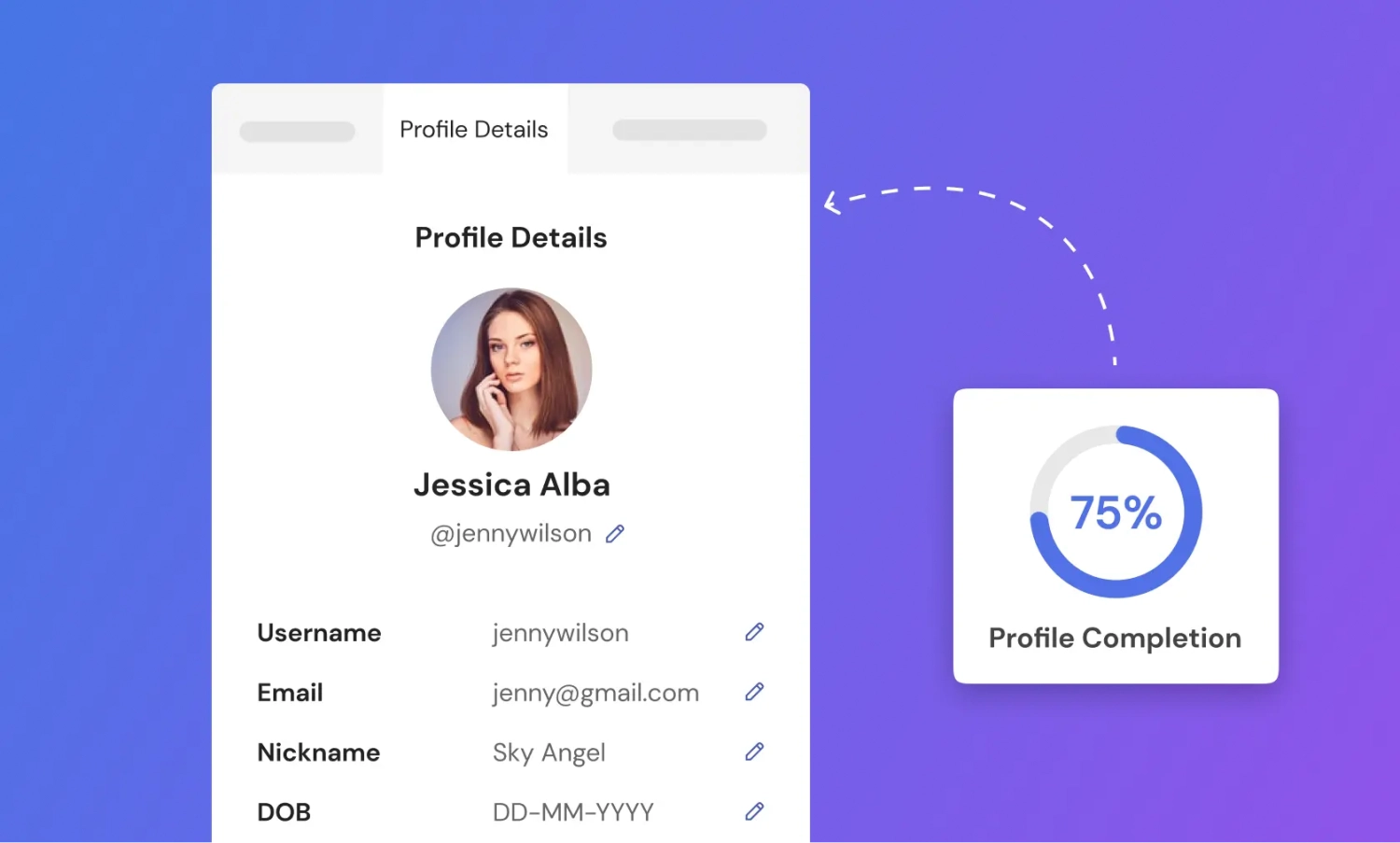
When WordPress users need to transform a static membership site into a dynamic, data-rich community, User Registration Profile Completeness offers a powerful solution through visual gamification. In my experience managing membership platforms, one of the biggest challenges is encouraging users to fill out their information after the initial signup. This specific add-on for the User Registration plugin solves this by graphically displaying a user’s profile completion status, effectively motivating them to provide missing details. By leveraging the User Registration Profile Completeness add-on, site owners can significantly increase data quality without resorting to aggressive nagging.
Whether you are running a community platform or an educational hub, understanding your users is key to personalization. This tool bridges the gap between a basic signup and a comprehensive user profile.
What Makes User Registration Profile Completeness Different
While there are many profile building plugins available, few focus specifically on the psychology of completion. Most standard registration forms capture data only at the point of entry. What makes this add-on unique is its focus on the post-registration experience. It integrates seamlessly into the User Registration ecosystem, placing a visual progress bar directly in the user’s profile edit page.
- Visual Gamification: Instead of text prompts, it uses a graphical progress bar that triggers the user’s desire to complete a task.
- Seamless Integration: It works natively with the User Registration form builder, requiring no complex shortcodes or third-party tools.
- Conditional Enforcement: You can set specific fields as mandatory for reaching 100%, ensuring you get the data that actually matters to your business.
User Registration Profile Completeness Features for WordPress Users
Visualizing User Profile Completion
The standout feature of this add-on is the ability to showcase users’ progress through intuitive visual representations. When a user logs in and navigates to their profile page, they are immediately greeted with a progress bar indicating how much of their profile is filled out. This feature taps into the Zeigarnik effect, a psychological phenomenon where people remember uncompleted or interrupted tasks better than completed ones. By visualizing the “incomplete” status, users are naturally compelled to finish what they started. This is particularly useful for membership sites where user engagement metrics are crucial.
Mandatory User Profile Fields
Not all data points are created equal. Sometimes you need a user’s bio, but their Twitter handle might be optional. This add-on allows administrators to set mandatory fields that must be filled to achieve 100% completion. You can require users to fill in all necessary information for a comprehensive profile before granting them access to specific community features. This granularity ensures that your user database remains clean and actionable, allowing for better segmentation and marketing automation later on.
Personalized Experiences and Data Quality
Complete user profiles provide valuable data that you can use to personalize recommendations, content, and tailored experiences for your users. For instance, if a user indicates their interest in “Advanced SEO” in their profile details, you can trigger specific email campaigns or show targeted content on the dashboard. This feature transforms the plugin from a simple data collection tool into a cornerstone of your site’s user experience (UX) strategy. High-quality data leads to better decision-making and more effective monetization strategies.
How to Install User Registration Profile Completeness
Quick Installation
- Ensure you have the User Registration free plugin installed and activated.
- Go to Plugins → Add New in your WordPress dashboard.
- Upload the User Registration Profile Completeness add-on zip file (available with Pro plans) OR navigate to User Registration → Add-ons if you have the premium version installed.
- Click Install Now followed by Activate.
Who Should Use User Registration Profile Completeness?
Membership Site Owners
If you are running a subscription-based site, knowing who your members are is vital. This add-on helps you gather detailed interests, demographics, and preferences. This allows you to upsell premium courses or services that are actually relevant to the user, thereby increasing your conversion rates. For those comparing membership plugins, the completeness feature offered here adds a layer of user engagement management that many competitors lack.
Online Communities and Directories
For a user directory or a community forum, a profile with just a username and email is useless. Users need to add profile pictures, bios, social links, and contact info to be effective members of the community. This add-on encourages them to fill out these details so other members can connect with them. It turns a ghost town of empty profiles into a thriving, interconnected network.
User Registration Profile Completeness vs Alternatives
When looking at alternatives like Ultimate Member or Profile Builder, those plugins often include profile completeness features within their core expensive packages. The User Registration approach is modular. You get the core registration system for free, and you add on the Profile Completeness feature only if you need it.
| Feature | User Registration Profile Completeness | Ultimate Member (Core) |
|---|---|---|
| Visual Progress Bar | Yes, customizable and graphical | Yes, basic text/percentage |
| Mandatory Field Logic | Yes, specific to completeness goal | Yes, general form validation |
| Integration Cost | Add-on (Pro plan required) | Requires Extensions/Pro License |
| Frontend Display | Profile page integration | Shortcode based placement |
User Registration Profile Completeness Pricing
The User Registration Profile Completeness add-on is a premium feature. It is not available in the free version of the plugin. To access this feature, you need to purchase one of the Pro licenses: Personal, Plus, or Professional. The pricing is tiered based on the number of sites you intend to use the plugin on and the level of support you require. All plans include this specific add-on, along with other premium features like content restriction and payment gateways. It is a cost-effective solution compared to hiring a developer to code a custom progress bar.
Pros and Cons
✅ Pros
- Increases Engagement: Gamification naturally encourages users to finish their profiles.
- Clean Data: Enforcing mandatory fields ensures you get high-quality user data.
- Easy Setup: No coding required; works out of the box with the User Registration plugin.
- Visual Appeal: The graphical representation is modern and user-friendly.
❌ Cons
- Premium Only: You must purchase a paid plan to access this specific add-on.
- Dependency: Requires the core User Registration plugin to function; cannot be used standalone.
- Limited Styling: While functional, custom CSS might be needed for very specific branding requirements.
Frequently Asked Questions
Is the Profile Completeness add-on free?
No, the Profile Completeness feature is part of the premium add-ons package. You need a valid license for the Personal, Plus, or Professional plan to activate it.
Can I customize which fields count towards the completion percentage?
Yes, you can configure the add-on to track specific fields. You can set mandatory user profile fields that the user must fill out to reach 100% completion, allowing you to prioritize the data most important to your site.
Does this work with the free version of User Registration?
You need the free User Registration plugin installed as the base, but the Profile Completeness feature itself is a premium extension that requires a Pro license key to activate.
Where does the progress bar appear?
The progress bar typically appears on the user’s frontend profile edit page. This ensures that users see their completion status immediately when they attempt to update their information.
Can I restrict content based on profile completeness?
While this add-on visualizes completeness, restricting content based on this percentage is usually handled by the core Content Restriction features found in the Pro version of the plugin. You can require users to complete their profiles before accessing specific pages.
Is it compatible with page builders like Elementor?
Yes, User Registration is compatible with popular page builders. You can display user profiles and the completeness meter within Elementor or other builders using the appropriate widgets or shortcodes provided by the plugin.
Final Verdict
User Registration Profile Completeness is a highly effective tool for any site owner serious about user data quality and engagement. It’s particularly well-suited for membership sites, online communities, and directories where a half-filled profile is a missed opportunity. By gamifying the experience, it solves the passive problem of empty profiles with an active, visual solution. If you are already using the User Registration ecosystem, this add-on is a must-have to maximize the value of your user base.