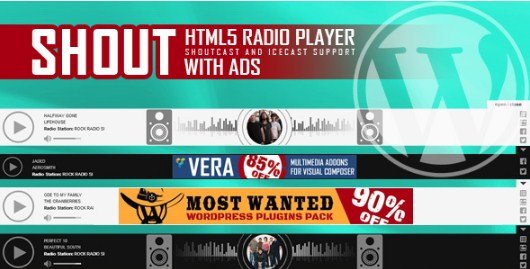
What is SHOUT – HTML5 Radio Player With Ads Plugin?
When WordPress users need to broadcast live audio streams while implementing monetization strategies through targeted advertisements, SHOUT – HTML5 Radio Player With Ads Plugin delivers a specialized solution that bridges traditional radio broadcasting with modern web technologies. Unlike generic audio players that merely play MP3 files, this dedicated WordPress radio player plugin specifically supports professional streaming protocols including Shoutcast and Icecast, making it essential for serious broadcasters requiring high-quality audio delivery and flexible revenue generation options. Whether you operate internet radio stations, host live podcasts, or manage community broadcasting services, SHOUT provides the technical infrastructure needed to deliver seamless audio experiences.
What Makes SHOUT Different
SHOUT distinguishes itself from standard WordPress audio plugins through its dedicated focus on live streaming radio protocols rather than pre-recorded content playback. While most HTML5 audio players are designed for podcasts or static music libraries, SHOUT is architected specifically for continuous streaming environments where stability and protocol compatibility determine broadcast success. The plugin eliminates the complexity typically associated with embedding radio streams by handling all technical negotiations between your WordPress site and streaming servers automatically, removing barriers that often require expensive custom development compared to alternative radio solutions.
- Native support for both Shoutcast and Icecast streaming protocols without additional configuration
- Built-in advertisement management system allowing you to display ads alongside or instead of track metadata
- Sticky player functionality that persists across page navigation, ensuring uninterrupted listening experiences
SHOUT Features for WordPress Users
Native Streaming Protocol Support
SHOUT eliminates compatibility issues through native support for both Shoutcast and Icecast protocols, ensuring your station connects regardless of server technology. The player automatically detects server types, adjusts connection parameters, and extracts current song titles and artist metadata directly from stream headers. Listeners always see accurate now-playing information without manual updates. For broadcasters using Shoutcast hosting or Icecast servers, this compatibility removes barriers that plague generic media players.
Integrated Advertisement Management
The integrated advertisement management system enables effective stream monetization by displaying banner ads, promotional messages, or sponsor graphics instead of track metadata. This dual-mode functionality lets you switch between listener information and revenue generation based on broadcasting schedules. Supporting standard image formats and links, the system works with most advertising networks. For stations relying on advertising income, this transforms the player from a utility into a revenue-generating asset that increases ad visibility through continuous listener engagement.
Responsive Mobile-First Design
SHOUT ensures your stream reaches audiences on any device through responsive design principles adapting to smartphones, tablets, and desktops without breaking layouts. Touch-friendly controls and optimized buffer management prevent mobile browsers from dropping connections when users switch applications or lock screens. Compatible with both iOS and Android, this addresses historical Flash-player mobile limitations. By ensuring consistent performance across devices, SHOUT maintains audience retention crucial for successful online radio operations competing in the professional broadcasting space.
Flexible Display Modes
Flexibility comes through both sticky and standard player configurations. The standard version embeds within page content, ideal for dedicated listening pages or blog posts. Alternatively, the sticky player attaches to viewport edges—typically browser bottoms—and persists as users navigate your WordPress site. This prevents interruptions when listeners browse content archives or explore sponsor information. The sticky mode particularly benefits community stations wanting engagement while allowing website exploration, effectively increasing time-on-site metrics while maintaining active audio streams.
How to Install SHOUT
Quick Installation
- Purchase and download the plugin files from the official CodeCanyon marketplace
- Navigate to Plugins → Add New in your WordPress dashboard
- Click Upload Plugin and select the SHOUT zip file
- Activate the plugin and navigate to the settings panel
- Enter your Shoutcast or Icecast stream URL in the configuration field
- Select your preferred display mode (sticky or standard) and save changes
Who Should Use SHOUT?
Internet Radio Stations
Internet radio stations benefit from SHOUT’s stream stability and listener retention features. The sticky player keeps audiences connected when browsing program schedules or DJ profiles, while advertisement integration helps replace traditional broadcast revenue models. Combining professional streaming protocol support with WordPress content management, stations create rich multimedia experiences including live audio, archived shows, and community interaction within unified platforms.
Live Podcasters
Live podcasters expanding into real-time broadcasting find SHOUT essential for bridging pre-recorded libraries with spontaneous streaming. The plugin allows simulcasting live recordings while maintaining existing WordPress workflows. During shows, hosts direct listeners to pages containing notes or forums without losing audio connections thanks to the persistent sticky player, creating immersive experiences differentiating professional operations from amateur setups.
Community Broadcasters
Religious and educational institutions utilize SHOUT to extend reach beyond traditional broadcast boundaries. Volunteer-friendly configuration requiring minimal maintenance makes it attractive for non-commercial operations. Displaying inspirational messages or donation appeals within the player interface helps achieve communication goals without complex technical overhead, allowing organizations to leverage existing website infrastructure while adding professional-grade streaming capabilities.
SHOUT vs Alternatives
| Feature | SHOUT | Generic HTML5 Players |
|---|---|---|
| Protocol Support | Native Shoutcast/Icecast | Limited/Requires custom code |
| Ad Management | Built-in advertisement system | Requires separate plugins |
| Mobile Optimization | Fully responsive with sticky option | Often desktop-focused |
| Pricing Model | One-time premium purchase | Mixed free/premium |
SHOUT Pricing
SHOUT operates on a premium CodeCanyon licensing model providing immediate access to all features—including Shoutcast and Icecast support, advertisement management, and both player versions—upon purchase. The one-time fee, typically $20-30, includes lifetime updates and six months of support. Extended support packages are available for long-term assistance. This eliminates recurring subscription costs while ensuring a fully functional broadcasting solution without the limitations of freemium alternatives.
Pros and Cons
✅ Pros
- Native support for industry-standard Shoutcast and Icecast streaming protocols ensures broad compatibility
- Built-in advertisement management enables immediate monetization without additional plugins
- Responsive sticky player maintains listener engagement across site navigation and mobile devices
- Streamlined configuration requiring only the radio stream URL to begin broadcasting
❌ Cons
- Premium-only pricing with no free trial version available for testing
- Requires separate hosting for the streaming server (player-only, not a broadcaster)
- Limited customization options for advanced users seeking deep CSS modifications
Frequently Asked Questions
Does SHOUT support both Shoutcast v2 and Icecast streaming protocols?
Yes, SHOUT provides native support for both Shoutcast (including version 2) and Icecast streaming protocols. The plugin automatically detects your server type and configures the connection parameters accordingly, ensuring compatibility regardless of which broadcasting software your station employs.
Can I monetize my radio stream using the built-in advertisement features?
Absolutely. SHOUT includes a dedicated advertisement management system that allows you to display banner ads, promotional images, or sponsor messages within the player interface. You can toggle between showing current song metadata or advertisements based on your scheduling needs.
Is SHOUT compatible with mobile devices and responsive themes?
Yes, SHOUT is fully responsive and optimized for mobile devices including iOS and Android smartphones and tablets. The player automatically adjusts its layout to fit different screen sizes and maintains stable streaming performance across all modern mobile browsers.
What is the difference between sticky and standard player versions?
The standard player embeds within your page content at a specific location, while the sticky player remains fixed to the browser viewport (typically the bottom or top) as users scroll or navigate between pages. The sticky version ensures continuous playback during site browsing.
Do I need technical knowledge to configure the streaming server settings?
No extensive technical knowledge is required. SHOUT features an easy configuration process that only requires your radio stream URL to begin working. The plugin handles all protocol negotiations and metadata parsing automatically.
Where can I purchase and download the SHOUT radio player plugin?
SHOUT is available exclusively through the CodeCanyon marketplace. You can purchase and download the plugin directly from the official SHOUT sales page on CodeCanyon, which provides immediate access to files and licensing upon completion of your purchase.
Final Verdict
SHOUT – HTML5 Radio Player With Ads Plugin stands as a specialized solution filling a crucial niche in the WordPress ecosystem for live radio broadcasters. Its combination of native Shoutcast and Icecast support, integrated monetization features, and mobile-responsive sticky player functionality addresses the core needs of internet radio stations better than generic audio plugins among WordPress broadcasting solutions. While the premium-only pricing and requirement for separate streaming hosting may deter casual users, serious broadcasters will appreciate the professional-grade stability and advertisement management capabilities that transform websites into profitable broadcasting platforms.