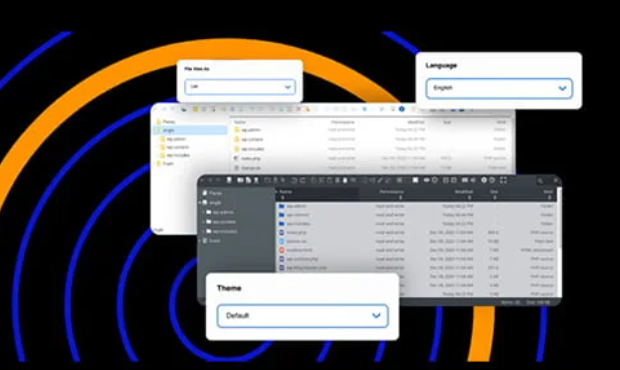
Secure File Manager Pro is a developer tool suite that allows users to edit, upload, download, and manage WordPress files directly from the dashboard without needing FTP or cPanel. With over 2 million downloads and a 5-star rating, it provides a secure environment for site file operations. The plugin replaces traditional file transfer methods with a streamlined internal interface.
WPExclusive members get access to File Manager as part of a full plugin and theme library — plans from $9.99/month. See the full Premium Plugins collection →
What Is Secure File Manager Pro?
Secure File Manager Pro is developed by Premium Plugins and is an administration plugin for WordPress. It has powered over 1 million websites, providing an alternative to sFTP and hosting control panels for file manipulation. It belongs to the administration category on WPExclusive, alongside other tools for site management.
This plugin solves the inconvenience of leaving the WordPress dashboard to fix code errors or move assets. It is designed for developers who need quick access to the file system and database without the latency of external clients.
Secure File Manager Pro Features
The feature set is built around providing a complete IDE-like experience within the WordPress administrative area.
Advanced File and Folder Operations
File Manager allows for standard operations including edit, delete, upload, download, copy, and paste for both files and directories. Users can adjust file upload size limits and hide specific files or folders from the interface. It includes a built-in code editor with a full-screen view and multiple UI themes for a customized development environment.
Access Control and Security
The plugin includes the ability to adjust permissions based on specific users or user roles. Administrators can limit operations, ensuring that only authorized personnel can delete or edit sensitive core files. It also sends email notifications for file changes, such as edits or uploads, to maintain a clear audit trail of site activity.
Database and Cloud Integration
Beyond file management, the plugin features a built-in database manager for direct SQL interactions. Documentation indicates support for cloud integrations including Google Drive, Slack, GitHub, and Dropbox. These extensions allow for a unified workflow across different storage providers and version control systems.
Pricing
Check current pricing on the File Manager sales page — WPExclusive members access it as part of their plan.
| Plan | Price | Sites | Includes |
|---|---|---|---|
| Basic | $39 USD | 1 Site | Database Manager + Core Features |
| Developer | $199 USD | 10 Sites | Database Manager + Core Features |
| Premium | $399 USD | 25 Sites | All Addons (Cloud Integrations) |
| WPExclusive Membership | From $9.99/month | Unlimited | File Manager + full library |
For developers managing multiple sites, a WPExclusive membership covers File Manager plus hundreds of other plugins and themes — usually less than one premium license.
Latest Version
The plugin receives regular updates to maintain compatibility with the latest WordPress versions and security standards. WPExclusive updates plugin files promptly after each release to ensure members have the most stable version available.
How to Install
- Download the File Manager .zip from your WPExclusive member account
- In WordPress: Plugins → Add New → Upload Plugin
- Select the .zip and click Install Now → Activate
- Navigate to the “WP File Manager” tab in your sidebar to begin configuration
- Configure user role permissions to restrict who can access the file system
Use Cases
Resolving Critical Errors and White Screens
When a plugin or theme conflict causes a site error, File Manager allows you to rename folders or edit code directly to restore site performance without needing to hunt for FTP credentials. This is essential for rapid troubleshooting during active development.
Bulk Asset Management and Backups
Users can upload zip files and extract them directly on the server, which is significantly faster than uploading files individually via standard WordPress media tools. This makes it a preferred choice for managing large galleries or moving specific directories between installs.
Agencies and Developers Managing Multiple Client Sites
Agencies can use File Manager to provide clients with private folders for file swapping without creating separate FTP accounts for every user. Managing this through WPExclusive allows agencies to deploy these tools across their entire client portfolio at a fixed cost.
Pros and Cons
✅ Strengths
- All-in-one replacement for FTP, sFTP, and cPanel access
- Robust user role permissions for multi-user environments
- Built-in syntax checker and code editor with theme support
- Integrated database manager for SQL operations
⚠️ Limitations
- Direct file system access poses a security risk if user permissions are not configured correctly
- Heavier server load during large file operations compared to native server-side FTP
- Developer auto-updates require an active license key. WPExclusive publishes updates manually when new versions are released.
Is Secure File Manager Pro GPL Licensed?
Yes. Secure File Manager Pro is distributed under the GNU General Public License (GPL) — the same license that governs WordPress itself. GPL gives any user the legal right to use, study, share, and redistribute the software. This is the legal framework that makes WPExclusive’s membership model possible.
WPExclusive distributes 100% original, unmodified files — the same release the developer publishes. No injected code, no alterations, no security risks.
Get Secure File Manager Pro on WPExclusive
WPExclusive membership starts at $9.99/month, $87/year, or $149 lifetime — giving you Secure File Manager Pro plus every plugin and theme in the library, on unlimited sites.
Explore the full Premium Plugins collection → or browse all WordPress plugins →
Frequently Asked Questions
What does Secure File Manager Pro do?
Secure File Manager Pro is an administration plugin used to manage files, folders, and databases from the WordPress dashboard. It eliminates the need for separate FTP or cPanel logins for file editing and maintenance.
Is Secure File Manager Pro free?
While a basic version exists on WordPress.org, the Pro version includes advanced features like user role permissions and database management. You can access it via WPExclusive for $9.99/month.
What is the latest version of Secure File Manager Pro?
The plugin is actively maintained — WPExclusive members always receive the most current release as soon as it is available in our library.
How much does Secure File Manager Pro cost?
Premium plans range from $39 for a single site to $399 for up to 25 sites. Via WPExclusive, it is included in plans from $9.99/month.
Is it legal to use Secure File Manager Pro via WPExclusive?
The plugin is GPL licensed, which explicitly permits redistribution. WPExclusive provides original, unmodified files — fully within GPL terms.
Does File Manager support cloud storage?
The plugin supports extensions for Google Drive, Dropbox, Slack, and GitHub. These allow you to integrate your favorite cloud apps directly into your WordPress file management workflow.