What is Progress Map WordPress Plugin?
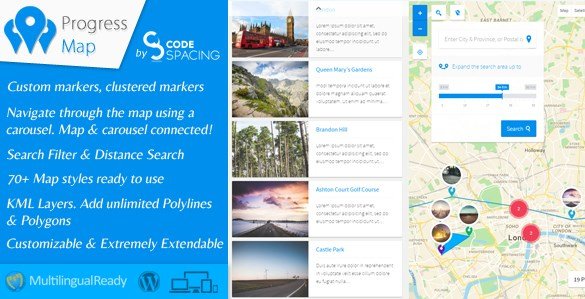
When WordPress users need to display location-based listings with intuitive navigation, Progress Map WordPress Plugin offers a unique dual-interface approach combining Google Maps with a synchronized carousel. This premium WordPress plugin transforms standard posts into interactive map markers, allowing visitors to explore real estate properties, hotel listings, restaurants, or store locations through an engaging visual interface that connects map markers directly to content cards.
What Makes Progress Map Different
Unlike standard map plugins that simply embed Google Maps, Progress Map creates a bidirectional relationship between your content and geography. The plugin publishes locations simultaneously as Google Map markers and carousel items, creating an intuitive browsing experience where selecting a carousel item automatically centers the map on that location, and clicking a map marker highlights the corresponding carousel entry.
- Seamless synchronization between map markers and content carousel
- Native integration with Custom Post Types without coding requirements
- Advanced geolocation search with radius drawing capabilities
- Support for multiple locations per single post
Progress Map Features for WordPress Users
Advanced Map Customization & Visual Styling
Progress Map provides complete control over your map aesthetics through an intuitive settings panel. The plugin includes over 70 pre-designed map styles ranging from minimalist monochrome to vibrant terrain views, or you can implement custom JavaScript style arrays for brand-specific appearance. You can upload custom marker icons and cluster graphics with full retina display support, ensuring crisp visuals on high-density screens. The interface allows precise control over Google Maps UI elements, zoom controls styling, and initial map view settings including satellite, terrain, or hybrid modes.
For sites managing extensive location databases, the clustered markers feature automatically groups nearby locations at wider zoom levels, improving performance and user experience when displaying hundreds of properties or business listings simultaneously.
Dynamic Carousel Integration & Layout Flexibility
The integrated carousel system sets Progress Map apart from conventional directory plugins. This responsive slider displays your location-based content adjacent to the interactive map with flexible positioning options—place the carousel above, beneath, or to either side of the map container. Each carousel item is fully customizable with resizable thumbnails, excerpt lengths, and custom styling options to match your theme aesthetics.
The bidirectional synchronization means users can browse through listings in the carousel while watching the map automatically pan and zoom to selected locations, or they can explore the map geographically and see the corresponding carousel items highlight instantly.
Powerful Location Search & Geolocation Features
Progress Map includes a sophisticated search system allowing visitors to find locations within specified distances from their desired address or current location. The search form supports unlimited distance presets with both kilometer and mile units, accompanied by an optional visual circle drawn around the search radius. The geolocation feature can automatically detect visitor positioning, centering the map on their current location for immediate nearby results.
The plugin accommodates complex listing scenarios through support for multiple locations within a single post—ideal for businesses with multiple branches, hotel chains, or real estate agencies listing properties with various amenities locations.
How to Install Progress Map WordPress Plugin
Quick Installation Guide
- Purchase and download the plugin files from CodeCanyon
- Navigate to Plugins → Add New in your WordPress dashboard
- Click “Upload Plugin” and select the downloaded ZIP file
- Activate the plugin through the Plugins menu
- Access Progress Map settings to configure your default map center and connect your preferred Post Types
After activation, you will find a new coordinates metabox when creating or editing posts, allowing you to input latitude and longitude data or select locations directly from an interactive map interface.
Who Should Use Progress Map WordPress Plugin?
Real Estate Professionals & Property Portals
For real estate websites and property listing directories, Progress Map provides the geographic visualization necessary for modern house hunting. Agents can display property locations with custom markers indicating different listing types (sale, rent, commercial), while potential buyers can filter by neighborhood proximity using the radius search. The carousel format allows showcasing property images and key details alongside the map view, creating an immersive browsing experience that reduces bounce rates. If you are building a comprehensive real estate platform, consider pairing this with specialized real estate themes for optimal functionality.
Hospitality & Tourism Businesses
Hotel chains, bed and breakfast directories, and tourism boards benefit from the plugin’s ability to display multiple locations per establishment—showing main buildings, restaurants, pools, or nearby attractions simultaneously. The geolocation feature helps travelers find accommodations near their current position, while the custom map styling can reflect the aesthetic of your destination brand. Restaurant directories can utilize the clustered markers feature to display dining options in dense urban areas without overwhelming the interface.
Retail Chains & Service Directories
Multi-location retailers, franchise operations, and service-based businesses like clinics or repair shops can leverage Progress Map as a sophisticated store locator. The plugin’s compatibility with Custom Post Types means you can create dedicated location post types separate from your blog content, while the search functionality helps customers find the nearest branch within their preferred travel distance. For businesses comparing directory solutions, exploring comprehensive directory plugin options can help ensure Progress Map meets your specific workflow requirements.
Progress Map vs Alternatives
| Feature | Progress Map | Standard Map Plugins |
|---|---|---|
| Map-Carousel Synchronization | Native bidirectional integration | Requires custom development |
| Custom Post Type Support | Unlimited CPTs without coding | Often limited to specific post types |
| Radius Search Visualization | Built-in circle drawing | Basic proximity filtering only |
| Map Styling Options | 70+ presets plus custom JS arrays | Limited to standard Google styles |
Progress Map Pricing
Progress Map WordPress Plugin is available as a premium CodeCanyon purchase, typically priced between $39-59 for a regular license covering single website usage. Extended licenses are available for multi-site or commercial redistribution projects. Pricing includes lifetime access to updates, though standard Envato support terms apply for technical assistance. The plugin requires valid Google Maps Platform API keys, which incur separate usage-based costs depending on your map load volume.
Pros and Cons
✅ Pros
- Intuitive visual interface connecting maps with content carousels
- Comprehensive customization options without requiring code knowledge
- Robust performance optimization with marker clustering for large datasets
- Advanced geolocation and radius search capabilities
- Seamless Custom Post Type integration supporting unlimited content types
❌ Cons
- Premium pricing may exceed budget options for simple single-location displays
- Requires ongoing Google Maps API costs for high-traffic sites
- Learning curve for utilizing all advanced customization features
Frequently Asked Questions
Can Progress Map work with my existing Custom Post Types?
Yes, Progress Map supports unlimited Custom Post Types. Simply select your desired CPTs from the plugin settings page, and the coordinates metabox will appear when editing those content types.
Does Progress Map require Google Maps API keys?
Yes, you need valid Google Maps Platform API keys with billing enabled. The plugin uses the JavaScript Maps API, and you should monitor usage to stay within Google’s free tier limits.
Is Progress Map mobile responsive?
Absolutely. The plugin is fully responsive and mobile-friendly, with touch-optimized carousel navigation and map controls that adapt to smaller screens.
Can I display multiple maps on the same page?
Yes, Progress Map supports displaying multiple map instances simultaneously, allowing you to showcase different location categories or regions on a single page.
How does the radius search feature work?
The search form allows visitors to enter an address or use their current location, select a distance radius (in kilometers or miles), and optionally display a visual circle on the map showing the search boundaries. The carousel automatically filters to show only locations within that radius.
Can I add multiple locations to a single post?
Yes, the plugin supports adding unlimited coordinates to individual posts, making it ideal for businesses with multiple branches, events with various venues, or properties with separate amenities locations.
Final Verdict
Progress Map WordPress Plugin delivers exceptional value for businesses requiring sophisticated location visualization beyond basic map embeds. The synchronized carousel interface creates an engaging user experience that encourages exploration and increases time-on-site metrics. While the premium pricing and API requirements represent ongoing investments, the plugin’s robust feature set—including Custom Post Type flexibility, advanced search capabilities, and extensive styling options—justifies the cost for professional directory sites, real estate platforms, and multi-location businesses. For organizations seeking to differentiate their location-based content through interactive visual storytelling, Progress Map stands as a technically sound solution that balances powerful functionality with manageable configuration complexity.


.png "Download WooCommerce Bundled Products")