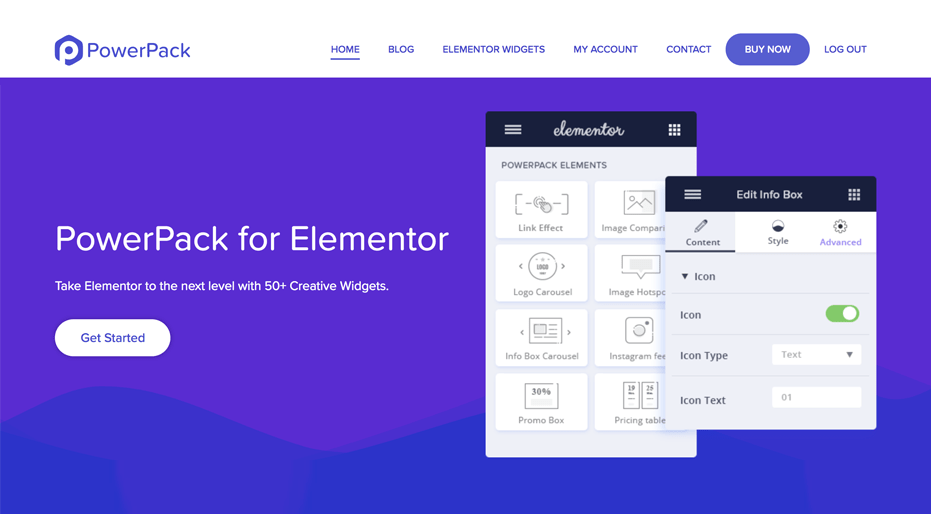
PowerPack Pro for Elementor is a performance-optimized extension that adds over 70 creative widgets and 150 professionally designed section blocks to the Elementor page builder. With more than 2.6 million downloads, it provides a comprehensive toolkit to replace multiple individual addons and reduce site bloat. It allows designers to build high-performing websites without writing a single line of code.
WPExclusive members get access to PowerPack Pro as part of a full plugin and theme library — plans from $9.99/month. See the full Elementor collection →
What Is PowerPack Pro for Elementor?
PowerPack Pro for Elementor is developed by the experts behind the top-rated Beaver Builder addons and serves as an enhancement suite for WordPress sites using Elementor. It belongs to the builder category on WPExclusive, alongside other tools for professional web designers and developers. This expansion pack focuses on consolidating features like form styling, SEO schema, and eCommerce layouts into a single codebase.
The plugin resolves the issue of installing dozens of micro-plugins that slow down site performance. PowerPack Pro is intended for agencies and freelancers who need a predictable, lightweight set of tools to handle complex design requirements across various client projects.
PowerPack Pro for Elementor Features
The feature set is built around high-efficiency code and visual design flexibility, focusing on reducing HTTP requests while expanding creative possibilities.
Advanced Design and Content Widgets
The plugin includes over 70 widgets such as Image Hotspots, Dual Headings, Info Tables, and Interactive Flip Boxes. These elements are highly customizable through the Elementor Pro interface. It also features a unique Cross-Domain Copy Paste tool, allowing users to move sections between different websites instantly to save development time. Creative effects like particle backgrounds and twinkling stars are available for visually immersive site headers.
Specialized SEO and Schema Widgets
PowerPack Pro was one of the first extensions to introduce search engine oriented tools within a page builder. It leverages structured data through dedicated widgets for FAQs, How-to guides, and Table of Contents, all of which automatically inject proper Schema markup. This helps improve search engine visibility and click-through rates by making content more readable for crawlers and eligible for rich snippets.
Dynamic Conditions and White Labeling
For advanced logic, PowerPack Pro includes a display conditions engine that controls the visibility of sections or widgets based on user roles, browser, date ranges, or login status. Agencies can utilize the extensive White Label Branding feature to rename the plugin and replace the developer’s logo with their own. This maintains brand consistency throughout the client-facing WordPress dashboard, making it an essential tool for white-label site builds.
Pricing
Check current pricing on the PowerPack Pro sales page — WPExclusive members access it as part of their plan.
| Plan | Price | Sites | Includes |
|---|---|---|---|
| Standard | $49/year | 1 Site | Access to all widgets |
| Lifetime | $249 | Unlimited | Lifetime updates and support |
| WPExclusive Membership | From $9.99/month | Unlimited | PowerPack Pro + full library |
For developers managing multiple sites, a WPExclusive membership covers PowerPack Pro plus hundreds of other plugins and themes — usually less than one premium license.
Latest Version
The plugin receives regular updates to ensure compatibility with the latest WordPress and Elementor cores. WPExclusive updates plugin files promptly after each release, ensuring members always have access to the newest widgets and performance patches.
How to Install
- Download the PowerPack Pro .zip from your WPExclusive member account
- In WordPress: Plugins → Add New → Upload Plugin
- Select the .zip and click Install Now → Activate
- Navigate to the PowerPack settings in the WordPress dashboard to enable or disable specific widgets to optimize performance.
Use Cases
Custom eCommerce Store Layouts
Site owners can use specialized WooCommerce widgets to style product grids and checkout pages that diverge from standard theme limitations, ideal for the ecommerce category.
Membership Site Login and Registration
PowerPack Pro enables the creation of custom-branded login and signup forms with integrated social login features for Facebook and Google, improving the user experience for community-based sites.
Agencies and Developers Managing Multiple Client Sites
The White Label feature and Template Library allow professional teams to deploy high-quality designs quickly while maintaining their own corporate identity on the backend. WPExclusive provides a cost-effective way to scale this efficiency across unlimited client domains.
vs Alternatives
| Feature | PowerPack Pro | Elementor Pro |
|---|---|---|
| Total Content Widgets | 70+ | 50+ |
| Cross-Domain Copy Paste | ✅ Yes | ❌ No |
| White Labeling | ✅ Yes | ❌ No |
| Starting Price | $49 | $59 |
| Available on WPExclusive | ✅ Yes | ✅ Yes |
Browse the full builder plugins on WPExclusive →
Pros and Cons
✅ Strengths
- Consolidates dozens of features like Form Stylers and WooCommerce widgets into one plugin to minimize bloat.
- Excellent SEO integration with pre-built Schema widgets for FAQ and How-to sections.
- Magic Wand tool allows instant copying of complex sections across different domains.
⚠️ Limitations
- Some advanced features like the Woo Mini Cart are exclusive to the Pro version.
- Requires Elementor to be installed actively as the base page builder.
- Developer auto-updates require an active license key. WPExclusive publishes updates manually when new versions are released.
Is PowerPack Pro for Elementor GPL Licensed?
Yes. PowerPack Pro for Elementor is distributed under the GNU General Public License (GPL), the same license that governs WordPress itself. GPL gives any user the legal right to use, study, share, and redistribute the software. This is the legal framework that makes WPExclusive’s membership model possible.
WPExclusive distributes 100% original, unmodified files from the same release the developer publishes. No injected code, no alterations, and no security risks are present in our downloads.
Get PowerPack Pro for Elementor on WPExclusive
WPExclusive membership starts at $9.99/month, $87/year, or $149 lifetime — giving you PowerPack Pro for Elementor plus every plugin and theme in the library, on unlimited sites.
Explore the full Elementor collection → or browse all WordPress plugins →
Frequently Asked Questions
What does PowerPack Pro for Elementor do?
PowerPack Pro for Elementor is a WordPress extension providing 70+ performance-optimized widgets and 150+ templates for the Elementor page builder. PowerPack Pro adds creative elements, SEO widgets, and eCommerce stylers to standard site designs.
Is PowerPack Pro for Elementor free?
A limited Lite version exists on the WordPress repository, but the Pro features require a premium subscription. WPExclusive members can access the full Pro version for a flat monthly fee.
What is the latest version of PowerPack Pro for Elementor?
The plugin is actively maintained — WPExclusive members always receive the most current release after it is officially published by the developers.
How much does PowerPack Pro for Elementor cost?
Retail plans start at $49 per year for a single site. Via WPExclusive, it is included in plans from $9.99/month, covering unlimited sites and the full WPExclusive library.
Is it legal to use PowerPack Pro for Elementor via WPExclusive?
The plugin is GPL licensed, which explicitly permits redistribution. WPExclusive provides original, unmodified files, operating fully within GPL legal terms.
What are the best alternatives to PowerPack Pro for Elementor?
Primary alternatives include Elementor Pro and Beaver Builder Professional. All are available on WPExclusive within the same membership, providing different approaches to visual site building.