What is Save & Share Cart for WooCommerce?
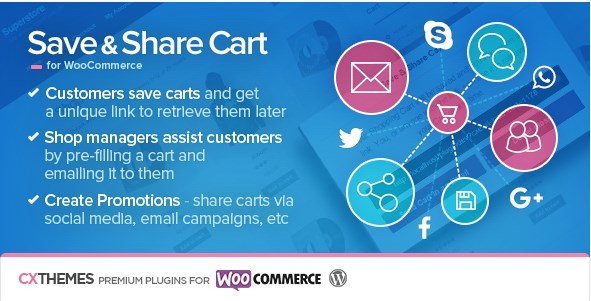
When WordPress users need to reduce cart abandonment and enable collaborative shopping experiences, Save & Share Cart for WooCommerce offers a powerful solution that transforms how customers interact with your store. Unlike native WooCommerce functionality that loses cart data when sessions expire, this plugin enables anyone using your store to save their carts—whether containing simple products, variation products, or add-on products—and receive a unique link to retrieve that cart later. This persistent cart system solves one of e-commerce’s biggest friction points: customers filling carts only to lose their work due to browser crashes, device switching, or interrupted sessions.
For store owners looking to optimize their WooCommerce conversion funnel, this plugin creates opportunities for B2B procurement, gift registries, and customer service interventions that directly impact revenue.
What Makes Save & Share Cart for WooCommerce Different
While standard wishlist plugins only save individual items, Save & Share Cart for WooCommerce preserves the entire cart state including quantities, variations, and configurations. The plugin generates styled email templates featuring product images, quantities, totals, and prominent retrieval buttons—turning casual browsing into actionable sales opportunities. According to Baymard Institute research, the average cart abandonment rate sits at nearly 70%, making persistent cart solutions essential for serious e-commerce operators.
- Server-side cart storage that survives browser cache clearing and device switching
- One-click email sharing with professionally formatted product summaries
- Administrative tools allowing shop managers to pre-fill carts for customer assistance
- Universal compatibility with all WooCommerce product types including complex variations
Save & Share Cart for WooCommerce Features for WordPress Users
Persistent Cart Storage and Retrieval
The foundation of this plugin lies in its ability to create permanent cart snapshots. Customers can fill their cart during a morning commute, save it with a single click, and retrieve it days later on their desktop without losing a single selection. This functionality proves particularly valuable for B2B customers managing complex procurement orders or shoppers researching expensive purchases across multiple sessions. The unique retrieval links work indefinitely, ensuring customers never lose their carefully curated selections due to technical limitations.
Advanced Email Sharing Capabilities
Beyond simple link generation, the plugin includes sophisticated email distribution features. When customers choose to share via email, recipients receive beautifully formatted messages displaying product thumbnails, exact quantities, line-item totals, and a prominent call-to-action button. This transforms the plugin into a powerful tool for wishlists, gift registries, and team purchasing scenarios where one person selects items and another completes payment. The email templates are fully responsive, ensuring perfect display across mobile devices and desktop clients.
Administrative Cart Pre-fill Tools
Perhaps the most underrated feature is the administrative interface that allows shop managers to create and share carts proactively. During phone support, live chat, or social media conversations, staff can pre-fill carts with recommended products, apply the correct variations, and send the complete cart directly to the customer. This reduces friction in the sales process and eliminates the back-and-forth typically required when guiding customers through complex product configurations. Store owners can also create promotional bundles by pre-filling carts with complementary products and sharing the links in marketing campaigns.
How to Install Save & Share Cart for WooCommerce
Quick Installation
As a premium solution available through Envato Market, installation differs slightly from standard WordPress.org plugins. Follow WordPress plugin best practices when uploading:
- Purchase the plugin from CodeCanyon and download the ZIP file
- Navigate to Plugins → Add New → Upload Plugin in your WordPress dashboard
- Select the downloaded ZIP file and click Install Now
- Activate the plugin and enter your purchase code for automatic updates
- Configure display settings under WooCommerce → Settings → Save & Share Cart
- Customize email templates and button placements to match your brand
Who Should Use Save & Share Cart for WooCommerce?
B2B and Wholesale Operations
Business-to-business stores benefit immensely from persistent cart functionality. Procurement officers often compile large orders requiring managerial approval before purchase. Rather than abandoning the cart during the approval process, they can save the cart and send the link to decision-makers who review the selection and complete payment. This workflow reduces sales cycle friction and prevents the technical limitations of session timeouts from interrupting high-value transactions. For wholesalers using product addons and complex variations, the ability to save intricate configurations proves invaluable.
Gift Registries and Group Gifting
Customers creating wedding registries, baby showers, or office gift collections can utilize this plugin as a sophisticated wishlist system. Unlike traditional wishlists that only display individual items, saved carts preserve exact quantities and product combinations. Friends and family receive styled emails showing exactly what the recipient wants, complete with images and pricing, and can choose to purchase the entire cart or specific items. This social shopping capability increases average order values while improving customer satisfaction through seamless gift-giving experiences.
Save & Share Cart for WooCommerce vs Alternatives
| Feature | Save & Share Cart for WooCommerce | Standard Wishlist Plugins |
|---|---|---|
| Cart Persistence | Full cart state with quantities and variations | Individual items only, no quantity preservation |
| Email Templates | Rich HTML emails with product images and CTAs | Basic text links or no email capability |
| Admin Pre-fill | Yes, shop managers can create and share carts | No, customer-initiated only |
| Product Type Support | All types including bundles and subscriptions | Often limited to simple products |
Save & Share Cart for WooCommerce Pricing
The plugin operates on a one-time payment model through the Envato Marketplace. The regular license, suitable for single-site deployments, typically starts around $39 and includes lifetime updates and six months of support. Extended licenses for multi-site or commercial applications are available at higher price points. Unlike subscription-based SaaS solutions, this one-time investment makes financial sense for established stores processing significant transaction volumes. Purchase the plugin here to begin reducing cart abandonment immediately.
Pros and Cons
✅ Pros
- Completely eliminates cart loss from session timeouts or browser issues
- Increases conversion rates by enabling collaborative purchasing decisions
- Seamless integration with product variations, addons, and custom fields
- Reduces customer service workload through self-service cart recovery
- Mobile-responsive sharing links work perfectly across all devices
- Administrative tools empower proactive sales assistance
❌ Cons
- Premium pricing structure may exceed micro-business budgets
- Requires manual installation and license management outside WordPress.org
- Email template customization requires basic HTML/CSS knowledge
- No built-in abandoned cart email sequence automation
- Limited analytics regarding shared cart conversion rates without additional tracking setup
Frequently Asked Questions
How does Save & Share Cart for WooCommerce handle product stock changes?
When customers retrieve a saved cart, the plugin checks current inventory levels and pricing. If items went out of stock or prices changed since saving, the cart updates to reflect real-time availability. Customers see clear notifications about unavailable items, preventing frustration from attempting to purchase discontinued products.
Can customers modify a cart after saving it?
Yes, saved carts serve as starting points rather than locked configurations. Once retrieved, customers can add or remove items, change quantities, or apply coupon codes normally. The plugin simply provides the foundation of their previous selections while maintaining full cart flexibility.
Is the cart sharing feature secure?
Each saved cart generates a unique, encrypted link using complex encoding that prevents unauthorized guessing. While designed for sharing, these links only expose product selections and quantities—not personal customer data, payment information, or account details. For sensitive B2B applications, consider implementing additional access controls at the server level.
Does this work with WooCommerce subscription products?
The plugin supports most WooCommerce product types including simple, variable, and addon products. For WooCommerce Subscriptions specifically, compatibility depends on your subscription plugin version, but the developers maintain updates for seamless integration with major subscription extensions. Always test subscription products in your staging environment before deployment.
Can I track which saved carts convert to sales?
The plugin logs cart retrieval events in your WordPress database, allowing you to cross-reference these with completed orders. For advanced tracking, append UTM parameters to shared links before distribution, then monitor conversion paths through Google Analytics. This data proves invaluable for measuring the ROI of customer service interventions and marketing campaigns.
What happens if a customer clears their browser cache?
Since carts save server-side with persistent unique URLs, browser maintenance activities like cache clearing or cookie deletion have no effect on saved carts. Customers can retrieve their selections on any device—switching from mobile to desktop seamlessly—which significantly improves user experience for research-intensive purchases.
Final Verdict
Save & Share Cart for WooCommerce addresses a genuine functionality gap that costs e-commerce stores billions in lost revenue annually. It’s particularly well-suited for B2B wholesalers, high-ticket retailers, and gift-oriented businesses where purchasing decisions involve multiple stakeholders or extended consideration periods. While the premium pricing and manual installation process may deter casual hobbyists, serious WooCommerce operators will find the investment recovers itself quickly through reduced abandonment rates and improved customer satisfaction. For stores seeking to eliminate technical friction from the buying process, this plugin delivers essential functionality that directly impacts your bottom line.