What is Material WP – Material Design Dashboard Theme?
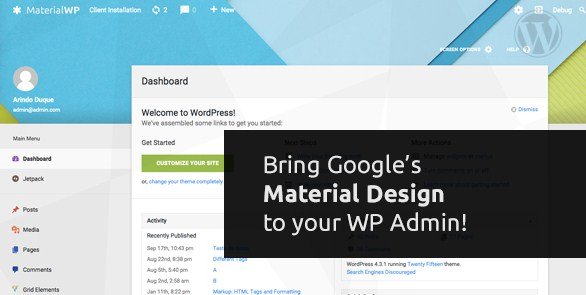
When WordPress users need to modernize their admin interface experience, Material WP – Material Design Dashboard Theme offers a revolutionary approach to dashboard customization. This powerful plugin transforms your WordPress backend into a sleek, modern interface following Google’s Material Design principles, making daily admin tasks more intuitive and visually appealing.
What Makes Material WP Different
Material WP stands out from other admin customization plugins by implementing Google’s Material Design language comprehensively throughout the WordPress dashboard. Unlike simple admin themes that only change colors, Material WP completely redesigns the entire admin experience with thoughtful animations, depth effects, and intuitive interactions that users expect from modern web applications.
- Complete Material Design implementation across all admin screens
- Individual user menu customization with drag-and-drop functionality
- Enhanced user experience with smooth animations and transitions
Material WP Features for WordPress Users
Complete Admin Interface Redesign
Material WP completely transforms your WordPress admin interface based on Google’s Material Design guidelines. Every element, from buttons to forms, menus to modals, is redesigned with modern aesthetics and improved usability. The plugin implements Material Design’s signature features including ripple effects, elevation shadows, and smooth transitions that create a cohesive, professional experience. This comprehensive redesign extends to all native WordPress screens and integrates seamlessly with most third-party plugins, maintaining consistency throughout your admin workflow.
Drag-and-Drop Menu Customization
One of Material WP’s standout features is its intuitive drag-and-drop menu reordering system. Each user can personalize their admin menu layout according to their workflow preferences, placing frequently accessed items where they’re most convenient. This individual customization means different team members can have their admin menus optimized for their specific roles and tasks. The menu positions are saved per user, allowing for a truly personalized admin experience that adapts to how you work, not forcing you to adapt to a rigid structure.
Responsive Design and Mobile Optimization
Material WP ensures your WordPress admin is fully responsive and works seamlessly across all devices. Whether you’re managing your site from a desktop, tablet, or smartphone, the Material Design interface adapts perfectly to your screen size. The mobile experience includes touch-optimized controls, collapsible menus, and simplified navigation that makes on-the-go site management practical and efficient. This responsive approach means you never lose functionality or aesthetics, regardless of how you access your WordPress dashboard.
How to Install Material WP
Quick Installation
- Purchase Material WP from CodeCanyon and download the plugin zip file
- Go to Plugins → Add New → Upload Plugin in WordPress dashboard
- Choose the downloaded zip file and click Install Now
- Activate the plugin and configure settings under Appearance → Material WP
For detailed installation guidance, check out our comprehensive WordPress plugin installation guide that covers common troubleshooting steps and best practices.
Who Should Use Material WP?
WordPress Agencies and Freelancers
WordPress agencies managing multiple client sites will find Material WP invaluable for creating a professional, branded admin experience. The Material Design interface impresses clients and makes WordPress more approachable for non-technical users. Agencies can customize the login page and admin interface to match client branding, adding value to their services and differentiating themselves from competitors who offer standard WordPress installations.
Content Creators and Bloggers
For content creators who spend hours in the WordPress dashboard, Material WP significantly improves the daily workflow experience. The clean, modern interface reduces eye strain and makes content creation more enjoyable. The ability to reorder menus means writers can prioritize post creation, media management, and editorial tools while hiding less frequently used settings. The enhanced visual feedback and smooth animations make the writing and publishing process feel more responsive and professional.
Material WP vs Alternatives
| Feature | Material WP | Ultimate Dashboard |
|---|---|---|
| Design Philosophy | Complete Material Design implementation | Minimal customization options |
| Menu Customization | Per-user drag-and-drop reordering | Global menu hiding only |
| Mobile Experience | Fully responsive with touch optimization | Basic responsive design |
While other admin customization plugins exist, Material WP’s comprehensive approach to Material Design sets it apart. Learn more about Google’s Material Design principles to understand why this approach creates superior user experiences.
Material WP Pricing
Material WP is available through CodeCanyon for a one-time purchase of $29, which includes 6 months of support and lifetime updates. Extended support can be purchased for an additional $8.25, extending support to 12 months. This single-site license makes it an affordable solution for transforming your WordPress admin experience without recurring subscription fees.
Pros and Cons
✅ Pros
- Complete Material Design transformation creates a modern, professional admin interface
- Per-user menu customization allows personalized workflows
- Excellent mobile responsiveness for on-the-go management
- One-time purchase with lifetime updates provides excellent value
- Smooth animations and transitions enhance user experience significantly
❌ Cons
- Premium plugin requires upfront investment
- May conflict with plugins that heavily customize the admin interface
- Limited color customization compared to some alternatives
Frequently Asked Questions
Is Material WP compatible with all WordPress themes?
Yes, Material WP only affects the admin dashboard and doesn’t interfere with your front-end theme. It works with any WordPress theme and most plugins.
Can I customize the Material Design colors in Material WP?
Material WP offers basic color customization options through the WordPress customizer, though it maintains Material Design principles for consistency.
Does Material WP work with WordPress multisite installations?
Yes, Material WP is fully compatible with WordPress multisite networks and can be activated network-wide or on individual sites.
Will Material WP slow down my WordPress admin?
No, Material WP is optimized for performance and uses efficient CSS and JavaScript. The Material Design animations are hardware-accelerated for smooth performance.
Can I revert to the default WordPress admin if needed?
Yes, you can simply deactivate Material WP to return to the default WordPress admin interface without any data loss.
Does Material WP include custom login page designs?
Yes, Material WP includes multiple login page style options that follow Material Design principles, allowing you to create a cohesive admin experience from login to dashboard.
Final Verdict
Material WP – Material Design Dashboard Theme is an excellent investment for anyone looking to modernize their WordPress admin experience. Its comprehensive Material Design implementation, combined with practical features like per-user menu customization and responsive design, makes it stand out in the admin customization space. It’s particularly well-suited for agencies, freelancers, and content creators who spend significant time in the WordPress dashboard and value a modern, efficient workflow. For more WordPress admin enhancement tools, check out our WordPress plugins collection or explore the official WordPress plugin repository for additional options.