What is JetSearch For Elementor?
JetSearch For Elementor is a premium WordPress plugin developed by Crocoblock, designed to significantly enhance the search functionality on websites built with Elementor, Gutenberg, or the Bricks builder. It replaces the often limited default WordPress search with a fast, flexible, and highly customizable AJAX-powered search system. The core purpose of JetSearch is to improve user experience by allowing visitors to find relevant content – posts, pages, custom post types (CPTs), WooCommerce products, and even taxonomy terms – quickly and efficiently, without page reloads. Its significance lies in its ability to transform site navigation, making content discovery seamless and intuitive. In today’s content-rich web environment, providing a powerful search tool is crucial for user retention and engagement. JetSearch addresses this need by offering granular control over search sources, results display, and overall search behavior. It integrates smoothly with the visual builders it supports, allowing users to drag, drop, and style search widgets directly within the editor interface. This ease of use, combined with advanced features like relevance sorting, fuzzy search, and detailed customization options, makes JetSearch For Elementor an indispensable tool for website owners and developers looking to provide a superior search experience, particularly for e-commerce stores, blogs, directories, and large content websites where finding specific information is paramount. It helps reduce bounce rates and increases time on site by ensuring users can locate what they need effortlessly.
Key Features of JetSearch For Elementor
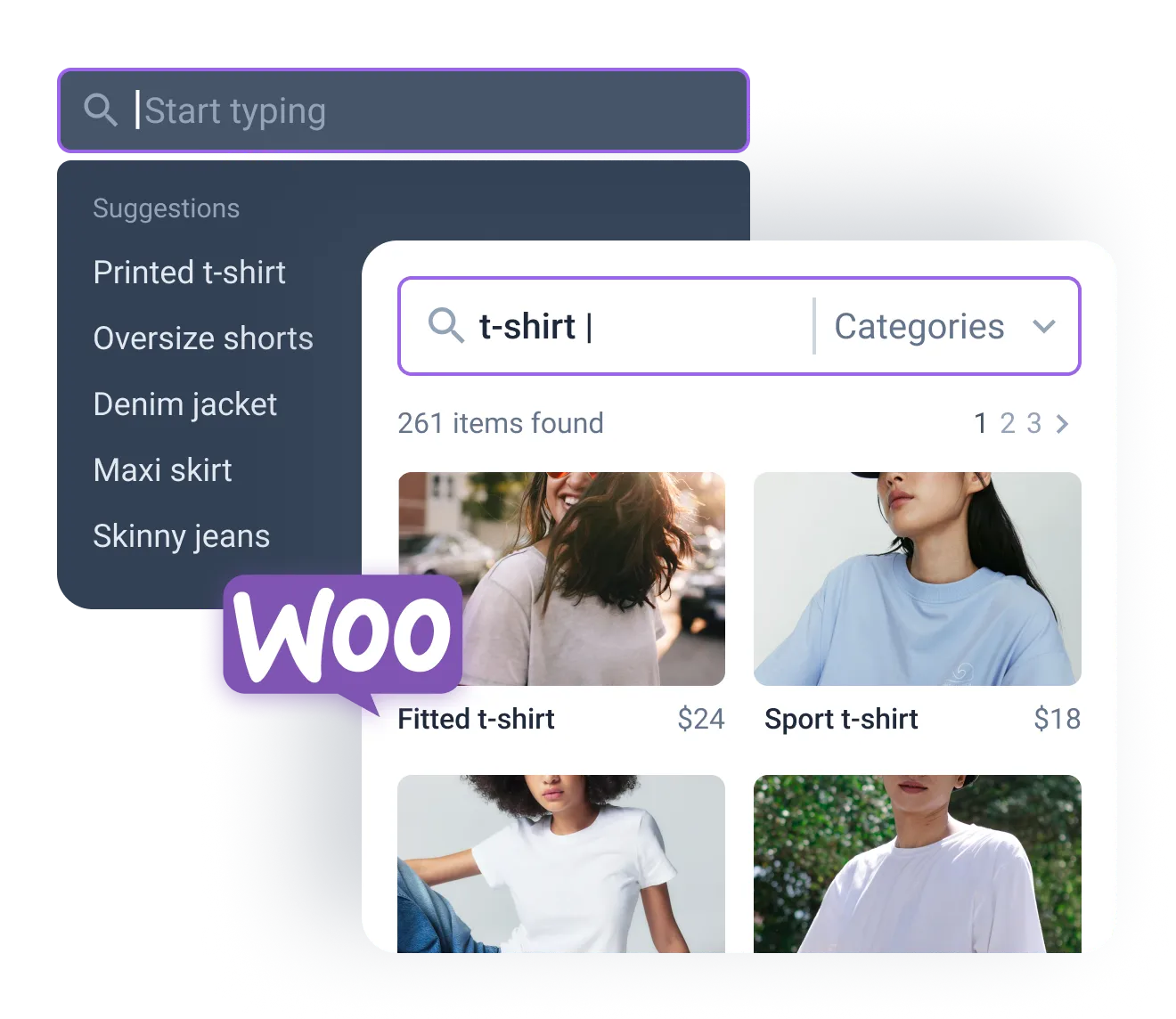
- AJAX-Powered Live Search: Implements lightning-fast search functionality. Results appear instantly in a dropdown as users type, eliminating the need for page reloads and providing a seamless user experience. This feature significantly speeds up content discovery across posts, pages, CPTs, and products.
- Extensive Search Source Control: Allows administrators to define precisely where JetSearch looks for results. You can include or exclude specific post types, taxonomies (categories, tags), authors, or even specific terms, ensuring only the most relevant content is searchable.
- WooCommerce Integration: Tailored specifically for online stores, JetSearch enables searching by product SKU, attributes, categories, tags, custom fields, and even booking availability (if using compatible booking plugins). This enhances the shopping experience, helping customers find products faster. See how it boosts WooCommerce Add-ons potential.
- Results Customization & Relevance Sorting: Offers deep customization for how search results are displayed in the AJAX dropdown and on dedicated results pages. You can control the layout (List, Grid, Masonry), pagination, and the information shown for each result. Results can be sorted by relevance, date, title, author, ID, menu order, or randomly.
- Fuzzy Search & Suggestions: Improves search accuracy by accounting for typos and partial matches (fuzzy search). It can also display popular search queries, user search history, or custom suggestions below the search bar, guiding users towards relevant content and correcting common mistakes automatically. It also includes search text highlighting in the dropdown.
The latest versions of JetSearch For Elementor continually improve compatibility with WordPress core, builders like Elementor and Bricks, and other Crocoblock plugins like JetEngine. Recent updates, such as version 3.5.5, introduced compatibility with Custom Meta Storage for AJAX search by meta field values and fixed styling issues within Bricks Builder templates, ensuring a consistent and powerful search experience across different site configurations. Check the official Crocoblock Changelog for detailed updates.
How to Obtain JetSearch For Elementor
JetSearch For Elementor is a premium plugin and is not available for free download from the WordPress.org repository. To get the plugin, you need to purchase it directly from the Crocoblock website. Here’s how you can obtain it:
1. Visit the Crocoblock Website:
- Navigate to the official JetSearch For Elementor page on the Crocoblock site.
- Review the features, demos, and pricing options available. Crocoblock offers JetSearch as a standalone purchase or as part of their comprehensive All-Inclusive subscription plans.
2. Choose a Subscription Plan:
- Standalone Plugin: You can purchase JetSearch individually, which typically grants a license for use on one website for one year, including updates and support. The current price is $23 per year.
- All-Inclusive Subscription: Alternatively, consider one of the Crocoblock subscription packages (like All-Inclusive or Lifetime) which bundles JetSearch with all other JetPlugins (like JetEngine, JetSmartFilters, JetWooBuilder, etc.) for use on multiple or unlimited websites. This offers better value if you plan to use multiple Crocoblock tools.
3. Complete the Purchase & Download:
- Add your chosen product (standalone JetSearch or a subscription) to the cart and proceed to checkout.
- After completing the payment, you will gain access to your Crocoblock account dashboard. From there, you can download the JetSearch For Elementor plugin .zip file and find your license key.
For a hassle-free setup and optimal performance for your WordPress site using powerful plugins like JetSearch, consider reliable managed hosting. Providers like WPX Hosting offer optimized environments, often with WordPress and WooCommerce pre-installed, ensuring your site runs smoothly from the start.
Installing JetSearch For Elementor: Step-by-Step Guide
Once you have purchased and downloaded the JetSearch For Elementor plugin .zip file from your Crocoblock account, installing it on your WordPress site is a straightforward process. Follow these steps:
1. Log in to Your WordPress Dashboard:
- Access your WordPress admin area by navigating to `yourdomain.com/wp-admin` and entering your credentials.
- Ensure you have administrator privileges to install new plugins. It’s always recommended to back up your site before installing new plugins.
2. Upload the Plugin File:
- In the left-hand sidebar, hover over ‘Plugins’ and click on ‘Add New’.
- On the Add Plugins page, click the ‘Upload Plugin’ button located at the top of the page.
- Click ‘Choose File’ and select the `jet-search.zip` file you downloaded from your Crocoblock account. Click ‘Install Now’.
3. Activate the Plugin and Enter License Key:
- After WordPress has successfully unpacked and installed the plugin files, you will see a success message. Click the ‘Activate Plugin’ button.
- Once activated, you might be prompted to enter your license key to receive automatic updates and support. Navigate to the Crocoblock or JetPlugins section in your dashboard (usually under ‘Crocoblock’ > ‘License’ or similar) and paste the license key obtained from your Crocoblock account. Activate the license.
Note: Always ensure you back up your WordPress website before installing or updating plugins like JetSearch For Elementor. After activation, you can find the JetSearch widgets (Ajax Search, Search Suggestions) within the Elementor, Gutenberg, or Bricks editor to add search functionality to your pages or templates. Configure the widget settings according to your needs, defining search sources, result layouts, and styling options.
JetSearch For Elementor Pricing
JetSearch For Elementor is offered as a premium plugin with flexible purchasing options through Crocoblock. The pricing structure caters to different user needs, from single-site owners to agencies managing multiple client projects. Understanding the costs involved helps in deciding the best investment for enhancing your site’s search capabilities. Crocoblock ensures value by including updates and support with their licenses, keeping the plugin compatible with the latest versions of WordPress and page builders. The primary options are purchasing the plugin individually or opting for a comprehensive bundle that includes other powerful tools from the JetPlugins suite. Consider the scale of your projects and whether you might benefit from other Crocoblock plugins when evaluating the pricing tiers. A subscription model ensures continuous development and support, which is crucial for maintaining compatibility and security. Remember that prices are subject to change, so always verify the current cost on the official Crocoblock website before making a purchase decision.
| Component | Price | Details |
|---|---|---|
| JetSearch (Standalone) | $23 / year | License for 1 website. Includes 1 year of plugin updates and Zoom chat support. Provides the Ajax Search and Search Suggestions widgets. |
| All-Inclusive Subscription | From $199 / year | Includes JetSearch and all 20+ other JetPlugins (JetEngine, JetSmartFilters, etc.). License for 1 or unlimited websites depending on the chosen tier. Includes 1 year of updates and support. Offers significant savings if using multiple Crocoblock plugins. |
| All-Inclusive Lifetime | From $999 (One-time) | Includes JetSearch and all other JetPlugins with lifetime access to updates and support. Available for 1 or unlimited websites. Best value for long-term users and agencies. |
JetSearch For Elementor Alternatives
While JetSearch For Elementor offers robust AJAX search features specifically tailored for Elementor, Gutenberg, and Bricks users within the Crocoblock ecosystem, several other powerful WordPress search plugins exist. Choosing the right alternative depends on your specific needs, budget, and technical requirements. Some alternatives focus purely on enhancing search relevance across all content types, while others might offer different integration methods or pricing models. It’s essential to compare features like search speed, customization options, compatibility with themes and plugins (especially WooCommerce and custom field plugins like ACF or JetEngine), indexing methods, and overall ease of use. Some popular alternatives provide free versions with limited functionality, allowing you to test their basic capabilities before committing to a premium plan. Evaluating these options ensures you select the search solution that best fits your website’s unique demands and enhances your visitors’ ability to find information efficiently.
- Pros: Highly customizable search engine, indexes content from PDFs, custom fields, taxonomies, shortcodes, and more. Excellent relevance algorithm control and detailed statistics. Integrates well with various themes and plugins.
- Cons: Premium only (no free version). Can be resource-intensive on large sites, potentially requiring careful configuration or higher hosting specs.
- Best For: Sites needing highly accurate and comprehensive search across diverse content types, including documents and extensive custom fields.
- Pros: Offers a capable free version available on WordPress.org. Indexes shortcode output, custom fields, user profiles, and taxonomy terms. Features fuzzy matching and search term highlighting. Premium version adds PDF indexing, multisite support, and finer controls.
- Cons: Can require significant database space. AJAX search requires additional setup or integration with other plugins. Relevance tuning might be less intuitive than SearchWP for some users.
- Best For: Users wanting improved search relevance over default WordPress search, with a free option to start. Good for blogs and content-heavy sites needing better matching.
Ivory Search:
- Pros: Allows creating multiple custom search forms, each configurable to search specific content types (posts, pages, products, media, custom fields). Offers AJAX search functionality. Has a free version with basic features.
- Cons: Advanced features like WooCommerce SKU search, PDF indexing, and deeper customization are reserved for the premium version. Interface might feel slightly less integrated than builder-specific plugins like JetSearch.
- Best For: Users needing multiple, distinct search forms targeting different areas or types of content on their site, with AJAX capabilities.
JetSearch For Elementor vs. Other Search Plugins
JetSearch For Elementor distinguishes itself from competitors primarily through its deep integration with page builders (Elementor, Gutenberg, Bricks) and the broader Crocoblock ecosystem. While plugins like SearchWP and Relevanssi focus heavily on backend indexing and relevance algorithms applicable to any theme, JetSearch excels in providing a seamless front-end building experience for the search interface itself. Users can visually design the search bar, dropdown results, and dedicated search results pages using familiar builder widgets and styling controls. This makes it exceptionally user-friendly for those already comfortable within these builder environments. Furthermore, its tight integration with other JetPlugins, such as JetEngine for custom post types and fields, and JetSmartFilters for faceted search, creates a powerful, cohesive system for handling complex data and filtering requirements. This synergy is a significant advantage over standalone search plugins that might require more custom development or third-party integrations to achieve similar results.
- Seamless Builder Integration: JetSearch provides dedicated widgets for Elementor, Gutenberg, and Bricks, allowing drag-and-drop placement and extensive styling options directly within the editor. Many alternatives require shortcodes or PHP implementation.
- AJAX Focus and Speed: Built from the ground up with AJAX in mind, it delivers a very fast, live search experience out-of-the-box with minimal configuration compared to some alternatives where AJAX might be an addon or require more setup.
- Crocoblock Ecosystem Synergy: Works flawlessly with JetEngine, JetSmartFilters, JetWooBuilder, and other JetPlugins, enabling powerful combinations for dynamic websites, directories, and e-commerce stores. For instance, comparing Elementor Pro vs Crocoblock often highlights this ecosystem advantage.
- Specific Use Case Optimization: Strong features for WooCommerce (SKU, attribute search) and custom content types make it ideal for specific site types often built with Crocoblock tools.
While general search plugins like SearchWP might offer more granular control over backend indexing weighting across a wider variety of sources like PDF content by default, JetSearch For Elementor often provides a more practical and efficient solution for users heavily invested in the Elementor/Gutenberg/Bricks visual building workflow, especially when leveraging other Crocoblock tools. The choice depends on whether the priority is deep backend index customization or seamless frontend builder integration and ecosystem compatibility.
Tips for Using JetSearch For Elementor Effectively
- Configure Search Sources Precisely: In the Ajax Search widget settings, carefully select which post types, taxonomies, and custom fields should be included or excluded. Avoid searching unnecessary areas to keep results relevant and improve performance.
- Customize the Results Dropdown: Utilize the styling and content controls for the AJAX results dropdown. Ensure it’s visually appealing, easy to read, and displays useful information (like thumbnails, prices for products, or excerpts). Adjust the number of results shown to balance speed and comprehensiveness.
- Leverage Relevance Settings: Experiment with the ‘Search results relevance’ options. Sorting by ‘Relevance’ usually works best, but you can prioritize specific criteria like title matches or date depending on your content strategy. Test different settings to see what yields the best results for typical user queries.
- Enable and Monitor Search Statistics: Activate the search analytics feature (if available/configured) within JetSearch or your WordPress dashboard. Analyzing what users are searching for, and what results they get (or don’t get), provides valuable insights for content improvement and SEO strategy.
- Optimize for WooCommerce: If running an online store, ensure you enable search by SKU, relevant product attributes, and categories within the widget settings. This dramatically improves the shopping experience for customers looking for specific items. Consider using the Search Suggestions widget alongside the main search bar.
- Design a Clear Search Results Page: While AJAX search is powerful, users might still click ‘Enter’ or a ‘View All Results’ link. Ensure you have a well-designed search results page template (built with Elementor/Gutenberg/Bricks and possibly JetEngine/JetThemeCore) that clearly presents all matching results using a grid or list layout.
Pairing JetSearch For Elementor with Complementary Tools
JetSearch For Elementor truly shines when used in conjunction with other plugins within the Crocoblock suite and the page builders it supports. Its primary pairing is, naturally, with Elementor, Gutenberg, or Bricks Builder, as it provides dedicated widgets that integrate seamlessly into these editors’ workflows. This allows for intuitive visual design of the search bar and results presentation. Beyond the builders, pairing JetSearch with JetEngine is incredibly powerful. JetEngine allows you to create custom post types, custom fields, and taxonomies. JetSearch can be configured to search within all this custom data, making it essential for directory sites, membership sites, real estate listings, or any site with complex custom structures. Furthermore, combining JetSearch with JetSmartFilters offers an unparalleled filtering and searching experience. While JetSearch handles the keyword search, JetSmartFilters provides faceted filtering (checkboxes, range sliders, dropdowns) that work alongside JetSearch, allowing users to refine search results based on specific criteria (e.g., filter products found via search by price range or category). For WooCommerce sites, pairing JetSearch with JetWooBuilder allows for complete customization of product archive and search results pages, ensuring the search functionality perfectly matches the store’s design and layout. This synergy creates a cohesive and powerful toolset for building dynamic, searchable, and user-friendly WordPress websites.
Why Invest in JetSearch For Elementor (Premium)?
While WordPress includes a basic search function, it’s often insufficient for modern websites, especially those with large amounts of content, custom data structures, or e-commerce functionalities. Investing in a premium plugin like JetSearch For Elementor becomes essential when you need to provide a significantly better user experience and more powerful search capabilities. The default search is slow (requires page reloads), lacks customization, struggles with custom fields and post types, and offers poor relevance sorting. JetSearch directly addresses these shortcomings. Opting for this premium solution is particularly worthwhile if your site requires:
- Lightning-Fast AJAX Search: Instant search results without page reloads dramatically improve user satisfaction and engagement, especially on mobile devices.
- Deep Search Customization: Control exactly what content gets searched (posts, pages, CPTs, WooCommerce products, taxonomies, custom fields) and how results are displayed and sorted for maximum relevance.
- Enhanced WooCommerce Search: Functionality crucial for online stores, like searching by SKU, product attributes, custom fields, and availability, helping customers find products easily and boosting conversions.
- Seamless Page Builder Integration: Effortless implementation and styling using dedicated widgets within Elementor, Gutenberg, or Bricks, eliminating the need for custom code or complex shortcode configurations.
- Advanced Features: Capabilities like fuzzy search (handling typos), search suggestions, results highlighting, and search analytics provide a sophisticated search experience comparable to major websites.
- Ecosystem Benefits: Perfect integration with other Crocoblock plugins like JetEngine and JetSmartFilters for building highly dynamic and filterable websites.
Investing in JetSearch For Elementor elevates your site’s usability, professionalism, and effectiveness, making it a valuable addition for serious website owners and developers. Visit the official Crocoblock JetSearch page for current pricing and subscription details.
Frequently Asked Question:
Does JetSearch For Elementor work with Gutenberg and Bricks Builder?
Yes, while the name includes “For Elementor,” JetSearch is fully compatible and provides dedicated blocks/elements for the Gutenberg block editor and Bricks Builder, offering the same powerful AJAX search functionality across all three major builders.
Can JetSearch For Elementor search inside custom fields created by plugins like ACF or JetEngine?
Yes, JetSearch can be configured to include custom field values in its search index. This is crucial for websites using custom data structures, allowing users to find content based on specific field information.
Is JetSearch For Elementor optimized for WooCommerce search?
Absolutely. JetSearch includes specific features for WooCommerce, enabling search by product title, content, SKU, categories, tags, and custom product attributes, significantly improving the e-commerce search experience.
How fast is the AJAX search with JetSearch For Elementor?
JetSearch is designed for speed. The AJAX search provides near-instant results as the user types, querying the database efficiently without reloading the page. Performance can depend on server resources and database size, but it’s generally very fast.
Can I customize the appearance of the search results dropdown?
Yes, JetSearch offers extensive customization options for the AJAX search results dropdown. You can control the layout, which information is displayed (thumbnail, title, excerpt, price, custom fields), colors, typography, and more, using the widget settings within Elementor, Gutenberg, or Bricks.
Do I need a Crocoblock subscription to use JetSearch For Elementor?
No, you can purchase JetSearch For Elementor as a standalone plugin for a single site. However, it is also included in the Crocoblock All-Inclusive subscriptions (Annual and Lifetime), which offer better value if you plan to use multiple JetPlugins.
Conclusion
JetSearch For Elementor stands out as a powerful and versatile AJAX search plugin, specifically engineered to enhance WordPress websites built with Elementor, Gutenberg, or Bricks Builder. By replacing the limitations of the default WordPress search, it delivers a significantly improved user experience through instant, relevant results without page reloads. Its strength lies in its deep customization options, allowing precise control over searchable content types (including WooCommerce products and custom fields via JetEngine), results display, and sorting relevance. The seamless integration with popular page builders makes implementation intuitive for users of all skill levels. For anyone looking to improve site navigation, reduce bounce rates, and empower users to find information quickly – especially on content-heavy blogs, directories, or e-commerce stores – JetSearch For Elementor is a highly recommended investment. Its compatibility within the Crocoblock ecosystem further extends its capabilities when paired with tools like JetEngine and JetSmartFilters. Consider implementing JetSearch to unlock a faster, smarter, and more user-friendly search experience on your WordPress site.
Disclaimer: Plugin features, pricing, and compatibility details mentioned are based on information available at the time of writing. Always refer to the official Crocoblock JetSearch page and the WordPress Developer Resources for the most current information and best practices. Remember to back up your site before installing or updating plugins.