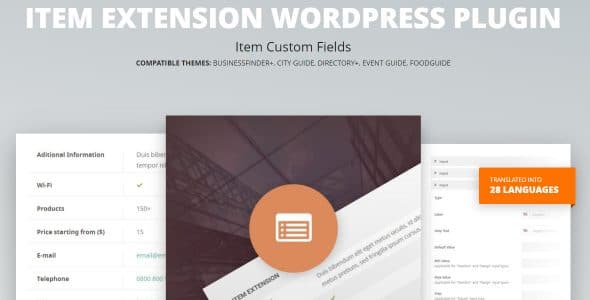
What is Item Extension WordPress Plugin?
When WordPress users need to extend their directory and listing items with additional custom information, Item Extension WordPress Plugin offers a powerful solution for adding structured data fields. This plugin allows you to predefined custom fields of 8 available types for each account package or administrator separately, giving you complete control over how your listings display information.
What Makes Item Extension Different
Item Extension WordPress Plugin stands out from other custom field solutions by being specifically designed for directory and listing websites. Unlike generic field plugins, it integrates seamlessly with the CitadelaWP ecosystem and offers package-based field management, making it ideal for multi-tier directory websites where different user levels need different field options.
- Package-specific field configuration
- 8 different field types for comprehensive data collection
- Administrator-level customization options
Item Extension Features for WordPress Users
Custom Field Management
The plugin provides comprehensive custom field management with 8 different field types including text fields, number inputs, date selectors, dropdown menus, checkboxes, radio buttons, file uploads, and URL fields. This variety ensures you can collect exactly the type of data your directory needs, from simple contact information to complex specifications and media files.
Package-Based Configuration
One of the standout features is the ability to configure different field sets for different account packages. This means you can offer basic users a simple set of fields while premium users get access to more comprehensive data entry options. This tiered approach is perfect for monetized directory websites where different subscription levels provide different capabilities.
Administrator Control
Administrators have granular control over field configuration, allowing them to set up fields globally or override them for specific packages. This flexibility ensures that your directory can evolve over time, adding new fields as your needs change without disrupting existing listings or user experiences.
How to Install Item Extension
Quick Installation
- Download the plugin from your CitadelaWP account dashboard
- Go to Plugins → Add New in WordPress dashboard
- Click Upload Plugin and select the downloaded file
- Click Install Now → Activate
Who Should Use Item Extension?
Directory Website Owners
If you run a business directory, real estate listing site, or any type of classifieds website, Item Extension is essential. It allows you to collect industry-specific information that makes your listings more valuable to users. For example, a restaurant directory can add fields for cuisine type, price range, and reservation requirements.
Membership Site Administrators
For membership websites that offer different tiers of service, this plugin is perfect for creating differentiated experiences. Premium members can access enhanced listing capabilities with more fields, while basic members get simplified options. This creates clear value for upgrading membership levels.
Item Extension vs Alternatives
| Feature | Item Extension | Advanced Custom Fields |
|---|---|---|
| Package-based Fields | Native support | Requires custom development |
| Directory Integration | Seamless CitadelaWP integration | Manual setup required |
Item Extension Pricing
Item Extension is part of the premium CitadelaWP plugin suite. Pricing starts at $69 for a single site license with annual renewals at $39. Multi-site and developer licenses are available with discounts for 5-site and 25-site packages. All licenses include one year of updates and priority support.
Pros and Cons
✅ Pros
- Package-specific field configuration
- 8 versatile field types
- Seamless CitadelaWP integration
❌ Cons
- Premium plugin only (no free version)
- Requires CitadelaWP ecosystem for full functionality
- Limited to directory/listing use cases
Frequently Asked Questions
Can I use Item Extension with any WordPress theme?
Yes, Item Extension works with most modern WordPress themes, though it’s optimized for CitadelaWP themes. You may need some CSS adjustments for perfect visual integration with other themes.
How many field types are available?
The plugin offers 8 different field types: text, number, date, dropdown, checkbox, radio buttons, file upload, and URL fields. These cover most common data collection needs for directory websites.
Can I export data from custom fields?
Yes, all custom field data is stored in standard WordPress post meta, making it compatible with most export plugins and tools. You can export your listings with custom field data using WordPress export functionality or specialized plugins.
Is Item Extension multilingual compatible?
Absolutely! The plugin includes 83 language translations and works perfectly with multilingual plugins like WPML and TranslatePress, allowing you to create field labels and content in multiple languages.
Can I change field types after data has been entered?
While you can modify field settings, changing field types after data collection may result in data loss. It’s recommended to plan your field structure carefully before launching your directory.
Does Item Extension work with WooCommerce?
Yes, the plugin integrates well with WooCommerce, allowing you to add custom fields to product listings or create hybrid directory-ecommerce websites where listings can have additional information beyond standard product data.
Final Verdict
Item Extension WordPress Plugin is a specialized tool that excels in its niche of directory and listing enhancement. It’s particularly well-suited for directory owners who need package-based field management and want to offer different levels of listing detail to different user tiers. While it may not be the most versatile custom field solution for general WordPress use, it’s unmatched for directory-specific applications where its package-based approach provides genuine business value.