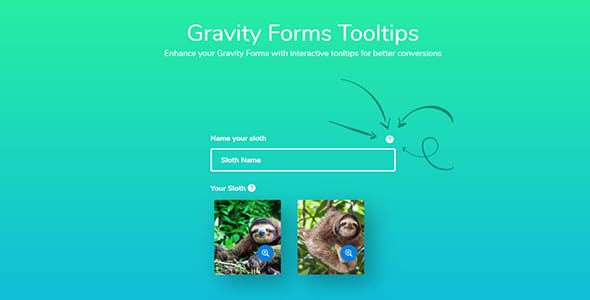
Gravity Forms Tooltips is a specialized add-on that allows users to add interactive, styled tooltips to any field within a Gravity Forms setup. It helps enhance communication by providing helpful information and guidance directly next to form labels or fields. Access this plugin through WPExclusive members as part of a full plugin and theme library with plans from $9.99/month.
See the full JetSloth collection → to discover more ways to improve your form design and functionality.
What Is Gravity Forms Tooltips?
Gravity Forms Tooltips is developed by JetSloth and acts as a visual enhancement plugin for WordPress forms. It belongs to the forms category on WPExclusive, alongside other tools for improving data collection and user interaction.
The plugin solves the problem of long, confusing forms by offering contextual help that appears only when a user needs it. Tooltips is designed for businesses that need to guide users through complex data entry tasks without cluttering the main interface.
Gravity Forms Tooltips Features
The feature set is built around providing fine-grained control over how help text is displayed on the frontend of your website.
Universal Field Compatibility
Tooltips works with all core Gravity Forms field types, ensuring you are never limited by the data you need to collect. It integrates perfectly with other add-ons such as Image Choices and Color Picker. This ensures that even advanced custom fields can maintain a consistent help-text experience.
Granular Appearance Controls
Users can customize the look and feel of their tooltips through a dynamic settings screen. Control icons, font size, and font color to match your brand identity. The plugin allows for global settings that affect all forms or specific overrides on a form-by-form basis for tailored designs.
Placement and Styling Flexibility
The plugin allows you to set the color, size, and specific position of every tooltip you create. For developers who need even more control, Tooltips permits additional custom CSS styles via theme settings. This makes it easy to integrate the tooltips into any existing WordPress theme design without technical friction.
Pricing
Check current pricing on the Tooltips sales page. WPExclusive members access it as part of their standard plan, which includes unlimited site usage and original files.
| Plan | Price | Sites | Includes |
|---|---|---|---|
| Single Add-On | $129/year | 1 Site | Plugin Updates |
| Sloth Bundle | $199/year | Unlimited | All JetSloth Add-ons |
| WPExclusive Membership | From $9.99/month | Unlimited | Tooltips + full library |
For developers managing multiple sites, a WPExclusive membership covers Tooltips plus hundreds of other plugins and themes — usually less than the cost of one premium license.
Latest Version
The plugin receives regular updates to ensure compatibility with the latest version of Gravity Forms (2.6+). WPExclusive updates plugin files promptly after each release by JetSloth to keep your site secure and functional.
How to Install
- Download the Tooltips .zip from your WPExclusive member account
- In WordPress: Plugins → Add New → Upload Plugin
- Select the .zip and click Install Now → Activate
- Navigate to individual Gravity Forms fields and click the Tooltips tab
- Enter your desired help content and configure the visual settings
Use Cases
Improving Complex Booking Forms
Use Tooltips to explain specific requirements for reservation dates or room types within your booking system. This reduces user errors and support tickets by clarifying requirements at the point of entry.
Standardizing Field Instructions for Clients
Agencies can use Tooltips to provide consistent instructions across multiple forms on a client’s site. It ensures that regardless of the form type, the help text looks uniform and professional.
Agencies and Developers Managing Multiple Client Sites
WPExclusive provides significant value for agencies by offering access to Tooltips for an unlimited number of clients. This allows developers to deploy high-quality UX enhancements across their entire portfolio without recurring high costs for individual licenses.
vs Alternatives
| Feature | Tooltips | Magic Tooltips |
|---|---|---|
| Certified Developer | ✅ Yes (JetSloth) | ✅ Yes | ✅ Custom CSS | ✅ Limited |
| Starting Price | $129 | $29 |
| Available on WPExclusive | ✅ Yes | ❌ |
Browse the full forms plugins on WPExclusive →
Pros and Cons
✅ Strengths
- Fully certified by Gravity Forms for maximum stability and security
- Direct integration with other popular JetSloth add-ons like Image Choices
- Highly visual settings editor allows for easy styling without code
⚠️ Limitations
- Requires Gravity Forms (v2.6 or higher) to function correctly
- Developer auto-updates require an active license key. WPExclusive publishes updates manually when new versions are released.
Is Gravity Forms Tooltips GPL Licensed?
Yes. Gravity Forms Tooltips is distributed under the GNU General Public License (GPL), the same license that governs WordPress itself. GPL gives any user the legal right to use, study, share, and redistribute the software. This is the legal framework that makes WPExclusive’s membership model possible.
WPExclusive distributes 100% original, unmodified files from JetSloth. We never use “nulled” versions. There are no injected codes or security risks involved in using the software through our platform.
Get Gravity Forms Tooltips on WPExclusive
WPExclusive membership starts at $9.99/month, $87/year, or $149 lifetime — giving you Gravity Forms Tooltips plus every plugin and theme in the library, on unlimited sites.
Explore the full JetSloth collection → or browse all WordPress plugins →
Frequently Asked Questions
What does Gravity Forms Tooltips do?
Gravity Forms Tooltips is a dedicated add-on used to add explanatory pop-ups to form fields. Tooltips simplifies complex forms by providing helpful hints to users without needing to add permanent text labels that take up space.
Is Gravity Forms Tooltips free?
Gravity Forms Tooltips is a premium plugin. You can access it via WPExclusive from $9.99/month, which includes the full library of premium assets.
What is the latest version of Gravity Forms Tooltips?
The plugin is actively maintained by JetSloth. WPExclusive members always receive the most current release as soon as it is processed by our team.
How much does Gravity Forms Tooltips cost?
The standard developer price is $129 for a single site license. Via WPExclusive, it is included in plans from $9.99/month for use on unlimited websites.
Is it legal to use Gravity Forms Tooltips via WPExclusive?
The plugin is GPL licensed, which explicitly permits redistribution. WPExclusive provides original, unmodified files — fully within GPL terms and legal standards.
What field types are supported?
Tooltips works with all core Gravity Forms fields, including standard text entries, radio buttons, checkboxes, and product fields.