What is Cooked Classic?
When WordPress users need a robust solution to manage and display recipes on their food blogs, Cooked Classic – A Powerful Recipe Plugin for WordPress offers a seamless, drag-and-drop experience that goes far beyond simple formatting. As someone who has tested countless plugins for food websites, I can tell you that finding a tool that balances aesthetic appeal with technical SEO requirements is rare. Cooked Classic steps in to bridge that gap, allowing you to create professional-grade recipes without touching a line of code. Whether you are a solo food blogger or building a community-driven recipe site, this plugin transforms standard WordPress posts into interactive culinary experiences.
What Makes Cooked Classic Different
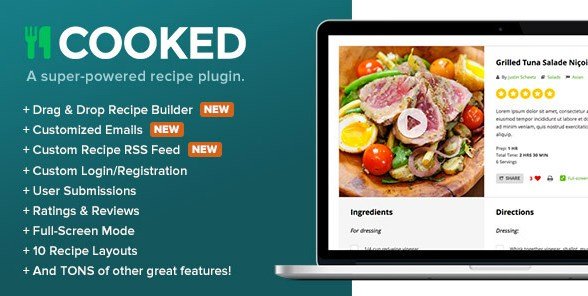
Unlike many standard plugins that merely offer a shortcode to display ingredients, Cooked Classic is built as a complete recipe management system. Its unique selling proposition lies in its versatility and community features. While other plugins focus solely on the blog author, Cooked Classic empowers your audience to contribute, turning a simple blog into a bustling recipe hub. It handles the heavy lifting of structured data (Schema markup), ensuring your recipes look delicious in Google search results, while simultaneously offering a user-friendly interface for front-end submissions.
- Community Engagement: Built-in front-end submission forms allow users to post their own recipes.
- Visual Customization: Offers 10 different recipe layouts and 3 list view styles to match any theme.
- Advanced Functionality: Includes a powerful search bar, nutrition facts generator, and video support.
Cooked Classic Features for WordPress Users
Drag & Drop Recipe Builder
One of the standout features of Cooked Classic is its intuitive recipe builder. As a content creator, I know how tedious it can be to format ingredients and instructions manually. This plugin provides a clean interface where you can drag and drop elements to build your recipe. You can easily add ingredients, instructions, and metadata without getting lost in complex HTML. If you are looking for a theme that pairs well with this functionality, check out the WordPress themes available on our site to ensure full compatibility.
Front-end Submissions & User Profiles
This feature is a game-changer for site scalability. Cooked Classic allows you to open up your site to the community. Users can register using custom login/registration forms, create profiles, and submit their own recipes directly from the front end of the site. This not only saves you time as an admin but also significantly increases your site’s content volume and user engagement. Each user gets a “Recipe Favorites” list, encouraging them to return and interact more deeply with your content.
SEO Optimization & Nutrition Facts
In the world of food blogging, visibility is everything. Cooked Classic automatically handles the technical SEO side by generating the necessary Recipe Schema markup. This helps Google understand your content, increasing the chances of appearing in Rich Results. Furthermore, the plugin includes a nutrition facts generator. Readers are increasingly health-conscious, and providing accurate nutritional breakdowns (calories, macronutrients, etc.) adds immense value and authority to your posts. For more tools to boost your site’s performance, browse our plugins collection.
How to Install Cooked Classic
Quick Installation
- Log in to your WordPress dashboard.
- Navigate to Plugins → Add New.
- Click Upload Plugin (since this is a premium plugin from CodeCanyon, you will need to download the ZIP file first).
- Select the cooked.zip file from your computer.
- Click Install Now and then Activate.
Who Should Use Cooked Classic?
Food Bloggers & Recipe Developers
If your primary income stream comes from food blogging or creating recipes for brands, presentation is key. Cooked Classic allows you to present your culinary creations professionally with print-friendly buttons, full-screen mode, and adjustable serving sizes. The rating and review system also helps build social proof, encouraging new visitors to try your recipes.
Community Recipe Site Owners
If you are looking to build the next “AllRecipes” or a niche cooking community, the front-end submission feature is indispensable. Cooked Classic manages user accounts and submissions, allowing you to moderate content before it goes live. This creates a dynamic ecosystem where your users generate the value, keeping your site fresh with minimal effort on your part.
Cooked Classic vs Alternatives
| Feature | Cooked Classic | WP Recipe Maker (Free Version) |
|---|---|---|
| User Submissions | Built-in front-end submissions & profiles | Premium add-on required |
| Recipe Layouts | 10 Unique Layouts included | Limited styling options |
| Nutrition Label | Automatic generator included | Requires premium version |
| Search Functionality | Powerful AJAX search bar included | Relies on standard WordPress search |
Cooked Classic Pricing
Cooked Classic is a premium plugin available exclusively through CodeCanyon. Unlike subscription-based plugins, it follows a traditional marketplace model. You typically purchase a single license for a one-time fee, which includes 6 months of support from the developer. Future updates are generally included as long as the plugin is maintained. This makes it a cost-effective solution for long-term projects without worrying about recurring monthly fees. Always check the latest pricing on the official CodeCanyon page.
Pros and Cons
✅ Pros
- Comprehensive drag-and-drop builder makes recipe creation fast.
- Includes advanced community features like user profiles and favorites.
- Excellent SEO support with automatic Schema markup.
- Highly customizable with 10 different layout options.
- No recurring subscription fees; one-time purchase model.
❌ Cons
- Premium plugin only; no free version to test before buying.
- Support is limited to 6 months unless extended (paid).
- The sheer number of features can be slightly overwhelming for beginners initially.
Frequently Asked Questions
Is Cooked Classic compatible with page builders like Elementor?
Yes, Cooked Classic provides shortcodes and widgets that you can use within page builders like Elementor, Divi, or Beaver Builder to display recipes anywhere on your site.
Does this plugin support video in recipes?
Absolutely. Cooked Classic has dedicated video support, allowing you to embed videos from YouTube or Vimeo directly into your recipe cards for a richer user experience.
Can users save their favorite recipes?
Yes, registered users have access to a “Favorites” feature where they can save recipes they like to their personal profile for quick access later.
Do I need coding skills to set up nutrition facts?
No coding is required. Cooked Classic includes a nutrition generator where you input the data, and it automatically generates a professional-looking nutrition label similar to what you see on packaged food.
Is the plugin mobile responsive?
Yes, all 10 recipe layouts are fully responsive, ensuring your recipes look great on desktops, tablets, and smartphones.
Does it include a print recipe button?
Yes, Cooked Classic includes a print-friendly mode, removing clutter like ads and navigation so users can print recipes cleanly.
Final Verdict
In my expert opinion, Cooked Classic is a top-tier contender for anyone serious about food blogging. It strikes an excellent balance between ease of use for the writer and functionality for the reader. While the lack of a free version might be a hurdle for some, the feature set—especially the community tools and robust recipe builder—justifies the investment. It’s particularly well-suited for food bloggers who want to scale their site into a community platform or those who simply want the most beautiful recipe presentation available on WordPress. If you want to read more reviews or find similar tools, visit the WPExclusive Blog.