What is Centum – Responsive WordPress Theme?
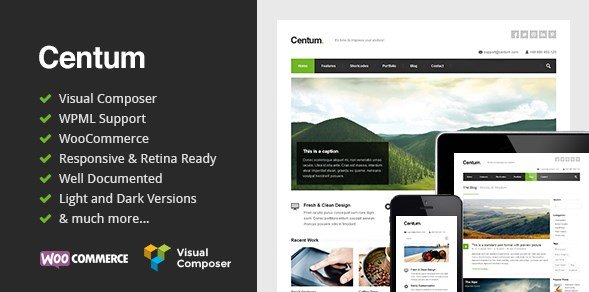
Centum is a premium responsive WordPress theme designed for corporate and portfolio websites. It features a clean and minimal design, making it ideal for showcasing your work professionally. With its robust features and responsive layout, Centum ensures your website looks great on any device.
Key Features of Centum – Responsive WordPress Theme
- Responsive Layout: Ensures your website looks great on all devices, providing a seamless user experience.
- Visual Composer Included: Offers drag-and-drop functionality for easy page building and customization.
- Slider Revolution Plugin: Included for free, allowing you to create stunning and dynamic slideshows.
- 500+ Google Fonts: Provides a wide range of typography options to match your brand’s style.
- WordPress Theme Customizer: Offers real-time preview of your customizations, making it easy to adjust settings.
The latest version of Centum includes enhanced compatibility with the latest WordPress updates and improved performance for faster loading times.
Why Choose Centum – Responsive WordPress Theme in 2024?
Centum remains a top choice for businesses and creatives looking to establish a professional online presence. Here’s why it’s the top choice:
- Clean and Minimal Design: Perfect for showcasing your work without distractions.
- Easy Customization: Visual Composer and the WordPress Theme Customizer make it easy to create a unique website.
- Responsive and Mobile-Friendly: Ensures a consistent experience across all devices.
- Included Premium Plugins: Save money with the included Slider Revolution plugin.
- Excellent Support: Comprehensive documentation and dedicated support ensure you get the help you need.
How to Download Centum – Responsive WordPress Theme
1. Purchase from ThemeForest:
- Visit the Centum ThemeForest page.
- Add the theme to your cart and proceed to checkout.
2. Download the Theme Files:
- Once your purchase is complete, download the theme files from your ThemeForest account.
- Locate the zipped theme file on your computer.
3. Unzip the Package:
- Extract the contents of the zipped file to a location on your computer.
- You’ll find the theme file and documentation within the extracted folder.
For a hassle-free setup, consider WPX Hosting from top rated reliable and managed providers, which comes with pre-install WordPress and WooCommerce with optimized performance.
Installing Centum – Responsive WordPress Theme: Step-by-Step Guide
1. Access Your WordPress Dashboard:
- Log in to your WordPress admin panel.
- Navigate to Appearance > Themes.
2. Upload the Theme:
- Click on “Add New” and then “Upload Theme.”
- Choose the Centum theme file from your computer and click “Install Now.”
3. Activate the Theme:
- After installation, click “Activate” to apply the Centum theme to your website.
- Follow the prompts to install any recommended plugins, such as Visual Composer and Slider Revolution.
Note: Back up your site before installing or updating themes. This ensures that you can restore your site in case anything goes wrong. The best WordPress backup plugins can help simplify this process.
Centum – Responsive WordPress Theme Pricing
| Component | Price | Details |
|---|---|---|
| Regular License | $59 | Use in a single end product that end users are not charged for. |
| Extended License | $2900 | Use in a single end product that end users can be charged for. |
Centum – Responsive WordPress Theme Alternatives
Divi:
- Pros: Highly flexible with a visual builder, extensive module library.
- Cons: Can be overwhelming for beginners, potential for code bloat.
- Best For: Users who need extensive customization options and a powerful visual builder.
Astra:
- Pros: Lightweight, fast loading, highly customizable with numerous starter templates.
- Cons: Relies heavily on third-party plugins for advanced features.
- Best For: Users who need a fast and customizable theme with a wide range of starter templates.
Avada:
- Pros: Packed with features, versatile for various website types, built-in page builder.
- Cons: Can be resource-intensive, steeper learning curve.
- Best For: Users who need a comprehensive theme with a wide range of features and flexibility.
Centum – Responsive WordPress Theme vs. Other Themes
Centum distinguishes itself with its clean and minimal design, making it an excellent choice for users who prioritize simplicity and elegance. While other themes may offer more complex features, Centum focuses on providing a straightforward and user-friendly experience.
- Cost: Centum offers a competitive price point compared to other premium themes.
- Flexibility: While not as extensive as some themes, Centum provides ample customization options for corporate and portfolio sites.
- Compatibility: Works seamlessly with essential plugins like WPML for multilingual support.
- Support: Pure Themes offers detailed documentation and support to help users get the most out of Centum.
Centum is easy to set up and is ideal for users who want a professional-looking website without the complexity of more feature-rich themes. Understanding what is a WordPress theme helps users make informed decisions about their site design.
Tips for Using Centum – Responsive WordPress Theme Effectively
- Utilize the Visual Composer: Use the drag-and-drop interface to create custom page layouts easily.
- Customize with the Theme Customizer: Take advantage of the real-time preview to fine-tune your website’s appearance.
- Optimize Images: Ensure your images are optimized for web to improve loading times and user experience.
- Use Shortcodes: Leverage the built-in shortcodes to add advanced elements to your pages without coding.
- Explore Page Templates: Experiment with different page templates to find the best layout for your content.
Pairing Centum – Responsive WordPress Theme with WPML
Centum pairs excellently with WPML (WordPress Multilingual Plugin), allowing you to create a multilingual website easily. This is particularly beneficial for businesses targeting a global audience, as it ensures your content is accessible to users in their native language.
Should You Invest in Premium Extensions?
The core Centum theme is sufficient for many users, but premium extensions can enhance your website’s functionality and design. Premium features are worth considering if you need:
- Advanced customization options
- Enhanced support and updates
- Integration with other premium plugins
- Access to exclusive templates and designs
Visit the official ThemeForest page for pricing details.
Conclusion
Centum – Responsive WordPress Theme is a versatile and user-friendly theme perfect for creating professional corporate and portfolio websites. With its clean design, responsive layout, and included premium plugins, Centum offers a great value for users looking to establish a strong online presence. Download and start using Centum today to showcase your work in style.
Disclaimer: Always check the official ThemeForest page for the most updated pricing, features, and terms. We strive for accuracy, but details may change.