What is Admin Menu Editor Pro WordPress Toolbar Editor Addon?
When WordPress administrators need complete control over their site’s admin interface, the Admin Menu Editor Pro WordPress Toolbar Editor Addon provides the perfect solution for customizing the WordPress Toolbar (also known as the Admin Bar). This powerful add-on extends the functionality of Admin Menu Editor Pro, giving you unprecedented control over every aspect of your WordPress toolbar.
What Makes Admin Menu Editor Pro Toolbar Editor Different
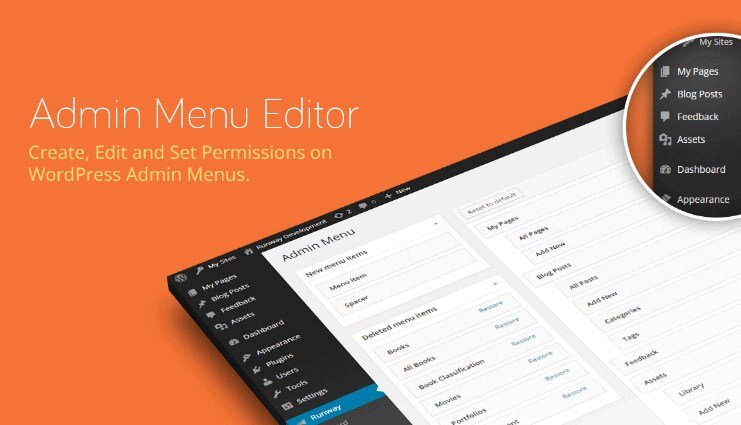
Unlike basic admin bar customization methods that require coding or complex hooks, the Toolbar Editor Addon offers a user-friendly, drag-and-drop interface that makes toolbar customization accessible to everyone. What sets it apart is its seamless integration with Admin Menu Editor Pro, providing a unified solution for complete WordPress admin interface customization.
- Visual drag-and-drop interface for intuitive toolbar editing
- Granular control over individual toolbar items and properties
- Seamless multisite network support for enterprise deployments
Admin Menu Editor Pro Toolbar Editor Features for WordPress Users
Toolbar Item Management
The Toolbar Editor Addon gives you complete control over every element in your WordPress admin bar. You can hide any toolbar item or entire groups with a single click, perfect for creating a cleaner interface for clients or team members. The ability to reorder items through drag-and-drop means you can prioritize the most important tools and create a workflow that matches your specific needs.
Custom Item Creation and Modification
Beyond simply rearranging existing items, the Toolbar Editor allows you to create completely new toolbar items. You can add custom links to external resources, internal tools, or frequently accessed pages. Each item can be fully customized with custom titles, URLs, CSS classes, and other properties. This feature is particularly valuable for agencies and developers who need to provide quick access to client-specific resources or development tools.
Advanced Configuration and Deployment
The export and import functionality makes it easy to deploy consistent toolbar configurations across multiple sites or backup your customizations. For WordPress multisite networks, this feature is invaluable as it allows network administrators to maintain consistent branding and functionality across all subsites. The add-on also supports role-based configurations, ensuring different user types see only the toolbar items relevant to their responsibilities.
How to Install Admin Menu Editor Pro Toolbar Editor Addon
Quick Installation
- Ensure you have Admin Menu Editor Pro 1.82 or later installed and activated
- Purchase the Toolbar Editor Addon from the official website
- Download the plugin ZIP file to your computer
- Go to Plugins → Add New → Upload Plugin in WordPress dashboard
- Select the downloaded ZIP file and click Install Now
- Activate the plugin and enter your license key
Who Should Use Admin Menu Editor Pro Toolbar Editor Addon?
WordPress Agencies and Freelancers
For agencies managing multiple client websites, the Toolbar Editor Addon is essential for creating branded, client-friendly admin experiences. You can remove confusing WordPress-specific items and add quick links to support documentation, contact forms, or client portals. The export/import feature ensures consistent branding across all client sites, saving hours of manual configuration time.
Multisite Network Administrators
p>Network administrators managing WordPress multisite installations will find the Toolbar Editor invaluable for maintaining consistency across subsites. You can create standardized toolbar configurations that ensure all site administrators have access to necessary network resources while maintaining a cohesive user experience. The add-on’s multisite support allows for both network-wide and site-specific customizations.Admin Menu Editor Pro Toolbar Editor vs Alternatives
| Feature | Toolbar Editor Addon | Admin Bar Disabler |
|---|---|---|
| Item Customization | Full control over titles, URLs, and properties | Basic hide/show functionality only |
| Multisite Support | Native network-wide configuration | Limited or no multisite support |
| Drag & Drop Interface | Visual reordering of all items | No visual editing capabilities |
Admin Menu Editor Pro Toolbar Editor Pricing
The Toolbar Editor Addon is available as a standalone purchase for $15 with your existing Admin Menu Editor Pro license. Alternatively, you can upgrade to the Agency license for $79, which includes the base plugin, all add-ons (including Toolbar Editor and Branding), and priority support. The Agency license is ideal for agencies and developers managing multiple client sites, offering the best value for comprehensive admin customization.
Pros and Cons
✅ Pros
- Intuitive drag-and-drop interface makes customization accessible to non-developers
- Comprehensive multisite support for network administrators
- Export/import functionality saves time on multiple site deployments
❌ Cons
- Requires Admin Menu Editor Pro as a prerequisite (additional cost)
- Limited browser support for older versions (IE9+ only)
- No free version available for testing before purchase
Frequently Asked Questions
Can I use the Toolbar Editor Addon without Admin Menu Editor Pro?
No, the Toolbar Editor is an add-on that requires Admin Menu Editor Pro version 1.82 or later to function. You must have the base plugin installed and activated before installing the Toolbar Editor.
Does the Toolbar Editor work with WordPress multisite networks?
Yes, the Toolbar Editor Addon fully supports both single site and WordPress multisite installations. Network administrators can configure toolbar settings for the entire network or individual subsites.
Can I export my toolbar customizations to other sites?
Absolutely! The Toolbar Editor includes export and import functionality, allowing you to save your toolbar configurations and apply them to other WordPress sites quickly.
Will this plugin slow down my WordPress admin area?
No, the Toolbar Editor Addon is lightweight and optimized for performance. It only loads when you’re editing toolbar settings and doesn’t impact the frontend or general admin performance.
Can I create different toolbar configurations for different user roles?
Yes, when used with Admin Menu Editor Pro, you can create role-specific toolbar configurations, showing different items to administrators, editors, authors, and other user roles.
Is there a money-back guarantee for the Toolbar Editor Addon?
Yes, the plugin comes with a 30-day money-back guarantee. If you’re not satisfied with the Toolbar Editor Addon, you can request a full refund within 30 days of purchase.
Final Verdict
The Admin Menu Editor Pro WordPress Toolbar Editor Addon is an essential tool for anyone serious about WordPress admin customization. Its intuitive interface, comprehensive features, and multisite support make it the go-to solution for agencies, developers, and network administrators. While the requirement of Admin Menu Editor Pro adds to the overall cost, the combined functionality provides unmatched control over the WordPress admin experience. For professionals managing multiple WordPress sites or client projects, this add-on is well worth the investment.