What is AD Post Preview WordPress Plugin?
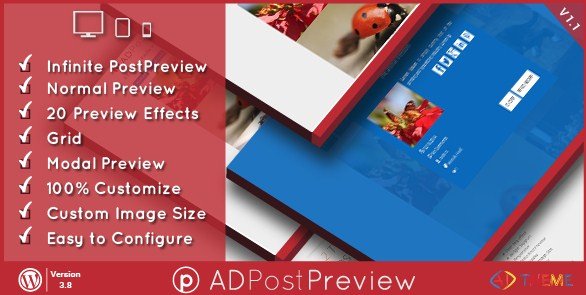
When WordPress users need to create stunning visual previews of their content without technical coding skills, AD Post Preview WordPress Plugin offers an elegant solution that transforms how posts and products are displayed. This premium plugin provides a comprehensive way to showcase content with 20+ different effects and two distinct preview types, making it an essential tool for site owners who want to improve user engagement and content discovery.
What Makes AD Post Preview Different
AD Post Preview WordPress Plugin stands out in the crowded WordPress plugin market by offering both simplicity and powerful customization options. Unlike other preview solutions that require extensive coding knowledge or provide limited options, this plugin gives users complete control over how their content appears to visitors before they click through. Whether you’re running a blog, e-commerce store, or portfolio website, this plugin transforms your standard post listings into engaging visual experiences that capture attention and encourage exploration.
- Two versatile preview types (Normal and Modal) to suit different content strategies
- 20+ stunning effects that add visual interest without compromising performance
- Seamless integration with popular e-commerce platforms including WooCommerce
AD Post Preview Features for WordPress Users
Diverse Preview Types
The plugin offers two primary preview types to accommodate different user preferences and site designs. The Normal Preview displays content directly on the page in an attractive format, while the Modal Preview creates a popup window that shows content without navigating away from the current page. This flexibility allows you to choose the user experience that best fits your website’s navigation flow and visitor behavior patterns.
Impressive Visual Effects
With over 20 different visual effects, AD Post Preview transforms standard content displays into engaging visual experiences. These effects include hover animations, transitions, and overlays that draw attention to your most important content. The effects are designed to enhance the user experience without slowing down your site, maintaining optimal website performance while delivering impressive visual appeal.
Flexible Content Source Options
One of the plugin’s most powerful features is its ability to pull content from multiple sources within your WordPress installation. You can create previews from Custom Post Types, WordPress Categories, WooCommerce Categories, WP E-Commerce Categories, and even Jigoshop Categories. This versatility makes it perfect for mixed-content websites that combine blog posts with e-commerce functionality. For e-commerce sites, check out our best WooCommerce plugins guide to see how this tool integrates with other essential e-commerce solutions.
Comprehensive Customization Capabilities
AD Post Preview provides extensive customization options to ensure your previews match your brand identity perfectly. You can control image sizes, colors, overlays, border radius, and even add custom CSS for unique styling. The plugin also offers widget support, allowing you to incorporate previews in sidebars and other widget-ready areas. According to WordPress.org documentation, widgets are essential components for creating versatile layouts, and this plugin leverages that functionality effectively.
Responsive Design & Filtering
In today’s mobile-first internet landscape, the plugin’s responsive design ensures your previews look great on all devices, from desktop monitors to smartphones. The filtering feature allows visitors to quickly sort through content by categories, improving the user experience and helping users find relevant content faster. This is particularly valuable for sites with extensive content libraries where navigation can become challenging without proper filtering options.
How to Install AD Post Preview
Quick Installation
- Purchase AD Post Preview from CodeCanyon and download the plugin zip file
- Go to Plugins → Add New in WordPress dashboard
- Click the “Upload Plugin” button at the top of the page
- Select the plugin zip file you downloaded and click “Install Now”
- Once installed, click “Activate Plugin” to begin using AD Post Preview
Who Should Use AD Post Preview?
E-commerce Store Owners
Online retailers using WooCommerce or other e-commerce platforms can significantly benefit from AD Post Preview’s product showcase capabilities. The plugin’s ability to create visually appealing product previews with hover effects and modal displays can increase product engagement and potentially boost conversion rates. The filtering functionality helps customers navigate product categories more efficiently, creating a better shopping experience that mirrors the functionality found on major e-commerce platforms like Amazon.
Content Creators & Bloggers
Bloggers and content creators with extensive article libraries can use AD Post Preview to create engaging content hubs that encourage deeper exploration of their website. The visual effects and grid layouts transform standard blog archives into magazine-style displays that capture reader attention. The plugin’s compatibility with featured images ensures your visual content takes center stage, creating the kind of polished appearance that professional media sites employ.
Portfolio Websites
Creative professionals including photographers, designers, and artists can showcase their work using the plugin’s visually stunning preview effects. The ability to create custom image sizes, apply overlays, and use sophisticated hover effects transforms a standard portfolio into an interactive gallery experience. The modal preview option allows potential clients to view larger versions of work without leaving the portfolio page, maintaining immersion in your creative presentation.
AD Post Preview vs Alternatives
| Feature | AD Post Preview | Competitors |
|---|---|---|
| Preview Types | 2 (Normal & Modal) | Usually 1 standard type |
| Visual Effects | 20+ built-in effects | Limited or none |
| E-commerce Integration | WooCommerce, WP E-Commerce, Jigoshop | Often WooCommerce only |
| Customization Options | Extensive (colors, sizes, overlays, CSS) | Basic limited options |
| Responsive Design | Fully responsive | Varies by plugin |
AD Post Preview Pricing
AD Post Preview is a premium WordPress plugin available through CodeCanyon for a one-time purchase fee of $24. This price includes lifetime access to the plugin with future updates and 6 months of support from the developer. Extended support options are available for an additional fee. Unlike many other premium plugins, AD Post Preview does not require a recurring subscription, making it a cost-effective solution for website owners who prefer one-time payments over ongoing expenses.
Pros and Cons
✅ Pros
- Extensive customization options allowing complete control over preview appearance
- Two distinct preview types providing flexibility for different content strategies
- 20+ visual effects that enhance content presentation without compromising performance
- Broad e-commerce platform compatibility including WooCommerce, WP E-Commerce, and Jigoshop
- Responsive design ensuring previews look great on all devices
- Translation-ready with included .po/.mo files for international websites
- One-time purchase fee without recurring subscription costs
❌ Cons
- Limited documentation compared to some larger plugin developers
- Only available through CodeCanyon, not directly from WordPress repository
- Learning curve for utilizing all 20+ effects effectively
- Additional fee required for extended support beyond initial 6 months
Frequently Asked Questions
Does AD Post Preview work with page builders like Elementor or Divi?
Yes, AD Post Preview is compatible with most popular page builders including Elementor and Divi. You can use the plugin’s shortcodes within page builder elements to incorporate post previews into custom page layouts. This compatibility makes it easy to create sophisticated designs that combine the flexibility of page builders with the powerful preview functionality of AD Post Preview.
Can I use AD Post Preview with custom post types created by other plugins?
Absolutely! AD Post Preview is designed to work with custom post types created by other plugins or themes. The plugin’s flexible content source options allow you to select any registered post type on your WordPress site, making it an ideal solution for complex websites with diverse content structures beyond standard posts and pages.
Is AD Post Preview translation-ready for multilingual websites?
Yes, AD Post Preview is fully translation-ready and includes .po/.mo files for easy language translation. This makes the plugin suitable for international websites and works seamlessly with popular multilingual plugins like WPML and Polylang. According to WordPress Polyglots documentation, having translation-ready plugins is essential for creating truly global websites.
Will the 20+ visual effects slow down my website?
No, AD Post Preview is designed with performance in mind. While it offers 20+ visual effects, these are implemented using optimized CSS and JavaScript that minimizes impact on page load times. The plugin doesn’t require heavy external libraries, ensuring your website maintains optimal performance even when using multiple preview effects. As with any plugin, we recommend testing performance with tools like Google PageSpeed Insights after implementation.
Can I create different preview styles for different pages on my website?
Yes, AD Post Preview allows you to create multiple preview styles using different shortcodes with unique parameters. This means you can have one style for your blog archives, another for your portfolio page, and yet another for product categories. Each preview style can have its own effect, layout, and customization options, giving you complete flexibility in how your content is presented across your website.
Does the plugin work with the latest version of WordPress?
Yes, AD Post Preview is regularly updated to ensure compatibility with the latest versions of WordPress. The plugin has been tested and confirmed to work with recent WordPress releases including WordPress 6.0+. The developer maintains the plugin to address any compatibility issues that may arise with WordPress core updates, ensuring your investment continues to function properly as the WordPress platform evolves.
Final Verdict
AD Post Preview WordPress Plugin offers an impressive combination of visual appeal, functionality, and customization options at a reasonable one-time price. Its versatility in supporting multiple content types, e-commerce platforms, and preview styles makes it suitable for a wide range of WordPress websites from personal blogs to sophisticated e-commerce stores. The extensive collection of visual effects sets it apart from competitors, while the responsive design ensures previews look professional on all devices. For website owners looking to enhance their content presentation without complex development work, AD Post Preview provides an excellent balance of power and usability that delivers tangible improvements in user engagement and content discovery. It’s particularly well-suited for content creators, e-commerce site owners, and anyone who needs to display large amounts of content in an organized, visually appealing way.