What is Accordion FAQ WordPress Plugin?
When WordPress users need to organize large amounts of content without overwhelming their visitors, the Accordion FAQ WordPress Plugin offers an elegant, space-saving solution. Managing extensive text on a single page can significantly hurt user experience and SEO dwell time. As a specialist in WordPress optimization, I have found that implementing a structured FAQ section is one of the most effective ways to address user intent quickly. This specific plugin provides a robust mechanism to display questions and answers in a collapsible format, ensuring your site remains clean while information remains easily accessible.
The Accordion FAQ WordPress Plugin is designed specifically for site owners who want more control than what standard theme options or basic text widgets provide. Unlike generic solutions, this premium tool available on CodeCanyon allows for deep customization and intuitive management. Whether you are running a corporate support site, a product page, or a service-based business, this plugin helps you structure your data efficiently.
What Makes Accordion FAQ WordPress Plugin Different
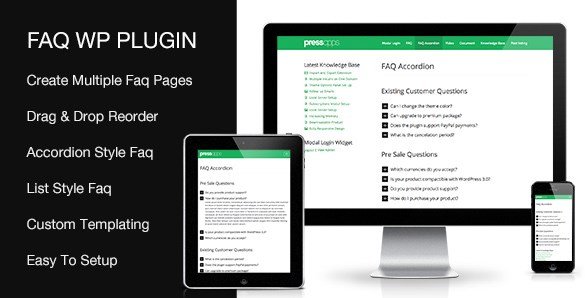
The WordPress ecosystem is flooded with FAQ solutions, ranging from simple free plugins to complex page builder extensions. However, the Accordion FAQ WordPress Plugin distinguishes itself through its dedicated focus on versatility and ease of use. Its primary selling proposition is the combination of a powerful Drag & Drop interface and a comprehensive Shortcode Generator. You do not need to write a single line of code to achieve professional-looking results.
- Intuitive Drag & Drop functionality for reordering FAQs and categories instantly.
- Multiple display styles including Accordion, List, and Block layouts to match any design.
- Extensive customization options for colors, fonts, and icons without touching CSS.
Accordion FAQ WordPress Plugin Features for WordPress Users
Drag & Drop Content Management
One of the most frustrating aspects of managing FAQs in WordPress is the lack of ordering control in native custom post types. This plugin solves that by implementing a seamless Drag & Drop interface. You can reorder individual FAQ posts and entire categories with a simple click-and-drag motion. This feature is incredibly valuable for maintaining a logical flow of information, ensuring that the most critical questions appear at the top of your lists. In my experience, this level of control saves site administrators hours of manual coding or tedious date-based sorting tricks.
Multiple Display Styles (Accordion, List, and Block)
Not every website has the same design requirements. Some layouts benefit from the traditional space-saving accordion, while others might require a full list of questions or a grid-based block layout. The Accordion FAQ WordPress Plugin provides these three distinct styles out of the box. The Accordion style is perfect for saving vertical space, keeping the interface clean. The List style is ideal if you want users to see all questions at a glance for easier scanning. The Block Accordion style offers a more modern, chunky aesthetic that works well with contemporary web designs. This flexibility ensures that the FAQ section blends perfectly with your existing theme, rather than looking like a tacked-on afterthought.
Advanced Customization & Shortcode Generator
Visual consistency is key to building a trustworthy brand. This plugin allows you to customize styling elements such as colors, icons, border radius, and font sizes directly from the dashboard. You don’t need to be a CSS expert to make your FAQs match your brand’s color palette perfectly. Furthermore, the included Shortcode Generator simplifies the implementation process. Instead of memorizing complex parameters, you can use the generator to insert the exact configuration you need into any page, post, or widget area. This makes the plugin accessible even for beginners who are just getting started with WordPress plugins.
How to Install Accordion FAQ WordPress Plugin
Quick Installation
- Log in to your CodeCanyon account and download the plugin ZIP file.
- Go to Plugins → Add New in your WordPress dashboard.
- Click “Upload Plugin” and select the ZIP file you downloaded.
- Click Install Now, then activate the plugin to start creating FAQs.
Who Should Use Accordion FAQ WordPress Plugin?
E-commerce Store Owners
For online stores, customer hesitation often stems from unanswered questions regarding shipping, returns, and product specs. Using this plugin, e-commerce owners can create comprehensive product-specific FAQ pages. The accordion style keeps the product page clean while offering immediate answers to conversion-critical questions. I highly recommend using the Block Accordion style on product pages to draw attention to guarantees or shipping info without cluttering the product description.
Service Providers and Agencies
Agencies, consultants, and service providers often face a barrage of repetitive inquiries. By implementing a robust FAQ section using this plugin, you can significantly reduce the time spent answering emails. The ability to categorize FAQs allows you to separate general questions from specific service details. If you are managing multiple client sites, the ease of setup and the professional output of this plugin make it a valuable tool in your toolkit. Check out more useful tools on our blog.
Accordion FAQ WordPress Plugin vs Alternatives
| Feature | Accordion FAQ WordPress Plugin | Free Alternatives (e.g., HTML/CSS) |
|---|---|---|
| User Interface | Visual Admin Panel with Drag & Drop | Requires Coding or Block Editor |
| Styling Options | Built-in Color/Font/Icon Customizer | Requires Custom CSS knowledge |
| Layout Flexibility | Accordion, List, and Block Modes | Usually static text lists |
Accordion FAQ WordPress Plugin Pricing
The Accordion FAQ WordPress Plugin is a premium product available exclusively through CodeCanyon. It typically follows a standard one-time payment model which includes lifetime updates and 6 months of support (optionally extendable). This is a cost-effective solution compared to subscription-based FAQ plugins, as you only pay once for a lifetime of usage on a single end product. You can view pricing details and license options on the official CodeCanyon page.
Pros and Cons
✅ Pros
- Intuitive Drag & Drop interface saves time.
- Multiple visual styles (Accordion, List, Block) offer design flexibility.
- Comprehensive styling options negate the need for custom CSS.
- Translation Ready for international websites.
- Dedicated Shortcode Generator simplifies usage.
❌ Cons
- Premium cost compared to free repository plugins.
- Requires manual installation via ZIP upload since it is not in the WordPress.org repository.
Frequently Asked Questions
Is the Accordion FAQ WordPress Plugin mobile responsive?
Yes, absolutely. The plugin is built to be fully responsive, ensuring that your accordion FAQs look great and function smoothly on all devices, including desktops, tablets, and mobile phones.
Do I need to know coding to use this plugin?
No coding knowledge is required. The plugin features a user-friendly admin dashboard and a shortcode generator that allows you to build and customize your FAQs visually without writing HTML or CSS.
Can I change the icons used in the accordion?
Yes, the plugin offers customization options for icons. You can typically select from standard icon sets or upload your own custom icons to match your brand identity, depending on the specific version settings.
How do I add the FAQ to a specific page?
You can add FAQs to any page or post using the provided Shortcode Generator. Simply configure your desired settings in the generator, copy the generated shortcode, and paste it into the WordPress editor or a text widget.
Is this plugin compatible with page builders like Elementor?
Yes, because the plugin uses shortcodes, it is compatible with almost all page builders. You can simply paste the shortcode into a Shortcode widget or HTML block within your page builder of choice.
Does the plugin support multiple languages?
Yes, the plugin is translation ready. It comes with .po/.mo files, allowing you to easily translate the FAQ interface into any language using tools like Poedit.
Final Verdict
The Accordion FAQ WordPress Plugin is a solid, reliable choice for anyone looking to improve site organization and user experience. Its combination of Drag & Drop ease, multiple layout styles, and deep customization makes it superior to basic text solutions. It’s particularly well-suited for e-commerce sites and service businesses that need to present information clearly and professionally. If you are looking for a premium, no-fuss solution to manage your FAQs, this plugin is a worthwhile investment. For more WordPress resources, visit WP Exclusive.