What is Youtube Vimeo Video Player and Slider WP Plugin?
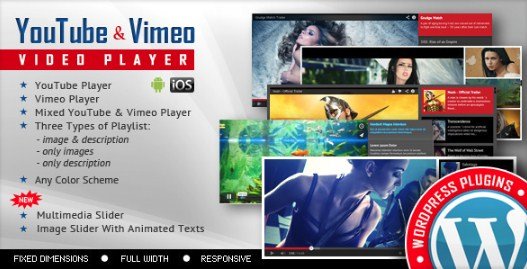
The Youtube Vimeo Video Player and Slider WP Plugin is a versatile WordPress plugin designed to seamlessly integrate and display video content from both YouTube and Vimeo. It serves a dual purpose: functioning as a dedicated video player for individual embeds or as a dynamic multimedia slider capable of showcasing a collection of videos. This plugin is crucial for website owners who want to enrich their content with video without relying on complex external services or manual coding. Its focus on responsiveness and ease of use makes it suitable for a wide range of WordPress websites, from blogs and portfolios to business sites and e-commerce platforms. By providing a centralized tool for handling popular video platforms, it streamlines the process of adding visually appealing and engaging elements to your site.
Key Features of Youtube Vimeo Video Player and Slider WP Plugin
- YouTube and Vimeo Support: Directly embed videos from the two most popular video hosting platforms, offering flexibility and broad content options.
- Mobile Compatible: Ensures your video players and sliders look and function flawlessly on all devices, including smartphones and tablets, providing an optimal user experience.
- Any Color Scheme: Allows for extensive customization of the player and slider appearance to match your website’s branding and design aesthetic.
- Responsive Design: Automatically adjusts the video player size and layout to fit the user’s screen dimensions, guaranteeing a consistent and visually appealing display.
- Easy Configuration: Offers a user-friendly interface and straightforward options for setting up and managing your video embeds and sliders without needing technical expertise.
While specific version details for the latest release would require checking the CodeCanyon marketplace, the core features ensure that the plugin remains a reliable solution for video integration, consistently updated to maintain compatibility and performance.
How to Download Youtube Vimeo Video Player and Slider WP Plugin
1. Visit the Official Sales Page:
- Navigate to the Youtube Vimeo Video Player and Slider WP Plugin on CodeCanyon.
- This is the official marketplace for purchasing and downloading the plugin.
2. Purchase the Plugin License:
- Click on the “Add to Cart” or “Buy Now” button on the plugin page.
- Complete the checkout process by following the instructions on the Envato market.
3. Download the Plugin Files:
- Once your purchase is complete, go to your CodeCanyon account’s downloads section.
- Find the “Youtube Vimeo Video Player and Slider WP Plugin” and download the installable WordPress file (usually a .zip file).
For a hassle-free setup, consider WPX Hosting, a top-rated reliable and managed provider, which comes with pre-installed WordPress and WooCommerce for optimized performance.
Installing Youtube Vimeo Video Player and Slider WP Plugin: Step-by-Step Guide
1. Access Your WordPress Dashboard:
- Log in to your WordPress website’s administrator area.
- Go to the “Plugins” menu and select “Add New”.
2. Upload and Install the Plugin:
- Click the “Upload Plugin” button at the top of the “Add New” plugins page.
- Click “Choose File” and select the downloaded .zip file from CodeCanyon. Then click “Install Now”.
3. Activate the Plugin:
- After the installation is complete, WordPress will show a success message.
- Click the “Activate Plugin” button to enable the Youtube Vimeo Video Player and Slider WP Plugin on your site.
Note: Back up your site before installing or updating plugins/themes. Always ensure you download the plugin from the official CodeCanyon sales page to guarantee you have the legitimate and secure version.
Youtube Vimeo Video Player and Slider WP Plugin Pricing
| Component | Price | Details |
|---|---|---|
| Regular License | $22 | Includes future updates and 6 months support from CodeRevolution. Can be used for one single end product which end users are not charged for. |
| Extended License | $120 | Includes future updates and 6 months support from CodeRevolution. Can be used for one single end product which end users CAN be charged for. |
| Support Extension | $6.38 (USD) | Extends support from 6 months to 12 months for the Regular License. |
Note that these prices are subject to change and are accurate as of the last update to the CodeCanyon page. For the most current pricing, always refer to the official sales page.
Youtube Vimeo Video Player and Slider WP Plugin Alternatives
EmbedPress:
- Pros: Supports a huge range of platforms (over 150+), including YouTube and Vimeo, with easy embedding using URLs. Offers extensive customization options and Gutenberg block integration.
- Cons: The free version has limited features; premium is required for advanced customization and integrations.
- Best For: Users who need to embed content from multiple sources beyond just YouTube and Vimeo.
Essential Grid:
- Pros: A premium plugin that can create dynamic grids with various media types, including YouTube and Vimeo videos. Offers highly customizable layouts and skins.
- Cons: Primarily designed for creating grids, not just simple video players. Can have a steeper learning curve due to its extensive options.
- Best For: Designers and developers looking to create complex, visually rich multimedia galleries and grids.
Slider Revolution:
- Pros: A powerful premium slider plugin that supports embedding YouTube and Vimeo videos within slides. Offers advanced animation features and templates.
- Cons: Like Essential Grid, it’s a comprehensive slider plugin, potentially overkill if you only need video embedding. Can be resource-intensive.
- Best For: Users who want to incorporate videos into highly animated and interactive sliders or presentations.
Youtube Vimeo Video Player and Slider WP Plugin vs. Other Video Plugins
When comparing the Youtube Vimeo Video Player and Slider WP Plugin to other video embedding and gallery solutions, its core strength lies in its focused feature set and ease of use specifically for YouTube and Vimeo. While alternatives like EmbedPress offer broader platform support, this plugin excels in providing a streamlined experience for the two most popular video platforms. Unlike comprehensive grid or slider plugins like Essential Grid or Slider Revolution, which support videos but also a myriad of other media types and complex layouts, this plugin is purpose-built for video playing and simple video sliders. This specialization often translates to a quicker setup and less complexity for users whose primary need is to display YouTube and Vimeo videos effectively and responsively.
- Focused Functionality: Designed specifically for YouTube and Vimeo embeds and sliders, keeping the interface clean and options relevant.
- Ease of Use: Generally simpler to configure and manage for basic video embedding compared to more feature-rich, multi-purpose plugins.
- Cost-Effective: Often more affordable if your needs are limited to YouTube and Vimeo compared to premium plugins that offer a wider range of features you might not use.
- Performance: By focusing on specific platforms, it can potentially offer better performance for YouTube and Vimeo embeds compared to plugins with broader, potentially heavier integrations.
The choice depends heavily on your specific requirements. If you only need to work with YouTube and Vimeo and prioritize simplicity, the Youtube Vimeo Video Player and Slider WP Plugin is a strong contender. If you require extensive platform support or complex multimedia layouts, alternatives might be more suitable.
Tips for Using Youtube Vimeo Video Player and Slider WP Plugin Effectively
- Optimize Video Thumbnails: Use compelling and high-resolution custom thumbnails for your YouTube and Vimeo videos. These are often displayed in sliders and can significantly impact click-through rates. Learn more about YouTube thumbnail best practices.
- Categorize and Organize: If creating multiple sliders or galleries, categorize your videos logically to make it easy for visitors to find content that interests them.
- Consider Autoplay (Sparingly): While autoplay can grab attention, use it cautiously and with sound muted by default to avoid annoying visitors. Autoplay can also impact page load times.
- Utilize Responsive Options: Ensure the responsive settings are correctly configured within the plugin to guarantee seamless viewing on all devices. Test on different screen sizes.
- Monitor Performance: Embedding multiple videos, especially in sliders, can affect website loading speed. Optimize the number of videos displayed initially and consider lazy loading if available. Explore tools like Google PageSpeed Insights to monitor site performance.
Pairing Youtube Vimeo Video Player and Slider WP Plugin with Elementor
Users of the Youtube Vimeo Video Player and Slider WP Plugin can enhance their layout capabilities by pairing it with a popular page builder like Elementor. While the plugin itself provides embedding and slider functionality, Elementor allows for drag-and-drop design of your entire page. You can easily insert the plugin’s output (either a single video embed or a slider shortcode) into any Elementor section or column. This pairing is beneficial for creating visually stunning landing pages, portfolio items, or blog posts where you want to integrate video content seamlessly within a custom layout. Elementor’s design tools provide granular control over spacing, margins, borders, and overall presentation, allowing you to perfectly frame your video players and sliders within your site’s design, offering a level of visual customization not typically available through just shortcodes.
Should You Invest in Premium Extensions?
While the standard license of the Youtube Vimeo Video Player and Slider WP Plugin offers robust features for embedding and creating basic video sliders, premium considerations (like extending support) become valuable if: you need:
- Extended support beyond the initial 6 months to ensure ongoing assistance with issues or compatibility updates.
- Developing a product (like a theme or plugin) that will include this video functionality and will be sold to end-users (requiring the Extended License).
- You rely heavily on the plugin for mission-critical parts of your website and require prompt support for any potential problems.
- You want peace of mind knowing you have access to expert help as new WordPress versions or video platform APIs are released.
Visit the official CodeCanyon sales page for detailed pricing information on support extensions and license types.
Frequently Asked Question:
Does the Youtube Vimeo Video Player and Slider WP Plugin support custom color schemes?
Yes, the plugin offers full support for customizing the color scheme of the player to match your website’s design.
Is the plugin responsive on mobile devices?
Absolutely, the plugin is built with responsive design in mind, ensuring videos and sliders display correctly on all screen sizes.
Can I mix YouTube and Vimeo videos in the same slider?
The plugin is designed to handle both platforms, but specific slider configurations might handle this differently. It’s best to check the plugin’s settings or documentation.
Do I need coding knowledge to use this plugin?
No, the plugin is designed for easy configuration through the WordPress dashboard and typically uses shortcodes, requiring no coding skills.
Where can I get support for the plugin?
Support for the plugin is provided by the author, CodeRevolution, via the support tab on the CodeCanyon item page for licensed users.
Can I use the plugin on multiple websites with a single license?
A regular CodeCanyon license is typically valid for use on a single end product (website). You would need to purchase additional licenses for use on multiple sites.
Conclusion
The Youtube Vimeo Video Player and Slider WP Plugin stands out as a robust and user-friendly solution for anyone needing to display video content from YouTube and Vimeo on their WordPress website. Its key strengths lie in its dedicated support for these major platforms, excellent responsiveness, and straightforward customization options, particularly for color schemes and basic configurations. Whether you need to embed individual videos or create dynamic video sliders to showcase a collection of content, this plugin provides the necessary tools to do so effectively and without technical headaches. By leveraging its features, you can significantly enhance user engagement and keep visitors on your site longer. We encourage you to explore its capabilities and see how it can transform the way you present video on your WordPress platform.
Disclaimer: Information regarding pricing, features, and alternatives is based on data available at the time of writing. Always refer to the official CodeCanyon sales page and plugin documentation for the most current and accurate information. Use the plugin responsibly and ensure you comply with YouTube and Vimeo’s terms of service when embedding videos.