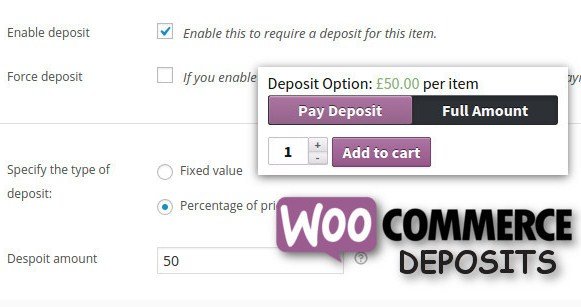
What is WooCommerce Deposits Partial Payments Plugin?
When WordPress users need a reliable solution to manage cash flow and reduce cart abandonment for high-ticket items, the WooCommerce Deposits Partial Payments Plugin offers a robust and flexible approach to financial management. As an expert in WordPress e-commerce solutions, I have seen how requiring full payment upfront can deter potential customers, especially for custom orders or services. This plugin bridges that gap by allowing store owners to accept a deposit upfront and the remaining balance at a later date, directly within the native WooCommerce workflow.
Distributed by Codecanyon, this plugin is specifically designed to integrate seamlessly with your existing WooCommerce setup. Whether you are running a rental service, selling expensive electronics, or offering bespoke manufacturing, this tool changes the dynamics of how you transact. It removes the friction of a large, immediate financial commitment for the buyer while securing the sale for the merchant.
What Makes WooCommerce Deposits Partial Payments Plugin Different
While there are several payment plan solutions available, I find the WooCommerce Deposits Partial Payments Plugin distinguishes itself through its granular control and seamless checkout integration. Unlike some subscription-based alternatives that force recurring payments, this plugin focuses strictly on a two-payment model: the deposit and the balance. This simplicity is its strength.
- Flexible Checkout Modes: It offers a unique checkout mode that places the deposit option directly at the cart stage, ensuring customers make a decision before finalizing the order.
- Automatic Payment Plans: The ability to send automatic email reminders for the remaining balance creates a passive collection system that saves store owners hours of administrative work.
- Global & Product Level Control: You can toggle deposits site-wide or restrict them to specific, high-value categories, providing maximum strategic control over your inventory.
WooCommerce Deposits Partial Payments Plugin Features for WordPress Users
Flexible Deposit Configuration
In my experience, every store has different financial needs. This plugin excels by offering two distinct methods for calculating deposits: a fixed value or a percentage of the total price. For instance, if you are booking a venue, you might charge a flat $500 fee regardless of the final catering cost. Conversely, for a high-end computer build, you might require a 30% deposit to cover parts. The WooCommerce Deposits Partial Payments Plugin handles both scenarios effortlessly. You can also choose to make deposits optional for the customer or mandatory, forcing them to pay a deposit to proceed with the checkout process.
Automated Payment Management
One of the most challenging aspects of partial payments is tracking who owes what. This plugin automates the heavy lifting. Once a deposit is paid, the order status updates, and the system tracks the remaining balance. The standout feature here is the automatic email reminder. You can configure the plugin to send email notifications to customers after a specific number of days, prompting them to log in and pay the remaining amount. This feature is crucial for maintaining healthy cash flow without having to manually chase clients. For more tools to enhance your site’s functionality, you can explore other WordPress Plugins.
Seamless WooCommerce Integration
What I appreciate most is that this is built from the ground up for WooCommerce. It doesn’t feel like a tacked-on script; it feels native. It works perfectly with WooCommerce Bookings, which is a significant advantage for service-based businesses. If you are selling time-based services, the deposit can be calculated per person or multiplied based on the booking duration. Furthermore, it includes specific settings to disable certain payment gateways when a deposit is in the cart—useful if you want to avoid COD for partial payments. The reporting features also integrate directly into the WooCommerce Reports panel, giving you a clear view of your deposit revenue separate from your full-pay revenue. Check out our collection of WooCommerce Plugins for more extensions.
How to Install WooCommerce Deposits Partial Payments Plugin
Quick Installation
- Log in to your WordPress dashboard and navigate to Plugins → Add New.
- Since this is a premium plugin from CodeCanyon, click Upload Plugin.
- Select the ZIP file you downloaded from your CodeCanyon account.
- Click Install Now and then Activate.
- Go to the new Deposits tab in your WooCommerce settings to configure your payment rules.
Who Should Use WooCommerce Deposits Partial Payments Plugin?
High-Ticket Retailers
If you sell luxury furniture, high-end electronics, or custom jewelry, you know that price resistance is a major hurdle. By allowing customers to pay a deposit now and the rest later, you psychologically lower the barrier to entry. It converts a “maybe later” into a “yes, book it now.” For authoritative guidance on WooCommerce best practices, I often refer to WooCommerce.com.
Service & Booking Providers
Hotels, event venues, and tour operators rely on securing dates. The WooCommerce Deposits Partial Payments Plugin is essential here. It ensures that a commitment is made (via deposit) to hold a reservation, preventing no-shows and double-bookings. The compatibility with WooCommerce Bookings makes this the go-to solution for any time-based inventory business.
WooCommerce Deposits Partial Payments Plugin vs Alternatives
| Feature | WooCommerce Deposits Plugin | Generic Payment Gateways |
|---|---|---|
| Integration | Native WooCommerce & Bookings | Requires external manual setup |
| Payment Reminders | Automated email triggers | Manual invoicing required |
| Inventory Blocking | Reserves stock immediately | Often holds stock until full payment |
WooCommerce Deposits Partial Payments Plugin Pricing
Available exclusively on CodeCanyon, this plugin follows a one-time purchase model. Unlike subscription-based plugins that charge annually, you pay a single fee for a lifetime license (though support and updates may need renewal depending on the author’s policy). This makes it a highly cost-effective solution for long-term projects compared to monthly recurring alternatives. Pricing typically varies based on support length, but it remains an affordable entry point for professional deposit management. Visit WPExclusive for more details on acquiring this tool.
Pros and Cons
✅ Pros
- High Flexibility: Supports both fixed and percentage-based deposits globally or per-product.
- Automation: Excellent email reminder system for collecting outstanding balances automatically.
- Compatibility: Works flawlessly with WooCommerce Bookings and multilingual plugins like WPML.
❌ Cons
- Licensing: Being on CodeCanyon means future updates depend on renewing support periods in some cases.
- Learning Curve: While intuitive, configuring specific gateway restrictions can take a few minutes to master.
- Limitation: Primarily focuses on 2-part payments (Deposit + Balance), not complex multi-installment plans.
Frequently Asked Questions
Can I force customers to pay a deposit?
Yes, the plugin allows you to configure deposits as mandatory. When enabled, the customer cannot proceed to checkout without selecting the deposit option or paying the required partial amount.
Does this plugin support WooCommerce Subscriptions?
This plugin is designed for one-time partial payments. For recurring payments, you would typically use WooCommerce Subscriptions. However, they can often coexist if used for different product types.
How do customers pay the remaining balance?
Customers receive an email with a payment link. They can also log in to their account on your site, view their “Partial Payment” orders, and pay the balance directly via the My Account page.
Is it compatible with other payment gateways?
Yes, it works with standard WooCommerce gateways like Stripe, PayPal, and BACS. You can even disable specific gateways (like Cash on Delivery) specifically for deposit orders to reduce risk.
Can I set different deposit amounts for different products?
Absolutely. While you can set a global rule, you can override this on a per-product basis. This allows you to require a 50% deposit for custom-made items but only 10% for standard stock items.
Will the inventory be reserved when a deposit is paid?
Yes, when a deposit payment is successful, WooCommerce treats it as a standard order process. The stock is reduced or reserved immediately, preventing other customers from buying the item while the deposit is pending.
Final Verdict
The WooCommerce Deposits Partial Payments Plugin is an essential tool for any serious WooCommerce store looking to improve conversion rates on high-value items. It offers a perfect balance of simplicity and power, providing the necessary features to manage cash flow without overcomplicating the user experience. It’s particularly well-suited for booking agencies and retailers of luxury goods, securing revenue that might otherwise be lost to hesitation. If you need a robust, native-feeling solution for partial payments, this plugin is a top-tier choice.