What is YITH WooCommerce Minimum Maximum Quantity Premium?
YITH WooCommerce Minimum Maximum Quantity Premium is a specialized WordPress plugin developed by YITHemes, designed to give e-commerce store owners precise control over the quantity of products customers can purchase. Its primary purpose is to enable the setting of minimum and maximum purchase thresholds, whether for individual products, specific categories, product tags, or the entire shopping cart. This functionality is crucial for various business models, such as wholesale operations where minimum order quantities (MOQs) are standard, or for retail promotions where limiting the purchase quantity of a discounted item can prevent stock depletion and ensure fair access for more customers. The significance of YITH WooCommerce Minimum Maximum Quantity Premium lies in its ability to streamline the purchasing process, guide customers effectively, and protect profit margins. For instance, sellers of low-cost, small items can enforce minimum quantities to make shipping economically viable, preventing losses on small orders. Conversely, setting maximum limits can be vital during flash sales or for limited-edition products. The plugin helps in managing inventory more efficiently and can be a strategic tool for upselling or cross-selling by encouraging customers to add more items to meet a minimum spend or quantity. Its robust feature set ensures that store owners can implement complex purchasing rules tailored to their specific needs, ultimately enhancing the user experience and optimizing sales strategies. For anyone serious about refining their WooCommerce store’s order management, this plugin offers a comprehensive solution.
Key Features of YITH WooCommerce Minimum Maximum Quantity Premium
- Comprehensive Cart Restrictions: Set minimum and maximum spend amounts for the entire cart, with options to include or exclude fees and taxes. You can also define a minimum or maximum number of total products required in the cart.
- Category and Tag-Specific Rules: Apply minimum or maximum quantity and spend rules to products belonging to specific categories or those sharing the same product tag. This allows for highly targeted sales strategies, like requiring a minimum purchase from a particular category to qualify for a promotion.
- Individual Product Controls: Define specific minimum or maximum purchase quantities directly on the product level, overriding global or category/tag rules if needed. This is perfect for products with unique selling conditions.
- Variable Product Handling: A crucial feature allows you to calculate quantity restrictions for variable products either as the sum of all variations or by applying rules to each variation individually. This offers flexibility for products with multiple options.
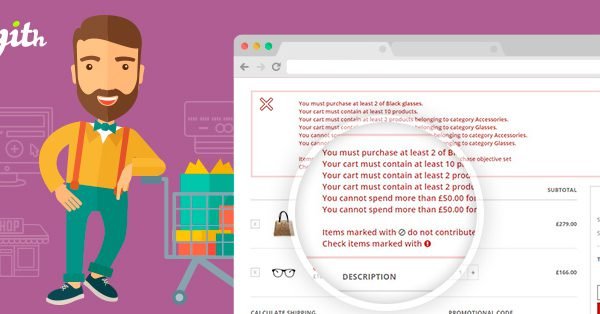
- Customizable Error Messages & Notifications: Enable and customize error messages that appear on the cart page or when the “Add to Cart” button is clicked if quantity rules aren’t met. Informative messages guide users to adjust their cart, improving user experience. You can also display all active purchase rules on product pages.
- Product Exclusion: Easily exclude specific products from any global or specific purchase rules, providing flexibility for items that don’t fit standard quantity restrictions.
- Bulk Actions for Efficiency: Apply restrictions to multiple products simultaneously using bulk actions from the WordPress product list, saving significant time for stores with large inventories.
- Integration with YITH Plugins: Seamlessly integrates with other YITH plugins like YITH WooCommerce Composite Products and YITH WooCommerce Product Bundles, extending its functionality to complex product types.
The latest version, currently 1.51.0 as of its last update, continues to refine these features, ensuring compatibility with the latest WordPress and WooCommerce versions (WordPress 6.6+, WooCommerce 9.6+). YITHemes consistently provides updates for bug fixes, new features, and maintaining compatibility, ensuring YITH WooCommerce Minimum Maximum Quantity Premium remains a reliable tool for e-commerce businesses. Their commitment to supporting multilanguage plugins like WPML and Weglot also makes it a globally viable option.
How to Download YITH WooCommerce Minimum Maximum Quantity Premium (Not Free)
YITH WooCommerce Minimum Maximum Quantity Premium is a premium plugin and is not available for free download. To acquire this powerful tool for your WooCommerce store, you must purchase a license from the official YITHemes website. While there isn’t a free version of the premium plugin itself, YITHemes often provides a 30-day money-back guarantee, allowing you to test the plugin’s capabilities on your site and ensure it meets your specific requirements without financial risk. This effectively serves as a trial period. Here’s the general process to obtain and start using the plugin:
1. Visit the Official YITHemes Sales Page:
- Navigate to the YITH WooCommerce Minimum Maximum Quantity Premium sales page on the YITHemes website.
- Review the latest features, pricing tiers (typically annual subscriptions that include support and updates), and any available bundles or discounts.
2. Purchase and Download the Plugin:
- Select the appropriate license for your needs and complete the purchase process. YITHemes offers various payment options.
- Once the purchase is complete, you will receive access to download the plugin’s ZIP file from your YITHemes account dashboard. You will also receive a license key, which is essential for activating the plugin and receiving automatic updates.
3. Understand the Value:
- While not free, investing in YITH WooCommerce Minimum Maximum Quantity Premium provides access to robust features, dedicated customer support, and regular updates that free alternatives might not offer. Consider the potential return on investment through optimized sales and improved customer management.
- The cost often covers a year of updates and support, ensuring your store’s quantity control mechanisms remain current and effective. Check out our YITH WooCommerce Multi Vendor Premium review for insights into YITH’s plugin ecosystem.
For a hassle-free setup, consider WPX Hosting from top rated reliable and managed providers, which comes with pre-install WordPress and WooCommerce with optimized performance.
Installing YITH WooCommerce Minimum Maximum Quantity Premium: Step-by-Step Guide
Once you have purchased and downloaded the YITH WooCommerce Minimum Maximum Quantity Premium plugin ZIP file from your YITHemes account, installing it on your WordPress website is a straightforward process. Ensure you have administrator access to your WordPress dashboard. Before starting, it’s always a good practice to back up your website, especially before installing new plugins. Here’s how to install YITH WooCommerce Minimum Maximum Quantity Premium:
1. Upload the Plugin to WordPress:
- Log in to your WordPress admin dashboard.
- Navigate to Plugins > Add New from the left-hand menu.
- At the top of the ‘Add Plugins’ page, click the Upload Plugin button.
- Click the Choose File button, then locate and select the plugin’s ZIP file (e.g., `yith-woocommerce-minimum-maximum-quantity-premium.zip`) that you downloaded from YITHemes.
- Click the Install Now button. WordPress will now upload and unpack the plugin files.
2. Activate the Plugin:
- After the installation is complete, you will see a success message. Click the Activate Plugin button.
- Once activated, you may be prompted to enter your license key to enable automatic updates and access support. This key is usually found in your YITHemes account dashboard. Follow the on-screen instructions to complete this step.
3. Configure Plugin Settings:
- After activation, a new menu item, usually under YITH > Minimum Maximum Quantity (or similar), will appear in your WordPress admin sidebar.
- Click on this menu item to access the plugin’s settings panel. Here, you can configure global rules for cart minimum/maximum quantities and amounts, set up rules for categories and tags, customize error messages, and manage other options according to your store’s needs. Refer to the official YITH documentation for detailed guidance on each setting. Learning how to effectively manage your WooCommerce setup, including understanding WooCommerce shortcodes, can further enhance your store’s functionality.
Note: Always back up your site before installing or updating plugins. After any update to YITH WooCommerce Minimum Maximum Quantity Premium, check its settings to ensure your configurations are intact and functioning as expected.
YITH WooCommerce Minimum Maximum Quantity Premium Pricing
YITH WooCommerce Minimum Maximum Quantity Premium is a premium plugin, meaning it requires a purchase to use its full range of features. YITHemes typically offers its plugins through an annual subscription model. This subscription generally includes access to the plugin, one year of updates (which often bring new features, improvements, and compatibility fixes with WordPress and WooCommerce updates), and one year of premium customer support. The exact pricing can vary based on the number of sites the license can be used on (e.g., single site, multiple sites, or unlimited sites for developers/agencies) and any ongoing promotions or bundle offers YITHemes might have. As pricing structures can change, it’s always best to check the official YITHemes sales page for the most current information. Typically, a single site license for a YITH premium plugin like this one might range from $60 to $100 per year, but this is an estimate. The cost reflects the plugin’s advanced functionality, ongoing development, and dedicated support system. YITHemes also offers a 30-day money-back guarantee, which allows you to try the plugin and get a full refund if it doesn’t meet your needs, providing a risk-free way to evaluate its value for your business. For specific pricing details, please visit the official YITH WooCommerce Minimum Maximum Quantity Premium page. Occasionally, YITHemes offers club memberships or bundles that provide access to multiple plugins at a discounted rate, which could be a cost-effective option if you plan to use several YITH plugins. Remember that while the initial cost might seem significant, the ability to enforce quantity rules can directly impact profitability, potentially offsetting the plugin’s expense through optimized sales and reduced handling costs for unprofitable orders. For more insights into managing your e-commerce finances, our WooCommerce tutorial might offer helpful tips.
| Component | Price | Details |
|---|---|---|
| Single Site License | Check Official Site | Typically includes 1 year of updates and support for one website. Ideal for individual store owners. |
| Multi-Site License (e.g., 3-5 sites) | Check Official Site | Often available for users managing several WooCommerce stores, offering a per-site discount. |
| Agency/Developer License | Check Official Site | May be offered for unlimited sites, catering to web development agencies or freelancers building multiple client stores. |
| YITH Club Membership | Check Official Site | Provides access to all or a large selection of YITH plugins and themes for an annual fee. |
YITH WooCommerce Minimum Maximum Quantity Premium Alternatives
While YITH WooCommerce Minimum Maximum Quantity Premium is a robust solution, several alternatives exist in the WordPress plugin ecosystem, each with its own strengths and weaknesses. Choosing the right one depends on your specific needs, budget, and the complexity of the rules you wish to implement. Some popular alternatives include:
1. WooCommerce Min/Max Quantities (by WooCommerce):
- Pros: Developed by WooCommerce, ensuring good compatibility and a straightforward interface. Allows setting min/max quantities and values per product, order, or category. Supports quantity grouping (e.g., buy in multiples of X).
- Cons: Can be more expensive than some third-party options for a single site license. Might lack some of the very granular rule combinations or specific YITH ecosystem integrations.
- Best For: Users who prefer official WooCommerce extensions and need reliable, core functionality for min/max quantity rules without overly complex scenarios.
2. Min/Max Quantity & Step Control for WooCommerce (by CodeAstrology):
- Pros: Often more budget-friendly and offers a good range of features, including min/max quantity, step quantity (increments), and default quantity settings at product, category, and global levels. It also has a free version with basic features.
- Cons: Support and update frequency might not be as extensive as YITH or official WooCommerce extensions. The user interface might feel less polished to some.
- Best For: Store owners on a tighter budget or those who need basic to intermediate quantity and step control features, especially if the free version meets their initial needs.
3. ELEX WooCommerce Minimum Order Amount Plugin:
- Pros: Focuses primarily on minimum order amounts but can be extended or combined for quantity-like restrictions. Often includes role-based restrictions, which can be very useful. Good support from ELEXtensions.
- Cons: May not be as comprehensive for maximum quantity rules or product-specific quantity limits as dedicated min/max quantity plugins. Its primary focus is on order value.
- Best For: Businesses that primarily need to enforce minimum order values, especially with different rules for different user roles (e.g., wholesale vs. retail customers).
When considering alternatives to YITH WooCommerce Minimum Maximum Quantity Premium, evaluate factors like the specific types of rules you need (cart total, product quantity, category-specific, tag-specific), your budget, the importance of integration with other plugins (especially if you use other YITH products), and the level of support and updates you require. Always check recent reviews and compatibility information before making a decision. You might also find relevant tools in our WooCommerce extensions category.
YITH WooCommerce Minimum Maximum Quantity Premium vs. Other Plugins
YITH WooCommerce Minimum Maximum Quantity Premium distinguishes itself from other quantity control plugins through its comprehensive feature set, user-friendly interface, and strong integration within the YITH ecosystem. While many plugins offer basic minimum or maximum quantity settings, YITH’s solution provides a more granular level of control. For instance, its ability to set rules based on product tags, in addition to individual products and categories, offers an extra layer of flexibility that not all competitors provide. This is particularly useful for stores with complex product categorizations or those running targeted promotions based on specific product attributes represented by tags. Furthermore, the plugin’s handling of variable products—allowing rules to apply to the sum of variations or individual variations—is a sophisticated feature crucial for businesses selling configurable items. Many simpler plugins might only apply rules at the parent product level, which can be limiting.
- Granular Rule Configuration: YITH WooCommerce Minimum Maximum Quantity Premium excels in allowing a wide array of conditions for quantity and spending limits, including cart-wide, per-product, per-category, and per-tag rules. This multi-layered approach provides superior control compared to plugins offering only basic product-level or cart-level restrictions.
- YITH Ecosystem Integration: A significant advantage is its seamless integration with other YITH plugins like YITH WooCommerce Product Bundles or YITH Request a Quote. This synergy creates a more powerful and cohesive e-commerce environment, where quantity rules are respected across different purchasing scenarios, which might not be the case when mixing plugins from various developers.
- User Experience and Customization: The ability to customize error messages and display purchase rules directly on product pages enhances transparency and guides customers effectively, reducing cart abandonment due to confusion. While other plugins offer error messages, YITH’s level of customization and options for displaying rules proactively is a strong point.
- Support and Updates: YITHemes is known for providing regular updates and dedicated customer support for their premium plugins. This reliability is a key differentiator from some smaller or less frequently maintained plugins, ensuring long-term compatibility and assistance when needed. The official WooCommerce plugin also has strong support, but its specific min/max extension might not have the same breadth of features as YITH’s dedicated offering.
While alternatives like the official WooCommerce Min/Max Quantities or third-party solutions from developers like CodeAstrology offer valuable functionality, YITH WooCommerce Minimum Maximum Quantity Premium often provides a more holistic and detailed approach, particularly for businesses requiring intricate rule sets or already invested in the YITH plugin suite. The choice depends on balancing specific feature needs against budget and the desired level of integration and support.
Tips for Using YITH WooCommerce Minimum Maximum Quantity Premium Effectively
- Clearly Communicate Rules: Utilize the plugin’s feature to display purchase rules on product pages and customize error messages to be informative and helpful. Customers are less likely to be frustrated if they understand the quantity requirements upfront. For example, instead of a generic error, a message like “This item must be purchased in multiples of 6” is much clearer.
- Test All Configurations Thoroughly: Before going live, rigorously test all your minimum/maximum quantity and amount rules across different products, categories, and user scenarios (e.g., logged-in vs. guest users, different user roles if applicable). Ensure they work as expected and don’t create unintended barriers to purchase.
- Leverage for Wholesale or Bulk Discounts: If you have a wholesale component to your business, use YITH WooCommerce Minimum Maximum Quantity Premium to enforce minimum order quantities (MOQs) for wholesale user roles. Conversely, for retail, you might set maximums on deeply discounted items to prevent abuse.
- Strategic Use for Promotions: During sales or special offers, set maximum purchase limits on promotional items to ensure wider availability and prevent single buyers from depleting stock. This can also encourage customers to explore other products if they hit a limit on one.
- Optimize for Shipping Costs: For low-priced items where shipping individual units is not profitable, set minimum quantity rules. This ensures that the order value justifies the shipping and handling costs, protecting your margins.
- Regularly Review and Adjust Rules: Market conditions, stock levels, and business strategies change. Periodically review your quantity rules to ensure they are still relevant and effective. What worked last quarter might need adjustment.
- Utilize Category/Tag Rules for Efficiency: Instead of setting rules product by product, use category or tag-level rules where applicable. This saves time and ensures consistency across groups of similar products.
- Combine with Other YITH Plugins: If you use other YITH plugins like YITH WooCommerce Product Bundles or YITH Request a Quote, explore how YITH WooCommerce Minimum Maximum Quantity Premium integrates with them to create even more sophisticated purchasing workflows and controls.
- Monitor Customer Feedback: Pay attention to customer service inquiries or feedback related to purchasing quantities. This can highlight areas where rules might be confusing or overly restrictive, allowing you to refine them for a better user experience.
Pairing YITH WooCommerce Minimum Maximum Quantity Premium with Complementary Tools/Plugins
YITH WooCommerce Minimum Maximum Quantity Premium becomes even more powerful when paired with other complementary WooCommerce plugins, especially those within the YITH ecosystem, as they are designed for seamless integration. For instance, when used with YITH WooCommerce Product Bundles, you can set minimum or maximum purchase quantities for entire bundles or apply rules to the individual components within a bundle. This is invaluable for promotions where you want to sell a specific number of bundled offers or ensure customers select a certain quantity of items within a customizable bundle. Similarly, integrating with YITH WooCommerce Composite Products allows store owners to enforce quantity restrictions on products made of several components. This ensures that users select appropriate quantities for each part of a composite product, adhering to overall purchase rules. Another excellent pairing is with YITH Request a Quote for WooCommerce. In this scenario, quantity rules set by YITH WooCommerce Minimum Maximum Quantity Premium can be enforced even during the quote request phase. This prevents customers from requesting quotes for quantities that don’t meet your business’s predefined limits, streamlining the quotation process. Beyond YITH plugins, consider pairing it with advanced pricing plugins. For example, a dynamic pricing plugin could offer bulk discounts, and YITH Minimum Maximum Quantity could then enforce that these discounted rates are only available when a certain minimum quantity is purchased, ensuring the discount strategy is profitable. Furthermore, using it alongside a role-based pricing plugin allows you to set different quantity rules for different user roles (e.g., stricter minimums for wholesalers, flexible options for retail). This combination allows for highly tailored e-commerce experiences. The core idea is to build a cohesive system where quantity controls work in harmony with pricing, product structuring, and customer interaction tools to achieve specific business goals, from managing inventory effectively to maximizing average order value.
Should You Invest in YITH WooCommerce Minimum Maximum Quantity Premium?
Deciding whether to invest in YITH WooCommerce Minimum Maximum Quantity Premium hinges on your specific e-commerce needs and business model. If your store deals with products that have inherent quantity constraints—such as items sold in specific pack sizes, low-cost products where individual shipping is unprofitable, or high-demand items needing purchase limits to ensure fair distribution—then this plugin is a strong contender. The premium features offered by YITH WooCommerce Minimum Maximum Quantity Premium go beyond basic quantity controls that might be available in simpler or free plugins. It’s particularly worth considering if you require:
- Granular Control over Purchase Rules: The ability to set minimum/maximum quantities and spend amounts not just per product or globally, but also for specific categories and product tags, offers a level of precision vital for complex sales strategies or inventory management.
- Advanced Variable Product Handling: If you sell products with multiple variations and need to apply quantity rules to the sum of variations or individual variations, the premium version’s capabilities are essential.
- Sophisticated Cart-Level Restrictions: Setting rules based on the total number of items in the cart, or the total cart value (with options to include/exclude fees), helps in optimizing shipping profitability and encouraging larger orders.
- Integration with the YITH Ecosystem: If you already use or plan to use other YITH plugins (like Product Bundles, Composite Products, or Request a Quote), the seamless integration offered by YITH WooCommerce Minimum Maximum Quantity Premium ensures a cohesive and efficient system.
- Customizable User Experience: The options to display purchase rules on product pages and customize error messages help in guiding customers and reducing frustration, which can be crucial for conversion rates.
- Dedicated Support and Regular Updates: Investing in a premium plugin from a reputable developer like YITHemes ensures access to professional support and continuous updates, maintaining compatibility and security.
If your store only requires very basic quantity limits (e.g., a simple minimum on a single product), a free or lighter plugin might suffice. However, for businesses aiming to strategically manage sales, prevent stock abuse, implement wholesale conditions, or optimize order values through carefully crafted quantity rules, YITH WooCommerce Minimum Maximum Quantity Premium provides the robust functionality that can lead to a significant return on investment. Visit the official YITHemes site for the latest pricing and to assess if its extensive feature set aligns with your operational demands and growth strategy.
Frequently Asked Questions:
1. Can I set different minimum order quantities for different product categories using YITH WooCommerce Minimum Maximum Quantity Premium?
Yes, YITH WooCommerce Minimum Maximum Quantity Premium allows you to set specific minimum (and maximum) quantity rules for products belonging to particular categories. You can also set minimum or maximum spend amounts for products within a specific category.
2. How does YITH WooCommerce Minimum Maximum Quantity Premium handle variable products?
The plugin offers flexibility for variable products. You can choose to calculate quantity restrictions as the sum of all variations added to the cart or apply distinct rules to each individual product variation. This is a key feature for stores with configurable products.
3. Can I customize the error messages shown to customers if they don’t meet the quantity rules?
Absolutely. YITH WooCommerce Minimum Maximum Quantity Premium allows you to enable and fully customize the error messages that are displayed on the cart page and when a customer clicks the “Add to Cart” button without meeting the defined quantity or amount requirements. Clear messages improve user experience.
4. Is it possible to exclude certain products from the minimum/maximum quantity rules with YITH WooCommerce Minimum Maximum Quantity Premium?
Yes, the plugin provides an option to exclude one or more specific products from applying the general or specific purchase rules you’ve configured. This is useful for items that need to bypass standard quantity restrictions.
5. What happens if a customer tries to checkout without meeting the set quantity or spend rules?
If a customer’s cart does not meet the established rules (e.g., minimum quantity not reached, maximum spend exceeded), YITH WooCommerce Minimum Maximum Quantity Premium will display the customized error message you’ve configured, preventing them from proceeding to checkout until the cart is adjusted to comply with the rules.
6. Does YITH WooCommerce Minimum Maximum Quantity Premium have a free version?
YITH WooCommerce Minimum Maximum Quantity Premium is a premium plugin. While YITHemes sometimes offers free versions for some of their plugins with limited functionality, this particular plugin with its comprehensive feature set is typically available as a paid product. They do offer a 30-day money-back guarantee for their premium plugins.
Conclusion
YITH WooCommerce Minimum Maximum Quantity Premium stands out as a comprehensive and highly flexible solution for WooCommerce store owners needing precise control over product purchase quantities and order values. Its extensive feature set, including rules for individual products, categories, tags, and the entire cart, combined with specific handling for variable products and customizable user notifications, makes it an invaluable tool for a variety of e-commerce strategies. Whether you’re looking to implement wholesale MOQs, prevent abuse of promotional offers, optimize shipping costs for low-value items, or simply guide customers towards more profitable purchase patterns, this plugin delivers the necessary controls. The integration with other YITH plugins further enhances its capabilities within a cohesive e-commerce ecosystem. While it is a premium investment, the potential benefits in terms of streamlined operations, protected profit margins, and improved customer experience can significantly outweigh the cost for businesses with specific quantity control needs. We encourage you to explore YITH WooCommerce Minimum Maximum Quantity Premium further on the official YITHemes website and consider how its powerful features can help you manage your online store more effectively and achieve your sales objectives. For businesses serious about fine-tuning their order management, this plugin is a top-tier choice.
Disclaimer: Plugin features, pricing, and compatibility details are subject to change. Always refer to the official YITHemes website for the most current and accurate information before making a purchase. Ensure the plugin is compatible with your WordPress and WooCommerce versions.