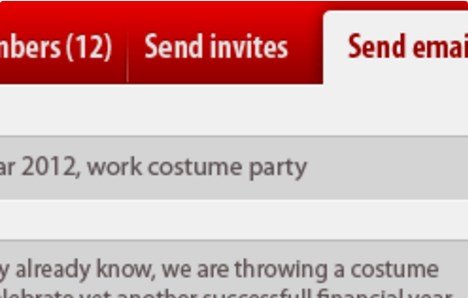
What is WPMU DEV BuddyPress Group Email?
WPMU DEV BuddyPress Group Email is a dedicated WordPress plugin designed specifically to enhance communication within BuddyPress communities. Developed by the experienced team at WPMU DEV, this plugin addresses a common challenge faced by online community managers: efficiently contacting all members of a specific group. In standard BuddyPress setups, reaching every group member directly via email can be cumbersome, often relying on individual messages or forum posts that might be missed. This plugin elegantly solves that problem by empowering designated group administrators and moderators with the ability to send targeted email messages directly to the entire membership roster of their group. Its significance lies in its simplicity and effectiveness; it provides a straightforward tool that integrates seamlessly into the BuddyPress environment, requiring no coding knowledge or complex configuration. For websites heavily reliant on BuddyPress for fostering interaction, collaboration, or information dissemination within focused groups (like clubs, teams, project collaborators, or course cohorts), WPMU DEV BuddyPress Group Email becomes an invaluable asset. It ensures important announcements, updates, or discussions reach all intended recipients, bypassing potential notification fatigue or overlooked activity feed items, thereby fostering stronger group cohesion and engagement directly through members’ primary communication channel – their email inbox.
Key Features of WPMU DEV BuddyPress Group Email
- Direct Group Emailing: Allows authorized group admins and moderators to send emails to all members of a specific BuddyPress group simultaneously from a simple interface within the group’s page.
- Simple Interface: Features an intuitive email composition form directly accessible within the group management area. Users just need to enter a subject and message body, then click send.
- Role-Based Access Control: By default, only Group Admins and Moderators have the permission to send group emails, preventing misuse and ensuring communications are official.
- Bypasses Notification Settings: Emails sent via this plugin are delivered directly to the member’s registered email address, ensuring receipt even if the user has disabled certain on-site BuddyPress notifications.
- Seamless BuddyPress Integration: Designed specifically for BuddyPress, ensuring smooth operation and compatibility within the BuddyPress group structure and user management system.
- Centralized Communication: Keeps group-specific announcements and important information dissemination managed within the website’s ecosystem, reducing reliance on external mailing lists or manual address collection.
- No Complex Setup: Installation and activation are straightforward, typical of WordPress plugins. There are no intricate settings to configure; it works effectively out-of-the-box.
- Maintained and Supported: Being a WPMU DEV product, it benefits from regular updates for compatibility and security, along with access to their reputable support team (requires active membership).
The latest version of WPMU DEV BuddyPress Group Email continues to provide stable and reliable group communication features, ensuring compatibility with the latest versions of WordPress and BuddyPress. WPMU DEV focuses on maintaining the plugin’s core simplicity while ensuring it remains a robust tool for community managers needing direct email outreach capabilities within their groups. Updates typically include performance enhancements, security patches, and compatibility fixes, reflecting WPMU DEV’s commitment to their product suite.
How to Download WPMU DEV BuddyPress Group Email
WPMU DEV BuddyPress Group Email is a premium plugin and is not available for free download from the WordPress.org repository. Accessing this plugin requires an active WPMU DEV membership. Here’s how you can download it:
1. Obtain a WPMU DEV Membership:
- Visit the WPMU DEV website and choose a membership plan that suits your needs. Plans typically offer access to their entire suite of plugins (including WPMU DEV BuddyPress Group Email), themes, and support.
- Complete the signup process and create your WPMU DEV account.
2. Access the Plugin Download:
- Log in to your WPMU DEV dashboard.
- Navigate to the ‘Plugins’ section and search for or locate ‘BuddyPress Group Email’. You can also find it directly via its product page linked from their main site.
3. Download the Plugin File:
- On the WPMU DEV BuddyPress Group Email plugin page within your dashboard, click the download button.
- This will save the plugin as a .zip file to your computer, ready for installation on your WordPress site. Alternatively, you can often install WPMU DEV plugins directly using their WPMU DEV Dashboard plugin if you have that installed on your site.
For a hassle-free setup and optimal performance for your community site, consider WPX Hosting, one of the top-rated reliable and managed WordPress providers. They offer optimized environments that can enhance the speed and reliability of BuddyPress sites, ensuring smooth operation for plugins like WPMU DEV BuddyPress Group Email.
Installing WPMU DEV BuddyPress Group Email: Step-by-Step Guide
Once you have downloaded the WPMU DEV BuddyPress Group Email plugin .zip file, installing it on your WordPress site is straightforward. Follow these steps:
1. Via WordPress Admin Dashboard (Recommended):
- Log in to your WordPress website’s admin area (usually `yourdomain.com/wp-admin`).
- Navigate to ‘Plugins’ in the left-hand sidebar menu, then click ‘Add New’.
- At the top of the ‘Add Plugins’ page, click the ‘Upload Plugin’ button.
- Click ‘Choose File’, select the `buddypress-group-email.zip` file (the exact filename might vary slightly) you downloaded from WPMU DEV, and click ‘Install Now’.
- After WordPress unpacks and installs the plugin, click the ‘Activate Plugin’ button.
2. Via FTP (File Transfer Protocol):
- Unzip the `buddypress-group-email.zip` file on your local computer. This will create a folder named something like `buddypress-group-email`.
- Connect to your website’s server using an FTP client (like FileZilla or Cyberduck) with your FTP credentials.
- Navigate to the `/wp-content/plugins/` directory within your WordPress installation.
- Upload the entire `buddypress-group-email` folder (not the .zip file) from your computer to the `/wp-content/plugins/` directory on your server.
- Once the upload is complete, go back to your WordPress admin dashboard, navigate to ‘Plugins’ > ‘Installed Plugins’.
- Locate ‘BuddyPress Group Email’ in the list and click the ‘Activate’ link below it.
3. Configuration (Minimal):
- WPMU DEV BuddyPress Group Email requires minimal configuration. Once activated, it automatically adds an ‘Email Members’ option within the admin/manage section of each BuddyPress group.
- Ensure BuddyPress is installed and active, and that you have groups created. Group administrators and moderators will now see the option to compose and send emails to their group members.
Note: Always back up your website completely before installing new plugins. Ensure BuddyPress is active and properly configured before activating WPMU DEV BuddyPress Group Email. No specific update prompts are usually needed unless noted by WPMU DEV.
WPMU DEV BuddyPress Group Email Pricing
WPMU DEV BuddyPress Group Email is not available as a standalone purchase. It is included as part of the comprehensive WPMU DEV membership package, which grants access to their entire library of premium plugins (like Forminator Pro, Smush Pro, Hummingbird Pro, Defender Pro, etc.), themes, site management tools (The Hub), and dedicated 24/7 expert support. This model provides significant value for users managing multiple sites or requiring a suite of tools for WordPress development, optimization, security, and marketing. Pricing is subscription-based, typically offered in monthly or annual payment options across different tiers, catering to freelancers, agencies, and individual site owners. The tiers usually vary based on the number of sites you can use the tools on and potentially the level of support or included services like hosting credits. Since pricing structures and specific inclusions can change, it’s essential to visit the official WPMU DEV website for the most current and detailed information regarding their membership plans and costs. Investing in a membership not only provides access to WPMU DEV BuddyPress Group Email but also equips you with a powerful toolkit for managing and enhancing your WordPress projects. Consider the overall value of the membership relative to your needs for various premium tools and support when evaluating the cost.
| Component | Price | Details |
|---|---|---|
| WPMU DEV Membership (Access to All Plugins) | Starts from approx. $15.83/month (billed annually, price subject to change) | Provides access to WPMU DEV BuddyPress Group Email, all other WPMU DEV plugins, themes, The Hub site management, and support. Tiers vary. |
| WPMU DEV BuddyPress Group Email | Included with Membership | Not sold separately. Requires an active WPMU DEV subscription. |
| Support & Updates | Included with Membership | Continuous updates and access to 24/7 expert support are part of the membership benefits. |
WPMU DEV BuddyPress Group Email Alternatives
While WPMU DEV BuddyPress Group Email offers a straightforward solution, several alternatives exist for communicating with BuddyPress group members, each with different approaches and features:
1. BuddyPress Group Email Subscription (GES):
- Pros: Often free or lower cost (if available as a standalone). Allows members to choose digest frequencies (daily, weekly, etc.) for group activity summaries, not just direct emails from admins.
- Cons: Focuses more on activity notifications than direct admin-to-member emails. Setup might be slightly more complex depending on the specific plugin version. Might not bypass notification settings as effectively for direct admin messages.
- Best For: Communities where members prefer summaries of group activity rather than immediate direct emails from admins, offering more control to the end-user over notification types.
2. BuddyBoss Platform (Built-in Email Features):
- Pros: BuddyBoss is a comprehensive fork/enhancement of BuddyPress, often including more robust communication tools integrated directly. May offer advanced email notification options and potentially direct group emailing capabilities within its ecosystem.
- Cons: Significantly more expensive than a single plugin. It’s a full platform overhaul, which might be overkill if you only need group email functionality. Migrating from standard BuddyPress requires effort.
- Best For: Users building a new community site or planning a major overhaul who want an all-in-one, highly polished platform solution with extensive features beyond just group emailing.
3. Email Marketing Service Integration (e.g., Mailchimp, SendGrid via custom code or other plugins):
- Pros: Leverages powerful external email marketing platforms with advanced analytics, segmentation, and deliverability features. Highly scalable for very large communities.
- Cons: Requires integration effort, potentially custom development or additional plugins (like WP Fusion or Uncanny Automator) to sync BuddyPress groups with email lists. Can incur separate costs for the email service provider. Less seamless for group admins compared to a built-in solution.
- Best For: Larger communities needing sophisticated email marketing capabilities, segmentation beyond simple groups, detailed analytics, and where technical resources for integration are available.
WPMU DEV BuddyPress Group Email vs. Other Plugins
WPMU DEV BuddyPress Group Email distinguishes itself primarily through its focused simplicity and direct integration within the WPMU DEV ecosystem. When comparing it to alternatives like BuddyPress Group Email Subscription (GES) or broader platforms like BuddyBoss, its core strength lies in doing one specific job – enabling admin/moderator-initiated group emails – exceptionally well and easily. While GES might offer users more control over activity digests, it doesn’t necessarily replicate the direct, push-communication functionality of the WPMU DEV plugin. WPMU DEV’s solution is about empowering group leaders, ensuring their messages get through regardless of individual member notification preferences for general site activity. Compared to integrating external email marketing services, WPMU DEV BuddyPress Group Email offers unparalleled ease of use for group admins; there’s no need to manage separate lists or deal with complex integration setups. The email interface is right within the familiar BuddyPress group management screen. Furthermore, being part of the WPMU DEV suite means reliable updates, professional support, and potential synergy with other WordPress plugins from their library, offering a cohesive experience if you’re already invested in their ecosystem. The main consideration is the WPMU DEV membership requirement, which contrasts with potentially free or lower-cost single plugins, but offers broader value through access to numerous other tools.
- Simplicity and Focus: Excels at its core task of direct group emailing without unnecessary complexity.
- Ease of Use for Admins: Provides a straightforward interface directly within the BuddyPress group context.
- WPMU DEV Ecosystem Integration: Benefits from the support, updates, and potential integration within the wider WPMU DEV product family.
- Reliable Delivery: Designed to bypass user notification settings for crucial admin/moderator announcements.
Choosing WPMU DEV BuddyPress Group Email makes the most sense for site owners already using or considering a WPMU DEV membership who need a simple, reliable way for group leaders to communicate directly with members via email within a standard BuddyPress installation.
Tips for Using WPMU DEV BuddyPress Group Email Effectively
- Establish Clear Guidelines: Define for group admins and moderators when and how the group email feature should be used. Outline appropriate content (e.g., important announcements, event reminders) versus what should be posted in forums or activity feeds.
- Avoid Over-Communication: Use the email feature judiciously to prevent members from feeling spammed. Reserve it for significant updates rather than routine conversations.
- Target Appropriately: Ensure the messages sent are relevant to the entire group receiving them. If your community has diverse subgroups, ensure groups are structured logically.
- Inform Members: Let group members know that admins/moderators may occasionally send important information via email directly through this feature, so they know to look out for it.
- Combine with Other Tools: Use email for key announcements but encourage ongoing discussion and interaction within BuddyPress group forums or activity feeds. The email can link back to relevant group pages.
- Monitor Usage: If you have many groups and moderators, periodically check if the feature is being used appropriately according to your community guidelines.
- Leverage for Engagement: Use it to announce new group initiatives, welcome new members collectively, or prompt action on critical group matters, thereby enhancing overall community engagement.
- Keep Emails Concise: Write clear, concise email subjects and messages. If detailed information is needed, summarize in the email and link back to a post or page on the site.
Pairing WPMU DEV BuddyPress Group Email with Other Community Tools
WPMU DEV BuddyPress Group Email functions as a targeted communication tool that pairs effectively with the broader suite of BuddyPress features and other community-enhancing plugins. Its primary synergy is, naturally, with BuddyPress itself, filling a communication gap within the core group functionality. When used alongside BuddyPress Group Forums, for instance, admins can email members about critical discussion topics or summarize key outcomes, driving traffic back to the forum for detailed interaction. If you are using membership plugins like MemberPress or Paid Memberships Pro to manage access to BuddyPress groups, WPMU DEV BuddyPress Group Email complements this by allowing targeted communication specifically within those restricted groups. Furthermore, if you’re utilizing other WPMU DEV plugins, the integration becomes even smoother. For example, you might use Forminator Pro to create custom group application forms and then use BuddyPress Group Email to welcome approved members or send initial instructions. The plugin also works well alongside event management plugins if groups are centered around specific events, allowing admins to send event reminders or updates directly to attendees within that group. The key benefit of pairing is leveraging direct email for high-priority communications while using other BuddyPress features (activity feeds, forums, messaging) for ongoing engagement and discussion, creating a more rounded and effective community communication strategy.
Is the WPMU DEV Membership Worth It for This Plugin?
Deciding whether the WPMU DEV membership is justified solely for accessing the BuddyPress Group Email plugin depends heavily on your specific needs and context. If your primary challenge is enabling direct email communication within BuddyPress groups and this feature is critical for your community’s success, the plugin itself offers a very effective and user-friendly solution. However, since it’s bundled within the WPMU DEV membership, the value proposition extends far beyond this single tool. You need to evaluate the entire package. Consider if you would also benefit from their other premium offerings:
- Performance & Optimization: Plugins like Smush Pro (image optimization) and Hummingbird Pro (caching, asset optimization).
- Security: Defender Pro offers robust security scanning, monitoring, and hardening features.
- Forms & Marketing: Forminator Pro for advanced forms, polls, and quizzes; Hustle Pro for popups and lead generation.
- Backups: Snapshot Pro provides reliable backup solutions.
- Site Management & Support: The Hub dashboard for managing multiple sites, plus access to 24/7 expert WordPress support.
If you require several of these tools or manage multiple WordPress sites, the WPMU DEV membership often presents excellent value compared to purchasing individual premium plugins from various developers. If WPMU DEV BuddyPress Group Email is the *only* premium plugin you anticipate needing, explore the alternatives mentioned earlier first. However, for those already invested or considering investing in a comprehensive WordPress toolkit and support system, gaining access to this focused BuddyPress enhancement is a significant bonus. Visit the official WPMU DEV site for detailed membership inclusions and pricing to make an informed decision.
Frequently Asked Questions:
What exactly does WPMU DEV BuddyPress Group Email allow me to do?
It enables BuddyPress group administrators and moderators to compose and send an email message directly to all members of their specific group using a simple form within the group’s management area.
Who can send emails using this plugin?
By default, only users with the role of Group Administrator or Group Moderator within a specific BuddyPress group can access the ‘Email Members’ feature and send emails.
Is WPMU DEV BuddyPress Group Email a free plugin?
No, it is a premium plugin developed by WPMU DEV. Access to download and use it requires an active WPMU DEV membership subscription.
How do group members receive the emails sent via this plugin?
Emails are sent directly to the email address associated with each member’s WordPress user profile. This ensures delivery even if the user has disabled certain on-site BuddyPress notifications.
Does WPMU DEV BuddyPress Group Email integrate with external email services like Mailchimp?
No, this plugin is designed for direct emailing from the WordPress site itself using the server’s default mail function (or configured SMTP). It does not natively integrate with third-party email marketing platforms.
Is there complex configuration required after installing the plugin?
No, WPMU DEV BuddyPress Group Email is designed for simplicity. After activation, the ‘Email Members’ option automatically appears for authorized users in the group management section without needing further setup.
Conclusion
WPMU DEV BuddyPress Group Email is a highly effective and straightforward plugin for enhancing communication within BuddyPress-powered communities. By providing group administrators and moderators with a simple tool to email all members directly, it bridges a crucial gap in standard BuddyPress functionality. This ensures that important announcements and updates reliably reach their intended audience, fostering better engagement and group cohesion. While access requires a WPMU DEV membership, the plugin’s ease of use, seamless integration, and the backing of WPMU DEV’s support and updates make it a valuable asset, particularly for those already utilizing or considering the broader WPMU DEV toolkit. If direct, admin-initiated email communication is essential for managing your BuddyPress groups effectively, WPMU DEV BuddyPress Group Email offers a purpose-built, reliable solution. Consider exploring the full benefits of a WPMU DEV membership to see if it aligns with your overall WordPress management needs.
Disclaimer: Plugin features, pricing, and membership details are subject to change. Always refer to the official WPMU DEV website for the most current information before making a purchase decision. Ensure compatibility with your versions of WordPress and BuddyPress.