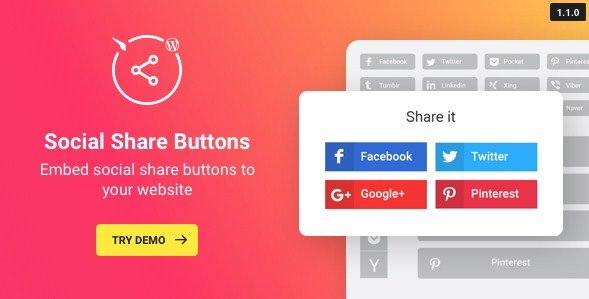
WordPress Social Share Plugin – Share Buttons is a CodeCanyon utility that adds customizable social sharing functionality to WordPress sites without requiring code. It includes 50+ predefined button styles, a shortcode generator, and options for fixed or floating placement to maximize content virality. Developers and site owners use it to increase brand exposure and social follower counts through streamlined visitor sharing actions.
WPExclusive members get access to WordPress Social Share Plugin – Share Buttons as part of a full plugin and theme library — plans from $9.99/month. See the full CodeCanyon collection →
What Is WordPress Social Share Plugin – Share Buttons?
WordPress Social Share Plugin – Share Buttons is developed by CodeCanyon and is a social sharing plugin for WordPress. It belongs to the social plugins category on WPExclusive, alongside other tools for audience engagement and content distribution.
The plugin solves the problem of manual social integration by providing instant share button deployment across unlimited site pages. It targets bloggers, business sites, and digital publishers who need to increase content reach without developer resources. The tool emphasizes ease of use through its code generator interface.
WordPress Social Share Plugin – Share Buttons Features
The plugin delivers extensive customization options for social button presentation and behavior, emphasizing visual flexibility and placement control across 50+ supported networks.
Extensive Button Library & Visual Customization
The plugin includes over 50 predefined social share buttons covering major networks. You can customize display using four predefined icon styles, three combinable color options, three icon shapes, and five icon animations. Transparency controls allow matching buttons to any site design. Display options include symbolic icons, text labels, or hybrid combinations to match your brand voice, making it one of the most flexible tools in the WordPress social plugin category.
Flexible Positioning & Device Control
Configure buttons as fixed elements or floating overlays positioned at any page location. The plugin supports unlimited button instances per website, allowing different configurations for different content types. Mobile visibility toggles let you hide or display buttons specifically on mobile devices, optimizing the experience for touch interfaces versus desktop browsing.
Code Generator & Implementation
A built-in shortcode generator produces installation code automatically—configure your button set visually, copy the generated code, and paste it into pages or posts. This eliminates manual coding requirements while maintaining precision placement control. The system supports unlimited button groups, enabling unique sharing configurations across different site sections.
WordPress Social Share Plugin – Share Buttons Pricing
Check current pricing on the WordPress Social Share Plugin – Share Buttons sales page — WPExclusive members access it as part of their plan.
Price for International Users
Developers in India, Indonesia, Pakistan, and other markets can access WordPress Social Share Plugin – Share Buttons through WPExclusive without regional pricing restrictions. The membership model provides global access to the plugin library at the same flat rate, avoiding individual plugin purchases in local currency markups.
For developers managing multiple sites, a WPExclusive membership covers WordPress Social Share Plugin – Share Buttons plus hundreds of other plugins and themes — usually less than one premium license.
WordPress Social Share Plugin – Share Buttons Latest Version
WordPress Social Share Plugin – Share Buttons receives regular updates to maintain compatibility with WordPress core changes and social API updates. WPExclusive members receive notification when new versions are available in their dashboard, ensuring access to the latest button styles and security patches.
How to Install WordPress Social Share Plugin – Share Buttons
- Download the WordPress Social Share Plugin – Share Buttons .zip from your WPExclusive member account
- In WordPress: Plugins → Add New → Upload Plugin
- Select the .zip and click Install Now → Activate
- Navigate to the plugin settings and configure your button style, position, and networks using the visual code generator
- Copy the generated shortcode and paste it into pages, posts, or widget areas where you want sharing functionality to appear
WordPress Social Share Plugin – Share Buttons Use Cases
Content Publishers Increasing Viral Reach
Bloggers and media sites use the plugin to reduce friction for readers sharing articles. By placing floating buttons in high-visibility locations, publishers see increased social traffic and follower growth. The mobile toggle ensures buttons don’t obstruct reading experiences on smartphones while remaining accessible on desktop.
Business Sites Building Brand Awareness
Corporate websites leverage the 50+ button library to target industry-specific social networks where their audiences congregate. Custom colors and shapes maintain brand consistency across sharing interfaces. The unlimited button instances allow different product pages to feature network-specific sharing options optimized for each content type.
Agencies Managing Multiple Client Sites
Web developers utilize the shortcode generator to deploy consistent sharing functionality across diverse client sites rapidly. The no-code configuration allows non-technical clients to adjust button settings independently after handoff. With WPExclusive membership, agencies implement this solution on unlimited client sites without individual licensing costs.
Pros and Cons
✅ Strengths
- 50+ predefined social network buttons with extensive visual customization (styles, colors, shapes, animations)
- Flexible positioning options including fixed and floating placements at any page location
- Mobile-specific visibility controls to optimize for different device types
- Shortcode generator eliminates coding requirements for implementation
- Unlimited button instances per website for granular control
⚠️ Limitations
- Premium CodeCanyon plugin requires purchase for access (no free tier available)
- Developer auto-updates require an active license key. WPExclusive publishes updates manually when new versions are released.
Is WordPress Social Share Plugin – Share Buttons GPL Licensed?
Yes. WordPress Social Share Plugin – Share Buttons is distributed under the GNU General Public License (GPL) — the same license that governs WordPress itself. GPL gives any user the legal right to use, study, share, and redistribute the software. This is the legal framework that makes WPExclusive’s membership model possible.
WPExclusive distributes 100% original, unmodified files — the same release the developer publishes. No injected code, no alterations, no security risks.
Get WordPress Social Share Plugin – Share Buttons on WPExclusive
WPExclusive membership starts at $9.99/month, $79/year, or $149 lifetime — giving you WordPress Social Share Plugin – Share Buttons plus every plugin and theme in the library, on unlimited sites.
Explore the full CodeCanyon collection → or browse all WordPress plugins →
Frequently Asked Questions
What does WordPress Social Share Plugin – Share Buttons do?
WordPress Social Share Plugin – Share Buttons adds customizable social sharing buttons to WordPress sites, allowing visitors to share content across 50+ social networks. It includes visual customization options, floating or fixed positioning, and a shortcode generator for easy implementation without coding skills.
Is WordPress Social Share Plugin – Share Buttons free?
No, this is a premium plugin available through CodeCanyon. It does not offer a free version. Access is available via WPExclusive membership starting at $9.99/month, which includes this plugin and hundreds of others.
What is the latest version of WordPress Social Share Plugin – Share Buttons?
WordPress Social Share Plugin – Share Buttons is actively maintained — WPExclusive members always receive the most current release compatible with the latest WordPress versions.
How much does WordPress Social Share Plugin – Share Buttons cost?
Check current pricing on the WordPress Social Share Plugin – Share Buttons sales page. Via WPExclusive, it’s included in plans from $9.99/month.
Is it legal to use WordPress Social Share Plugin – Share Buttons via WPExclusive?
WordPress Social Share Plugin – Share Buttons is GPL licensed, which explicitly permits redistribution. WPExclusive provides original, unmodified files — fully within GPL terms.
Can I use WordPress Social Share Plugin – Share Buttons on multiple websites?
Yes, the plugin supports unlimited button instances per website, and with WPExclusive membership, you can install it on unlimited sites without additional licensing fees.