What is WordPress Real Media Library – Media Categories & Folders?
When WordPress users need to organize their rapidly growing media libraries efficiently, WordPress Real Media Library offers an intuitive folder-based organization system that transforms the chaotic media library into a structured, navigable resource. This powerful plugin creates a user-friendly interface to manage thousands of images, videos, audio files, and documents through a familiar folder structure.
What Makes WordPress Real Media Library Different
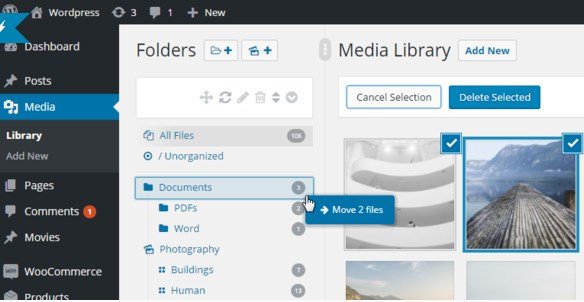
Unlike the default WordPress media library that displays all files in a linear, unorganized fashion, WordPress Real Media Library introduces a comprehensive folder system similar to how you organize files on your computer. Its unique drag-and-drop functionality allows you to create folders and subfolders that make managing your media intuitive and efficient. The plugin operates seamlessly within the WordPress ecosystem without altering file structures, maintaining compatibility with all existing themes and plugins while providing an enhanced organizational layer that significantly improves workflow efficiency.
- Drag-and-drop interface for intuitive file organization
- Folder shortcuts that don’t duplicate files physically
- Dynamic gallery creation from organized folders
WordPress Real Media Library Features for WordPress Users
Intuitive Folder Management System
The core feature of WordPress Real Media Library is its robust folder system that mimics the file management experience on your desktop computer. You can create unlimited folders and subfolders to categorize your media files exactly how you want them. The interface provides complete control through a comprehensive toolbar that allows you to create, rename, delete, and rearrange folders with just a few clicks. The tree view navigation makes finding specific folders quick and easy, even with extensive folder structures. You can also use bulk actions to select and delete multiple folders simultaneously, saving significant time when reorganizing your media library.
Advanced Media Organization Capabilities
Beyond basic folder creation, WordPress Real Media Library offers sophisticated organization features that transform how you interact with your media files. The plugin allows you to create shortcuts of files that reference the original media without duplicating it physically on your server, saving valuable storage space. These shortcuts can have their own metadata fields (title, description, caption) separate from the original file, allowing for flexible content reuse. You can upload files directly to specific folders, bypassing the default media library dump. The improved uploader supports touch devices, making media management possible on tablets and mobile devices. Additionally, the fast folder search feature enables quick navigation to any folder in your library with just a few keystrokes.
Seamless Integration and Dynamic Galleries
WordPress Real Media Library integrates deeply with the WordPress ecosystem, enhancing rather than replacing existing functionality. The plugin adds filtering capabilities to the “Insert Media” dialog, allowing you to quickly find files within your organized folder structure when adding images to posts or pages. For content creators, the plugin offers dynamic gallery creation through both Gutenberg blocks and shortcodes, automatically generating galleries from folder contents that update when you add new files to those folders. The plugin is fully compatible with popular page builders, including Elementor Pro, and works seamlessly with other media-focused plugins. It also supports WordPress multisite installations, making it suitable for network administrators managing multiple sites.
How to Install WordPress Real Media Library
Quick Installation
- Purchase and download the plugin from CodeCanyon
- Go to Plugins → Add New in WordPress dashboard
- Click “Upload Plugin” and select the downloaded ZIP file
- Install Now → Activate
Who Should Use WordPress Real Media Library?
Content Marketers and Bloggers
Content marketers who regularly publish numerous articles with accompanying images will find WordPress Real Media Library invaluable for maintaining an organized media workflow. By creating folders based on content categories, campaigns, or publication dates, marketers can quickly locate and reuse assets across multiple posts. This organization significantly reduces the time spent searching for specific images and ensures consistent branding through easy access to approved media assets. The plugin’s shortcut feature is particularly useful for marketers who need to use the same images across different campaigns while maintaining different metadata for each context.
E-commerce Store Owners
E-commerce websites with extensive product catalogs benefit tremendously from WordPress Real Media Library’s organizational capabilities. Store owners can create folder structures that mirror their product categories, making it simple to manage product images, variations, and promotional materials. When working with WooCommerce or similar e-commerce platforms, the ability to organize product images, lifestyle shots, and promotional banners into logical folders streamlines the process of adding new products and updating existing ones. The plugin’s compatibility with popular e-commerce solutions ensures seamless integration without technical conflicts.
WordPress Real Media Library vs Alternatives
| Feature | WordPress Real Media Library | FileBird |
|---|---|---|
| Folder Structure | Robust tree view with unlimited subfolders | Simpler folder interface |
| Shortcuts | Virtual shortcuts without file duplication | Requires file duplication |
| Dynamic Galleries | Built-in gallery blocks and shortcodes | Limited gallery integration |
| Pricing | One-time purchase with lifetime updates | Subscription model for premium features |
WordPress Real Media Library Pricing
WordPress Real Media Library is available through CodeCanyon with a one-time purchase model. The regular license starts at $29 for use on a single website, while the extended license at $149 is intended for projects where the end-user is charged for using the product. Unlike many competitors that use subscription models, Real Media Library offers a significant advantage by providing lifetime updates and support with the initial purchase. This pricing model makes it an excellent long-term investment for website owners who want to avoid recurring fees while still maintaining access to the latest features and compatibility updates. The plugin also offers a money-back guarantee, allowing users to test its capabilities risk-free.
Pros and Cons
✅ Pros
- Intuitive drag-and-drop interface similar to desktop file management
- File shortcuts save storage space by avoiding physical duplication
- Lifetime updates and support with one-time purchase
- Excellent compatibility with popular page builders and plugins
- Dynamic gallery creation from organized folders
- Works perfectly with multisite installations
❌ Cons
- Requires purchase from CodeCanyon rather than WordPress.org repository
- Learning curve for users accustomed to default media library
- Premium cost may be prohibitive for very small blogs
- Some advanced features may require additional extensions
Frequently Asked Questions
Does WordPress Real Media Library change my file structure on the server?
No, the plugin works by creating a virtual folder system that operates independently of your actual file structure. Your media files remain exactly where they were uploaded, and the plugin simply creates organizational references that don’t require physical file movement or duplication.
Can I migrate folders from other media organization plugins?
Yes, WordPress Real Media Library includes an import feature that allows you to transfer folders from competing plugins like FileBird, WP Media Folder, Enhanced Media Library, and Media Library Assistant. This makes switching to Real Media Library seamless without losing your existing organizational structure.
Is this plugin compatible with the latest WordPress version and Gutenberg editor?
Absolutely. WordPress Real Media Library is fully compatible with WordPress 5.x and the Gutenberg block editor. It includes custom Gutenberg blocks for creating dynamic galleries from your organized folders and integrates seamlessly with the block-based editing experience.
Can I use this plugin on multiple websites with a single purchase?
The licensing requires separate purchases for each website. The regular license covers a single end-product, while the extended license is for projects where users are charged for accessing the content. For multiple websites, you’ll need to purchase additional licenses according to your specific use case.
Does the plugin work with page builders like Elementor or Divi?
Yes, WordPress Real Media Library is designed to work perfectly with all major page builders. Its folder structure appears within the media selection dialogs of page builders, allowing you to maintain organizational consistency regardless of how you build your WordPress pages.
Will this plugin slow down my website?
No, WordPress Real Media Library is built for performance and uses efficient database queries to organize your media without adding significant load to your website. The plugin’s code is optimized for speed, and it doesn’t create physical file duplicates that could consume server resources.
Final Verdict
WordPress Real Media Library is an essential tool for any WordPress website with a growing media library. Its intuitive folder system transforms the chaotic default media library into a structured resource that saves significant time during content creation and management. The plugin’s one-time purchase model with lifetime updates offers excellent long-term value compared to subscription-based alternatives. While it may seem like overkill for very small blogs, its benefits quickly become apparent as your media library grows to hundreds or thousands of files. The drag-and-drop interface, file shortcuts, and dynamic gallery creation features set it apart from competitors, making it a must-have investment for content-heavy websites, e-commerce stores, and anyone who values efficient media management. By implementing WordPress Real Media Library, you’re not just organizing your media—you’re creating a scalable foundation for content growth that will continue to pay dividends in time savings and workflow efficiency for years to come.