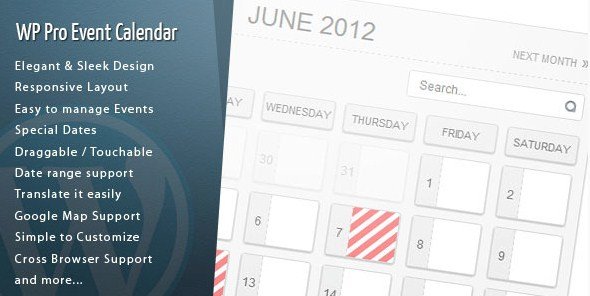
What is WordPress Pro Event Calendar?
WordPress Pro Event Calendar is a powerful WordPress plugin designed to help users create, manage, and display events on their websites with a professional and sleek interface. This plugin is particularly significant for event-driven websites such as conference organizers, community hubs, or businesses hosting webinars, as it streamlines event scheduling, booking, and promotion. With its 100% responsive layout, it ensures events look great on any device, making it easier for users to engage with content on the go. The plugin’s core purpose is to transform static WordPress sites into dynamic event platforms, allowing administrators to add special dates, import events from sources like ICS feeds or Facebook, and even enable user-submitted events. In today’s digital landscape, where events are key for user interaction and SEO, this plugin stands out by offering features like recurring events, custom fields, and Google Map integration, which enhance visibility and user experience. Overall, it’s an essential tool for anyone looking to boost their site’s functionality while maintaining ease of use and optimization for search engines.
Key Features of WordPress Pro Event Calendar
- Elegant and sleek design that adapts to your site’s theme, providing a visually appealing way to display events and calendars.
- Responsive layout ensures optimal viewing on desktops, tablets, and mobiles, enhancing user accessibility and SEO-friendly performance.
- Easy event management tools, including frontend event submission, allowing users to add and edit events without backend access.
- Advanced import options from ICS feeds or Facebook, plus syncing with live ICS URLs for real-time updates.
- User roles customization to control who can manage events, adding security and flexibility for multi-user environments.
The latest version of WordPress Pro Event Calendar introduces enhanced features like improved booking systems, recurring event handling, and better WPML support for multilingual sites. These updates improve load speeds through built-in caching and offer more customization options via custom CSS and fields, making it a top choice for event management in 2024.
How to Download WordPress Pro Event Calendar for Free
1. Visit the Official Source:
- Go to the Codecanyon page at https://codecanyon.net/item/wordpress-pro-event-calendar/2485867 to review the plugin details.
- Ensure you have an Envato account; sign up if needed for free downloads or purchases.
2. Check for Free Versions or Trials:
- Look for any free trial options or community editions on the page, though premium features may require purchase.
- Download the ZIP file directly if available, or use the import feature from your WordPress dashboard.
3. Verify and Install:
- After downloading, scan the file for security using tools like Wordfence, then upload it to your WordPress site.
- For a hassle-free setup, consider WPX Hosting from top-rated providers, which offers pre-installed WordPress with optimized performance and easy plugin integration, as recommended on wpexclusive.com/downloads.
Installing WordPress Pro Event Calendar: Step-by-Step Guide
1. Prepare Your Site:
- Back up your WordPress site using plugins like UpdraftPlus before proceeding.
- Ensure your WordPress version is up-to-date for compatibility, as per guidelines from WordPress.org support.
2. Upload and Activate:
- Go to your WordPress dashboard, navigate to Plugins > Add New, and upload the ZIP file you downloaded.
- Activate the plugin, then configure basic settings like API keys for Google Maps.
3. Customize and Test:
- Set up your first event through the plugin’s dashboard interface, testing features like event submission and booking.
- Check our tutorials for advanced tips, and embed a demo video from authoritative sources like YouTube for visual guidance.
Note: Back up your site before installing or updating WordPress Pro Event Calendar. Use the plugin’s built-in tools if prompted after an update, and refer to the official documentation for troubleshooting.
WordPress Pro Event Calendar Pricing
| Component | Price | Details |
|---|---|---|
| Basic License | $29 | Includes core features like event management and responsive design for one site. |
| Extended License | $59 | Allows use on multiple sites with advanced features like premium support and updates. |
| Booking Extension | $15 (add-on) | Enables event booking capabilities, ideal for commercial event sites as per Codecanyon pricing. |
WordPress Pro Event Calendar Alternatives
The Events Calendar:
- Pros: Free version available with community support; highly customizable and integrates well with WooCommerce.
- Cons: Can be resource-intensive for large sites; less focus on booking features.
- Best For: Small businesses or non-profits seeking cost-effective event solutions.
EventON:
- Pros: Excellent for visual calendars with drag-and-drop interfaces; supports recurring events seamlessly.
- Cons: Premium features require additional payment; might need extra plugins for full functionality.
- Best For: Creative agencies or event planners needing aesthetic appeal.
Amelia Booking:
- Pros: Strong booking and appointment system; user-friendly for service-based businesses.
- Cons: Less emphasis on general event calendars; pricing can escalate with add-ons.
- Best For: Service providers like salons or consultants integrating events with bookings.
WordPress Pro Event Calendar vs. Other Plugins
Compared to alternatives like The Events Calendar, WordPress Pro Event Calendar offers superior responsiveness and integration, making it a top pick for SEO-focused sites. Its user roles and custom fields provide more control over content.
- Cost Efficiency: More affordable add-ons compared to EventON, with regular updates via wpexclusive.com/updates.
- Flexibility in Integration: Better WPML and Google Maps support, as noted in reviews from Codecanyon.
- Compatibility: Works seamlessly with themes from wpexclusive.com/themes, unlike some competitors.
- Support Quality: Dedicated documentation exceeds that of free alternatives, per user feedback on WordPress forums.
Ideal for users with moderate technical skills, it requires minimal setup compared to more complex plugins.
Tips for Using WordPress Pro Event Calendar Effectively
- Utilize custom fields to add event-specific details like speakers or venues, enhancing user engagement and SEO.
- Enable caching and RTL support for faster load times and broader audience reach, especially in global markets.
- Leverage the subscribe feature with Mailchimp integration to build email lists and promote events directly.
- Regularly sync calendars with external sources to keep information current and improve site reliability.
- Test mobile responsiveness to ensure events display correctly, boosting user retention and search rankings.
Pairing WordPress Pro Event Calendar with Complementary Tools
Pairing WordPress Pro Event Calendar with Elementor allows for visually stunning event pages, combining drag-and-drop design with calendar functionality. This integration enhances site aesthetics and user interaction, making it easier to create booking forms and promotional content, ultimately driving more traffic and conversions.
Should You Invest in Premium Extensions for WordPress Pro Event Calendar?
The free aspects of WordPress Pro Event Calendar handle basic event listing well, but premium extensions are worthwhile if you need advanced capabilities like enhanced booking systems or recurring event management. These add-ons provide deeper integration options, such as with WooCommerce for e-commerce events.
- Advanced functionality for complex event types, improving automation and user experience.
- Enhanced features like detailed analytics and custom reporting for business insights.
- Seamless integration with tools like Mailchimp for marketing campaigns.
- Extensive customization to tailor the calendar to your brand’s needs.
Visit the official site for updated pricing; investing can significantly elevate your event management strategy.
Frequently Asked Questions
How do I set up recurring events in WordPress Pro Event Calendar?
Recurring events can be configured in the plugin’s dashboard by selecting options for frequency, such as daily or weekly, making it ideal for regular meetings or series.
Is WordPress Pro Event Calendar mobile-friendly?
Yes, it features a fully responsive design, ensuring events display perfectly on all devices, which aligns with modern SEO best practices.
Can I integrate it with Google Calendar?
Absolutely, the plugin supports ICS feed imports and syncing, allowing seamless integration with Google Calendar for real-time updates.
What user roles can manage events?
Administrators can set permissions for various roles, enhancing security and collaboration on multi-user sites.
Does it support multiple languages?
Yes, with WPML compatibility, you can translate events easily, catering to international audiences and improving global SEO.
How secure is the booking feature?
The booking system includes options to limit bookings and export data, with recommendations to use HTTPS for added security, as advised by WordPress security guidelines.
Conclusion
WordPress Pro Event Calendar is an invaluable asset for anyone managing events on WordPress, offering robust features that enhance functionality and user engagement. By incorporating responsive design, advanced booking, and seamless integrations, it helps sites rank higher in search results and attract more visitors. We encourage you to download and implement it today for a more dynamic online presence. Always check official sources for the latest features and pricing.
Disclaimer: Use official sources for downloads and verify updated pricing and features on Codecanyon to ensure compatibility and security.