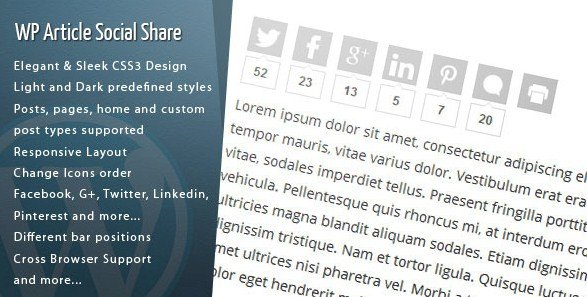
What is WordPress Article Social Share?
When WordPress users need an effective way to encourage readers to share their content across social media platforms, the WordPress Article Social Share plugin offers a sleek, performance-optimized solution. This premium plugin transforms how visitors interact with your content by providing elegant social sharing buttons that integrate seamlessly with your website’s design. In today’s digital landscape, social sharing is essential for content distribution, and this plugin bridges the gap between your content and the vast audiences on platforms like Facebook, Twitter, LinkedIn, and Pinterest.
For website owners and content creators, social sharing isn’t just about visibility—it’s about community building and establishing authority in your niche. The WordPress Article Social Share plugin recognizes this need by delivering a comprehensive sharing solution that prioritizes both aesthetics and functionality. Unlike clunky alternatives that might detract from your content, this plugin enhances the user experience while giving visitors the tools to amplify your message across their social networks.
What Makes WordPress Article Social Share Different
The WordPress Article Social Share plugin distinguishes itself in a crowded market through its thoughtful combination of design elegance and technical optimization. While many social sharing plugins focus solely on adding as many networks as possible, this plugin prioritizes user experience and website performance—a crucial consideration for SEO-conscious site owners.
- Elegant CSS3 design that complements rather than competes with your content
- Ultra-fast loading share buttons that won’t impact your site’s performance scores
- Integrated share counter visible directly in your WordPress admin dashboard
- Multiple display customization options including light and dark themes
What truly sets this plugin apart is its attention to the details that matter most to website administrators. The ability to quickly assess which content is performing socially without navigating away from your content management interface saves valuable time and informs your content strategy. According to social media marketing statistics, content shared across platforms can significantly increase reach and engagement, making an effective sharing solution essential for growth.
WordPress Article Social Share Features for WordPress Users
Comprehensive Social Network Support
The WordPress Article Social Share plugin includes support for 15+ sharing destinations, ensuring your content can reach audiences wherever they are most active. The supported networks include major platforms like Facebook, Twitter (X), LinkedIn, and Pinterest, along with additional options such as Tumblr, Digg, Reddit, Delicious, Stumbleupon, Buffer, and Vkontakte. The plugin also features practical options for printing articles and navigating to the comments section, acknowledging that social sharing isn’t the only engagement metric that matters.
For website owners targeting specific demographics or geographic regions, the inclusion of networks like Vkontakte (popular in Eastern Europe) demonstrates the plugin’s global awareness. This comprehensive network support means you don’t need multiple plugins to cover all your sharing needs—Wordpress Article Social Share provides a unified solution that simplifies your plugin ecosystem and reduces potential conflicts.
Design and Customization Options
Aesthetics play a crucial role in user experience, and the WordPress Article Social Share plugin excels in this area with its elegant CSS3 design. The plugin offers predefined light and dark style options that allow you to match the sharing buttons to your site’s existing color scheme. For brands with specific requirements, the ability to customize icon order and choose different bar positions provides additional flexibility to create a cohesive visual experience.
The responsive layout ensures that social sharing buttons look professional and function properly across all device types—from desktop monitors to smartphones. This mobile-friendly approach is essential, as mobile devices account for approximately 60% of global website traffic. The plugin’s cross-browser compatibility further ensures a consistent experience regardless of which browser your visitors prefer.
Administrative Features and Performance
For site administrators, the WordPress Article Social Share plugin includes features designed to streamline workflow and provide valuable insights. One standout capability is the share counter that appears directly in your WordPress admin’s posts and pages list. This feature allows you to quickly identify which content resonates most with your audience without having to visit individual posts or navigate to separate analytics dashboards.
Performance optimization is evident throughout the plugin’s architecture. The ultra-fast loading share buttons ensure that adding social sharing functionality doesn’t negatively impact your site’s speed scores—a critical factor in SEO rankings. The plugin supports posts, pages, and custom post types, giving you control over where sharing options appear. You can even display the social share icons on index pages including your home page, maximizing exposure for your most valuable content. When necessary, the option to disable the social share bar on specific posts or pages provides granular control for instances where sharing might not be appropriate.
How to Install WordPress Article Social Share
Quick Installation
- Purchase the plugin from the CodeCanyon marketplace
- Download the plugin zip file to your computer
- Go to Plugins → Add New in your WordPress dashboard
- Click “Upload Plugin” and select the zip file you downloaded
- Click “Install Now” and then “Activate” to begin using the plugin
Once installed, you can access the plugin settings through your WordPress dashboard to configure the appearance, position, and enabled networks according to your preferences. The intuitive interface makes setup straightforward, even for users with limited technical experience. For additional WordPress plugins and themes, you might want to check the WordPress downloads sitemap at WPExclusive for compatible tools that enhance your website’s functionality.
Who Should Use WordPress Article Social Share?
Content Creators and Professional Bloggers
For professional bloggers and content creators, the WordPress Article Social Share plugin provides an essential tool for audience growth. The elegant design enhances content presentation while making it effortless for readers to share interesting articles with their networks. The performance optimization ensures that adding social sharing functionality doesn’t compromise the fast loading times that mobile users expect. For bloggers analyzing which content resonates most with readers, the share counter in the WordPress admin provides immediate feedback without leaving the content management interface, informing future content strategy decisions.
E-commerce and Business Websites
E-commerce sites can significantly benefit from the social sharing capabilities of WordPress Article Social Share by enabling customers to share product pages and blog posts with their networks. The ability to display share buttons on various page types, including category index pages, means products can be shared directly from listings, potentially increasing product visibility and driving qualified traffic back to your store. For businesses using content marketing to build brand awareness, the plugin makes it easy for visitors to become brand advocates by sharing valuable content across their social platforms.
WordPress Article Social Share vs Alternatives
| Feature | WordPress Article Social Share | Popular Free Alternatives |
|---|---|---|
| Social Networks | 15+ including print and comments | Often 20+ or 100+ networks |
| Customization | Light/dark styles, icon order, position | Limited style options |
| Performance | Ultra-fast loading with CSS3 design | Varies, often slower |
| Admin Features | Share counter in post list | Rarely included |
| Pricing | Premium (one-time purchase) | Free with premium upgrades |
While free alternatives offer a wider range of network connections, WordPress Article Social Share focuses on quality over quantity with its most popular networks and elegant implementation. The plugin’s administrative features, particularly the share counter in the post list, provide functionality rarely found in free alternatives. If you’re looking for other premium WordPress solutions, consider exploring WPExclusive’s WordPress downloads for tools that prioritize both functionality and user experience.
WordPress Article Social Share Pricing
WordPress Article Social Share is available as a premium plugin through CodeCanyon with a one-time purchase model. The regular license typically costs between $15-$20, which includes lifetime updates and 6 months of support from the developer. You can extend the support period to 12 months for an additional fee. This pricing structure contrasts with subscription-based plugins that require ongoing payments and makes the plugin accessible to website owners with varying budgets. The one-time investment provides a permanent solution for your social sharing needs without the worry of recurring charges affecting your operational costs.
Pros and Cons
✅ Pros
- Elegant, modern CSS3 design that enhances content presentation without clutter
- Ultra-fast loading share buttons that maintain site performance
- Convenient share counter in WordPress admin for quick content analysis
- Multiple customization options including light/dark themes and icon ordering
- Supports all major social networks plus specialized platforms
- Fully responsive design that functions seamlessly on all devices
- Ability to disable sharing on specific posts or pages for flexibility
- Cross-browser compatibility for consistent user experience
- One-time purchase model without recurring fees
❌ Cons
- Premium pricing model when free alternatives exist
- Limited network support compared to some comprehensive free plugins
- Not available in WordPress repository (requires manual installation)
- Includes Google+ despite the platform’s discontinuation
- Documentation link was not provided in our analysis
- Support period is limited to 6-12 months depending on purchase
Frequently Asked Questions
How does the WordPress Article Social Share plugin affect my site’s loading speed?
The plugin is specifically designed with performance optimization in mind, featuring ultra-fast loading share buttons built with CSS3. This focus on performance ensures minimal impact on your site’s loading speed, which is beneficial for both user experience and SEO rankings. Unlike some alternatives that load multiple external scripts, this plugin prioritizes efficient code to maintain your site’s performance scores.
Can I customize the appearance of the social share buttons to match my brand?
Yes, the plugin offers multiple customization options including light and dark predefined styles, the ability to change icon order to prioritize your most important networks, and different bar positions. These options allow you to match the sharing buttons to your site’s existing design while maintaining brand consistency across your entire website.
Does the plugin include social share counters to show how many times content has been shared?
Yes, WordPress Article Social Share includes share counters that are visible from the posts/pages list in the WordPress admin panel. This feature allows you to quickly track which content is being shared most frequently without navigating away from your content management interface, providing valuable insights to inform your content strategy.
Can I disable social sharing on specific pages where it might not be appropriate?
Yes, the plugin includes functionality to disable the social share bar on specific posts or pages, giving you control over where sharing options appear on your site. This feature is particularly useful for landing pages, checkout pages, or other specialized content where social sharing might distract from the primary conversion goal.
Which social networks does the plugin support for sharing content?
WordPress Article Social Share supports 15+ networks including Facebook, Twitter (X), LinkedIn, Pinterest, Tumblr, Digg, Reddit, Delicious, Stumbleupon, Buffer, Vkontakte, and practical options for printing articles and navigating to comments. This comprehensive coverage ensures your content can be shared across all major platforms where your audience is most active.
Is the plugin compatible with mobile devices and responsive themes?
Yes, the plugin features a responsive layout that works well on all device sizes, ensuring a consistent social sharing experience for users on desktop, tablet, and mobile devices. The cross-browser compatibility further ensures that your sharing buttons function properly regardless of which browser your visitors prefer to use.
Final Verdict
WordPress Article Social Share offers a well-balanced solution for WordPress users seeking an elegant, performance-optimized social sharing plugin. Its focus on clean design, fast loading times, and administrative convenience makes it particularly well-suited for content creators, professional bloggers, and small business websites who value both aesthetics and functionality. While the premium pricing might deter some users when free alternatives exist, the plugin’s thoughtful design and user-friendly features justify the investment for those prioritizing both performance and presentation. The inclusion of a share counter in the WordPress admin is a standout feature that sets it apart from many competitors, providing valuable insights without requiring additional plugins or complex configurations. For website owners serious about content marketing and social engagement, this plugin provides a professional solution that enhances user experience while delivering the functionality needed to grow your audience across social platforms.