What is WooCommerce Social Login By Wpweb?
When WooCommerce store owners struggle with high cart abandonment rates and complicated registration processes, WooCommerce Social Login By Wpweb offers a seamless solution to streamline user authentication. This powerful plugin allows your customers to register and login using their existing social media accounts instead of creating new credentials, significantly reducing friction in the checkout process.
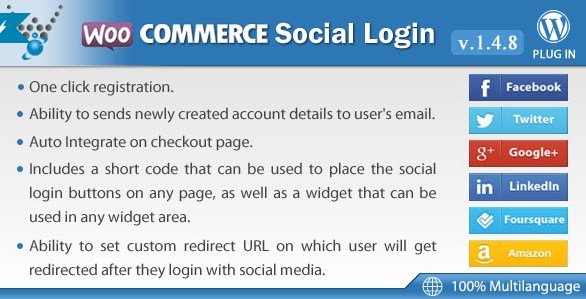
As an experienced WordPress developer, I’ve seen countless e-commerce sites lose potential customers at the registration stage. Research indicates that approximately 30% of online shoppers abandon their carts when faced with creating a new account. WooCommerce Social Login By Wpweb addresses this exact pain point by supporting login through 13+ popular social networks including Facebook, Google, Twitter, LinkedIn, Amazon, PayPal, and more.
The plugin seamlessly integrates with your existing WooCommerce store, adding social login buttons at strategic points during the customer journey—checkout page, my account page, login forms, and registration forms. This integration not only enhances user experience but also helps in building a customer database with verified information from social platforms.
What Makes WooCommerce Social Login By Wpweb Different
Unlike many social login solutions in the WordPress ecosystem, WooCommerce Social Login By Wpweb is specifically designed with e-commerce needs in mind. While other plugins may focus solely on authentication, this solution optimizes the entire customer journey from registration to checkout, understanding that each second saved increases conversion potential.
The plugin stands out with its extensive support for multiple social platforms (more than most competitors), customization options for button placement and appearance, and its seamless integration with WooCommerce’s existing checkout flow. Additionally, it offers valuable features like user data synchronization, which automatically populates user profile fields with information from their social accounts, reducing form completion time even further.
- Supports 13+ social networks including industry leaders like Amazon and PayPal for checkout-specific advantages
- Complete customization of login button styles to match your store’s branding
- Strategic placement options for login buttons at key conversion points
- Automatic account creation with verified social media data
- Integration with WooCommerce’s existing checkout and account pages
WooCommerce Social Login By Wpweb Features for WordPress Users
Multi-Platform Social Network Integration
The plugin’s most prominent feature is its extensive support for social media platforms. With WooCommerce Social Login By Wpweb, you can offer login options through Facebook, Twitter, Google, Yahoo, LinkedIn, Foursquare, Windows Live, VKontakte (VK.com), Instagram, PayPal, Amazon, LINE, and email login. This wide range of options ensures that customers can use their preferred social network, regardless of geography or demographics.
What particularly impressed me about this integration is the specific attention to e-commerce-relevant platforms like Amazon and PayPal. Many customers already have trusted accounts with these payment processors, and allowing login through these familiar interfaces can significantly boost trust and conversion rates.
The setup process for each social network is streamlined, with clear documentation on obtaining API credentials from each platform. The plugin also handles the token management and authentication flow in the background, ensuring a secure connection between your store and social platforms.
Customization and Branding Options
Consistent branding is crucial for building trust with online shoppers. WooCommerce Social Login By Wpweb understands this by providing extensive customization options for the appearance and placement of social login buttons. You can adjust the size, shape, color, and even the icons of the login buttons to match your store’s design language perfectly.
The plugin offers multiple layout options—horizontal, vertical, or icon-only—allowing you to implement social login buttons in various areas of your site without breaking the design. I’ve found this flexibility particularly valuable when working with clients who have specific design requirements or limited space on their checkout pages.
Additionally, the plugin provides shortcode support, enabling advanced users to place social login buttons in custom locations or within other page builders. This level of customization ensures that the social login feature feels native to your site rather than like a tacked-on addition.
User Data Synchronization and Account Management
One of the most powerful features of WooCommerce Social Login By Wpweb is its ability to automatically populate user profile data from social media accounts. When a customer logs in via a social network, the plugin can retrieve information such as their name, email address, and profile picture, automatically filling in these details in your store’s database.
This automatic data synchronization not only saves customers time but also increases the accuracy of your customer database. Information retrieved from verified social accounts tends to be more reliable than manually entered data, reducing bounced emails and improving communication effectiveness.
The plugin also handles account linking seamlessly—if a customer returns to your store and attempts to log in with a different social network than before, the system can recognize them and link the accounts to prevent duplicate profiles. This sophisticated account management capability ensures a consistent customer experience across multiple visits and devices.
How to Install WooCommerce Social Login By Wpweb
Quick Installation
- Purchase and download the plugin from CodeCanyon
- Go to Plugins → Add New in WordPress dashboard
- Click “Upload Plugin” and select the zip file you downloaded
- Click Install Now → Activate
- Locate “WooCommerce Social Login” in your WordPress dashboard menu
- Configure API credentials for your desired social networks
- Customize button appearance and placement settings
After installation, you’ll need to obtain API credentials from each social network you want to support. The plugin provides step-by-step instructions for this process, which typically involves creating developer accounts with each platform and registering your website as an application. While this setup requires some initial effort, it’s a one-time process that enables the seamless social login functionality.
Who Should Use WooCommerce Social Login By Wpweb?
High-Volume WooCommerce Stores
For established WooCommerce stores processing dozens of transactions daily, reducing even small frictions in the checkout process can significantly impact revenue. These stores typically benefit most from social login as they often have a diverse customer base with varied technical comfort levels. By offering familiar social login options, these stores can reduce abandoned carts and improve conversion rates by providing an alternative to traditional registration forms.
High-volume stores also appreciate the plugin’s ability to streamline the return customer experience. Once a customer has logged in with their social account once, returning customers can complete purchases with just a few clicks, dramatically increasing the likelihood of repeat business.
Mobile-First E-commerce Businesses
Mobile users face particular challenges with traditional registration forms, from small screens making typing difficult to concerns about entering personal information on mobile devices. WooCommerce Social Login By Wpweb addresses these pain points specifically by enabling quick authentication without requiring form completion.
For mobile-first businesses, the plugin’s touch-optimized login buttons and streamlined authentication flow make it an essential tool. The social login buttons are designed to be easily tappable on mobile screens, and the authentication process typically happens in a separate window or popup before returning the user to your store—perfect for smaller screens.
International Stores with Global Customer Base
International e-commerce businesses face unique challenges with authentication as preferred social platforms vary by region. WooCommerce Social Login By Wpweb addresses this by supporting regionally popular networks like VKontakte for Russian markets, LINE for Asian markets, and globally recognized platforms like Facebook and Google.
For stores targeting specific geographical markets, the ability to offer login through regionally preferred social networks can dramatically increase conversion rates by providing a familiar, trusted authentication method that aligns with local preferences and internet habits.
WooCommerce Social Login By Wpweb vs Alternatives
| Feature | WooCommerce Social Login By Wpweb | Nextend Social Login |
|---|---|---|
| Number of Supported Platforms | 13+ networks including Amazon and PayPal | 8-10 networks depending on version |
| Customization Options | Extensive (size, color, shape, layout) | Limited styling options |
| E-commerce Focus | Specifically designed for WooCommerce | General WordPress plugin |
| Button Placement | Multiple strategic locations (checkout, my account, etc.) | Mostly limited to login forms |
| Price | Premium license with lifetime updates | Freemium model with premium addon costs |
When comparing WooCommerce Social Login By Wpweb to alternatives like Nextend Social Login, the key differentiators become clear. While Nextend is a solid general-purpose social login plugin for WordPress, WooCommerce Social Login By Wpweb is purpose-built for e-commerce scenarios. The specialized focus on WooCommerce integration, checkout optimization, and support for payment-related social networks like Amazon and PayPal gives it a distinct advantage for online stores.
The plugin also offers superior customization options compared to most alternatives, allowing store owners to maintain brand consistency throughout the authentication process. This attention to design details can have a subtle but meaningful impact on user trust and conversion rates.
WooCommerce Social Login By Wpweb Pricing
WooCommerce Social Login By Wpweb is available as a premium plugin through CodeCanyon with a one-time purchase model. The current pricing starts at $29 for a Regular License, which includes lifetime updates and 6 months of support from the developers. For extended support (12 months), an additional fee can be paid.
Unlike many competing plugins that use a subscription model, this one-time payment structure can be more cost-effective for established stores over the long term. The license allows for use on a single end product, with options for multiple installations available at higher price points.
While the initial cost may be higher than some alternatives, the value provided in terms of conversion optimization and customer experience improvements typically results in a quick return on investment for most e-commerce businesses.
Pros and Cons
✅ Pros
- Extensive support for 13+ social networks including e-commerce focused platforms like Amazon and PayPal
- Specifically designed for WooCommerce with seamless integration at key conversion points
- Highly customizable button styling to match any store’s branding
- Automatic user data synchronization reduces form completion time
- One-time payment model without recurring subscription fees
- Lifetime updates included with purchase
- Professional support available from developers
❌ Cons
- Initial setup requires obtaining API credentials from each social platform, which can be time-consuming
- No free version available to test before purchasing
- Higher upfront cost compared to some freemium alternatives
- Advanced customization may require technical knowledge
- Plugin may conflict with other security or authentication plugins in rare cases
Frequently Asked Questions
Does WooCommerce Social Login By Wpweb work with all WordPress themes?
Yes, the plugin is designed to work seamlessly with any WordPress theme that supports WooCommerce. The login buttons are responsive and will adapt to your theme’s styling while maintaining the custom appearance you configure in the plugin settings.
Is customer data secure when using social login?
Absolutely. The plugin uses the official OAuth authentication protocols provided by each social network, ensuring that no passwords are ever stored on your server. Authentication happens directly between your customer’s browser and the social platform, with your server only receiving a secure token confirming their identity.
Can I use this plugin with other WooCommerce extensions like subscriptions or memberships?
Yes, WooCommerce Social Login By Wpweb is fully compatible with most popular WooCommerce extensions. Once logged in via social media, customers can access any restricted content, subscription plans, or membership areas as normal WooCommerce users.
What happens if a customer uses different social networks on different visits?
The plugin includes account linking functionality that recognizes returning customers regardless of which social network they use. It can link multiple social accounts to a single customer profile, ensuring a consistent experience across visits.
Does the plugin support multiple languages?
Yes, WooCommerce Social Login By Wpweb is translation-ready and supports multiple languages. The plugin interface can be translated to your preferred language, and the social login buttons themselves will automatically appear in the user’s browser language when possible.
Can I track which social networks customers use to login?
Yes, the plugin includes tracking functionality that records which social networks customers use to authenticate. This data can be valuable for understanding your customer demographics and optimizing your social media marketing efforts accordingly.
Final Verdict
WooCommerce Social Login By Wpweb offers a comprehensive solution for reducing checkout friction and improving the customer registration experience. With its extensive social network support, e-commerce-focused features, and customization options, it’s particularly well-suited for established WooCommerce stores looking to optimize their conversion funnel. While the initial setup requires some effort to configure API credentials, the long-term benefits in reduced abandoned carts and improved customer experience make it a valuable investment for most e-commerce businesses. The one-time payment model also makes it an attractive option compared to subscription-based alternatives, especially for store owners planning to use the plugin over multiple years. If you’re serious about improving your store’s checkout experience and conversion rates, WooCommerce Social Login By Wpweb is certainly worth considering.