What is WooCommerce Product Size Guide?
When WordPress users need to solve the common problem of product returns due to sizing issues, WooCommerce Product Size Guide offers an elegant solution that displays size guides directly on product pages. This WooCommerce extension, available on CodeCanyon, helps online store owners significantly reduce return rates by providing customers with accurate sizing information before making a purchase decision. The WooCommerce Product Size Guide plugin allows you to create, customize, and display size tables for any product or category without requiring HTML knowledge or technical expertise.
What Makes WooCommerce Product Size Guide Different
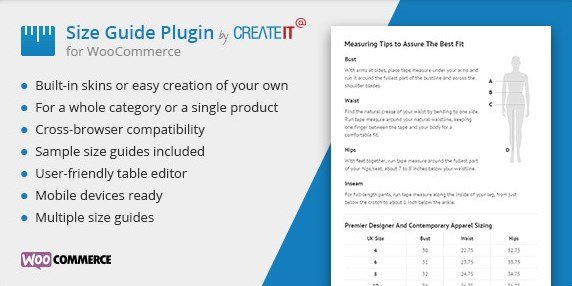
Unlike generic size chart solutions, WooCommerce Product Size Guide offers comprehensive customization options with three beautiful pre-built skins and the ability to add your own custom styles. What sets this plugin apart is its flexibility – you can create size guides for specific products, entire product categories, or even multiple tables within a single size guide to accommodate various measurement systems. This level of customization ensures that your size guides match your store’s branding while providing customers with the precise information they need to make confident purchasing decisions.
- Seamless integration with WooCommerce product pages
- No technical knowledge required – create tables with a single click
- Mobile-responsive design that looks great on all devices
WooCommerce Product Size Guide Features for WordPress Users
Customizable Size Tables
One of the standout features of the WooCommerce Product Size Guide is its intuitive table creation system. The plugin comes with three professionally designed skins that you can use immediately, and for those with specific branding requirements, filters allow you to add your own custom styles. The table creation process is remarkably simple – no HTML knowledge is required as you can create complex tables with just a single click. This feature is particularly valuable for fashion retailers who need to display various measurements across different product types.
Flexible Display Options
The plugin offers incredible flexibility in how you display your size guides. You can create guides that apply to multiple product categories simultaneously, saving time and ensuring consistency across related products. Alternatively, you can create specific size guides for individual products when necessary. The most powerful feature is the ability to include multiple tables within a single size guide, which is perfect for international stores that need to display measurements in different systems (imperial vs. metric) or for products that require different types of measurements (garment length, width, etc.).
Mobile-Responsive Design
With over 50% of e-commerce traffic coming from mobile devices, having a mobile-responsive size guide is essential. WooCommerce Product Size Guide ensures that your size charts display perfectly on smartphones and tablets without requiring customers to zoom or scroll horizontally. This responsive design maintains readability and usability across all device sizes, which significantly improves the mobile shopping experience and reduces mobile-specific return rates. The plugin includes sample size guides that demonstrate how to optimize your tables for mobile viewing, helping you get started quickly.
How to Install WooCommerce Product Size Guide
Quick Installation
- Purchase the plugin from CodeCanyon and download the ZIP file
- Go to Plugins → Add New in WordPress dashboard
- Click Upload Plugin and select the downloaded ZIP file
- Click Install Now → Activate
- Enter your purchase code to activate the plugin
Who Should Use WooCommerce Product Size Guide?
Fashion and Apparel Retailers
Fashion retailers face the highest return rates in e-commerce, with sizing being the primary reason for returns. WooCommerce Product Size Guide is specifically designed for these merchants to display detailed sizing information for clothing, shoes, and accessories. The ability to create multiple tables within one guide allows fashion retailers to show different measurements (bust, waist, hip, inseam) in both inches and centimeters, catering to international customers while reducing confusion and returns. According to industry research, clear sizing information can reduce return rates by up to 25%.
Multi-Vendor Marketplaces
For marketplaces using WooCommerce Product Vendors or similar multi-vendor solutions, consistent sizing information across different vendors’ products is crucial for customer satisfaction. WooCommerce Product Size Guide allows marketplace administrators to create standardized size templates that vendors can use, ensuring a consistent customer experience regardless of which vendor’s products they’re viewing. This standardization helps build trust with customers and reduces the confusion that often occurs when browsing products from multiple sellers with different sizing conventions.
WooCommerce Product Size Guide vs Alternatives
| Feature | WooCommerce Product Size Guide | WooCommerce Size Charts |
|---|---|---|
| Pre-designed Templates | 3 professional skins included | Limited templates |
| Custom CSS Support | LESS files included for advanced customization | Basic custom CSS only |
| Multiple Tables per Guide | Yes, unlimited tables per guide | Limited to one table per product |
| Category-level Assignment | Yes, assign guides to entire categories | Product-specific only |
WooCommerce Product Size Guide Pricing
WooCommerce Product Size Guide is available through CodeCanyon as a premium plugin with a one-time purchase fee of $19. This price includes lifetime access to the plugin with future updates and 6 months of support from the developer. Additional support extensions can be purchased for $5.63 for 12 months. There’s no free version available, but the plugin comes with sample size guides that help you get started immediately after installation. This pricing model makes it an affordable solution for businesses of all sizes looking to reduce return rates and improve the customer shopping experience.
Pros and Cons
✅ Pros
- Three professional pre-built skins that look great out of the box
- Intuitive interface requires no HTML knowledge
- Supports unlimited size guides for large catalogs
- Mobile-responsive design ensures usability on all devices
- Flexible assignment to specific products or entire categories
- Multiple tables within a single guide accommodate different measurement systems
❌ Cons
- One-time purchase rather than subscription model (which some businesses prefer)
- No free version available to test before purchasing
- Requires WooCommerce to function (not a standalone solution)
Frequently Asked Questions
Can I customize the appearance of my size guides to match my store’s branding?
Yes, WooCommerce Product Size Guide comes with three pre-built skins and includes filters that allow you to add your own custom styles. For advanced users, LESS files are included for deeper customization.
Do I need HTML knowledge to create size tables?
No, the plugin is designed for users without technical knowledge. You can create complex tables with just a single click using the intuitive interface.
Can I display different size guides for different product categories?
Yes, WooCommerce Product Size Guide allows you to create guides that apply to multiple product categories or individual products, giving you complete flexibility in how you present sizing information.
Will the size guides display correctly on mobile devices?
Absolutely. The plugin includes mobile-responsive design that ensures your size tables look great and are easy to read on smartphones and tablets without requiring users to zoom or scroll horizontally.
Can I include multiple measurement systems in a single size guide?
Yes, one of the plugin’s powerful features is the ability to create multiple tables within a single size guide, making it easy to display measurements in both imperial and metric systems or different types of measurements for the same product.
Is there a limit to how many size guides I can create?
No, WooCommerce Product Size Guide supports unlimited size guides, making it suitable for stores with large product catalogs or diverse product lines.
Final Verdict
WooCommerce Product Size Guide is a powerful yet user-friendly solution for online retailers looking to reduce return rates and improve customer satisfaction. Its combination of ease of use, customization options, and flexible display options make it an excellent choice for fashion retailers and any business selling products where sizing matters. The ability to create multiple tables within one guide and assign guides to entire categories makes it particularly valuable for stores with large catalogs or international customer bases. While the lack of a free version might be a drawback for some, the $19 one-time fee represents excellent value for the functionality provided and the potential reduction in return-related costs.