What is WooCommerce Delivery Time Picker for Shipping?
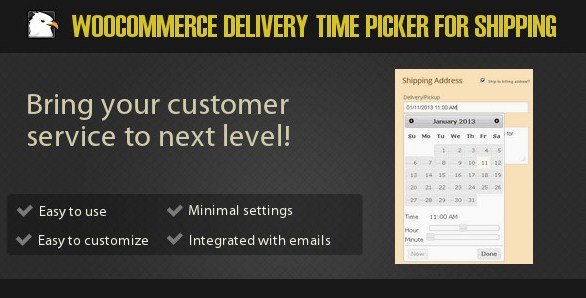
When WordPress users need a robust solution to manage logistics and customer expectations, WooCommerce Delivery Time Picker for Shipping offers a comprehensive way to handle delivery scheduling. This plugin acts as a bridge between your online store and physical delivery logistics, allowing customers to select a precise date and time for their order delivery directly on the checkout page. By integrating a user-friendly date and time widget, it eliminates the back-and-forth communication often required to schedule shipments, ensuring a smoother experience for both the buyer and the merchant.
In my experience managing WooCommerce stores, one of the biggest friction points is the ambiguity of delivery times. Customers want to know when their goods will arrive, and store owners need to control their delivery capacity. This plugin solves that specific problem by giving full control to the administrator while providing an intuitive interface for the customer. The selected delivery time is not just recorded; it is displayed in the admin order view and included in email notifications, ensuring everyone involved in the fulfillment process is on the same page.
What Makes WooCommerce Delivery Time Picker Different
While there are several calendar and booking plugins available, the WooCommerce Delivery Time Picker for Shipping distinguishes itself through its granular configuration options. Most simple plugins allow you to disable weekends, but this plugin goes several steps further. It allows administrators to create complex rules using a specific syntax to block date ranges, specific days of the month, or recurring events.
- Advanced Date Restrictions: Use code-like syntax to block complex date ranges (e.g., holidays or seasonal breaks).
- Operational Control: Limit the number of shipments per day to prevent overloading your logistics team.
- Shipping Method Integration: Enable the picker only for specific shipping methods, such as Local Pickup vs. Standard Shipping.
Furthermore, the plugin is built with localization in mind. It supports 74 different languages out of the box and allows you to customize every text label on the frontend without touching a single line of code. This makes it an excellent choice for international businesses that need to provide a localized checkout experience. If you are looking for alternatives, you might check out WooCommerce Product Add-ons, but for pure delivery scheduling, this plugin’s specialized features are hard to beat.
WooCommerce Delivery Time Picker Features for WordPress Users
Granular Date and Time Restrictions
The standout feature of this plugin is its powerful restriction engine. Administrators can prevent customers from selecting delivery dates that are inconvenient for the business. This ranges from simple settings, like disabling weekends, to advanced configurations. For instance, you can use specific syntax to block dates dynamically.
Examples include blocking 1/1/* to prevent shipping on New Year’s Day every year, or */1/* to block the first day of every month. You can even define ranges like 12/24/* - 1/1/* to suspend operations during the holiday season. Beyond dates, you can restrict specific hours or set a minimum preparation time (e.g., orders must be placed 24 hours in advance). This level of control is crucial for businesses with limited manpower or specific operating hours. You can learn more about standard WooCommerce shipping settings to see how this addon enhances the core functionality.
Frontend Customization and Localization
User experience is paramount at checkout. This plugin allows you to customize the appearance and text of the delivery picker to match your brand. You can choose from different themes to ensure the widget blends seamlessly with your site’s design. Additionally, you have full control over the date and time format displayed to the user.
For store owners serving a diverse customer base, the language support is a significant advantage. The plugin supports 74 languages, allowing you to translate labels like “Delivery Date” or “Delivery Time” into the customer’s native tongue automatically. If you operate a global store, this feature reduces cart abandonment caused by language barriers. For stores requiring additional checkout functionality, consider pairing this with Checkout Field Editor plugins to create a fully customized form.
Logistics and Capacity Management
Managing order volume is essential for maintaining service quality. The plugin includes a feature to limit the number of shipments per day. Once the set limit is reached for a specific date, that date is automatically grayed out or hidden from future customers. This prevents the common problem of promising more deliveries than your team can physically handle.
Additionally, the plugin offers flexibility through shortcodes such as [wdt_shipping_time] and [wdt_field]. These allow you to display the selected shipping time or the picker itself anywhere on your site, not just on the checkout page. This is particularly useful for custom thank you pages or order tracking pages. The integration with email notifications is also seamless; the admin and the customer receive confirmation of the scheduled slot immediately after the order is placed.
How to Install WooCommerce Delivery Time Picker
Quick Installation
- Log in to your WordPress dashboard and navigate to Plugins → Add New.
- Click the “Upload Plugin” button at the top of the page.
- Select the zip file you downloaded from CodeCanyon and click Install Now.
- Once installed, click “Activate Plugin” to start configuring your delivery settings.
Who Should Use WooCommerce Delivery Time Picker?
Local Food and Beverage Businesses
For bakeries, meal prep services, or local grocery delivery, freshness is everything. These businesses operate on tight schedules and often have specific delivery windows (e.g., morning or evening). This plugin allows customers to choose a 2-hour window that suits them, while the owner ensures they don’t accept orders outside of their delivery route times. Restricting same-day delivery for orders placed after a certain cutoff time is a vital feature for these merchants to manage preparation time effectively.
Furniture and Appliance Retailers
Large item delivery requires coordination not just of time, but of manpower and truck availability. Using the “Max shipments per day” feature, a furniture store can ensure they only schedule as many deliveries as they have trucks and drivers for. This prevents the logistical nightmare of overbooking. Furthermore, blocking weekends or specific holidays ensures that drivers get the necessary time off, maintaining high safety standards and employee morale.
WooCommerce Delivery Time Picker vs Alternatives
| Feature | Delivery Time Picker | Standard Booking Plugins |
|---|---|---|
| Date Restriction Syntax | Advanced (e.g., */1/* for monthly recurrence) |
Basic (usually just block specific dates or weekdays) |
| Shipment Limits | Yes (Limits orders per time slot/day) | Usually No (Focuses on resource availability) |
| Shipping Method Integration | Deep integration (Enable/Disable per method) | Generic (Often treats shipping as a flat service) |
WooCommerce Delivery Time Picker Pricing
This plugin is available exclusively on CodeCanyon. It typically follows a standard Envato pricing model, offering a Regular License for use on a single end product. This is a one-time purchase which includes lifetime updates and 6 months of support (with the option to extend). There is no free version available in the WordPress.org repository, so the upfront cost is the only financial commitment required. This pricing model makes it accessible for small businesses looking for a premium solution without recurring monthly subscription fees.
Pros and Cons
✅ Pros
- Highly configurable date and time restrictions using custom syntax.
- Built-in capacity management to limit daily shipments.
- Multi-language support with easy text customization.
- Integrates seamlessly with existing WooCommerce shipping methods.
- Shortcode support allows for flexible placement on the site.
❌ Cons
- Premium only (No free version to test before buying).
- The date restriction syntax has a learning curve for complex rules.
- Support is tied to the Envato support system, which can be slower than direct developer support.
Frequently Asked Questions
Can I hide the time picker for certain shipping methods?
Yes, the plugin allows you to enable or disable the picker specifically for different shipping methods. This is useful if you offer local pickup (where time selection is needed) but not for standard mail shipping.
How do I block public holidays using this plugin?
You can use the “Restrict Dates” feature in the settings. By entering specific dates or date ranges (e.g., 12/25/* for Christmas), the system will automatically disable those days in the calendar.
Does this plugin support time zones?
The plugin operates based on the time zone set in your WordPress General Settings. Ensure your WordPress site time zone matches your business location to ensure accurate delivery cut-off times.
Can I limit the number of deliveries per hour?
Yes, the plugin features a setting to limit the number of shipments per day. While specific hourly limits depend on how you configure your time slots, the core capacity management is designed to prevent overbooking on specific dates.
Is the delivery date visible in customer emails?
Absolutely. Once a customer selects a date and time, this information is automatically added to the order details and is included in the standard WooCommerce email notifications sent to both the customer and the admin.
Do I need coding skills to translate the labels?
No coding is required. The plugin provides a settings area where you can simply type in the text for labels, date formats, and error messages in any language you prefer.
Final Verdict
WooCommerce Delivery Time Picker for Shipping is a robust, professional-grade solution for any store that needs to manage delivery logistics. It goes beyond simple date selection by offering deep customization, capacity management, and shipping method integration. It’s particularly well-suited for local businesses like florists, bakeries, and furniture stores that operate on specific schedules. While the lack of a free tier might be a hurdle for some, the feature set justifies the investment for businesses serious about streamlining their delivery operations. If you need to extend your store’s functionality further, you might also look at WooCommerce Subscriptions for recurring delivery needs.