What is WooCommerce Default Quantity (By Barn2 Media)?
When WordPress users need to control product quantities in their online store, WooCommerce Default Quantity (By Barn2 Media) offers a comprehensive solution for setting default quantities, minimum/maximum limits, and step values. This powerful plugin gives store owners complete control over how customers purchase products, whether you’re running a wholesale business, selling in bulk, or simply want to optimize your checkout process.
What Makes WooCommerce Quantity Manager Different
WooCommerce Quantity Manager stands out from other quantity control plugins with its hierarchical rule system and granular control options. Unlike basic quantity plugins that only allow simple global settings, this plugin lets you create sophisticated quantity rules at multiple levels – storewide, category-specific, product-specific, and even variation-specific levels.
- Advanced hierarchical logic that allows fine-tuned control over quantity rules
- Integration with popular Barn2 plugins like Product Table and Quick View Pro
- User role-based quantity rules for wholesale and B2B scenarios
WooCommerce Default Quantity Features for WordPress Users
Default Quantity Control
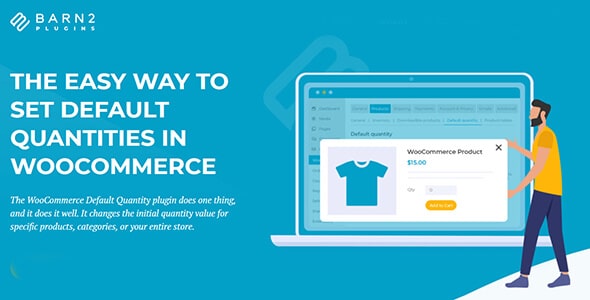
The core feature allows you to change the initial quantity value that appears in product pages. Set any default quantity – even zero – to subtly encourage customers to purchase specific amounts. This psychological pricing tactic can significantly increase average order values, especially when combined with strategic product bundling. You can set defaults globally for your entire store, for specific product categories, or for individual products, giving you complete flexibility in your sales strategy.
Minimum and Maximum Quantity Rules
Protect your profit margins and ensure manageable order sizes with comprehensive min/max quantity controls. Set minimum quantities to guarantee profitable orders, maximum limits to prevent inventory depletion, and even minimum order values to qualify for free shipping or wholesale pricing. These rules can be applied globally or targeted to specific products, categories, or user roles, making it perfect for wholesale businesses that need different rules for different customer types.
Quantity Step Values and Increments
Force customers to purchase in specific quantity groupings with step value controls. Perfect for products sold in packs, cases, or bundles where partial quantities don’t make sense. For example, set step values of 6 for products sold by the half-dozen, or 12 for items sold by the dozen. The plugin automatically validates quantities and prevents customers from adding incompatible amounts to their cart, reducing customer confusion and support requests.
How to Install WooCommerce Default Quantity
Quick Installation
- Go to Plugins → Add New in WordPress dashboard
- Search for “WooCommerce Quantity Manager”
- Click Install Now → Activate
Who Should Use WooCommerce Default Quantity?
Wholesale and B2B Stores
Wholesale businesses can enforce minimum order quantities and bulk purchasing requirements while offering different rules for different customer tiers. Set higher minimum quantities for wholesale customers while maintaining retail-friendly defaults for regular shoppers. The user role-based rules allow you to create completely different shopping experiences for B2B vs B2C customers on the same website.
Restaurants and Food Service
Restaurants and catering services can ensure customers order in appropriate portion sizes or package quantities. Set default quantities for meal deals, bundle items, or catering packages. The plugin integrates seamlessly with WooCommerce Restaurant Ordering to create a complete food ordering system with precise quantity controls.
WooCommerce Default Quantity vs Alternatives
| Feature | WooCommerce Quantity Manager | Basic Quantity Plugins |
|---|---|---|
| Hierarchical Rules | Global → Category → Product → Variation | Usually global only |
| User Role Support | Built-in role-based rules | Rarely included |
| Error Validation | Real-time validation with helpful messages | Basic or no validation |
WooCommerce Default Quantity Pricing
WooCommerce Quantity Manager offers flexible pricing plans to suit businesses of all sizes. Single site licenses start at $69 per year, with multi-site options available for agencies and developers. Lifetime licenses are also available for those who prefer a one-time investment. All purchases include a 30-day money-back guarantee and access to priority support from the Barn2 team. For the best value, consider the All Access bundle which includes this plugin plus 18+ other premium WooCommerce plugins.
Pros and Cons
✅ Pros
- Comprehensive quantity control at multiple levels
- Excellent integration with other Barn2 plugins
- User role-based rules for wholesale scenarios
❌ Cons
- Premium pricing may be high for small stores
- Learning curve for advanced rule combinations
- No quantity-based pricing (requires separate plugin)
Frequently Asked Questions
Can I set different quantity rules for wholesale vs retail customers?
Yes, WooCommerce Quantity Manager includes user role-based rules that allow you to create different quantity requirements for different customer types. You can set higher minimum quantities for wholesale customers while maintaining retail-friendly defaults for regular shoppers.
Does this plugin work with product variations?
Absolutely! You can set unique quantity rules for individual product variations, allowing different minimums, maximums, and defaults for size, color, or other variation options within the same product.
Can I force customers to buy in specific quantity multiples?
Yes, the step values feature allows you to require purchases in specific increments. For example, set step values of 6 to force customers to buy in multiples of 6 (6, 12, 18, etc.), perfect for products sold in packs or cases.
Will this plugin slow down my website?
No, WooCommerce Quantity Manager is optimized for performance and has been tested on stores with 10,000+ products without any performance issues. The plugin uses efficient database queries and caching to ensure fast page load times.
Does it work with my existing theme?
Yes, the plugin is designed to work with any WordPress theme. It uses standard WooCommerce styling and doesn’t modify your theme’s appearance, ensuring compatibility with both free and premium themes.
Can I change the default quantity to zero?
Yes, you can set the default quantity to any number including zero. Setting it to zero gives customers complete freedom to choose their quantity while still maintaining your minimum/maximum rules.
Final Verdict
WooCommerce Default Quantity (By Barn2 Media) is an exceptional plugin for store owners who need sophisticated quantity control beyond WooCommerce’s basic capabilities. Its hierarchical rule system, user role support, and seamless integration with other WooCommerce extensions make it particularly valuable for wholesale businesses, restaurants, and anyone selling products in bulk. While the premium pricing may be a consideration for very small stores, the comprehensive feature set and excellent support make it a worthwhile investment for growing businesses.