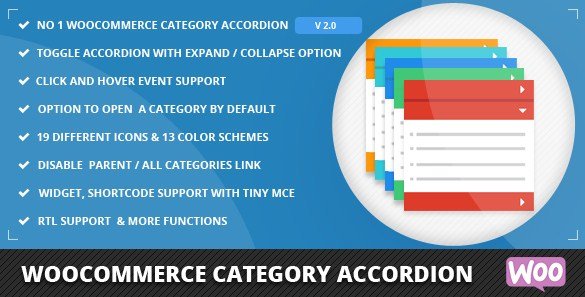
What is WooCommerce Category Accordion?
When WordPress users need to organize complex WooCommerce store navigation efficiently, WooCommerce Category Accordion offers a space-saving, intuitive solution with expandable category trees. This premium plugin transforms traditional category listings into an interactive accordion interface that enhances both user experience and your store’s visual appeal. As your product catalog grows, keeping navigation organized becomes crucial for conversion rates, and WooCommerce Category Accordion provides exactly the functionality needed to maintain a clean, professional appearance while ensuring customers can easily find what they’re looking for.
What Makes WooCommerce Category Accordion Different
WooCommerce Category Accordion stands out from other category navigation solutions by offering unparalleled customization options while maintaining a lightweight codebase. Unlike standard category widgets that display all categories at once, creating cluttered sidebars, this plugin presents your product categories in a clean, collapsible format that expands only when users interact with it. This approach not only saves valuable screen real estate but also creates a more engaging browsing experience that can lead to increased product discovery and higher conversion rates. The plugin’s attention to detail is evident in features like RTL support, event type customization (click or hover), and the ability to highlight active categories to improve wayfinding.
- Transforms flat category lists into interactive accordion navigation
- Provides extensive customization options for colors, icons, and behavior
- Supports unlimited category levels without performance impact
WooCommerce Category Accordion Features for WordPress Users
Navigation & User Experience
The core strength of WooCommerce Category Accordion lies in its ability to create a seamless navigation experience for your customers. The plugin offers both toggle and collapsed options, allowing you to control whether categories remain open or close after interaction. You can choose between click or hover event types based on your preference and user behavior patterns. What makes this particularly valuable is the current category highlighting feature, which automatically expands and highlights the category corresponding to the product being viewed, providing essential context for shoppers. This functionality works across all category levels, making deep product hierarchies easy to navigate. Additionally, the plugin includes smooth animation controls, allowing you to adjust the accordion speed to match your site’s overall feel and responsiveness expectations.
Customization & Display Options
WooCommerce Category Accordion offers an impressive array of customization options to ensure the widget blends perfectly with your site’s design. The plugin includes 19 Font Awesome icons, allowing you to visually distinguish between open and closed categories with recognizable iconography. You have complete control over product count display, choosing whether to show or hide the number of products in each category. For stores with diverse inventories, the show/hide empty categories option prevents customers from clicking into categories without products, improving the shopping experience. The plugin also offers sophisticated sorting capabilities, allowing you to arrange categories by ID, name, or slug in either ascending or descending order. If you need to feature certain categories or temporarily remove others, the exclude category functionality provides granular control without needing to delete categories from your WooCommerce setup.
Technical Performance & Compatibility
Despite its extensive feature set, WooCommerce Category Accordion maintains a lightweight codebase that won’t slow down your site. The plugin is translation-ready, making it suitable for international stores, and includes full RTL (Right-to-Left) support for languages like Arabic and Hebrew. It’s cross-browser compatible, ensuring consistent performance across Chrome, Firefox, Safari, and Edge. The plugin can be implemented either as a widget in your sidebar or through a shortcode for custom placement, giving you flexibility in design. For technically-minded store owners, the category level control allows you to determine exactly how many levels of subcategories to display, preventing overly deep navigation trees that might overwhelm users. The plugin also supports unlimited categories and subcategories without performance degradation, making it scalable for growing businesses.
How to Install WooCommerce Category Accordion
Quick Installation
- Purchase the plugin from CodeCanyon and download the ZIP file
- Go to Plugins → Add New in your WordPress dashboard
- Click on the “Upload Plugin” button at the top of the page
- Select the downloaded ZIP file and click “Install Now”
- Once installed, click “Activate” to enable the plugin
- Navigate to Appearance → Widgets to add the WooCommerce Category Accordion widget to your sidebar
Who Should Use WooCommerce Category Accordion?
Stores with Complex Product Hierarchies
E-commerce stores with deep category structures benefit immensely from WooCommerce Category Accordion. If your store sells products that naturally fall into multiple layers of categorization (like Electronics → Computers → Laptops → Gaming Laptops), a standard category widget would create an overwhelmingly long list. The accordion format allows customers to focus on relevant sections without being distracted by unrelated categories. This is particularly valuable for Woomerce stores with large catalogs in industries like fashion, electronics, home goods, or auto parts where products naturally organize into multiple hierarchical levels.
Mobile-First WooCommerce Stores
With mobile commerce accounting for an increasing percentage of online sales, space optimization becomes critical. WooCommerce Category Accordion is ideal for mobile-first or responsive designs where screen real estate is at a premium. The collapsible format ensures that navigation doesn’t dominate the mobile viewing experience, allowing products to take center stage. The plugin’s ability to function with both click and hover events makes it adaptable to different touch interfaces, ensuring consistent performance across all devices. For stores implementing WooCommerce mobile solutions, this plugin provides a navigation solution that scales elegantly from desktop to mobile viewports without requiring separate implementations.
WooCommerce Category Accordion vs Alternatives
| Feature | WooCommerce Category Accordion | Standard WooCommerce Category Widget |
|---|---|---|
| Navigation Format | Interactive accordion with expand/collapse | Flat list of all categories |
| Space Efficiency | High – categories only take space when expanded | Low – all categories visible at once |
| Customization Options | Extensive (icons, colors, behavior, animations) | Limited (basic display options) |
| Event Types | Click or hover support | Standard links only |
| Category Highlighting | Advanced – highlights current category and opens parent | Basic – adds CSS class to current category |
WooCommerce Category Accordion Pricing
WooCommerce Category Accordion is available as a premium plugin through CodeCanyon for a one-time purchase of $19. This includes lifetime access to the plugin with future updates, 6 months of support from the developer (which can be extended to 12 months for an additional $5.63), and quality checked by Envato. The plugin license allows for usage on a single end product, making it ideal for individual store owners. For developers or agencies managing multiple stores, an Extended License is available for $94, which includes the same features but allows for use in an end product that’s sold to end users.
Pros and Cons
✅ Pros
- Highly customizable appearance with 19 included icons and color options
- Responsive design that works perfectly on all device sizes
- Supports unlimited category levels without performance issues
❌ Cons
- Premium plugin with no free version available
- Requires configuration to get the most out of its features
- Support period is limited unless extended with additional purchase
Frequently Asked Questions
Does WooCommerce Category Accordion support subcategories?
Yes, the plugin supports unlimited subcategory levels and allows you to control exactly how many levels to display. You can configure it to show only top-level categories, go down a specific number of levels, or display your complete category hierarchy.
Can I disable parent category links?
Absolutely. WooCommerce Category Accordion offers flexible link management with options to disable links for top-level parent categories, all parent categories, or individual categories. This is useful when you want parent categories to serve only as organizational headers rather than clickable links.
Is this plugin compatible with page builders?
Yes, WooCommerce Category Accordion includes shortcode functionality that allows you to place the category accordion anywhere on your site. This makes it fully compatible with popular page builders like Elementor, Divi, Beaver Builder, and others that support custom shortcodes.
Does WooCommerce Category Accordion work with RTL languages?
The plugin fully supports RTL (Right-to-Left) languages, making it suitable for international stores in Arabic, Hebrew, and other RTL languages. The interface automatically adjusts to maintain proper alignment and functionality in RTL environments.
Can I show product counts in the accordion?
Yes, WooCommerce Category Accordion includes an option to display product counts next to each category. You can enable or disable this feature based on your preference and design requirements. When enabled, customers can see at a glance how many products are available in each category.
Will this plugin slow down my WooCommerce store?
No, WooCommerce Category Accordion is designed with performance in mind. The plugin uses lightweight code and doesn’t add significant overhead to your site. It loads only the necessary assets and has been tested to ensure compatibility with caching plugins and performance optimization tools.
Final Verdict
WooCommerce Category Accordion is a well-designed, feature-rich solution that addresses a common pain point for medium to large WooCommerce stores. Its ability to organize complex product hierarchies into a clean, user-friendly interface makes it particularly valuable for stores with extensive catalogs. The plugin offers excellent customization options without requiring coding knowledge, and its lightweight implementation ensures it won’t negatively impact site performance. While the lack of a free version might be a consideration for very small stores, the $19 price point is reasonable for the functionality provided. It’s particularly well-suited for stores with deep category structures, mobile-first designs, or those looking to improve their navigation aesthetics. For store owners who find the default WooCommerce category widget limiting, this plugin provides an elegant upgrade that can enhance both user experience and potentially increase conversion rates through improved product discoverability.