What is Wiloke Countdown Timer for Elementor?
When WordPress users need to create urgency and boost conversions on their websites, Wiloke Countdown Timer for Elementor offers a powerful solution designed specifically for the Elementor page builder. This premium plugin allows you to add beautiful, customizable countdown timers to your Elementor-built pages with ease. The Wiloke Countdown Timer for Elementor plugin is designed to help marketers and business owners leverage the psychological principle of scarcity to drive more sales and actions from their visitors.
In today’s competitive digital landscape, creating a sense of urgency is crucial for driving conversions. Whether you’re running a limited-time sale, counting down to a product launch, or promoting a special event, a well-designed countdown timer can significantly increase engagement and prompt visitors to take action. Wiloke Countdown Timer for Elementor provides you with the tools to create these urgency elements without needing any coding knowledge.
What Makes Wiloke Countdown Timer Different
Unlike generic countdown plugins, Wiloke Countdown Timer is built specifically for Elementor, seamless integration with the page builder’s interface and workflow. What sets this plugin apart is its focus on creating high-converting countdown timers that not only look professional but also effectively trigger the fear of missing out (FOMO) in your visitors. The plugin offers multiple design options, easy customization, and intuitive controls that make creating urgency elements a breeze.
- Seamless Elementor integration with dedicated widget
- Multiple professionally designed timer styles
- Advanced customization options without coding
- Mobile-responsive designs that look great on all devices
- Performance-optimized to not slow down your site
Wiloke Countdown Timer Features for WordPress Users
Multiple Countdown Timer Styles
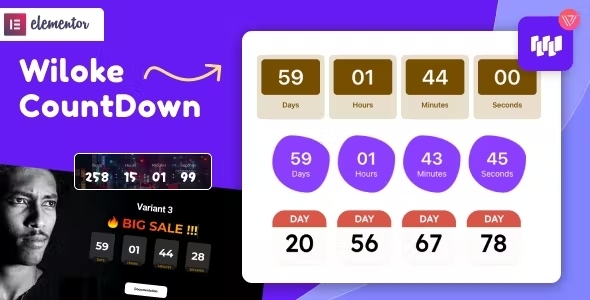
Wiloke Countdown Timer for Elementor comes with a variety of professionally designed timer styles that cater to different aesthetic preferences and use cases. From minimal and elegant designs to bold and attention-grabbing styles, you can choose the perfect timer to match your brand and page design. Each style is fully responsive and maintains its visual appeal across all device sizes, ensuring your countdown looks great whether viewed on a desktop, tablet, or smartphone.
The diverse style options mean you can create different countdown experiences for different campaigns. A sleek, minimalist timer might work best for a luxury product launch, while a bold, animated timer could be more effective for a flash sale. The ability to customize colors, fonts, sizes, and other visual elements ensures that your countdown timer will perfectly complement your page design rather than looking like an add-on.
Time-Based Marketing Features
The core strength of Wiloke Countdown Timer is its ability to create effective time-based marketing campaigns. You can set exact start and end dates for your countdowns, create recurring countdowns for regular events, or set evergreen timers that create personalized urgency for each visitor. These options give you the flexibility to implement various marketing strategies that leverage the psychological power of scarcity and urgency.
For more advanced use cases, the plugin allows you to redirect visitors to a different page when the countdown expires, display a custom message, or show a specific element after the countdown ends. This means you can create complete marketing funnels within your Elementor pages, using the countdown as the trigger that moves visitors through your conversion process. Whether you’re counting down to a webinar, a product launch, or the end of a sale, these features help you maximize the impact of your time-sensitive campaigns.
Customization and Design Control
Wiloke Countdown Timer for Elementor provides extensive customization options that give you complete control over the appearance of your countdown timers. You can easily adjust colors, fonts, sizes, spacing, and other design elements directly from the Elementor editor. The intuitive controls make it simple to match your countdown to your brand identity, ensuring a consistent visual experience across your site.
Beyond basic styling options, the plugin also allows you to add labels to your countdown (days, hours, minutes, seconds), customize the separator style, and even add custom prefixes and suffixes. This level of detail ensures that your countdown not only looks professional but also clearly communicates the urgency message to your visitors. The live preview feature lets you see your changes in real-time, making the design process efficient and frustration-free.
How to Install Wiloke Countdown Timer for Elementor
Quick Installation
- Purchase Wiloke Countdown Timer from CodeCanyon and download the plugin zip file
- Go to Plugins → Add New in your WordPress dashboard
- Click on the “Upload Plugin” button at the top of the page
- Select the downloaded zip file and click “Install Now”
- Once installed, click “Activate” to enable the plugin
- Open any Elementor page and you’ll find the Wiloke Countdown Timer widget in the Elementor widget panel
After installation, make sure you have Elementor installed and activated on your site, as Wiloke Countdown Timer is an addon specifically designed for Elementor. The plugin requires Elementor Pro or Free version 3.0 or higher to function properly.
Who Should Use Wiloke Countdown Timer for Elementor?
E-commerce Store Owners
For e-commerce businesses, Wiloke Countdown Timer is an invaluable tool for creating urgency around product launches, flash sales, and special promotions. Research shows that adding countdown timers to product pages can increase conversion rates by up to 33%. By clearly displaying limited-time offers, store owners can encourage hesitant buyers to make purchase decisions more quickly. The plugin’s ability to create eye-catching, professional-looking timers that match your store’s design makes it perfect for WooCommerce sites built with Elementor.
Digital Marketers and Course Creators
Digital marketers and course creators can leverage Wiloke Countdown Timer to boost registration for webinars, online courses, and other time-sensitive digital products. By creating countdowns to enrollment deadlines or live event start times, marketers can create anticipation and encourage early sign-ups. The plugin’s versatility makes it suitable for various marketing funnel stages, from creating initial excitement with an evergreen countdown to driving last-minute sign-ups with a final deadline timer.
Event Organizers and Promoters
Event organizers can use Wiloke Countdown Timer to build excitement for upcoming events, from conferences and concerts to local meetups and webinars. A prominently displayed countdown on your event landing page not only creates urgency but also serves as a constant reminder for visitors to register or purchase tickets. The plugin’s customizable styles allow you to create timers that match your event branding, helping to reinforce your event’s identity while driving registrations.
Wiloke Countdown Timer vs Alternatives
| Feature | Wiloke Countdown Timer | Elementor Pro Countdown Widget |
|---|---|---|
| Timer Styles | Multiple professionally designed styles | Basic style with limited customization |
| Customization Options | Extensive styling and behavioral options | Standard Elementor controls only |
| Evergreen Countdowns | Yes | No |
| Redirect on Expire | Yes | Limited options |
| Performance | Optimized for minimal impact | Standard Elementor performance |
While Elementor Pro includes a basic countdown widget, Wiloke Countdown Timer for Elementor offers a more comprehensive solution with additional features and design options. The primary advantage of Wiloke is its specialized focus on creating urgency through diverse, professionally designed timers with advanced behavioral options like evergreen countdowns and expiry actions. For businesses that rely heavily on time-sensitive promotions, the enhanced functionality of Wiloke Countdown Timer provides a significant advantage over the built-in Elementor option.
Wiloke Countdown Timer Pricing
Wiloke Countdown Timer for Elementor is available as a premium plugin through CodeCanyon. The plugin is offered with a regular license for $29, which includes future updates and 6 months of support from the developers. An extended license is available for use in end products for sale, priced at $145. Both licenses include quality checking by the CodeCanyon team and access to future plugin updates. There is no free version of this plugin available, but the affordable price point makes it accessible to businesses of all sizes looking to implement professional countdown timers on their Elementor websites.
Pros and Cons
✅ Pros
- Seamless integration with Elementor page builder
- Multiple professionally designed timer styles
- Extensive customization options without coding
- Includes evergreen countdown functionality
- Mobile-responsive and performance-optimized
- Affordable one-time purchase with lifetime updates
❌ Cons
- Requires Elementor to function (no standalone version)
- Premium plugin with no free tier available
- Limited documentation compared to some larger plugins
- Support is limited to 6 months after purchase
Frequently Asked Questions
Does Wiloke Countdown Timer work with Elementor Free version?
Yes, Wiloke Countdown Timer for Elementor works with both the free version of Elementor and Elementor Pro. However, you need to have Elementor (free or pro) installed and activated on your site to use this plugin.
Can I create multiple countdown timers on the same page?
Absolutely! There’s no limit to the number of countdown timers you can add to a single page using Wiloke Countdown Timer for Elementor. You can use different styles and settings for each timer to create unique urgency elements throughout your page.
What happens when a countdown timer expires?
With Wiloke Countdown Timer, you have several options for what happens when a countdown expires. You can hide the countdown, display a custom message, redirect visitors to a different URL, or show specific content that was hidden during the countdown period. This flexibility allows you to create complete marketing funnels using your countdown timers.
Is Wiloke Countdown Timer mobile-responsive?
Yes, all countdown timer styles included with Wiloke Countdown Timer are fully mobile-responsive. The timers automatically adjust to look great on all device sizes, from desktop monitors to tablets and smartphones, ensuring your urgency message reaches visitors regardless of how they access your site.
Do I need coding skills to use Wiloke Countdown Timer?
No coding skills are required to use Wiloke Countdown Timer for Elementor. The plugin provides intuitive controls within the Elementor interface that allow you to customize every aspect of your countdown timers without writing a single line of code. The drag-and-drop functionality makes it easy for anyone to create professional-looking countdown timers.
Can I use Wiloke Countdown Timer on multiple websites?
The regular license from CodeCanyon allows you to use the plugin on one end product (website). If you want to use the plugin on multiple websites, you’ll need to purchase a separate license for each site. The extended license is specifically for using the plugin in products that are sold to end users.
Final Verdict
Wiloke Countdown Timer for Elementor is a well-crafted plugin that fills a specific need for Elementor users looking to add professional countdown timers to their pages. Its strengths lie in the variety of design options, ease of use, and specialized features like evergreen countdowns that go beyond basic functionality. The plugin delivers on its promise to help create urgency and FOMO in marketing campaigns without requiring technical skills or design expertise. While it may not offer the extensive feature set of more comprehensive marketing plugins, its focused approach to countdown timers makes it an excellent choice for businesses that prioritize creating time-sensitive promotions. At $29 for a regular license, it represents good value for businesses that regularly run limited-time offers and need a reliable, attractive solution for displaying countdowns on their Elementor-built sites.