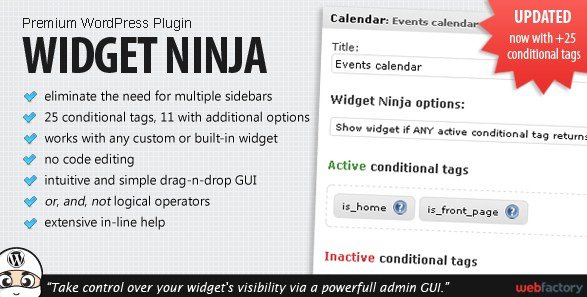
What is Widget Ninja WordPress Plugin?
When WordPress users need precise control over where and when widgets appear on their site, Widget Ninja WordPress Plugin offers an innovative solution. This powerful plugin revolutionizes how you manage widgets by providing 25+ conditional tags that determine widget visibility based on various parameters. Instead of creating multiple sidebars for different page types, you can use logical statements to display widgets exactly where you want them.
Widget Ninja is distributed through CodeCanyon and has become an essential tool for WordPress developers and site owners who want to create dynamic, personalized widget layouts without coding. Its intuitive drag-and-drop interface makes complex conditional logic accessible to users of all skill levels, allowing you to create sophisticated widget display rules in minutes.
What Makes Widget Ninja WordPress Plugin Different
Widget Ninja stands out in the WordPress plugin ecosystem by addressing a common challenge that site builders face: the need for contextual widget display without managing numerous sidebars. While traditional WordPress themes often require creating separate sidebars for different pages or post types, Widget Ninja takes a more efficient approach by applying conditional logic directly to widgets.
- Eliminates the need for multiple sidebars across your WordPress site
- Enables complex logical statements with conditional tags to control widget visibility
- Provides 25 conditional tags, with 11 offering additional configuration options
- Supports OR, AND, and NOT logical operators for creating sophisticated display rules
- Works seamlessly with any custom or built-in WordPress widget
- No code editing required – everything is managed through a user-friendly interface
- Features an intuitive and simple drag-and-drop GUI for easy configuration
- Includes extensive in-line help documentation throughout the interface
- Offers more options and is easier to use than similar solutions like Widget Logic
What truly sets Widget Ninja apart is its balance between powerful functionality and user experience. While other plugins might offer similar conditional capabilities, Widget Ninja’s interface makes implementing these conditions straightforward, even for those without technical backgrounds. This combination of power and usability has made it a preferred choice for many WordPress professionals.
Widget Ninja Features for WordPress Users
Conditional Logic & Visibility Control
At the core of Widget Ninja WordPress Plugin is its robust conditional logic system. With 25 different conditional tags at your disposal, you can precisely control when and where widgets appear on your site. These conditions cover common scenarios such as displaying widgets on specific post types, categories, tags, pages, and even custom taxonomies. Eleven of these tags come with additional options, allowing for even more granular control over widget visibility.
What makes this system particularly powerful is the ability to combine conditions using logical operators. You can use AND, OR, and NOT operators to create complex rules that precisely define when a widget should appear. For example, you could create a rule that displays a sidebar widget only on blog posts in the “Technology” category AND written by a specific author. This level of control would normally require custom coding or theme modifications, but Widget Ninja makes it accessible through its intuitive interface.
Widget Management Efficiency
Widget Ninja WordPress Plugin dramatically improves how you manage widgets by eliminating the need for multiple sidebars. In traditional WordPress setups, creating different widget arrangements for different sections of your site would require creating and maintaining numerous sidebars. This approach quickly becomes unwieldy and difficult to manage as your site grows.
With Widget Ninja, you can maintain a single set of sidebars while still delivering contextual content throughout your site. This efficiency reduces administrative overhead and makes your site easier to maintain. For WordPress developers and site managers, this means less time spent managing sidebars and more time focusing on content creation and other important tasks.
User-Friendly Interface
Despite its powerful capabilities, Widget Ninja WordPress Plugin features an approachable interface that doesn’t require technical expertise. The drag-and-drop GUI makes setting up conditional rules intuitive and straightforward. You can simply select the conditions you want to apply, arrange them in the desired logical order using the drag-and-drop interface, and save your changes.
Throughout the interface, Widget Ninja provides extensive in-line help documentation that guides users through the setup process. This contextual assistance helps users understand the various conditional tags and how to use them effectively, reducing the learning curve typically associated with implementing complex display rules. This focus on user experience makes Widget Ninja accessible to WordPress users of all skill levels.
How to Install Widget Ninja
Quick Installation
- Purchase Widget Ninja from CodeCanyon
- Download the plugin ZIP file to your computer
- Go to Plugins → Add New in your WordPress dashboard
- Click on the “Upload Plugin” button at the top of the page
- Select the Widget Ninja ZIP file from your computer
- Click “Install Now” and then “Activate” once installation is complete
After activation, you’ll find Widget Ninja options added to your WordPress widget management area. Each widget will now have additional Widget Ninja settings where you can configure visibility rules. For detailed documentation on using all features of the plugin, refer to the documentation included with your purchase or visit the WPExclusive plugins directory for additional resources.
Who Should Use Widget Ninja?
Content Creators and Bloggers
Content creators who want to display relevant widgets based on the content being viewed will find Widget Ninja invaluable. For example, a food blogger could display recipe-related widgets on recipe posts but show general blog widgets on other content types. This contextual approach improves user experience by presenting visitors with information and calls-to-action that are most relevant to their current browsing context. By delivering more targeted widget content, content creators can increase engagement and conversion rates without creating complex theme customizations.
E-commerce Site Owners
WooCommerce and other e-commerce site owners can leverage Widget Ninja to create dynamic sidebar experiences that adapt based on product categories, cart status, or customer behaviors. For instance, you could display shipping information widgets on product pages while showing promotional banners on checkout pages. This targeted approach helps e-commerce sites provide more relevant information to customers at different stages of the purchasing journey. If you’re running an e-commerce site, you might also find our WooCommerce customizer plugin useful for further enhancing your store’s functionality.
WordPress Developers and Agencies
WordPress developers and agencies building sites for clients will appreciate Widget Ninja’s efficiency and flexibility. It allows for creating sophisticated widget display rules without writing custom code or developing complex theme solutions. This not only saves development time but also results in more maintainable solutions that clients can manage themselves if needed. Developers can implement advanced widget strategies that would typically require custom coding, making Widget Ninja a valuable addition to any WordPress developer’s toolkit.
Widget Ninja vs Alternatives
| Feature | Widget Ninja | Widget Logic |
|---|---|---|
| Interface Type | Visual drag-and-drop GUI | Text-based code entry |
| Conditional Tags | 25 built-in tags with visual selection | Requires knowledge of WordPress conditional tags |
| Logical Operators | Visual AND, OR, NOT operators | Requires writing PHP code for logical operations |
| User Skill Level | Suitable for all skill levels | Requires coding knowledge |
| Documentation | Extensive in-line help | Limited documentation |
| Plugin Updates | Regular updates and support from developer | Infrequent updates |
While Widget Logic was a pioneer in conditional widget display, Widget Ninja WordPress Plugin has evolved the concept with a more user-friendly approach. Widget Logic requires users to write PHP code directly, making it inaccessible to those without programming knowledge. Widget Ninja, on the other hand, achieves similar and more advanced functionality through its visual interface. This comparison highlights how Widget Ninja has made powerful conditional widget management accessible to a much broader audience.
Widget Ninja Pricing
Widget Ninja WordPress Plugin is available as a premium plugin through CodeCanyon. The plugin is offered as a single purchase with a one-time payment, which includes lifetime updates and six months of support from the developer (extendable to 12 months for an additional fee). This pricing model makes it an affordable solution for both individual site owners and agencies who need powerful widget management capabilities. While there is no free version available, the plugin’s extensive functionality and ease of use provide excellent value for the investment.
When considering the cost, factor in the time saved by not having to create and manage multiple sidebars, the improved user experience from contextual widget display, and the professional appearance this functionality can give your site. For WordPress professionals building client sites, the cost can typically be passed along as part of the project budget while providing long-term value to the client through easier site maintenance.
Pros and Cons
✅ Pros
- Eliminates the need for multiple sidebars across your WordPress site
- Intuitive drag-and-drop interface that doesn’t require coding knowledge
- 25 conditional tags providing extensive visibility control options
- Supports complex logical statements with AND, OR, and NOT operators
- Works seamlessly with any custom or built-in WordPress widget
- Extensive in-line help documentation throughout the interface
- More user-friendly than alternatives like Widget Logic
- Regular updates and support from the developer
- One-time purchase with lifetime updates
- Lightweight plugin that doesn’t slow down your site
❌ Cons
- Premium plugin with no free version available
- Requires initial learning investment to fully leverage all features
- Only available through CodeCanyon, not the WordPress plugin repository
- Potential compatibility issues with some page builders (rare)
- Advanced conditional logic may occasionally require troubleshooting
Frequently Asked Questions
Does Widget Ninja work with page builders like Elementor or Divi?
Yes, Widget Ninja WordPress Plugin works with most page builders. While it primarily operates on traditional WordPress widget areas, its functionality doesn’t conflict with page builder widgets. For sites that use both traditional sidebars and page builder content, Widget Ninja can effectively manage the visibility of widgets in standard widget areas.
Can I use Widget Ninja with custom post types?
Absolutely! Widget Ninja includes conditional tags for all standard post types and automatically detects custom post types registered on your site. This makes it perfect for managing widget visibility across complex sites with various content types, such as portfolios, testimonials, products, or any custom content structure.
Will Widget Ninja slow down my website?
No, Widget Ninja WordPress Plugin is lightweight and optimized for performance. It adds minimal overhead to your site because it runs efficient queries to check widget visibility conditions. The plugin only loads the logic for active widgets, ensuring that your site performance remains unaffected even with complex conditional rules.
Is there a limit to how many conditions I can apply to a single widget?
Widget Ninja allows you to apply as many conditions as needed to a single widget. You can create complex logical statements by combining multiple conditions using AND, OR, and NOT operators. This flexibility enables extremely precise control over widget visibility based on virtually any combination of criteria.
Can I use Widget Ninja with any WordPress theme?
Yes, Widget Ninja WordPress Plugin is theme-independent and works with any WordPress theme that supports standard widgets. Whether you’re using a popular theme like Divi, Avada, or Astra, or a custom theme developed specifically for your site, Widget Ninja will function properly as long as your theme implements standard WordPress widget areas.
Do I need coding knowledge to use Widget Ninja?
No coding knowledge is required to use Widget Ninja effectively. While the plugin implements powerful conditional logic that could be achieved through coding, it provides a user-friendly visual interface that makes these capabilities accessible to all users. The extensive in-line help documentation guides you through setting up complex widget display rules without touching a single line of code.
Final Verdict
Widget Ninja WordPress Plugin is an exceptional solution for WordPress users who need precise control over widget visibility without technical complexity. Its combination of powerful conditional logic capabilities and an intuitive, accessible interface makes it stand out in the widget management plugin category. It’s particularly well-suited for content creators, e-commerce site owners, and WordPress developers who want to deliver contextual, relevant widgets throughout their sites without managing multiple sidebars.
While it requires a modest investment compared to free alternatives, the time saved and improved user experience make it well worth the cost for sites that need sophisticated widget display rules. For anyone who has struggled with managing multiple sidebars or wants to create more dynamic, personalized widget layouts, Widget Ninja WordPress Plugin offers the perfect balance of power and usability.