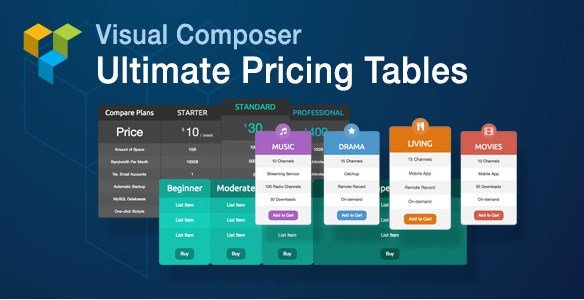
What is Visual Composer Ultimate Pricing Tables Add-on?
When WordPress users need to display pricing plans professionally on their websites, Visual Composer Ultimate Pricing Tables Add-on offers a powerful solution. In the digital marketplace, the presentation of your pricing tiers is often the deciding factor between a bounce and a conversion. A cluttered or unattractive pricing section can confuse potential customers, leading to lost revenue. This premium WordPress plugin enhances the popular Visual Composer page builder with specialized pricing table functionality, allowing users to create attractive, fully customizable pricing sections without any coding knowledge. By integrating directly into the Visual Composer interface, the Visual Composer Ultimate Pricing Tables Add-on eliminates the need for external shortcodes or complex HTML, streamlining your workflow and ensuring your pricing displays are consistent with the rest of your site design.
This add-on is specifically designed for those who have already invested in the Visual Composer (now WPBakery) ecosystem. It bridges the gap between generic page builder elements and specialized conversion tools. Whether you are selling software licenses, service packages, or membership subscriptions, the ability to visually distinguish your pricing plans is crucial. This plugin provides the granular control needed to highlight your “best value” plan, emphasize key features, and guide the user’s eye toward the call-to-action buttons that matter most.
What Makes Visual Composer Ultimate Pricing Tables Different
The market is flooded with pricing table plugins, ranging from standalone freemium options to complex enterprise solutions. However, Visual Composer Ultimate Pricing Tables Add-on differentiates itself through deep integration. Unlike generic pricing table plugins that require you to use shortcodes or separate interfaces that break your design flow, this add-on leverages the familiar Visual Composer backend you already know. This means no context switching; you build your tables right alongside your text blocks, images, and sliders.
Furthermore, many standard plugins lock you into rigid grid systems or pre-set color schemes that clash with your brand. Visual Composer Ultimate Pricing Tables Add-on gives you complete control over every aspect of your pricing tables while maintaining the intuitive drag-and-drop experience that Visual Composer users love. With this add-on, you’re not limited to pre-designed templates but instead have the freedom to create truly unique pricing displays that match your brand identity perfectly. It treats the pricing table as a native component of your page layout rather than an embedded foreign object.
- Seamless integration with Visual Composer page builder interface
- Unlimited customization options without touching a line of code
- Fully responsive design that adapts perfectly to mobile, tablet, and desktop
- Dedicated support and regular updates specifically for VC compatibility
Visual Composer Ultimate Pricing Tables Add-on Features for WordPress Users
Flexible Column and Layout Controls
The Visual Composer Ultimate Pricing Tables Add-on provides the same column layout flexibility as Visual Composer itself, allowing you to create pricing tables with any number of columns that perfectly suit your needs. Whether you need a simple two-column comparison for a basic service or a comprehensive five-column display for a complex SaaS product, this add-on handles it effortlessly. You are not restricted to fixed widths; you can adjust column spans and widths with precision, ensuring your pricing information is presented in the most readable and visually appealing way possible. This flexibility is essential for creating hierarchy, allowing you to make your “Pro” or “Enterprise” plan wider or more prominent than the basic tiers.
Additionally, the layout controls handle spacing with surgical precision. You can toggle padding on and off for individual columns or the entire table structure. This control over white space is vital for preventing the design from looking cramped on smaller screens or too sparse on large monitors. For those looking for more WordPress plugins that offer this level of layout control, this add-on sets a high standard.
Advanced Design Customization
With Visual Composer Ultimate Pricing Tables Add-on, you have complete control over the visual presentation of your pricing tables. You can customize background and text colors independently for each section, including support for transparency options that let your page background show through for a glass-morphism effect. The border styles are fully adjustable, with options for rounded or square edges to match your website’s design language. You can define border thickness and color, ensuring the table either blends subtly into the background or stands out as a distinct card element.
Beyond borders and colors, the typography controls allow you to adjust font sizes, weights, and line heights for headers, subheaders, and feature lists. This ensures that your pricing is legible and that the most important information—like the price itself—is the most visible element on the screen. You can also add distinctive headers or ribbons to specific columns to label them as “Most Popular” or “Best Value,” a critical psychological trigger for increasing conversions.
Animation and Interactive Elements
Engagement is key when presenting pricing options, and Visual Composer Ultimate Pricing Tables Add-on helps you capture attention with sophisticated animation options. Static tables are often ignored by scrolling users. This plugin allows you to apply eye-catching entrance animations to your pricing plans that trigger when users scroll to them, creating a dynamic browsing experience. These subtle movements draw the eye and signal that the content is interactive and important.
The plugin includes Font Awesome Icons (version 4.1) with over 500 icons to choose from, enabling you to visually represent features and benefits at a glance. Instead of listing “Email Support,” you can use an envelope icon, making the list scannable and visually digestible. You can also customize call-to-action buttons extensively—changing hover states, colors, and shapes—to guide visitors toward your preferred pricing tier. By improving the user experience (UX) through these interactive elements, you significantly improve the likelihood of conversion. For more information on the parent builder, visit the official WPBakery website.
How to Install Visual Composer Ultimate Pricing Tables Add-on
Quick Installation
- Log in to your CodeCanyon account and download the plugin ZIP file.
- Go to Plugins → Add New → Upload Plugin in your WordPress dashboard.
- Click “Choose File” and select the downloaded ZIP file, then click Install Now.
- Activate the plugin once the installation is complete.
- Navigate to a page using Visual Composer; you will see the new Pricing Table element in the content elements list.
It is important to note that this plugin acts as an extension. You must have the Visual Composer (WPBakery Page Builder) installed and activated on your site for this add-on to appear and function correctly. For detailed installation instructions and troubleshooting tips for any plugin, you can check out our comprehensive WordPress plugin installation guide.
Who Should Use Visual Composer Ultimate Pricing Tables Add-on?
SaaS and Subscription Businesses
Software as a Service (SaaS) companies live and die by their conversion rates. These businesses rely heavily on clear pricing presentation to convert visitors into trial users or subscribers. Visual Composer Ultimate Pricing Tables Add-on provides the perfect solution for showcasing multiple subscription tiers (e.g., Basic, Pro, Enterprise), highlighting feature differences, and emphasizing the recommended plan. The ability to create eye-catching animations and use icons to represent features makes complex pricing structures easy to understand at a glance. If you are managing a SaaS product on WordPress, this tool is almost essential for presenting your tiered logic clearly without hiring a dedicated developer for every price change.
Service Providers and Agencies
Marketing agencies, consulting firms, and creative studios often offer different service packages. Whether it’s “Silver,” “Gold,” and “Platinum” SEO packages or different tiers of web design services, displaying these clearly is vital for client acquisition. Visual Composer Ultimate Pricing Tables Add-on allows you to present your service tiers professionally, with complete customization to match your brand identity. The responsive design ensures your pricing looks great on any device, which is crucial since many potential clients will view your pricing on mobile devices before making contact. Additionally, web designers building client sites will find this add-on saves them hours of custom CSS coding.
Visual Composer Ultimate Pricing Tables vs Alternatives
| Feature | Visual Composer Ultimate Pricing Tables | Generic Shortcode Plugins |
|---|---|---|
| Page Builder Integration | Native Visual Composer integration; drag & drop | Shortcode-based with separate modal interface |
| Design Flexibility | Complete customization using VC settings | Limited to pre-designed templates & custom CSS |
| Animation Options | Built-in entrance animations for columns | Usually static; requires external CSS |
| Icon Library | Font Awesome Icons (500+) included | Varies; often limited or requires separate plugin |
| Responsiveness | Inherits VC responsive behavior & controls | Generic responsive tables often break layouts |
Visual Composer Ultimate Pricing Tables Pricing
Visual Composer Ultimate Pricing Tables Add-on is available for a one-time purchase on CodeCanyon. While prices on CodeCanyon can fluctuate, it typically retails for a very reasonable one-time fee (often around $13-$18). This includes lifetime access to the plugin with future updates and 6 months of support from the developer. Extended support options are available for an additional fee if you require assistance beyond the initial 6-month period. Unlike many modern SaaS-style WordPress plugins that require monthly or annual subscriptions to keep the features active, this plugin offers excellent value with a single payment for permanent usage. This makes it a highly cost-effective tool for freelancers and agencies building multiple client sites. You can view the current pricing and licensing options on the official CodeCanyon sales page.
Pros and Cons
✅ Pros
- Seamless integration with Visual Composer page builder workflow
- Highly customizable design options (colors, borders, fonts, padding)
- Responsive design ensures tables look great on all devices automatically
- Includes animation features for better user engagement and UX
- Comes with Font Awesome Icons for visual feature representation
- One-time payment model with no recurring subscription fees
- Simple to use for anyone familiar with the Visual Composer interface
❌ Cons
- Strictly requires Visual Composer (WPBakery) plugin to function
- Limited to Font Awesome 4.1 icons (newer versions like 6.0 are available elsewhere)
- No built-in conversion tracking or A/B testing features
- Documentation is minimal due to the simplicity of the add-on
Frequently Asked Questions
Is Visual Composer Ultimate Pricing Tables Add-on compatible with the latest version of WordPress?
Yes, the plugin is regularly updated by the developer to ensure full compatibility with the latest versions of WordPress and the Visual Composer plugin.
Can I use Visual Composer Ultimate Pricing Tables Add-on without the Visual Composer plugin?
No, this is strictly an add-on. It requires the Visual Composer (WPBakery Page Builder) plugin to be installed and activated to function, as it adds a new element specifically to that builder’s interface.
Is there a free version or trial available for Visual Composer Ultimate Pricing Tables Add-on?
No, this is a premium-only plugin available for purchase on CodeCanyon. There is no free trial or lite version available for download from the WordPress.org repository.
Can I create unlimited pricing tables with this plugin on multiple sites?
You can create unlimited tables on a single website with a Regular License. If you intend to use the plugin on multiple client websites, you are required to purchase a separate license for each site according to Envato’s licensing terms.
Does the Visual Composer Ultimate Pricing Tables Add-on support RTL (Right-to-Left) languages?
Yes, the plugin is designed to respect the WordPress language settings and supports RTL languages, making it suitable for Arabic, Hebrew, and other international websites.
How do I receive support if I encounter issues with the add-on?
Support is provided directly through the CodeCanyon comments section and support ticket system for the first 6 months after purchase. You can extend this support period by purchasing an extension when you buy the plugin or at a later date.
Final Verdict
Visual Composer Ultimate Pricing Tables Add-on is a powerful, niche-specific solution that fills a gap for users loyal to the Visual Composer ecosystem. It provides a robust set of tools for creating professional pricing tables without the bloat of a standalone plugin or the complexity of custom coding. The seamless integration with Visual Composer’s interface makes creating beautiful pricing tables intuitive, even for those without technical skills, significantly reducing development time.
While the requirement for Visual Composer may limit its audience to those already using that specific page builder, those who meet this prerequisite will find excellent value in this add-on. The one-time payment structure provides excellent long-term value compared to subscription-based alternatives. It’s particularly well-suited for SaaS companies, service providers, and agencies that need to present pricing options professionally and consistently. If you are looking for a way to upgrade your pricing pages without hiring a developer, and you already use WPBakery, this add-on is a no-brainer investment. For more insights on optimizing your WordPress site, visit WPExclusive.