What is Visual Composer Page Intro?
When WordPress users need to create captivating splash pages or introductory screens without writing code, Visual Composer Page Intro offers a seamless solution integrated directly with WPBakery Page Builder. This specialized addon transforms first impressions by allowing you to build stunning intro pages using the familiar drag-and-drop interface, complete with video backgrounds, parallax effects, and intelligent display controls that enhance user engagement from the moment visitors land on your site.
As a powerful extension for WPBakery Page Builder, Visual Composer Page Intro bridges the gap between standard page functionality and specialized introductory experiences. Whether you’re promoting a product launch, announcing a special event, or simply creating a memorable welcome experience, this plugin provides the tools to make every first impression count without requiring custom development work or technical expertise.
What Makes Visual Composer Page Intro Different
Unlike generic coming-soon plugins or standalone splash page tools, Visual Composer Page Intro functions as a native extension of WPBakery Page Builder (formerly Visual Composer). This deep integration means you maintain complete design flexibility while adding sophisticated intro functionality that feels like a natural part of your page building workflow rather than an external overlay.
The plugin differentiates itself by leveraging WPBakery’s comprehensive element ecosystem while introducing specialized components designed specifically for intro pages. This approach means you don’t have to learn a new interface or compromise on design possibilities – you simply get enhanced capabilities within the builder you already know and use. The result is a cohesive experience where your intro pages perfectly match your site’s existing design language while delivering maximum impact.
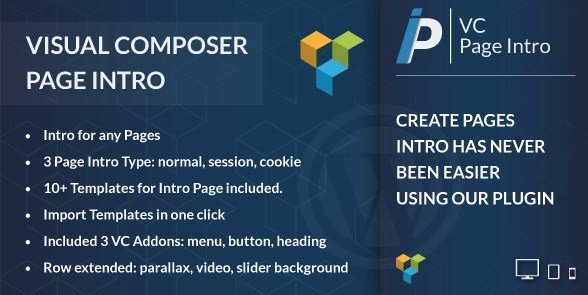
- Seamless WPBakery integration with 12 ready-to-import demo layouts
- Three distinct display modes: Normal, Session-based, and Cookie-based triggers
- Extended row backgrounds featuring parallax images, video, and dynamic sliders
- Specialized addons for intro-specific menus, headings, and call-to-action buttons
- Unlimited intro page creation with per-page assignment capabilities
Visual Composer Page Intro Features for WordPress Users
Flexible Display Modes and User Experience Control
The plugin offers sophisticated control over when and how visitors see your intro content. Normal mode displays the intro every time someone loads your page, perfect for critical announcements or age verification gates where the message must be seen regardless of visit frequency. Session mode intelligently shows the intro once per browsing session, ideal for promotional campaigns where you want to capture attention without frustrating users who navigate through multiple pages during the same visit. Cookie mode remembers visitors for days or weeks, ensuring returning customers don’t repeatedly see the same welcome screen.
This granularity in display control allows you to balance marketing goals with user experience, potentially reducing bounce rates while maintaining promotional impact. For example, an e-commerce site might use session mode during a flash sale to highlight promotions without annoying repeat customers, while a membership site might use cookie mode to show special introductory offers only to first-time visitors. The flexibility extends to individual page assignments, meaning you can have different intro strategies for different parts of your site.
Immersive Visual Elements and Background Options
Visual Composer Page Intro extends WPBakery’s standard row functionality with premium background capabilities that create cinematic first impressions. The image parallax background option adds depth and movement as users scroll, creating a sense of sophistication perfect for creative agencies and portfolio sites looking to establish a premium brand presence. This parallax effect uses a lightweight JavaScript implementation that maintains smooth performance even on mobile devices.
The video backgrounds feature supports autoplay functionality with optional sound controls and a powerful auto-redirect feature that sends users to specific pages when the video concludes. This is excellent for product launches or storytelling campaigns where you want to guide visitors through a narrative before delivering them to your main content. The plugin supports both self-hosted video files and embeds from popular platforms like YouTube and Vimeo, with optimization settings to balance visual quality with loading times.
Additionally, slider backgrounds allow you to rotate multiple messages or visuals within a single intro, maximizing the impact of your splash screen real estate without requiring additional plugins. These sliders can be customized with transition effects, timing controls, and navigation options, giving you full creative control over how your introductory content is presented. Each slide can have its own background image, color scheme, and overlay settings, creating a dynamic experience that adapts to different promotional needs.
Specialized Content Building Tools
Beyond background enhancements, the plugin includes three purpose-built addons designed specifically for intro pages. The Menu addon creates navigation systems optimized for splash pages, allowing you to direct visitors to specific site sections or external links. This menu system supports custom styling options, hover effects, and responsive behaviors that ensure your navigation remains accessible across all devices, even when presented against complex video or image backgrounds.
The Heading addon provides typography controls fine-tuned for large, impactful intro text that renders beautifully across all devices. With support for gradient text, background clipping, and advanced typography settings, this addon makes it easy to create eye-catching headlines that capture attention immediately. You can apply different text effects, including outline, shadow, and glow options that make your text stand out against any background.
The Button addon generates conversion-focused call-to-action elements that stand out against complex backgrounds. This specialized button element includes features like ripple effects, hover animations, and customizable sizing options that make your primary actions impossible to miss. Combined with WPBakery’s existing element library and the ability to create unlimited intro variations, these tools provide everything needed for professional splash page design that drives real results.
How to Install Visual Composer Page Intro
Installation via CodeCanyon
As a premium plugin available exclusively on CodeCanyon, installation differs slightly from standard WordPress repository plugins. First, ensure you have WPBakery Page Builder installed and activated on your WordPress site, as Visual Composer Page Intro is an addon that requires this parent plugin to function. After purchasing Visual Composer Page Intro, download the plugin ZIP file from your CodeCanyon downloads section.
- Navigate to your WordPress dashboard and go to Plugins → Add New
- Click the Upload Plugin button at the top of the page
- Select the downloaded ZIP file from your computer
- Click Install Now and wait for the installation to complete
- Activate the plugin once installation is finished
- Enter your purchase code in the plugin settings to enable updates and support
Upon activation, the plugin integrates immediately with WPBakery Page Builder, adding new options to your row settings and element library. You’ll see a new “Intro Settings” tab in the row editing window, where you can configure the specific display properties for your intro page. To get started quickly, you can import one of the 12 pre-made demo layouts included with the plugin, which showcase various design patterns and functionality combinations that you can then customize to match your brand.
Creating Your First Intro Page
Once installed, creating your first intro page is straightforward. In your WordPress dashboard, navigate to Pages → Add New and edit the page with WPBakery. Add a new row or select an existing row, then navigate to the row settings. In the “Intro Settings” tab, enable the intro functionality and choose your preferred display mode (Normal, Session, or Cookie). Configure the background options to select an image, video, or slider background, and customize any overlay colors or effects as needed.
Next, add content elements to your row using the specialized intro addons or standard WPBakery elements. The Menu addon can help visitors navigate to key sections of your site, while the Heading and Button addons create clear calls-to-action. Preview your intro page to ensure it looks and functions as intended, then publish the page. You can assign the intro to specific pages or make it site-wide through the plugin’s assignment settings.
Who Should Use Visual Composer Page Intro?
Marketing Agencies and Creative Professionals
Web design agencies managing multiple client campaigns will find this plugin invaluable for creating branded splash pages without custom coding. Whether launching a new product microsite, creating temporary promotional overlays for e-commerce stores, or building portfolio intros that showcase creative capabilities, the ability to assign different intros to specific pages while maintaining brand consistency through visual builder integration saves significant development time.
For creative professionals like photographers, designers, and artists, Visual Composer Page Intro provides an elegant way to present work before revealing the full website. The parallax and video background options create a museum-like experience that sets the tone for the visitor’s journey. Agencies can create white-labeled solutions for clients, using the plugin’s unlimited creation capability to deliver custom introductory experiences that would normally require custom development budgets.
The session and cookie controls ensure that agencies can deliver professional user experiences that don’t annoy repeat visitors. This is particularly valuable for clients with content-heavy sites where forcing visitors to see an intro on every page would create frustration. With these sophisticated display controls, agencies can implement strategies that maximize impact while respecting user preferences.
E-commerce and Business Website Owners
Online store owners can leverage Visual Composer Page Intro to announce seasonal sales, new collection launches, or shipping updates without redesigning their entire homepage. The video background feature with auto-redirect capability works particularly well for fashion retailers or tech companies wanting to showcase product videos before revealing the main store. This approach creates a cinematic product reveal that builds anticipation before presenting purchasing options.
Business sites can use cookie-based intros to display welcome messages or newsletter signups only to first-time visitors, improving conversion rates while maintaining a clean experience for returning customers. For B2B companies, intro pages can deliver essential information like compliance notices or certifications without cluttering the main navigation. The specialized menu addon ensures that visitors can bypass the intro if needed while still presenting key navigation options.
Membership sites and online communities can use intro pages to convey community guidelines, highlight new features, or showcase member benefits. The per-page assignment capability allows site owners to create specialized intros for different membership levels or content sections, delivering personalized experiences that increase engagement and retention.
Visual Composer Page Intro vs Alternatives
When comparing Visual Composer Page Intro to other solutions in the market, several key differences emerge that may influence your decision based on your specific needs and existing technology stack.
| Feature | Visual Composer Page Intro | Standard Coming Soon Plugins |
|---|---|---|
| Page Builder Integration | Native WPBakery extension with full design control | Limited or no builder integration; template-based only |
| Display Triggers | Normal, Session, and Cookie-based options | Usually binary on/off or simple cookie |
| Background Options | Parallax, Video with auto-redirect, Slider | Static images or basic video only |
| Assignment Flexibility | Multiple intros for specific pages/posts | Typically site-wide or home-only |
| Customization Level | Full control via WPBakery elements | Limited to template options |
| Performance Impact | Optimized for WPBakery ecosystem | Variable, often loads additional resources |
Unlike dedicated coming soon or maintenance mode plugins that focus on site-wide offline pages, Visual Composer Page Intro is designed specifically for creating ongoing introductory experiences that complement rather than replace your main content. This makes it more suitable for marketing campaigns and brand storytelling rather than temporary site notifications. The integration with WPBakery means that users already familiar with that builder will have virtually no learning curve, whereas alternatives often require learning entirely new interfaces.
For users of other page builders like Elementor or Divi, comparable functionality exists through native features or third-party addons, but these solutions vary widely in implementation and quality. Visual Composer Page Intro’s focused approach means it excels at its specific purpose without the feature bloat that can affect performance of more comprehensive page builder addons.
Visual Composer Page Intro Pricing
Visual Composer Page Intro is available through CodeCanyon’s standard licensing model. The regular license typically ranges between $20-$25 for use on a single website, including six months of support from the developer and lifetime updates. An extended license option is available for developers creating websites for clients or integrating the plugin into commercial themes. This extended license allows for wider usage rights that accommodate multiple end clients.
Given that this is an addon requiring WPBakery Page Builder (sold separately), factor in the combined cost when budgeting your project. WPBakery itself typically ranges from $45-$64 depending on the license type, so the total investment for both plugins represents a mid-range expense compared to comprehensive page builder solutions. However, for agencies and businesses already invested in the WPBakery ecosystem, this addon provides specialized functionality that would otherwise require custom development.
The six months of included support can be extended to twelve months for an additional fee, which may be valuable for businesses implementing complex introductory strategies. Support is provided directly through CodeCanyon’s comment system and typically includes assistance with installation, configuration, and troubleshooting basic issues. Documentation is available online, though some users report it could be more comprehensive for advanced use cases.
Pros and Cons
✅ Pros
- Deep WPBakery integration maintains familiar workflow and design flexibility
- Three distinct trigger types (Normal, Session, Cookie) provide granular visitor control
- Video background with auto-redirect feature ideal for storytelling and product launches
- One-click demo import system gets splash pages running in minutes
- Unlimited intro creation allows different campaigns for different site sections
- Specialized addons optimized for intro page functionality
- Regular updates ensure compatibility with the latest WordPress and WPBakery versions
- Responsive design ensures intros look great on all devices
❌ Cons
- Requires WPBakery Page Builder (separate purchase), increasing total cost of ownership
- CodeCanyon licensing model restricts usage compared to GPL plugins
- Resource-intensive features like video backgrounds may impact page load speeds if not optimized
- Limited to WPBakery users; not compatible with Elementor, Gutenberg, or other builders
- Support limited to six months by default, with additional cost for extension
- Documentation could be more comprehensive for advanced use cases
- No free version or trial available for testing before purchase
Frequently Asked Questions
Is Visual Composer Page Intro compatible with the new Visual Composer Website Builder?
No, this plugin is specifically designed for WPBakery Page Builder (formerly known as Visual Composer). It does not work with the newer Visual Composer Website Builder plugin or other page builders like Elementor. The integration is specifically coded for WPBakery’s architecture and element system.
Can I use multiple intro pages on different posts within the same website?
Yes, the plugin supports unlimited intro page creation. You can build different intros for various posts, pages, or custom post types, and assign specific intros to specific content through the easy-to-use assignment panel. This allows for highly targeted introductory experiences based on content type or visitor intent.
What is the difference between Session and Cookie intro types?
Session-based intros display once per browsing session and reappear when the user closes and reopen their browser. Cookie-based intros use browser cookies to remember visitors for a specified time period (days or weeks), making them ideal for longer-term “first visit” experiences. Session mode is better for limited-time promotions, while cookie mode works well for permanent welcome messages.
Does Visual Composer Page Intro work with WordPress block editor (Gutenberg)?
While the plugin adds functionality to WPBakery, your intro pages will display regardless of whether your content uses Gutenberg or the classic editor. However, you must use WPBakery to design the intro pages themselves. The resulting intro pages will work seamlessly with the rest of your site regardless of which editor you use for regular content creation.
Can I add video backgrounds with sound to my intro page?
Yes, the plugin supports video backgrounds, though modern browser autoplay policies typically require videos to be muted for automatic playback. The auto-redirect feature can send users to another page when the video completes. You can enable sound through user interaction controls or set up custom buttons that enable audio with a single click.
Is there a free version or trial available?
No, Visual Composer Page Intro is a premium-only addon available exclusively through CodeCanyon. There is no free version, though the regular license is affordably priced for single-site use. This model allows the developer to focus specifically on WPBakery integration and provide ongoing updates and support.
Final Verdict
Visual Composer Page Intro delivers exactly what it promises: a robust, flexible solution for creating sophisticated splash pages within the WPBakery ecosystem. It’s particularly well-suited for agencies and businesses already invested in WPBakery who need granular control over visitor experiences. While the requirement for WPBakery and CodeCanyon’s licensing model present minor limitations, the plugin’s specialized features like video auto-redirect and session-based triggers justify the investment for serious marketers.
The plugin shines in its implementation of intelligent display controls and specialized intro elements, providing capabilities that would otherwise require custom development. For users creating multiple introductory campaigns or needing sophisticated targeting of different visitor segments, the time savings compared to alternative approaches quickly outweighs the initial investment. If you’re looking to make powerful first impressions without custom development and you’re already using WPBakery, this addon deserves consideration alongside other WordPress landing page solutions.